5 posts were merged into an existing topic: TenPetrol and PMDG
No - the problem is not my hardware or my monitor. And it’s not simply “4K resolution + RTX 5090 causing it” either. The stuttering shows up across different resolutions, different MSFS settings and on different hardware setups.
And they did not happen with SU4….
1 Like
You have a habit of playing word games.
I never said your hardware was the “root cause”. The simple fact is that your hardware can’t deliver smooth performance at your settings. What is the “root cause”? Which came first, the chicken or the egg?
And if your hardware is not part of the performance equation, why are your settings (as you correctly pointed out earlier) not completely maxed out? Because even your exceptional hardware isn’t capable of playing the sim at fully maxed-out settings, which you’ve acknowledged in turning them down.
What’s interesting to me is that your situation is almost assuredly CPU-related, but your settings adjustments favor easing pressure on your GPU.
My settings are pretty much the same as yours and I’m running 2024 butter smooth on a 12700K and 4090.
I never said 4K was the cause. Word games. The cause is trying to run your system too hard at 4K. Those two statements are not analogous.
Without a shadow of a doubt.
5 Likes
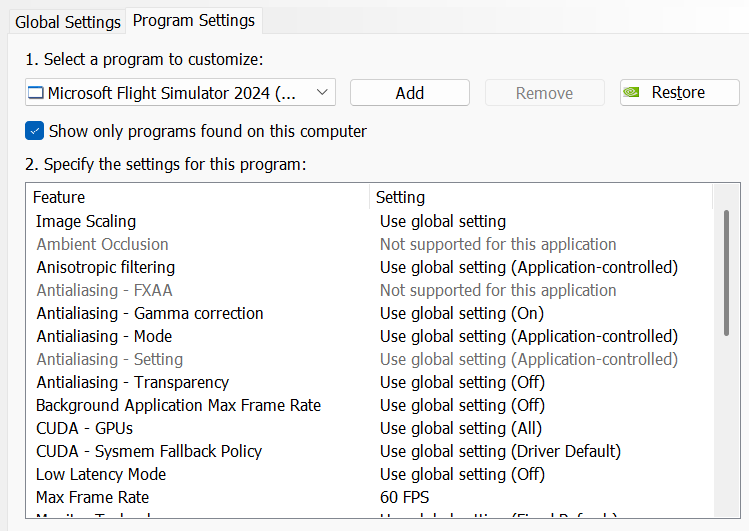
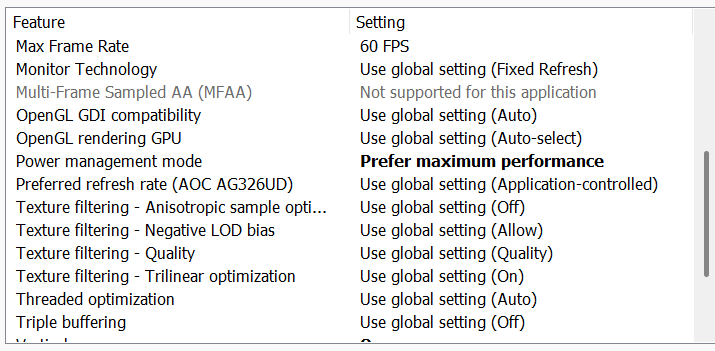
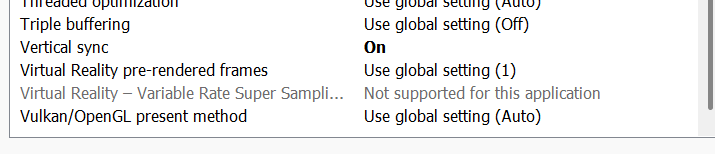
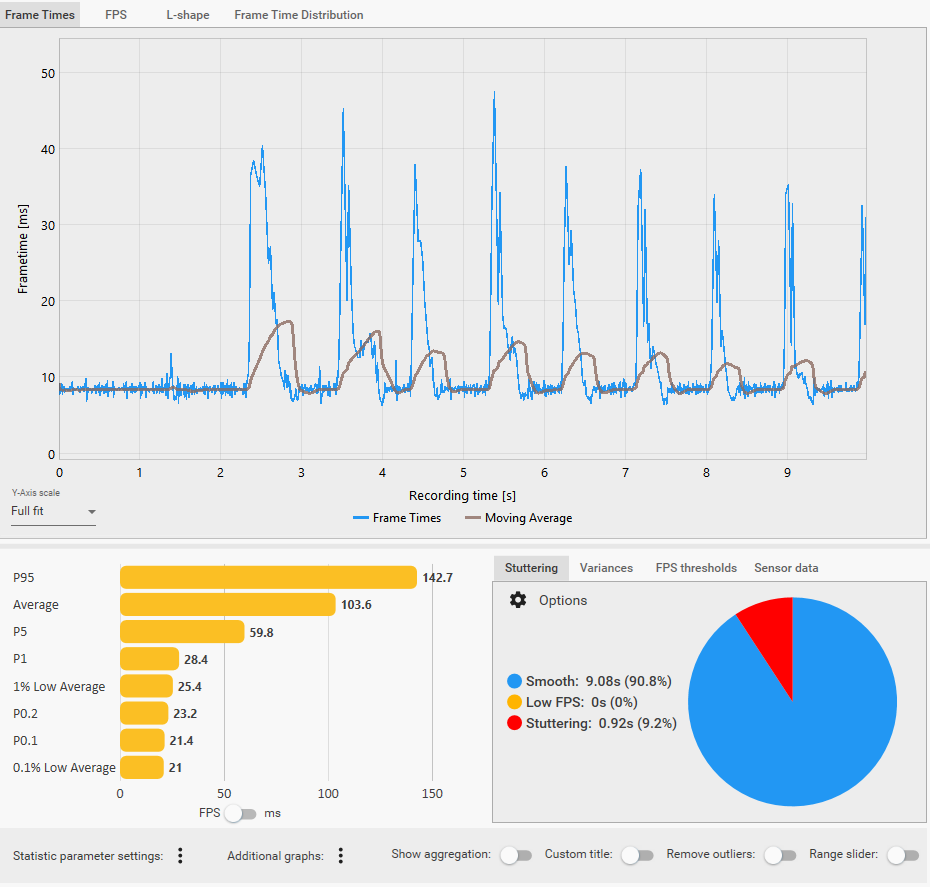
I realized last night that the Max Frame Rate setting is tied to the generation of real FPS and not FG. After realizing this, I set it down from 100 FPS to 61 FPS and the sim has been incredibly smooth now! I still get 120 FPS with FG but the frametime graph is very flat now!
If you’re experiencing stutters, try this!
1 Like
I don’t have everything maxed out simply because I don’t need it. I don’t care about ultra grass or maxed-out traffic - simple as that.
You know very well your settings are not “pretty much the same” as mine - they’re not even close.
Either way, suggesting that my hardware or resolution is the problem simply doesn’t convince me, so you’re honestly wasting your time trying to push that angle.
1 Like
I have a band aid if you need it.
PSVR2 cockpit resolution is pretty bad on PS5. No way of reading the indicators. Otherwise would be awesome 
SU5 has been so far so good, but my biggest gripe is the performance. I have noticed a significant decrease. I am almost positive there is some sort of memory leak. The other day flying the FlightFX C750 over the Grand Canyon, my FPS (with FG x2 on) dropped by over half. My settings are high, but not ultra. I got a 5080 with an i9 14900KF. SU4 had pretty good performance even at heavy airports. But when I dove into the Dev Mod FPS counter, it showed my VRAM was tickling 16GB (max for my card) for no apparent reason. It eventually leveled out, back to normal, but it raised a concern of a memory leak.
If you’re running 165Hz and you want smooth performance I’d suggest maxing your frame rate in the sim settings to either 55 (1/3 refresh rate) or 83 (half refresh rate), turn on frame gen and fly smooth. Cap your GPU frame rate at the same as you set in sim.
Thanks for the suggestion! I’ve had much better results following re-installs of both sims. I’ve got graphics settings dialed down quite a bit hoping for better performance, but not sure I can go back up to Ultra settings as before…
10, there was a post a few days ago that detailed the actual screen results of all the various graphics settings. Did you happen to notice that and have an idea where I can find it?
THX
Tim
Hi all. I can see some people have had success for performance issues by doing a full reinstall of the sim which is great if it resolved your problems. However as I don’t have such perf concern and rather my perceived issue being the clouds having lower quality, can I check has anyone had this issue and have seen it be resolved by doing a reinstall? Much appreciated
Overall, I don’t have any major stuttering issues in SU5. I don’t experience stuttering during taxi, takeoff, cruise or landing. However, I do get stuttering when, for example, panning the camera from the OVHD view to the MCDU.
https://forums.flightsimulator.com/t/severe-stutter-when-switching-between-instrument-views-within-cockpit/765470


Gaming Rig
- PC Case Be Quiet Light Base 900 FX
- MSI MPG X870E Carbon WIFI - BIOS 1A8
- Virtualization - disabled
- Re-size bar - enabled
- PSU ASRock Phantom Gaming 1600W
- Ryzen 7 9850X3D
- AIO Arctic Liquid Freezer III 420
- 64GB Ram CL26 DDR5 6000 2x32GB G.Skill
- AOC Agon Pro AG326UD
- MSI MAG 271QPX E2
- ASUS ROG Astral RTX 5090 OC / 581.94 / 596.36
- USB HUB
- Logitech X56 H.O.T.A.S
- VKB Gladiator NXT Evo Space Combat Edition
- Honeycomb Alpha Flight Controls XPC Yoke
- Logitech Flight Rudder Pedals
- Airbus EFIS Winwing
- Airbus FCU Winwing
- Airbus MCDU Winwing
- Boeing 737 MCP Core Flight
- Boeing 737 EFIS Panel Core Flight
- Boeing FMC/PFP 3N Winwing
- Thrustmaster T300 RS racing wheel
- Sound Blaster X5
- Sound Blaster Katana v2
- 4xNVMe // 4TB for MSFS2022/2024
- 1xSSD
- 1xHDD
- Windows 11 PRO 25H2
Not sure if this is exactly the post you meant, but I think it might be this one
https://forums.flightsimulator.com/t/fs2024-graphics-settings-and-performance-guide-11-20-2024/667840
2 Likes
Well I wasn’t referring to any particular post or anything I’m just going based on how a clean frame pipeline ultimately looks. See you don’t want to make your sim try to push out as many frames as it can, it’s unnecessary work for the sim. What you need is just the proper mathematical number of frames for the given monitor refresh rate you’re using. Now in your setup you said you have 165Hz refresh rate. The sim isn’t going to pump that out especially not in ultra and high graphics settings. So if you turn on Max Frame Rate and drop it in half you’re already doing yourself a favor particularly if your monitor can be set to a half refresh rate. This makes it so the sim only pumps out the number of frames you need and hands them off in a stream to your GPU. Your GPU needs that setting maxed at the same rate you set in the sim, and then you can turn on Frame Generation of your choice. I have not used in sim FG as I used an external one (because I’m afraid to put a newer driver on my system for the GPU since I have this thing dialed in perfect) but regardless of what you do, you want mathematical 1/2 or 1/3 of your refresh rate. You might even be able to change your monitor’s refresh rate for simming purposes do 1/2 and not even bother with frame gen.
1 Like
I think it’s subjective and certainly all about opinion. One man’s trash may be another man’s treasure. I’m basing it solely on my experience of before and after. I think the user under your comments feels the same way that I feel. So again, it’s all about perspective.
Can’t help you with this but… please learn how to make screen shots. Your screen photos look awful because of the moire effect. Windows button + Shift + S, and drag the mouse around the area you want to clip. Then paste in your message. For someone who plans to use the sdk, I had expected knowledge about this, to be honest… and also about basic installer usage. You could try running the installer as administrator. Safe flights.
1 Like
Yea panning is my biggest stutter issue. Especially after several minutes launching a flight
1 Like
No reoccurring stutter is as annoying as the one those of us who use ATC get every time you open the ATC window. A short stutter while panning views might be partially obscured by the fact the whole view is also moving concurrently. No such “luck” with this one. The ATC stutter would drive you crazy 
1 Like
Same problem here