Hi,
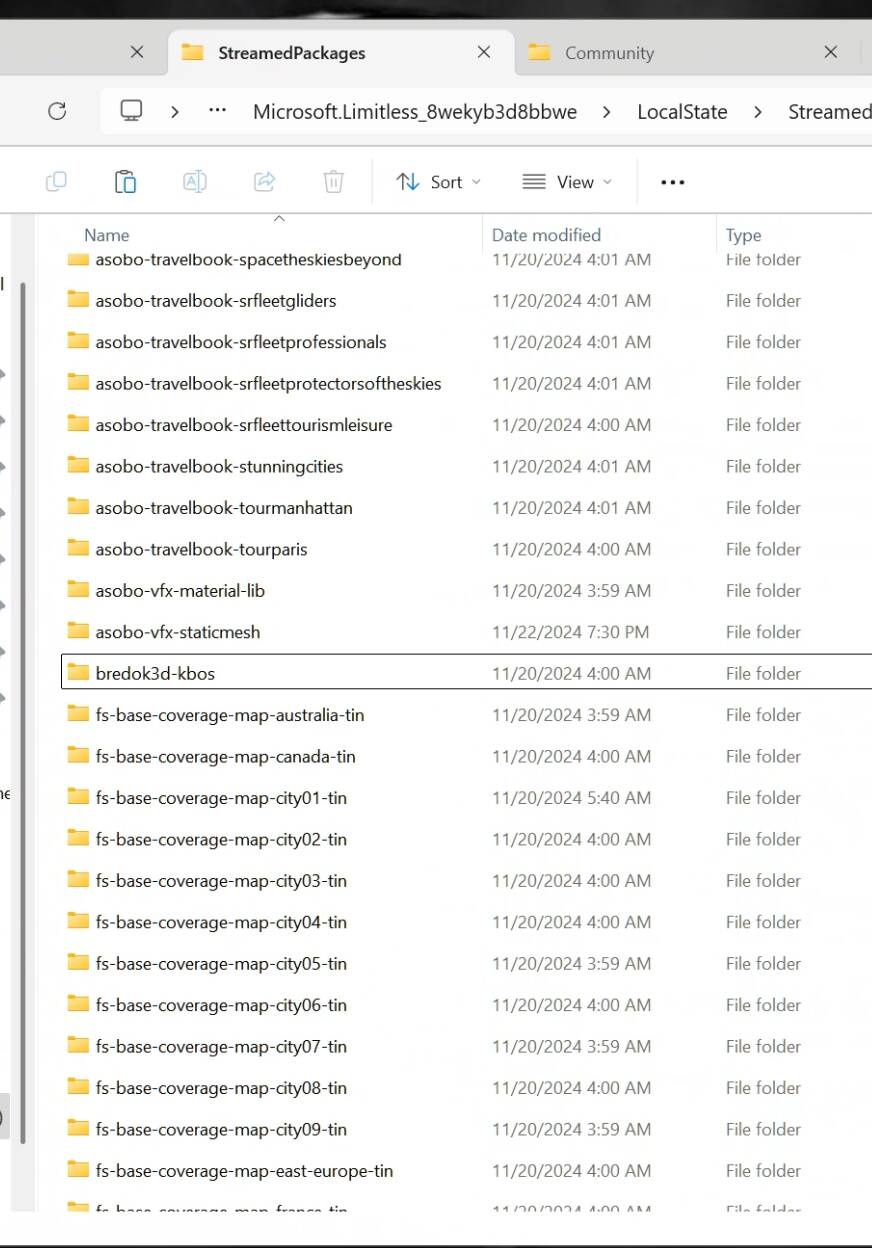
I might have found a workaround for the incompatible MSFS2020 package issue.
Some more datapoints would be welcome.
Thanks,
Hi,
I might have found a workaround for the incompatible MSFS2020 package issue.
Some more datapoints would be welcome.
Thanks,
I saw others say it works and I’ll be testing in a few hours. If this works for all I vote this is the post of the year. Kudos for finding this workaround!! Everything I tried didn’t work.
Title amended to clarify that this topic relates to MSFS 2024.
Does not work for me.
Edit:
I tried it for my missing C172 (G1000).
Asobo-aircraft-c172sp-as1000 ← maybe this is not it
That did not work.
That would be a default Asobo airplane from their 2024 packages. This would only disable bad marketplace-purchased 2020 content. Sorry.
I got rid of bredok KBOS. A number of others are also reporting success.
My theory was that if there’s a folder in community it overrides anything in streamed, and since the the folder is empty it just doesn’t load anything at all. Works for a number of us as far as I can tell.
Ref posts here for other samples.
Edited: It does work now.
You solved it, no more 97%.
I copied all my purchased stuff to community and deleted the files from within those to empty them. Sim finally started. Thank you!!
This folder is non existent for Steam users
I’m a Steam user, the path may be slightly different but the folders are there in basically the same place.
C:\Users.…\AppData\Roaming\Microsoft Flight Simulator 2024\StreamedPackages
I already deleted this folder and 2024 just creates it again and downloades the 2020 stuff.
What exactly do we have to do to try this solution??
And also this has nothing to do with the 97% problem. The game loads even with incompatible 2020 Addons for many people. It just creates glitches if you choose the selected areas.
Don’t delete the streamed folder contents, as you not they’re recreated. Make an empty folder of the same name in the 2024 community folder.
Still no chance… too long loading error…
What can a useless empty “streamed package” folder help in the community folder??
It appears that the sim looks for community folder contents and will use those instead of anything streamed. An empty folder in the community folder with the same name as a streamed folder item prevents the package from loading from streamed.
It doesn’t appear to be restricted to scenery, and 97% seems to be a thing for broken default aircraft with FS2020 mods as well. Do you fall into that category?
So what exactly do i have to do step by step???
What FS2020 marketplace items do you have that you’re trying to deactivate?
I dont try to deactivate anything. I dont put anything in the community folder of 2024. It is all downloaded automaticly by 2024 into the StreamingPackage folder. creating the empty folder in C:\Users\Admin\AppData\Roaming\Microsoft Flight Simulator 2024\Packages\Community did not anything better
The object of this workaround is to deactivate any MSFS2020 marketplace purchases in MSFS2024. You need to find any folder in streamed packages that doesn’t start with Asobo, fs-base, or Microsoft and make an empty folder in MSFS2024s community folder with exactly the same name.
The one that broke stuff for me was bredok.
So in my 2024 community folder I made an empty folder called bredok3d-kbos and now it doesn’t load.
I don’t know how else to explain this.
You really tried your very best.
And I can confirm it works! Mainly I also had to exclude an old Bredok product in this way you described. Thanks a lot!
And btw: your patience is extraordinary! 
Confirming this works for me with MP purchased addons. Thanks a million for this!! Ms Store version.