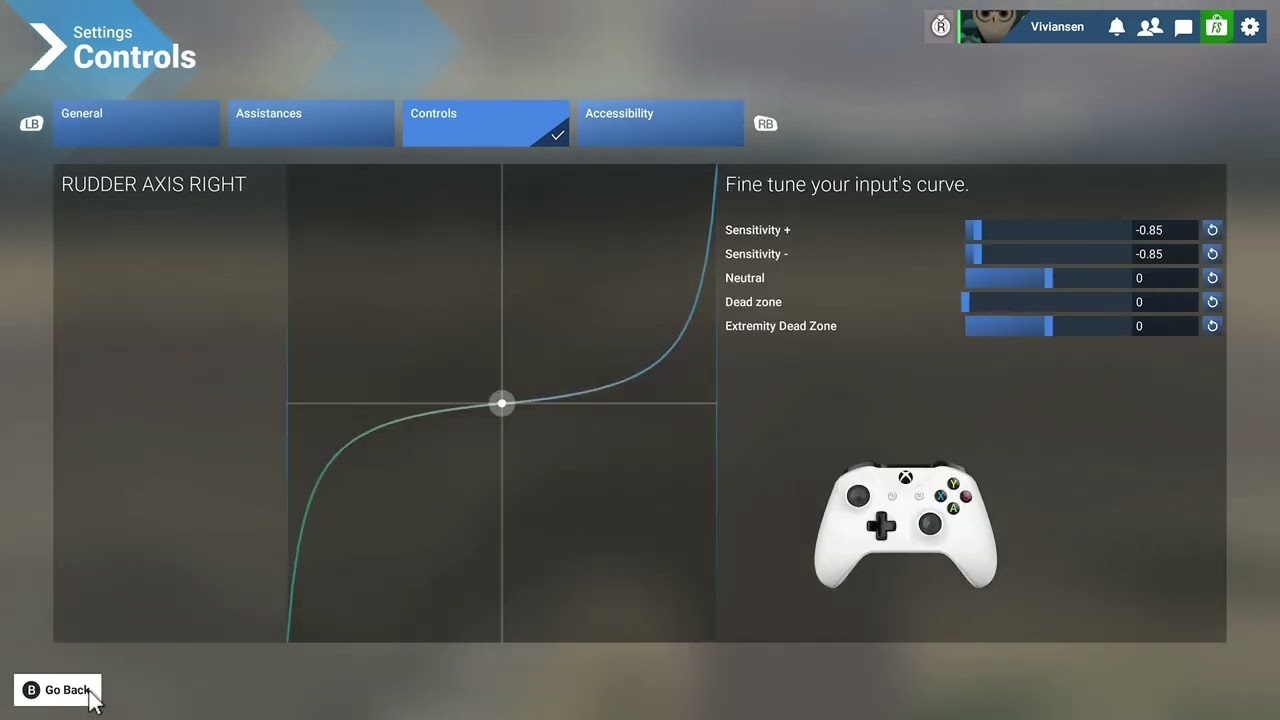
I’ve recorded a video just for you, let me know if the link works. Bear in mind, i’m yet testing the controller settings but it should help you to have a better experience or so i hope.
3 Likes
oooooooh thanks so much man!!!
If you improve it or something, comment here, I’ll be attentive!
You’re welcome captain, let me know if things are going better. 
Agreed. Requesting developer team to bring reactivity setting back. Thanks!
I’d like to see the return of the Reactivity setting. I have used it some to minimize twitchiness on PC with CH Yoke and Pedals.
1 Like
Yes plz, this setting made flying with a Controller less twitchy
1 Like
So convoluted, but yes this is the way
Hi @JackBlackOne, Apologies for delayed response (the forums have been rather busy recently!).
I can’t recall now, but I’m pretty sure I used my mouse, as that is how I usually navigate & alter things in the UI.
I’ve done a more refined Xbox Controller ( sensitivity ) setting for who is finding the analogue sticks too twitchy. Bear in mind, deadzones are mostly a personal preference. This is a controller setting mainly for bush planes.
Another issue i have is that the little schematic there does not move so you can actually adjust it. (Unless theyve fixed that) i if i adjust then move my throttles or sisdestick it doesnt move so i cant really see if my setting worked or not witout unpausing the sim.
Hi I am 75 and was flying ok in 2020 but 2024 the planes don’t seem to fly the same or maybe it’s just me and I am really struggling to get the right sensitivity settings for the Xbox controller god only knows what I will be like at Xmas when I get my thrustmaster captain’s joystick and quadrant I know their is still problem I can’t even get my Ov ten bronco that I usually fly .But I am glad you guys are here to help:heart:
1 Like
A big part of the issue is in MS/Asobo side, for whatever reasons they’ve removed options to properly calibrate the Xbox controller. Hope you enjoy your new stuff.
Hi guys trying to change sensitivity on Xbox with a controller and a mouse is diabolical even tried typing it in got locked out screen freeze 4 times think Asobo has a lot of work to I did manage it after 2 hrs of swearing and frustration sometimes when I had save it it did not save it anyway thanks for the help.
I’ve created a wishlist request for this feature. Please vote for it here:
Here’s a set to help Xbox players who are using an Xbox Controller. Since they removed the Reactivity slider setting, it’s pretty hard to properly calibrate and set your Xbox Controller. Bear in mind, dead zones are mainly a matter of personal preferences and are strictly tied to the shape of your gamepad. This set was tested on bush planes, i don’t use airliners at all.