Very interesting article as it explains a lot of possibilities. I think the claim is plausible, that we know Rebar is whitelisted for MSFS - however not optimized in ReBAR size for each individual system automatically by default.
On my system with a 16gb AMD 7800xt rebar consumes approximately 1.5 to 2gb of extra vram.
I tested ReBAR enabled vs disabled in MSFS 2024 some time ago. At 2K resolution with an RTX 4090, the difference in VRAM usage was around 1GB. For example, with ReBAR enabled it was around 14GB of VRAM usage, while with ReBAR disabled it was around 13GB. I don’t remember the exact numbers anymore, but the difference was roughly 1GB.
With GPUs that have a large amount of VRAM, such as the RTX 4090 or RTX 5090, this doesn’t really matter. However, for GPUs with, for example, 8GB of VRAM, that 1GB difference can be significant.
Even for GPUs with 16GB of VRAM, it can make a difference at 4K, because MSFS 2024 is poorly optimized and often runs right at the VRAM limit.
Which is why I set up different graphics profiles for different types of flying, rather than using one-size-fits-all.
Look I get it, people want the easy fix, regardless of what they’re giving up in return. All good by me.
I agree with IslandSimPilot 100%. It’s very important to know that solving one glaring problem may create a reduction in performance as a baseline. Perhaps not as noticeable as hitting VRAM max, but there all the time.
There is rarely a magic bullet (or setting) in tuning our diverse PCs, but there are best practices and methods that can benefit nearly everyone. When we share those insights, everyone benefits. Perhaps your individual situation drives a different outcome, but the method, process, and understanding of how we go about things might be relatively uniform to follow.
For VRAM issues, it’s always best to first address the basics - texture resolution, render resolution, pre-caching, and often non-optimized add-ons.
Turning off resizable bar might be a more extreme solution for specific uses cases, but is often not the ideal solution versus the more direct levers.
So, to each their own. But I appreciate a well thought out approach to resolving issues and finding the best balance.
Good discussion by all.
A fundamental issue that I don’t see being talked about much is that in a world of VRAM hungry games, traditional system requirements for games based on ‘Minimum’, ‘Recommended’ and ‘Ideal’ specs are meaningless because there is now a significant disconnect between the raw computing power your CPU/GPU is capable of delivering (FPS) and the associated performance degradation you will experience if you go over budget on VRAM. Your system may well be able to run MSFS 2024 at 60 fps (doubled with frame gen), but run out of VRAM, a single resource in a multi resource system, and your experience becomes a stuttering slide show – better than ‘Ideal’ becomes below minimum in a split second.
Most of us have already figured out that for MSFS 2024, “Ideal” specs are very dependent on the kind of settings and scenarios you want to fly, with VRAM being one of the most significant factors that affect how you setup and run the game. My point is a simple one: why not be honest, tell people that from the beginning and base recommended specs on typical player scenarios which actually reflect system requirements.
Many people, myself included, looked at the official recommended specs and built/purchased systems based on CPUs and 16MB video cards that otherwise eat MSFS 2024’s lunch when it comes to fps, but are handicapped because we want to fly airliners out of international airports with live traffic. To then be told that we should have figured out, that we would need more VRAM to run more VRAM intensive scenarios, is a bit rich when the official system requirements have little to no indication of the relationship between in-game settings and VRAM utilisation.
Nailed it you are absolutely right. Running a 9070xt on 4k always with rebar off. Otherwise getting every flight the nagging messages saying I reached VRAM levels
The only thing i agree with you and Island Sim pilot is the to each their own part and the fact that there are many variables that must be decided on to achieve the desired outcome.
Unless we are comparing apples to apples (most times it is not) and the testing method is the exact same (That too is difficult in this sim) then one can definitively state doing something one way is objectively better than another.
There is no place where i can accept that it is overall beneficial for me to leave on REBAR or SAM (in my case) when best case scenario on my setup its going to barely register a 1% low improvement.
I can make that up and then some by tightening secondary memory timings coupled with enabling fast timings and increasing vram speed in the adrenaline software (increase the data rate vs increasing the data size) . Additionally my frame rates are capped as well so im not looking for additional raw frames even if it did theoretically provide any.
Turning it off and having an extra 800mb VRAM available for allocation and not locked out because its already directly coupled to the CPU is a tangible improvement coming in on finals at KORD/KATL/KJFK/EGLL/EHAM/RJTT in an effort to prevent it from turning into a slideshow. Also no im not going to turn down my texture settings (why would i do that when it would look objectively worse than the sim i “upgraded” from)? Obviously i will be conservative in the add-ons downloaded to keep within a certain VRAM budget (no 8k liveries or un optimized airports) but telling me that it would be better to keep SAM on wholesale with no regard for the Users system specs is not good advice ..
I’m sure you and island sim pilot disagree but at least all agree on the “to each his own” conclusion. Which was my point in the first place. Every PC config has to be considered on their own merits as to whether it should be turned on or not. Not everyone has VRAM to burn in this unoptimzed sim we have presently and AMD implementation of rebar may be different or have different options (and by extension possibly different results) than the Nvidia equivalent.
Primary System Specs
9800X3D/9070XT on 3440x1440 UW / 32GB RAM/ (All manually optimized tested & benched)
I ran some tests today for an hour, and my conclusion contradicts what some people here think. On my system (AMD 9070XT 16GB GPU, 1440p monitor, frame rate capped at 75fps) with ReBAR ON, the penalty is immediate: I lose 1.5GB of available VRAM in MSFS. I immediately start getting “insufficient memory” warnings without having changed any of my MSFS settings. I’m constantly on the verge of running out of VRAM. Worst of all, the fluidity isn’t as good as it is with ReBAR OFF, and I experience more stuttering. Rapid 90-degree pans—looking left, right, or behind—are choppier. So, for me, ReBAR ON is completely pointless. I would have to drastically lower all my quality settings; why make that sacrifice when I gain nothing from it?
Mind you, I’m not claiming it will be the same for everyone—maybe ReBAR works better on Nvidia GPUs or with other motherboards, I don’t know…
I’d advise everyone to test it out and form their own objective opinion on his own equipment.
I conducted my tests flying an aerobatic plane over New York—an area heavy on photogrammetry—using various altitudes and tight turns to trigger rapid changes in viewpoint, with two large airports in the distance, enough to force MSFS to work hard…
Agree with you here in its entirety. But considering this was the second go round where i got burned depending on their recommended specs (MSFS2020 recommendations were just as bad) i had watched the market with the intention of upgrading my 6800XT to a 5080 with the expectation that it was going to have more than 16GB of VRAM. I knew from experience how high VRAM utilization was in msfs2020 in DX12 mode that i needed more than 16GB to not to be constrained in 2024 but both AMD and NVIDIA dropped the ball on providing the market reasonably priced cards over 16GB of Vram.
Supers look like they are going to be hella expensive too so what was once a sure buy for me when/if they eventually get released im now second guessing because im not spending over ?$1500 for a graphics card. I love this hobby and love upgrading my pc (been building my own PC’s since 286 days growing up in Jamaica) but sorry im not balling like that in this economy right now.
It’s absolutely to-each-their-own, I’m just trying to help people make informed decisions. If it were as simple as “turn off ReBar and gain 1.5GB of VRAM” then every user would do it. First of all, your CPU is maxed out before VRAM 99.9% of the time. But the other side is, your scenery popping will be 100 times worse. I’ve shown it. If that trade-off is worth it to you that’s perfectly fine, but understand that’s what you’re trading. Also, if you want to save 1-1.5GB of VRAM with literally no visual difference whatsoever, turn Texture Resolution down from Ultra to Medium.
In any event I have some insanely exciting news coming out over the next few days that touches on all of this. It will absolutely touch this discussion.
I can tell the difference going from texture resolution ultra to high much less ultra to medium what is this ? At that rate i may as well go back to 2020 sorry.
In my system with 32gb ram Ryzen 5600X and an AMD 7800xt 16GB card rebar consumes 1.5 - 2gb of vram and raytraced shadows about another 1gb. Turning these off saves me around 3gb. I play plenty of other games and rebar off does’t hurt performance at all. Maybe it’s because it’s an older system.
My CPU (i9) spends most of its time twiddling its thumbs—it tops out at 70% usage in MSFS—and I experience very little pop-in because I crank the TLOD up to 400. Conversely, the lower you set the TLOD, the worse it gets: more pop-in, textures become blurrier and the photogrammetry looks less impressive.
Some people don’t notice the difference or consider it negligible, but it’s definitely there. To each their own, I suppose;
personally, I choose to voluntarily cap my frame rate at 75fps matching my screen refresh rate in exchange for higher visual quality. And the experience is perfectly smooth—aside from the occasional stutters almost everyone is dealing with these days and which might be resolved one day by Asobo…
So does your VRAM, the point is which one hits its limit first. And I cap at 58 FPS on a 60Hz monitor, smooth as silk.
In my opinion, ReBAR is yet another technology that failed to live up to its promises. The best proof of this is that it is disabled by default for certain games where it does more harm than good.
The BIOS is full of settings like that—supposed to boost performance but ultimately left disabled because they cause instability or compatibility issues. No, ReBAR is absolutely not essential for a PC to run properly.
Interestingly, as an RX9070XT user I come down on the other side of that ReBar argument. In my case I leave it enabled. When performing my controlled testing, meaning not maxing out the CPU, GPU or VRAM, I find I get an additional 5-6 FPS better when Rebar is enabled. I consider that as an indication my system performs better with it enabled. Like others, I also see an additional 1GB+ VRAM usage, but I adjust my graphics settings accordingly to ensure the VRAM is never exhausted.
As a guide, I use the Fenix and spawn to EGLL. I then adjusted my settings to get me to within 12-13 GBs VRAM usage, leaving a bit extra headroom. I then keep those as my default settings. As such I have not received the memory warning as of yet, and I’m able to maintain a smooth 60 FPS without FG. An added benefit of SU6 is that I’ve enabled FSR 4.1.1 set to Quality and the image quality has improved over TAA.
RX9070XT, 9800X3D, 64 GB, Asus X670E, ReBar enabled, HAGS disabled, VRR enabled, 120Hz monitor with framerate capped at 1/2 refresh rate.
Like others have mentioned, there is no one size fits all, when it comes to ReBar.

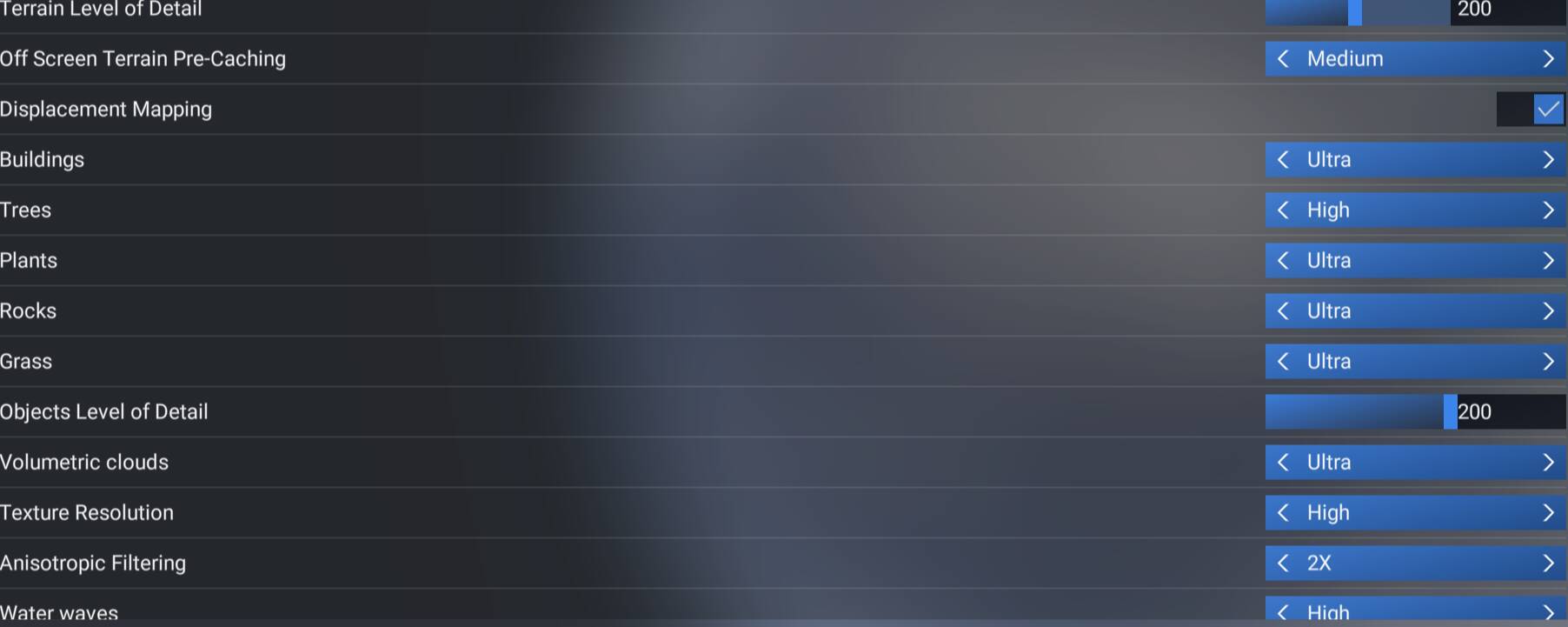
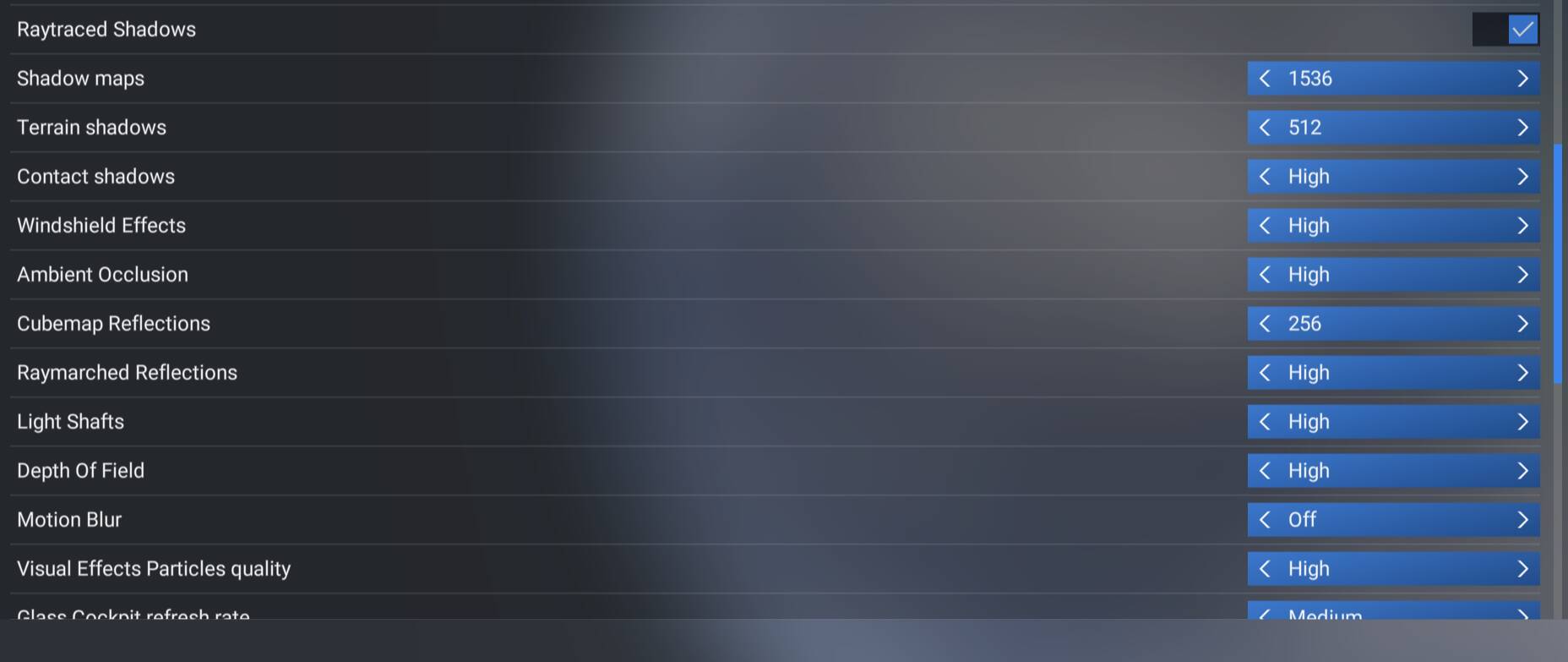
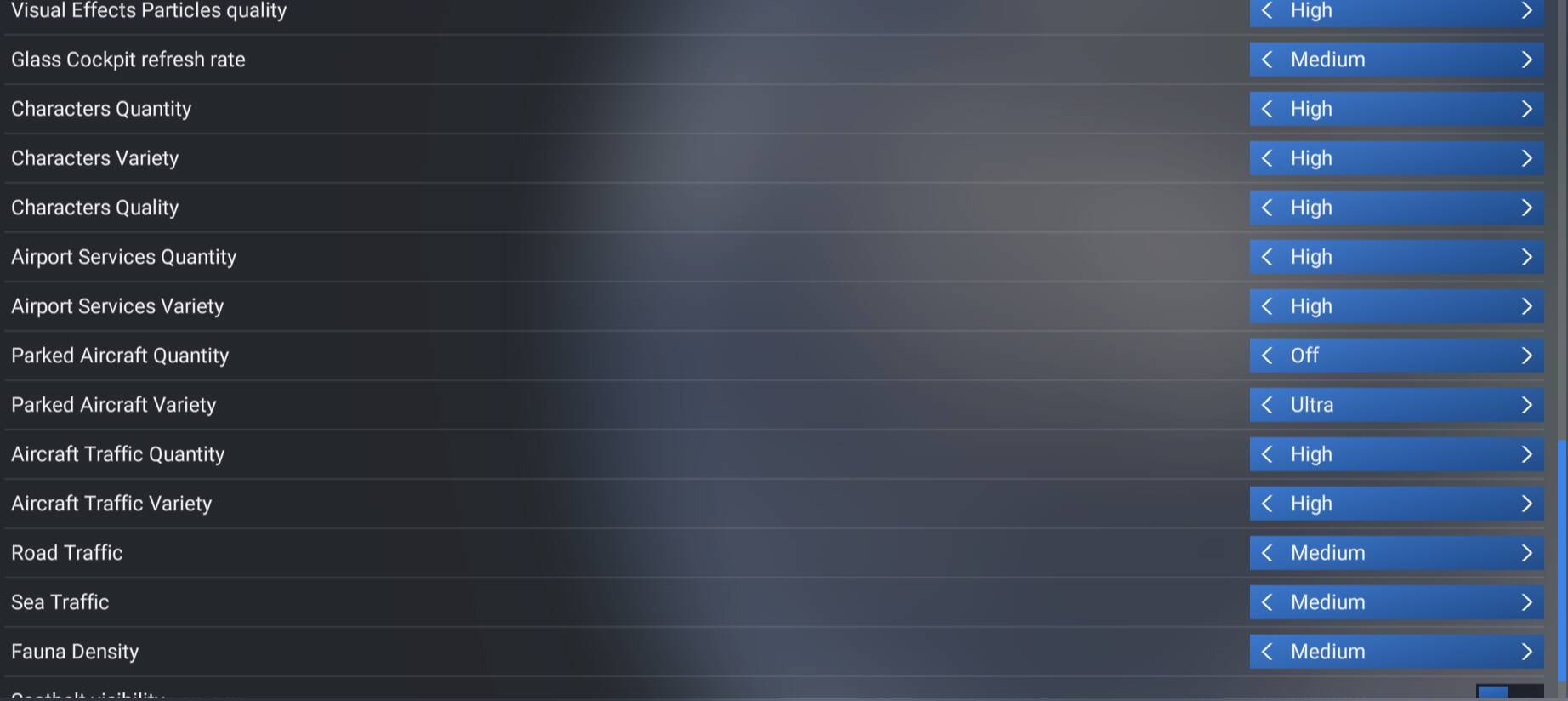
That’s an awesome way to run the sim right there.
If I see right you are not running at 4k it is rather 3.5k and that can bake a huge difference. I guess it is the format of your screen that dictates that maximum not being 4k
I’m running at 2K not 4K. 1440P is the sweet spot for the RX9070XT. 4K is a bit too much considering it only has 16 GBs VRAM, IMO.