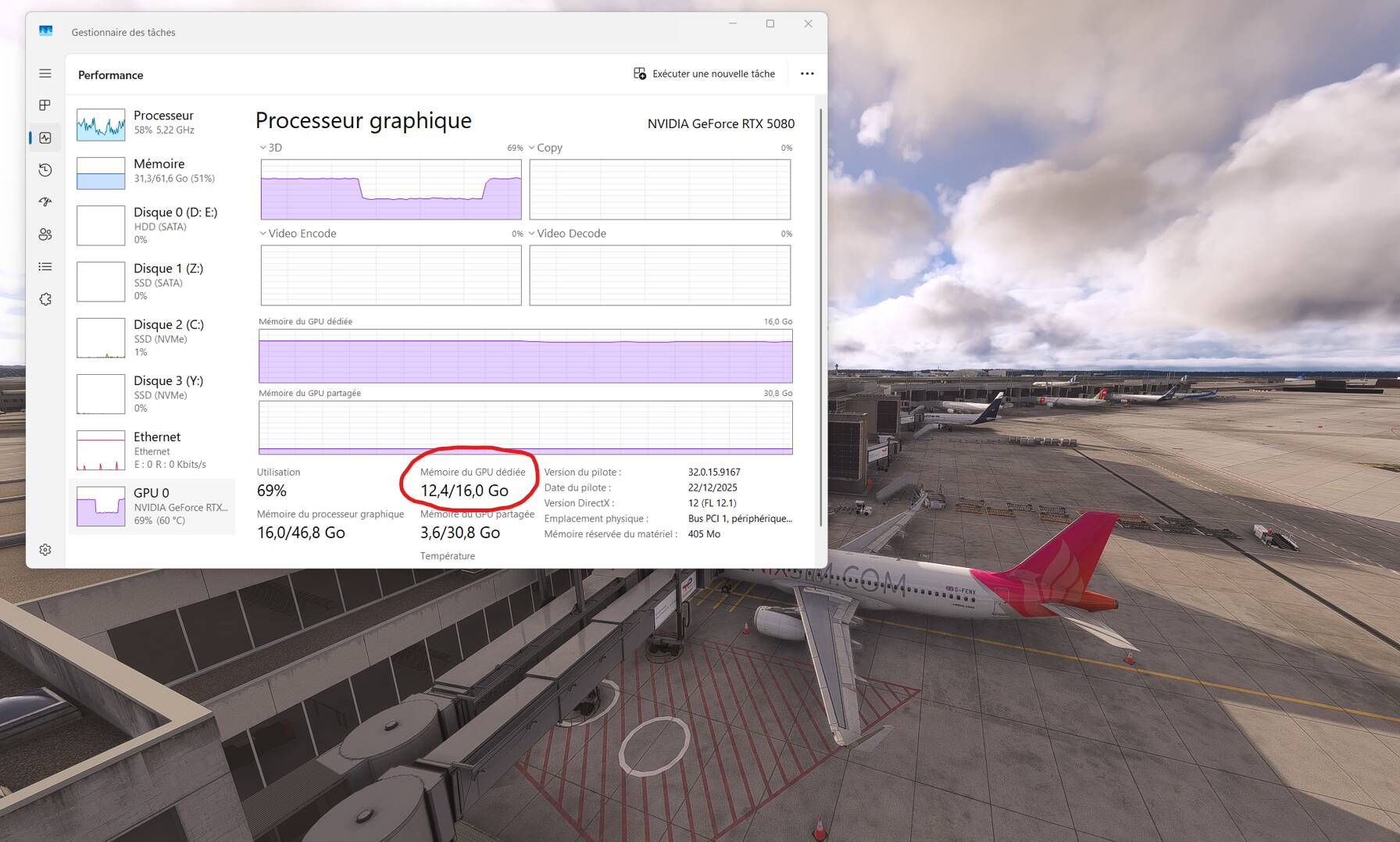
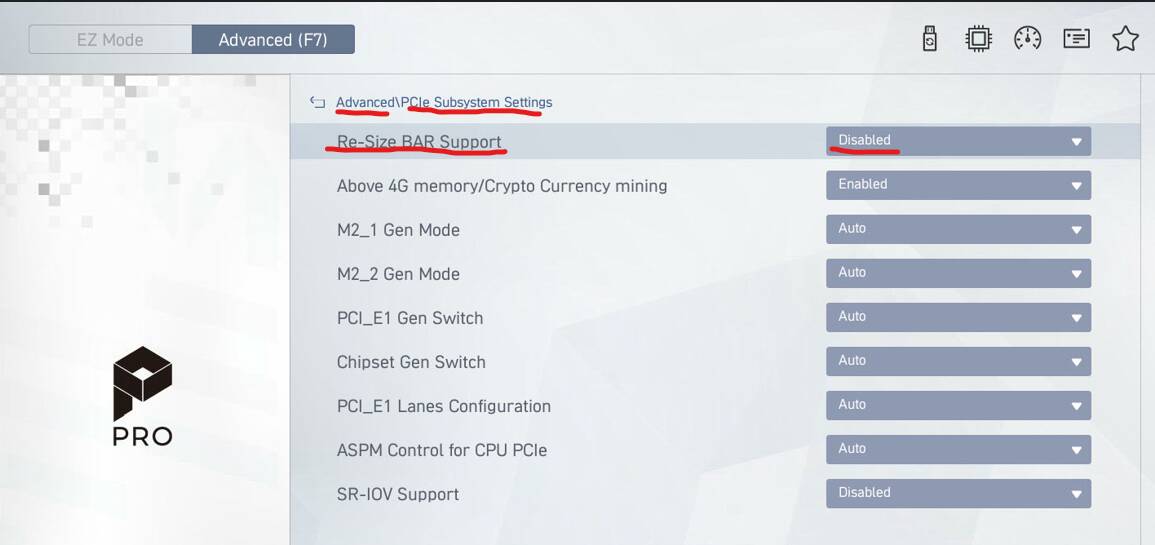
ReBar causing VRAM overusage and decreases available VRAM amount in MSFS 2024

Hello,
Here’s a test of enabling or disabling RBar.

This is factual, not an opinion, and is intended to share and inform.

Configuration: AMD Ryzen 7 9800X3D - MSI PRO B850-S WIFI6E - RAM: 2 x 32 GB (64 GB) DDR5 6000 MHz - MSI GeForce RTX 5080 16G VENTUS - ViewSonic XG2703-GS computer screen 27" G-Sync

Sim: MSFS 2024 SU4 - Real-world weather - A320 Fenix ​​- GSX Pro - FSTL enabled - EDDF gate 20 (Aerosoft V1.1.1).

Date: January 2, 2025, between 10:15 AM and 10:40 AM

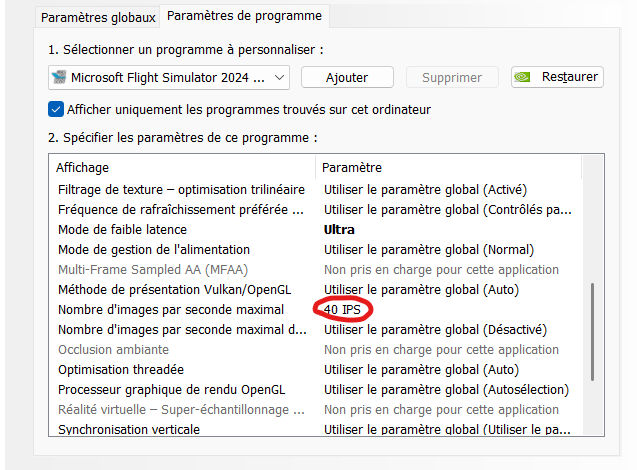
MSFS Settings

FPS limited to: 40

in BIOS > R-Size BAR Support => Enabled (default)

in BIOS > R-Size BAR Support => Disabled

1 Like

I chose to turn ReBar OFF in bios to reduce the VRAM load a bit. On the other hand, this allows me to push the graphics quality settings even higher.

I know I have 3 or 5 fewer fps than with ReBar ON, but I don’t care because my framerate is capped anyway.

The test was done under exactly the same conditions? E.g., you did a clean reboot also before the test with rebar enabled? No other apps have been started (or closed) bevore starting the Simulator.

From my experience, ReBar on or of has no influence on the VRAM usage. But opening and closing (!) a browser before starting the Simulator causes additional 2 GB of used VRAM.

“you did a clean reboot also before the test with rebar enabled?”

Are you serious???
How do you change a BIOS setting without restarting the PC? :joy:

3 Likes

Upshot of this is that you have to turn it off in the BIOS regardless of what the drive settings say?

Worth a test as i am pushing the VRAM up to the limits of my 5080.

1 Like

But you need to change the BIOS settings only once. So for the first measurement it was not necessary to reboot, you could have it done after your PC was already running for hours, maybe even with a running MSFS or other Apps.

Even after a reboot, you have not described your steps performing the measurements. It is sufficient to open one additional menu via the toolbar in the cockpit to achieve a complete different result.

Have you observed all this? I don’t think so. It is not easy to define a setup and steps that allow reliable reproducible measurements.

This (specifically changing ReBAR without accessing BIOS/rebooting) is possible for Nvidia users but not AMD.

OFF: turn it off in the BIOS

ON: turn it ON in the BIOS - AND - turn it on with NVinspector.

Many videos on Youtube for this.

Topic is about the BIOS setting, which is ReBAR and Resizable BAR is set in NVIDIA Profile Inspector - that’s a separate thing.

EDIT

BIOS setting (ReBAR) is shared by both NVIDIA and AMD, while the setting in NVIDIA Profile Inspector applies only to NVIDIA and is named according to NVIDIA terminology: Resizable BAR.

Thanks for pointing out that difference. :wink:
My explanation, or this test (whichever you prefer), is only valid if you make the necessary changes in the BIOS. I don’t use NVIDIA Profile Inspector (I haven’t even installed it).

NB : Another observation: using scenery like EGLL from Inibuilds or EDDF from Aerosoft significantly increases VRAM usage. This is especially true when these airports are located near photogrammetric cities.

There’s a lot of settings that can be tried for resize bar between On or Off with Nvidia profile inspector (Rbar size limit).

For the values that aren’t displayed in the menu, you can put them manually:

0x000000000C800000 = 200 Mo
0x0000000010000000 = 256 Mo
0x0000000012C00000 = 300 Mo
0x0000000020000000 = 512 Mo
0x0000000040000000 = 1 Go
0x0000000060000000 = 1,5 Go
0x0000000080000000 = 2 Go
0x0000000100000000 = 4 Go
0x0000000200000000 = 8 Go
0x0000000280000000 = 10 Go
0x0000000300000000 = 12 Go
0x0000000400000000 = 16 Go
0x0000000600000000 = 24 Go

I read somewhere that the default value for most of game in Nvidia’s whitelist is 1 Go but I’m not sure for MSFS.

PS: Resize bar Off = 256 Mo

After hours of testing, I really think 1,5 Go is the best value, at least against micro stutters.

PS 2 : Of course, you can put any value you want.

It’s basically any decimal value in Mb converted in hexadecimal with 5 zero left after the value.

Example: 1go = 1024 = 400 in hexadecimal = 0x0000000040000000

1 Like

This is the real question. I read in some forum (probably here) that Rebar for MSFS has just not been optimised in the Nvidea drivers - hence the VRAM issues on some systems.

1 Like

It’s strange then that NVIDIA themselves turn ReBar on for only select games and MSFS is one of them…
You would think if it was a whitelisted feature, then it would be optimized

I don’t think there’s a lot of “optimizations” that can be done here. Rbar is basically what size of a chunk of vram the CPU can eat in one time. That’s it.

Does the game needs it and which hardware benefits the most ? That I don’t know…

In fact it’s more about bandwidth and “CPU calls” than vram quantity.

What I don’t understand is why this parameters affect the quantity of vram used by MSFS. If someone could explain, it would be interesting.

1 Like

EDIT

Out of curiosity, I’ll check VRAM usage with ReBAR enabled in the BIOS and Resizable BAR Disabled in the MSFS 2024 profile in NVIDIA Profile Inspector.

I’m so far not convinced this is the case. I have not seen a measurement describing a reliable, reproducible setup confirming a higher VRAM usage with ReBar.

1 Like

No, no, that’s a fact. There’s no doubt about it.

Turn Rebar off in bios and spawn on any airport, look at the vram in use. Now, turn it on in bios and spawn in the exact same place, you’ll see a clear increase of the vram used. I’m 100% sure.

So I asked my new friend chatgpt why rebar consum more vram. Here the answer:

Because Resizable BAR changes VRAM addressing granularity and allocation strategy, not because it “wastes” memory.

Direct explanation, no marketing noise.

1. What Resizable BAR actually does

Without ReBAR:
The CPU accesses VRAM through fixed 256 MB windows. GPU data is loaded/unloaded in small chunks. VRAM usage is more fragmented and conservative.

With ReBAR:
The CPU can address the entire VRAM as a single block. Game engines and drivers preload more assets (textures, buffers, meshes). The GPU keeps more data resident in VRAM.
Result: higher VRAM occupancy.

2. Why VRAM allocation increases
Three main reasons:

a) Aggressive preloading
Drivers detect ReBAR and:
preload more high-resolution textures,
keep more buffers alive to avoid RAM ↔ VRAM round-trips.
Faster → more memory-hungry.

b) Less streaming, more residency
Without ReBAR:
assets are constantly streamed,
VRAM is freed more often.
With ReBAR:
assets stay in VRAM longer,
fewer swaps = more memory occupied.

c) Deliberate over-allocation
Modern engines prefer to:
reserve generously rather than risk GPU stalls,
especially when the CPU can directly access full VRAM.

3. This is NOT real “consumption”
Key point many miss:
VRAM “used” ≠ VRAM “required”
A large portion is opportunistic cache
If another workload needs it, it is released immediately
In other words:
ReBAR turns VRAM into a large, low-latency cache.

4. Practical consequences
:check_mark: More stable FPS
:check_mark: Less micro-stuttering
:check_mark: Better CPU-limited performance
:cross_mark: Monitoring tools can be misleading (VRAM looks saturated)
:cross_mark: Can hurt GPUs with low VRAM (8 GB or less) in poorly optimized games

5. Blunt conclusion
Resizable BAR does not increase requirements,
it allows maximum intelligent VRAM occupancy.
More VRAM used = smoother pipeline.
Not a problem. An architectural choice.
End.

5 Likes

I feel it’s important to explain why I disabled R-Size BAR Support in the BIOS.

With my new configuration (AMD Ryzen 7 9800X3D - MSI PRO B850-S WIFI6E - 64GB RAM - MSI GeForce RTX 5080 16GB) and MSFS 2024 SU4, the message “VRAM overflow” appeared (a problem I never encountered with MSFS 2020 + Intel 12700 + 64GB RAM + RTX 3090 24GB).

On the verge of crashing at any moment, I checked the Task Manager and found the following:

  • With MSFS 2024 + an MSFS 2024 aircraft + an MSFS airport + an empty Community folder, the amount of VRAM used was between 10 and 11 GB.
  • With MSFS 2024 + A320 Fenix ​​+ FSTL + GSX + graphically demanding airports, the amount of VRAM used was between 15.3 and 15.6 GB (Dangerous state => crash imminent).

And in the second case, of course, the “VRAM overflow” message appeared (NB: always on the ground, never in flight).

So, after investigating the problem from every angle, the only solution I found (inspired in part by this forum) was to disable R-Size BAR Support in the BIOS. By doing this, I solved the problem; I never again received the “VRAM overflow” message, as the VRAM usage dropped below approximately 12 GB in all cases. It’s a fact.

I didn’t investigate any potential side effects because, with my hardware configuration and settings (40 FPS max + everything on ULTRA except “Texture Resolution,” which is on High), MSFS 2024 runs perfectly.

Note: There are still some minor issues, such as slight stuttering after landing during taxiing and occasional hiccups when switching between camera and/or instrument views.
In conclusion, I prefer 40 FPS without stuttering to 80-100 FPS (which is what I get by default) with stuttering.

7 Likes

Yup, I get it, I did the same for the same reason but I went back to this parameter in my fight against micro stutters when panning the cockpit mostly when looking quickly to overhead panel (always on the ground when that happens). I found that a resize bar limit of 1.5 Go (0x0000000060000000) improved the situation in that regard without causing any trouble with vram quantity. Of course it needs to be investigated further.

It’s the enernal problem with MSFS and those kinds of very intensive games. CPU, GPU, RAM, SSD, LAN, etc… everything is on the constantly on the edge. As we all have different hardware and different way to play the game, it’s hard to find a general answer for everybody.

1 Like

For the sake of knowledge, I did some tests to compare the settings.

Exact same plane/place/date/hour/clear sky/no traffic

Resize bar “OFF” in bios
GPU CORE LOAD : 58%
GPU MEMORY ALLOCATED : 11,125 MB
GPU MEMORY USAGE : 68,2%
GPU D3D DYNAMIC MEMORY : 2,205 MB

Resize bar "ON in bios but “OFF” in driver
GPU CORE LOAD : 58%
GPU MEMORY ALLOCATED : 11,064 MB
GPU MEMORY USAGE : 67,9%
GPU D3D DYNAMIC MEMORY : 2,168 MB

Resize bar “ON” in bios and driver
GPU CORE LOAD : 55%
GPU MEMORY ALLOCATED : 12,746 MB
GPU MEMORY USAGE : 78,2%
GPU D3D DYNAMIC MEMORY : 490 MB

Resize bar “ON” with 256 Mo size limit (same limit as rbar OFF)
GPU CORE LOAD : 55%
GPU MEMORY ALLOCATED : 12,707 MB
GPU MEMORY USAGE : 77,9%
GPU D3D DYNAMIC MEMORY : 512 MB

Resize bar “ON” with 512 Mo size limit
GPU CORE LOAD : 55%
GPU MEMORY ALLOCATED : 12,699 MB
GPU MEMORY USAGE : 77,9%
GPU D3D DYNAMIC MEMORY : 499 MB

Resize bar “ON” with 1 Go size limit
GPU CORE LOAD : 55%
GPU MEMORY ALLOCATED : 12,654 MB
GPU MEMORY USAGE : 77,6%
GPU D3D DYNAMIC MEMORY : 496 MB

Resize bar “ON” with 4 Go size limit
GPU CORE LOAD : 55%
GPU MEMORY ALLOCATED : 12,841 MB
GPU MEMORY USAGE : 78,8%
GPU D3D DYNAMIC MEMORY : 510 MB

Resize bar “ON” with 8 Go size limit
GPU CORE LOAD : 55%
GPU MEMORY ALLOCATED : 12,770 MB
GPU MEMORY USAGE : 78,3%
GPU D3D DYNAMIC MEMORY : 492 MB

Resize bar “ON” with 16 Go size limit
GPU CORE LOAD : 55%
GPU MEMORY ALLOCATED : 12,527 MB
GPU MEMORY USAGE : 78,8%
GPU D3D DYNAMIC MEMORY : 497 MB

Basically 2 things…

You don’t need to turn it off in bios if you don’t want it, disabling it msfs profile is enough.

Whatever the setting, once it’s activated it changes the allocating memory policy costing around 1.5GB in this scenario.

Ps: Thinking about it, a static test like I did is probably not the best way to compare those settings because it’s more about data in and out vram. Would be great if we had a dynamic benchmark scenario…

3 Likes