turning off rebar worked extremely well, together with FSR3 and DynamicSettings, temporarily fixed the broken game
2 Likes
ReBar is enabled on my system according to NVPI and looking at the 2024 profile. I stopped using NVPI but I downloaded it again to check. And I am using the latest driver.

Globally ReBar is disabled.
1 Like
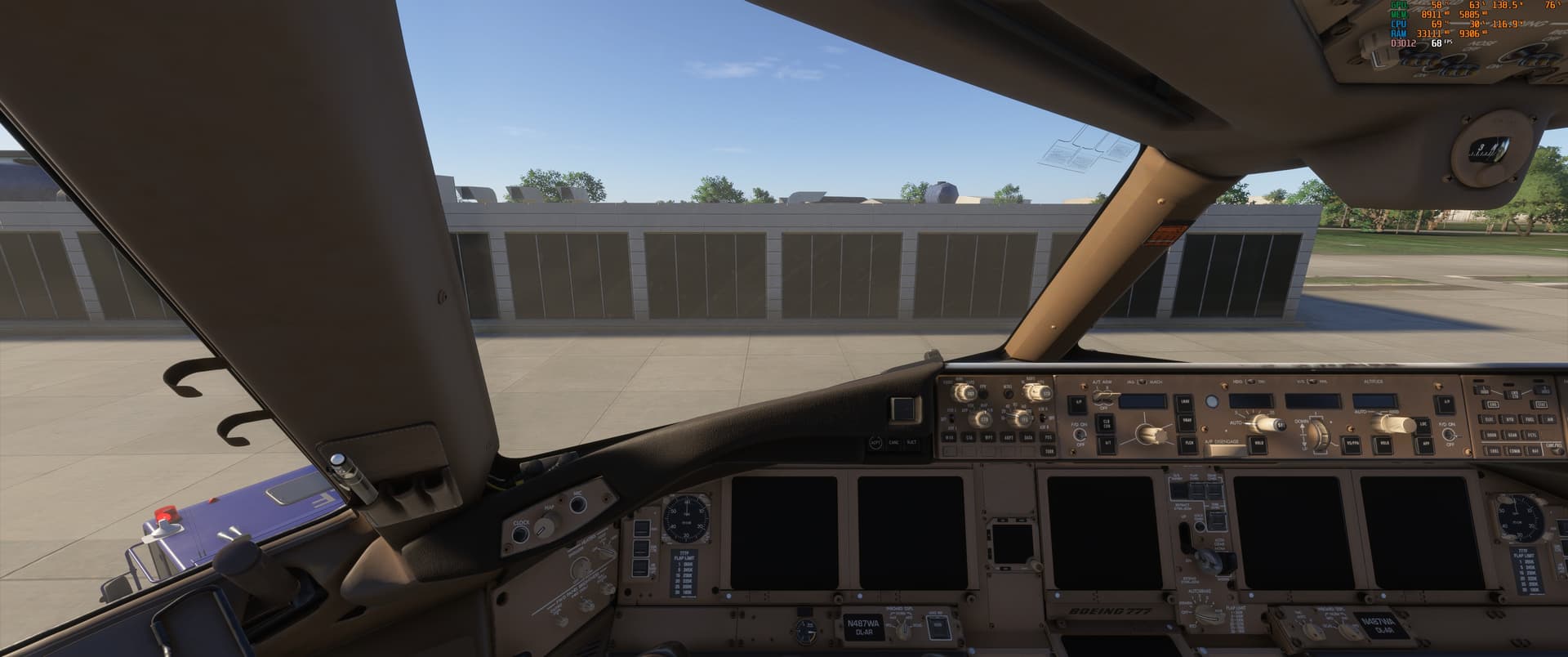
On my system, turning ReBar off in Nvidia Profile Inspector specifically for MSFS 2024 seems to have helped a lot with higher FPS and lower VRAM usage.
I have a 7900x CPU, 4070ti GPU, and 64GB of RAM.
With ReBar on: 68 FPS
With ReBar off: 86 FPS
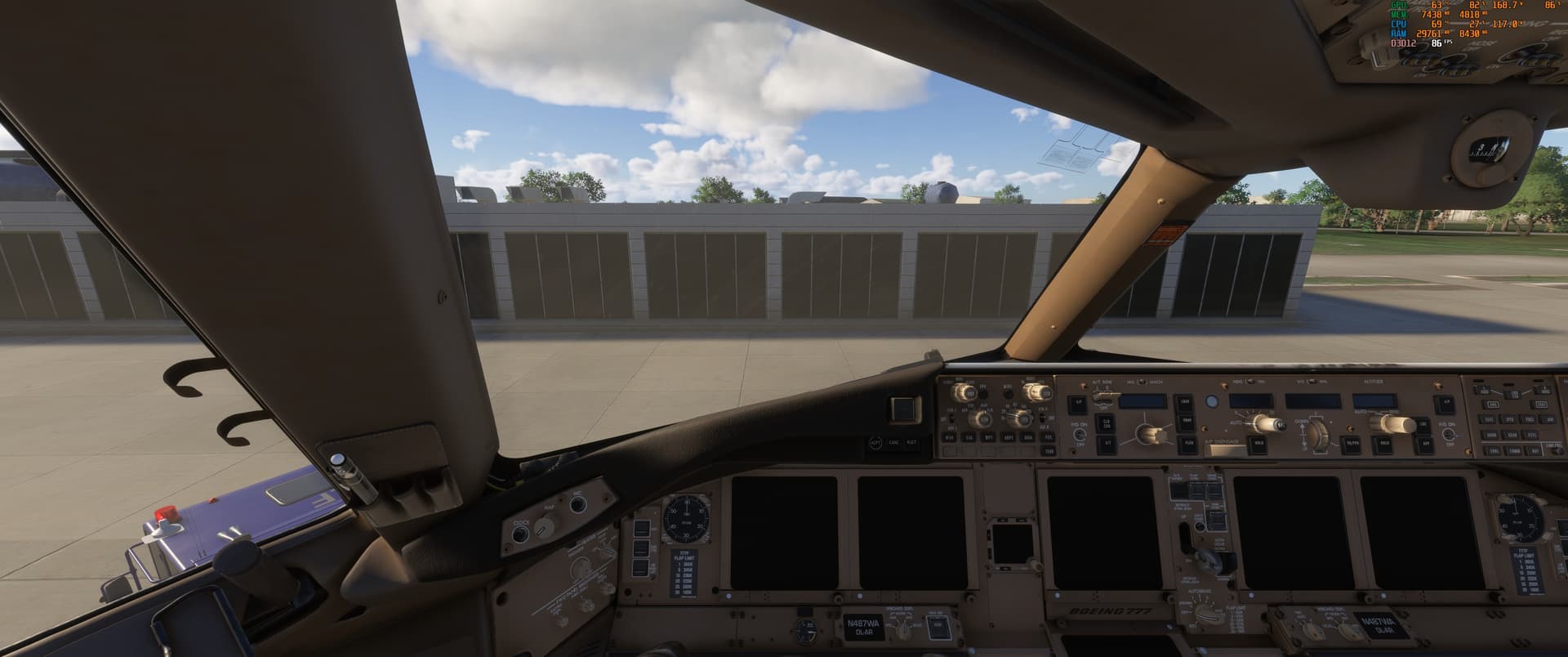
Same settings for both pictures, same location, same ramp. This is in the PMDG 777F.
5 Likes
I though it was the opposite? Using Resizable Bar added 1gb more usage of Vram which is not that good (especially with the Fenix). So….on or off? =P
My experience has been that disabling resizable BAR both decreased VRAM usage and increased VRAM availability. I went from, say 12gb used/13gb available to 11gb used/14gb available in many/most scenarios.
That said, I’m seeing some reports that the mainthread optimization found in the current SU4 beta may have “fixed” this and enabling Re-BAR could result in better performance, so I’ll be testing that today myself.
I observe something similar - about 1GB less VRAM usage when RBAR is off.
At least for me, it makes wonders with the Fenix. With RB on I get VRAM warnings (i have 16gb vram), and whitout - none.
Will this be fixed you think? Is the problem in FS24 or Fenix or how resizable bar works generally? They HAVE to fix this, it just feels stupid to have it turned off to access full vram.
I have a 7900XTX and can confirm that disabling rebar has reduced vram usage. I did also not get a vram error message ever since.
Did someone already create an official bug report for this?
1 Like
This issue is true because the sim tends to use as much VRAM as it can although the VRAM usage in Dev Mode only occasionally matches the VRAM usage reported from the card and can be over or under reported so not sure it’s real anyway. However, since I fully setup adding settings for all 4 of the ReBar settings in Profile Inspector (so Nvidia only I’m afraid) even though I can get VRAM reports in dev mode of way over the VRAM (seen 18GB on a 16GB card and even 15GB when I had a 12GB card), aside from the occasional warning flashing up, it has zero effect on the experience and hasn’t caused a crash or reduction in frames for months. I’m using a 4080 so shouldn’t be getting VRAM issues and hasn’t really changed apart from the numbers since I was using a 4070.
I don’t know if it is the same for other apps but in MSFS at least, ReBar seems to work both ways, if it has plenty it can use VRAM instead of System RAM to speed things up (what it claims to do) but can also use system ram (or all too often, swap file, see below) if short on VRAM when it needs to.
If you don’t have ReBar enabled and hit the limit, in my experience, the sim crashes but fully set up, it doesn’t, regardless of the numbers but avoid changing views and settings in flight, this makes it worse by adding new VRAM requirements without getting the others back.
The VRAM issue still seems to be caused by a sluggishness by the SIM to release VRAM it no longer needs, gets there in the end but takes way too long. This can be speeded up to 1-2 minutes by tuning the Virtual RAM and some registry changes to stop the ReBar adding to the swap file and go only to System RAM but this isn’t for the faint hearted so not linking the videos of how to do this, if you know what you are doing, you will find them easy enough. I have 2 machines so if I screw one, still have the other to use until I fix it so can afford to be braver than most can.
Yes, I just looked this up yet one more time and there is some confirmatory data out to say that turning this on or off has little effect especially with MSFS 2024, where maybe is a slight detriment on but looks to me within the margins of testing error:

1 Like
I get the sense that if you have the CPU overhead but low VRAM it off would be better; but if you are very CPU bound the improved CPU efficiency
from it may be the greater benefit
From time to time I watch only a few YouTubers from the broadly understood hardware space: Gamers Nexus, Actually Hardcore Overclocking and Monitors Unboxed. I don’t really watch others because I don’t think it’s a good use of my time. We all have our own brains and can decide what’s best for our hardware at any given moment. I personally prefer to rely on my own experience.
In my case, back when I was still on a 2K monitor, after disabling ReBAR in the BIOS (because that’s the only way it really makes sense), VRAM usage dropped by about 0.5-1GB. That doesn’t really matter much for me since I’m running an RTX 4090 and VRAM usage didn’t exceed roughly 12GB at the time, if I remember correctly. I’m not saying this is a rule for everyone — it clearly depends on the system configuration. In my case the drop was at most around 1 GB, but on a different setup it could be 2GB or 4.
I’ve now moved to a 4K monitor and decided to test this again, this time using the Fenix A321 so I’m gathering fresh observations.
Moving on to the 4K scenario: VRAM usage increased and was fluctuating between roughly 12GB and 15GB. After disabling ReBAR in the BIOS, VRAM usage dropped by about 0.5-0.7GB. That’s a plus, but there are also clear downsides.
With ReBAR disabled, FPS dropped by around 5-8. The main thread went from green at ~15 ms to yellow at ~18 ms. I also observed increased frame times on the rdr thread, coherent and graphics queue - so overall, it was all downsides performance-wise.
The only real benefit, as mentioned, was the VRAM reduction of up to about 0.7GB, which in my case doesn’t bring any meaningful advantage. After the tests, I re-enabled ReBAR in the BIOS and won’t be disabling it again.
Of course, on your own gaming rigs this may look different, but for my setup I’m leaving ReBAR enabled.
EDIT
MSI X870E Carbon WIFI, Ryzen 7 9800X3D, RTX 4090, 4K OLED, 2K OLED monitor, 64GB DDR5 6000 CL26.
In my case, having ReBAR enabled brings only benefits.
4 Likes
I agree that you have to use your own brain rather than the YouTubers but a few do collect data, which I find painful to do correctly. Flight simulation is almost as bad as watching politics.
In my situation enabling ReBar does not seem to bring much benefit but I am running my 5080 with the pedal to the floor. Have always been on 4K. I generally run in 2D in IFR on the B-787 on complex scenarios and the visual does not get demanding until the approach and landing at SFO where I have custom traffic and custom airport. But then it makes minor differences.
I have been ignoring the shadow options that might put more of a stress on it but I cannot notice them visually.
VR put much more of a stress on my system but I do not see any stutters even when the FR falls to 30 raw on landing but it pops back up to 40 quickly. The tire tracks on the touchdown zones are a big stress.
Whatever they did in the past month or so has put me in a very fine tuning mode and am a pretty happy clam. It is interesting to understand the tech.
1 Like
Do you have ReBar fully enabled, also in the NVidia inspector?
It’s so interesting that with 4K, those aircraft and sceneries with a 5080 you aren’t overloading the VRAM when I almost always am - non VR. What settings for TLOD/OLOD and texts do you have?
I tested ReBAR by enabling/disabling it in the BIOS only. I didn’t force or tweak NVIDIA Resizable BAR via NVIDIA Profile Inspector.
EDIT
I’ve edited my earlier post where I mentioned NVIDIA, as it could have been misleading. I apologize for that.
In the past, when enabling ReBar, I always tested it with my current graphics settings and the result was that annoying VRAM message but after reading your post, I tried it again by first resetting my graphics settings to their default, High-End. I can confirm your findings. With ReBar disabled my VRAM was around 7GBs, CPU latency around 15ms leading to a FR of just over 60 FPS. When I enabled ReBar my VRAM increased to about 9 GBs, CPU latency dropped a ms or two and FR increased 5-6 FPS.
I’m going to keep it like that for now while I begin to increase my graphics settings to see how far I can get before exhausting the VRAM.
Many Thanks. 
1 Like
Thanks for the feedback.
It is interesting to see these results already as I am wondering what the NVidia inspector settings on ON would do on top of that…
Under Microsoft Flight Simulator 2024 just disable it. I have ReBar enabled under global settings.