Reduce ReBar Size Limit setting to remove ReBar stutters (a subsequent driver update negated this suggestion)

Added July 16th. Please note that a driver update removed the need for me to limit rebar size. However I’ll keep my findings in mind if this stutter anomaly ever returns on subsequent driver updates.

TLDR; don’t disable ReBar but reduce the Size Limit setting to reduce stuttering

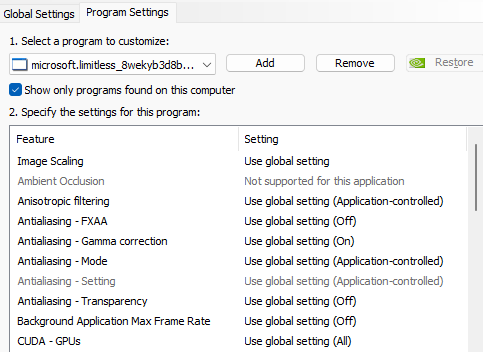
There are a lot of posts on this sub-forum correctly indicating that by disabling ReBar the sim exhibits less stutters (especially when panning around the cockpit). I had the same stutter issue (RTX4090/9800X3D) but rather than disable ReBar completely I set the Size Limit setting to 0x20000000 (hex for 512MB) using NVIDIA ProfileInspector. By default this field is blank in the MSFS 2024 profile and there are conflicting opinions on a Google search over what this default value actually is.

With ReBar disabled memory is sent to the GPU in 256MB chunks (maximum size). By setting the ReBar on and its size value to 0x20000000 this is doubling the max chunk size to 512MB. I may try other sizes to see if I can max out just before stuttering returns.

Disclaimer: of course limiting the size in this way may be reducing the effectiveness of ReBar but at least it removes the stutters. You may want to try different values to suit your system but I would recommend a value which is a factor of 2 plus I’d reboot the PC between value changes just in case.

Also I’m sure this has helped with the big stutter that occurs at airports just after landing but more testing is necessary.

Important: I don’t suggest this as a “cure all” for every stutter which occurs on peoples systems when in the sim but only to alleviate the ReBar induced stuttering…

{B59B24FA-E110-4728-8072-70108F286154}

I have a very similar setup (RTX 4090+Ryzen 7 9800X3D+64GB DDR5 CL26), and I’m not experiencing any stutters during SU3_beta testing - even when rapidly panning around the cockpit. The SU3 beta is running smoothly without stuttering or CTDs - I’m finally enjoying flying again.

In BIOS, virtualization is disabled and ReBar is enabled. I’m using the latest NVIDIA driver, but installed in a minimal configuration - without NVIDIA app and without the NVIDIA audio driver.

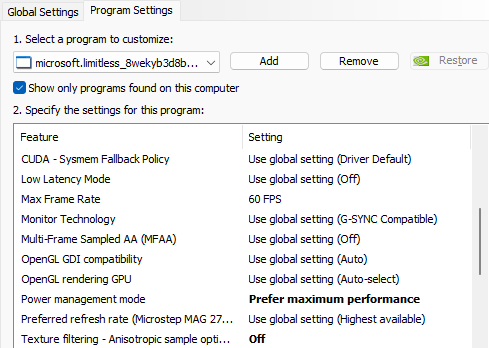
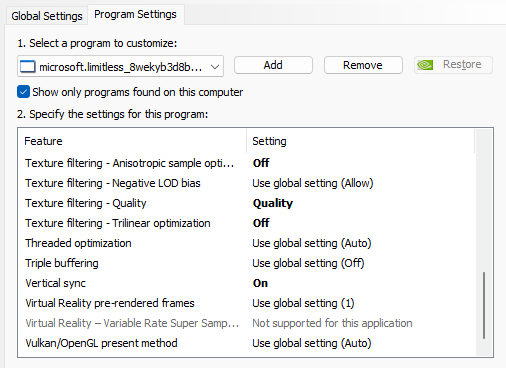
Click here to take a look at my NVIDIA Control Panel settings

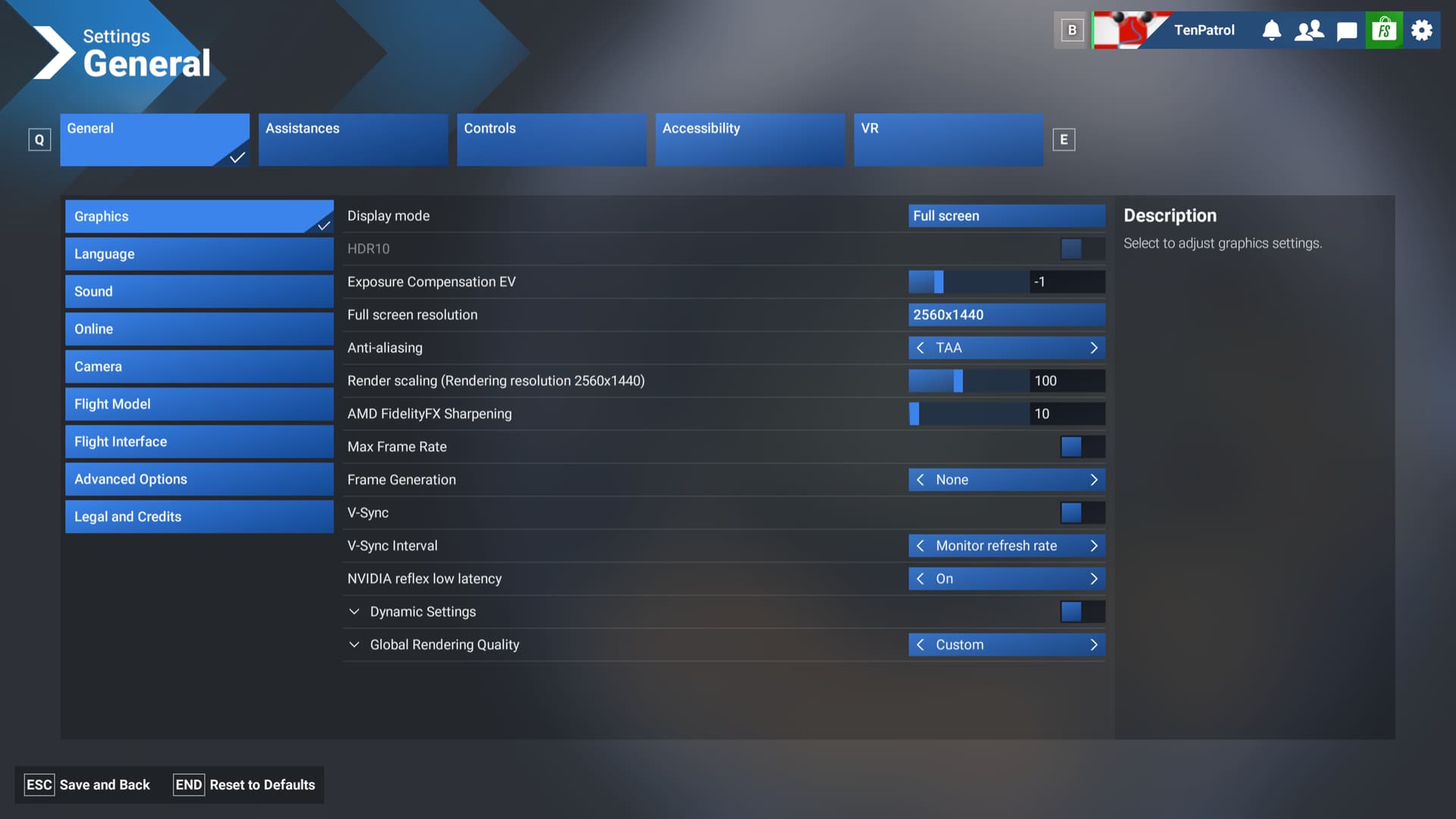
Click to view my SU3 Beta settings


Click here to check out my gaming rig
  • MSI MPG X870E Carbon WIFI - BIOS 1A3
  • Virtualization - disabled
  • Re-size bar - enabled
  • PSU MSI MEG Ai1300P
  • Ryzen 7 9800X3D
  • AIO Arctic Liquid Freezer III 360
  • 64GB Ram CL26 DDR5 6000 2x32GB G.Skill
  • MSI MAG 271QPX E2
  • Gigabyte RTX 4090 Gaming OC / 576.52
  • USB HUB
  • Logitech X56 H.O.T.A.S
  • VKB Gladiator NXT Evo Space Combat Edition
  • Honeycomb Alpha Flight Controls XPC Yoke
  • Logitech Flight Rudder Pedals
  • Airbus EFIS Winwing
  • Airbus FCU Winwing
  • Airbus MCDU Winwing
  • Boeing 737 MCP Core Flight
  • Boeing 737 EFIS Panel Core Flight
  • Boeing FMC/PFP 3N Winwing
  • Thrustmaster T300 RS racing wheel
  • Sound Blaster X5
  • Sound BlasterX Katana
  • 4xNVMe // 4TB for MSFS2022/2024
  • 1xSSD
  • 1xHDD
  • Windows 11 PRO 23H2
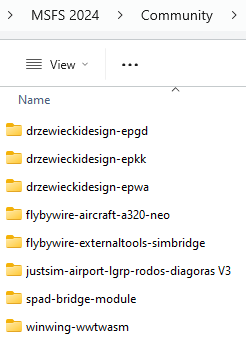
Community folder

So this suggestion is not applicable to you. Simple.

Just like it’s simple that MSFS 2024 developers should focus on optimizing performance, rather than leaving us to tinker with low-level settings we ideally shouldn’t have to touch in the first place, like ReBar. Users shouldn’t have to rely on trial and error with hardware features to get smooth performance in a modern sim.

Please just ignore this tip (which may be of help to fellow simmers) if it offends you so much.

I’m not offended - just pointing out that during beta testing, our focus should be on evaluating how MSFS 2024 performs as-is, not how it behaves after tweaking low-level system settings. Introducing too many external variables like driver hacks risks skewing the results and makes it harder for developers to identify real issues that need fixing before release. Constructive feedback based on default or common configurations is much more valuable.

So why isn’t your community folder empty?

Edit. Ignore last comment. I came to give what I thought was a helpful suggestion not get into an argument. I’ll say no more :slight_smile:

Going to try some of these settings, in particular the max frame rate.

I set mine to max 30 in game and use FSR frame gen, but I think I would prefer not to use frame gen altogether.

It’s not empty because I’m not experiencing any issues in SU3_beta that would indicate conflicts with 3rd party add-ons. That said, when I do run into problems or need to verify something cleanly, I temporarily rename the Community folder and create a new, empty one. I also rename exe.xml and content.xml to ensure no leftover modifications are loaded during testing. Then I retest in a clean environment as needed.

I only meant to point out that any kind of system-level tweak can influence the outcome of testing and potentially distort the results. Of course, everyone is free to test however they like, but I believe it’s worth mentioning for the sake of consistent and useful feedback during the beta.

I think it’s valid to tinker with those things even in a beta, as it could point to the things that should be changed in the code to not need the tinker steps.
Just make sure you keep track of what and how you changed, so you can revert to original settings after testing. That’s probably the most important part. Otherwise you can really mess up your system’s configuration.

Hmmm, that does not make logical sense. They will not know that one has deviated from the expected PC configuration, and so whatever outcomes are reported via telemetry or forum post will not inform the teams of “things that should be changed in the code.” Such data will be an outlier and not inform any code changes.

Reducing size really helps? I foudn this guide Enable HAGS and maximize ReBAR on your recent NVIDIA GPU | Frontier Forums

Mods: I see the point other members are making regarding skewing beta performance and perhaps this suggestion would be better being placed into the General sub-forums…

Topic moved from SU3Beta category, as this is neither feedback on something in the Beta, or a regression noted in the Beta.

Folks, keep your posts respectful towards others.
Remember:

  • A Pilot is a Pilot - Treat everyone in the community with respect, and seek to have positive experiences with your fellow pilots.

I think it is a helpful suggestion for those interested in tweaking their setups. There are numerous posts on this forum about tweaks like this, for example, to engage nVidia features or settings that aren’t baked into the game natively. Some use Profile Inspector, some use the nVidia App, some use the nVidia Control Panel, some even go so far as to manually modify .ini files, etc. A lot can be learned by the well-informed by doing this kind of experimentation.

All that said, I’ve long subscribed to the KISS method. When I load a new nVidia driver, I use the “Custom” and “Clean” install options to install only the graphics driver and PhysX. I do have the nVidia App installed, but I leave all the NCP and nVidia App settings at their defaults. Before launching the sim, I close all browsers and other applications except Tobii Eye Tracker. Upon entering the sim, I tweak only the settings that are natively available in the game’s control panel. If I encounter stutter or any other distracting performance issues, I reduce the graphics settings one at a time to find the best balance between quality and performance.

To my way of thinking, if an adjustment is not natively available in the game’s control panel, any setting you force onto a game using Inspector, NCP, or the nVidia App can lead to unpredictable results. Equally true, any apps you have running in the background when you launch the game can also lead to reduced system performance and unpredictable results.

To each their own with making tweaks or adjustments that are not natively available in-game, but subscribing to the KISS method has served me well ever since I first started studying computers and computer science in the 1960’s. And no, that’s not a typo.

Yeah, I worded that weirdly. I meant it cold point to things like: " Oh, we should check our texture/asset/whatever streaming/caching/whatever to the system." Or something like that.

Your points are well taken. And certainly people should not blindly make a bunch of changes to their system (outside the parameters of the sim itself) based on YouTube ‘wizards’ or even helpful and experienced members of this and other flight sim forums.

However…

Using proper test methodology (change one thing and test, repeat as necessary) and an abundance of caution, it’s fine to use 3rd party apps like Profile Inspector, Process Lasso, NvCP, etc. to improve the performance of their individual system.

There are subjective tests (“I’m having a periodic stutter”) and objective tests. My favorite of the latter is CapFrameX. I’ve done a LOT of testing with that, changing one thing and testing, repeating as necessary.

My point is that subjective tests can lead you down a very bad road, and in a multi-variate environment like a PC running simulator software, one can quickly end up in performance quicksand.

The other thing is that things like video card drivers, Windows settings (like HAGS, Game Mode, Power Plan, etc.) are easy to adjust and test. Change one thing and do 5-10 5 minute repetitive flights in CapFrame X. If it’s better, you’ve improved your system. If not, set it back. Repeat with other variables and combinations of variables.

Is it time consuming? Heck yeah. I’ve literally spent days where my only flight was 5 minutes over NYC, over and over and over.

Is it worth it? Each of us needs to decide that for ourselves. I’ve seen some massive improvements in some cases, and in others very little (if any) improvement. Personally, I enjoy the process. I’m weird that way. :grinning_face_with_smiling_eyes:

I also somewhat arrogantly enjoy thinking I may in some way be helping others understand the complexities inherent in seeking optimum results. I don’t pretend to be a computer expert, or a game software expert, and certainly don’t want anyone else to think that of me. But I do believe that our sim experiences can be improved with proper use of tools that are not built into the sim. Empirical testing is key.

I’ve found the best way to reduce stutters is to limit my frame rate using Vsync. I have ditched both DLSS Swapper and Nvidia Profile Inspector.

If a ton of people were using apps to modify graphics, then it could be a problem with telemetry. Asobo would be scratching their heads wondering why the performance of two identical systems is so different.

I don’t see this as a problem since the majority of users don’t modify the graphics using apps or messing with ReBar and so on.

Also Asobo does read these forums so if modifying things was a problem I am sure they would have let us know in the beta release notes.

I agree with all of that as I’m prone to tweaking all kinds of settings to try to get the best performance out of my hardware and without sacrificing the visual quality of my games. Your slippery slope analogy certainly applies here and it’s easy to get lost in the weeds. Employing the scientific method, as you have suggested, is absolutely key. Again, however, for most users, employing the KISS method is essential.