I tried before and it seems to work momentarily. If i fly for a while, moving the camera with the mouse, the lag appears again. To solve that, just enable vsync on the game menu and disable it before return to de flight. This seems to “reset” the issue for, according to my test, two minutes of flight. After that i have to restart de loop.
It would be nice if some developer would stop by to shed some light on this strange problem. I’ll keep trying things, more time testing than flying, if this is not love for this simulator…
1 Like
Yep! This is extremely annoying. I have also found that you can click out of the sim ( second monitor ) And click back in to regain performance. I really don’t get it. Whenever i get this sim running perfect something always breaks it.
3 Likes
Same here..
Stutter party..
That’s why I wish there was a way to ignore an update and wait some time before updating
2 Likes
same here. 
1 Like
I have a 12700K/4080, and a 100 Hz G-SYNC monitor. In the AAU Beta, I had set a frame-rate limit to 48 fps in NVidia control panel and, with frame generation, the game would show 48 fps in Dev Mode but run at an effective 96 fps with no tearing or artifacts.
In the release version of AAU1, the same frame-limit cuts the Dev Mode FPS to 24 FPS! (With a 40 ms main thread).
Even in VR, the max FPS is limited to 24 fps (reprojection off) whereas I was getting 40-50 in the beta.
I’ve since increased that limit to 98 fps in NVidia control panel. The game runs at 49 fps, and I haven’t done comprehensive testing but it seems fixed in VR too.
I´m also affected! Using 5800X3D + 4090ti
I´f you monitoring FPS (developer mode) you can see that something is interfering. clicking on my second monitor solve the problem instantly. I found that it is triggered by programs which runs in the background (FS2Crew e.g.). If I call for example for the before start checklist I get immediatly the stutters. Once again clicking on my second monitor solves the issue.
Best regards,
Holger
I think it’s not a program’s fault. when you click on the second monitor, FG turns off and the problem is gone because FG is off 
the problem is related to g-sync off (or not g-sync compatible monitor, like in my case i think) + vsync on in the nvcp

i use 75hz no g-sync compatible display. frame limit to 74fps with vsync on in nvcp.
1440p / TAA / Frame Generation On / Ultra settings / Live Weather / Live Traffic / 200 lod and buildings.
It’s ok (youtube make it worse than it is in the original)
but before the update it was so much better especially with 3rd party airpanes/sceneries.
The frametime just keeps going crazy.
I think I wasn´t clear enough …
I click on the second monitor and there after immediately back to the game and everything is fine until the issue comes back after a while.
Exactly what i am facing. Im glad im not the only one seeing this.
As soon as i click my second monitor and then back to the sim it is back to being smooth.
Its like a memory like which is fixed by doing that… I simply do not understand it
Seems especially to be a problem if using a second monitor. I found some kind of interfering phase which you can see in the developer mode. It seems that the SIM with FG and the settings on the second monitor (non FG) activ at the same time. In this phase I get the stutters.
@SPEEDBIRDlhr you can see it in two overlappings graphs.
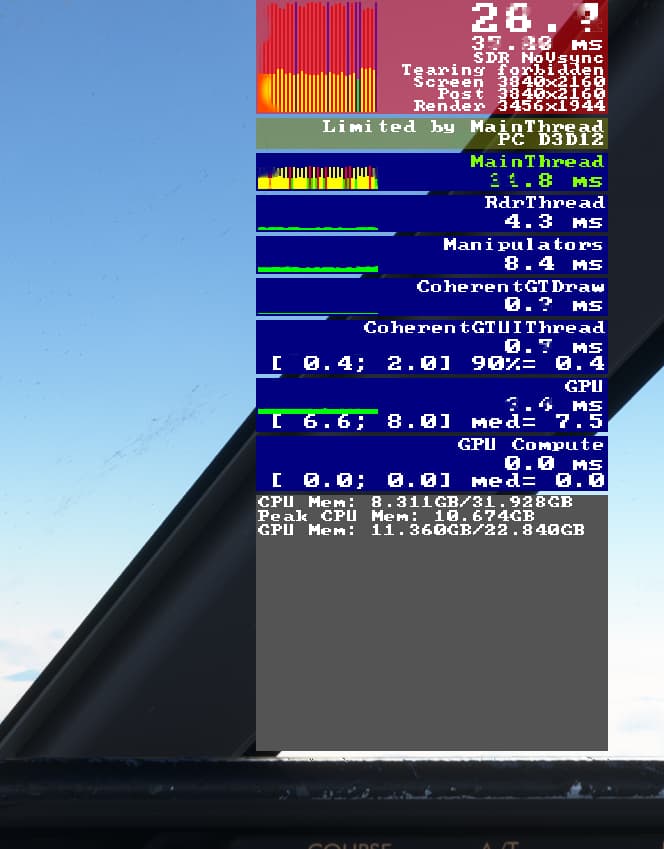
The red one is the sim, the lower yellow one is non FG on the second monitor.
aah.ok… i can confirm that when I turn on g-sync and v-sync without framelimit
Interesting find! Have you at all tested by running just one minute? I’m not near my pc to check at the moment.
I just cannot fathom how a simple aircraft and avionics update could cause the sim to come unstable with the flagship nvidia dlss3. The thing heavily promoted for MSFS.
Not yet tested, also not near my pc right now.
My theory is that some background processes (Navigrapgh e.g.) trigger that interfere phase. I was able to reproduce it by using FS2Crew.
I have to say that my 4090 is brand new and I have now idea how it was before the latest avionic update was released.
Can you say for sure that this issue didn´t exist before the latest update?
That at least would give me some hope that it can be fixed timely …
Brand new 4090 here too.
The issue was definitely not there before the update. I even reinstalled the sim and the issue is there with vanilla install and default aircraft.
Just out of curiosity which card do you use exactly?
Hi,
I also met the same DLSS3 frame gen and VSYNC issue since the last MSFS update on a 4090 FE using a 60Hz display (GSYNC disabled).
As a workaround I can get full “smoothness” back when setting Max Frame Rate to 60 (or 59) FPS in NVIDIA Control Panel (VSYNC is still ON in NVCP, not in MSFS settings, 528.24 drivers).
But when capping FPS I can’t pop out cockpit displays anymore as MSFS is still having a FPS counter issue with pop out windows (maybe counting them twice or more).
It’s really a shame because everything was working perfectly until now.
I also think that these new settings will also disturb motion reprojection in VR and that they will have to be modified back according to the chosen mode VR or 2D.
I have the MSI Gaming Trio X 4090
1 Like
Out of curiosity,
As you have the same setup as kinda pretty much, ( 4090, 60hz monitor ) Do you notice after some time the performance in the sim drops? It happens to me and can be resolved by clicking my second monitor, Very strange.
Can´t say it because so far I didn´t make any flight with my new card because I´m fighting with the issue above. Paid almost 2K for graphic card to see this, sad but true …
Hope it will be fixed very soon!!
2 Likes
Yeah.
Sadly i purchased this new pc for the sim specifically and it even made me think something was wrong with my hardware but its not.
Hopefully they fix it, i’m sure they will.
2 Likes