I flew an ILS approach to runway 15 at KLHM tonight using the DA62X mod and the Working Title G1000 V0.3.2 mod. No problems capturing the localizer or the glideslope. There was a slight yaw oscillation, but it was barely perceptible and had no impact on my ability to land. So far, the G1000 seems fine.
1 Like
We have identified an issue where you cannot monitor second radio (like, ATIS or some other frequency) when flying on VATSIM / PilotEdge / IVAO online ATC networks, because the G1000 does not have a “BOTH” button on the audio panel and it seems like that is what those networks’ pilot client apps expect when they set up the voice radio channels.
This works OK on the C152 for example, which does have the BOTH button, and thus sets the COM RECEIVE BOTH simconnect variable.
The G1000 however does not have such a button, and likely since the developers were not aware of the issue, “BOTH” is not set when the individual “listen” buttons for COM1 and COM2 are active at the same time.
I wonder if someone is already familiar with the XML logic this seems to be implemented in - I tried to look and it seems to me that the audio panel code is not yet at all part of the WT G1000 mod, and I am not familiar with how that stuff works.
I am posting this in hopes that someone might be able to implement this logic as part of Working Title G1000 mod (not sure if that is related to the other garmin glass cockpits too).
I will continue to investigate but have limited time and knowledge about the SDK right now.
I tried it today on a short hop and while I was trying to enter the airport code to fly direct the FMS knob stopped responding and the MFD stopped responding as well. No RPM, manifold pressure, fuel gauges and buttons all of it froze.
Help for Beginner
I’ve tried searching but to no avail. Is there a basic resource that explains, in simple terms, how to actually use the G1000? I’ve downloaded the manual from Garmin but it seems to bear little resemblance to what is actually in the aircraft - I use the C172.
It loads and runs flight plans okay and I can play about with the map settings. But when I try to enter the menu it just freezes up and I can’t get it do do anything, including return to the map. I’m pretty sure it’s me so that’s why I need some help as I’d really like to learn some basics before I “graduate” to the bigger stuff. I’m using the latest download and it’s the first item in the Community Folder, in case that makes a difference.
Thanks for any guidance.
I have the following issue frequently: at the start area I can use the declutter button properly, but don’t have any airspaces. Enroute the declutter button stops working. And after a while, maybe 50nm or so, airspaces begin to show up again and the declutter button works.
This is in the DA40NGX. The G1000 mod folder is above the DA40 folder (named it ZDA40 NGX).
Any new update on this mod on the way?
I would love to see the following fetures.
- VNAV compatability
- Add / delete waypoints without deleting to hole shabang..
- Direct to waypoint by “enter -enter”.
1 Like
I read somewhere that MSFS loads all the default core stuff first, then everything in the Community folder in alphabetical order. Where there are any duplications, MSFS uses the last loaded.
Because of this it can be important to structure your Community folder to get MSFS to load mods in a partuclar order, to avoid conflict and to make sure mods like the G1000 work as designed. I am told that the use of “working” in the name of the G1000 mod was done in an effort to get this mod to load last. I rename all mods with 1 to 4 to use the following order:-
1 - Scenery (ie folder name is 1_Vic Mega Pack)
2 - Aircraft repaints (ie folder name is 2_DA40_COB)
3 - Aircraft mods like the DA40 NGX project (ie folder name is 3_DA40-NGX)
4 - System mods like the G1000 project (ie folder name is 4_workingtitle-g1000)
So perhaps you need the G1000 mod to load last (ie after the DA40 NGX mod for Crocodoc84). I’m sure someone will correct me if I’m wrong. Not sure if this will help with either problem.
I had no problem either so I didn’t understand what people were talking about until I switched manually the NAV source from FMS to LOC1 during one flight and it didn’t capture. Seems to only capture if you let it switch automatically from FMS to LOC…
1 Like
Okay thanks, will give it a try, easy enough to do.
Yes, as you pass over the FAF, as long as you’re on APR, the source will switch from GPS to LOC1.
The key to total success though, is to make sure the LOC frequency is the accurate one. I’ve discovered in many nearby airfields within a 200 NM radius of my sim “home-field,” the ILS frequences are mostly incorrect as the plane is supposed to auto-tune one of the NAV radios with the selected approach. Fortunately, I pull down approach plates from Skyvector and those freqs are accurate.
I have never used the autotune feature, I’m always setting the ILS frequency manually. I won’t thrust such a feature even in real life.
What I have noticed with this mod is that while on the ground the PFD displays “NO WIND DATA” , whereas the vanilla C172 - G1000 does display wind while on the ground. See below.
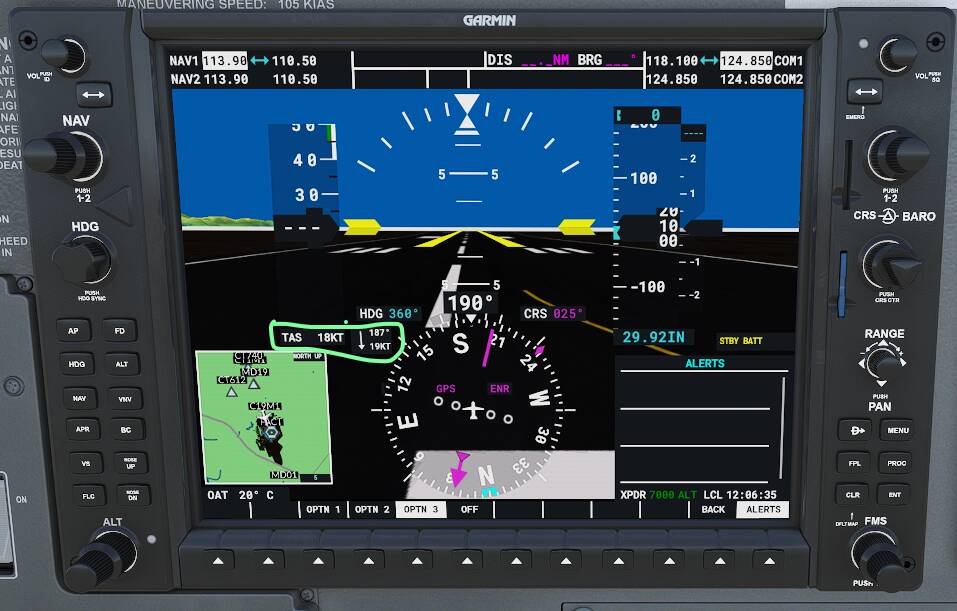
What is the situation in real life ?.
Thanks
The MOD version is correct, the real gps calculates wind speed and direction by observing it’s affect on the aircraft’s motion in the air. On the ground the wind is, hopefully, not moving the aircraft so there’s no way for it to know what that is.
5 Likes
Thanks @ClydeFJ . Subsequent to my post I have done some googling and came across a “huge discussion” on XP forum about the same thing. Yes, the mod is correct - aircraft must be in flight 
I read that it is advisable to load the aircraft after the system mods, so that aircraft-specific changes to the Garmin units will load correctly (engine display for example). But I will try it the other way around to see what it gives me.
I know the feeling. I jumped into xplane the other day and I didn’t last long. The scenery is just too mehhh. I will live with the issues in msfs, and take the eye candy.
I haven’t had so many issues overall. This is a massive project, there are always bugs.
5 Likes
Is there a way to configere the g1000 in a way that the mfd starts up without waiting for the “rightmost softkey”?
This would be a nice workaround for homecockpits until we can map keys to the garmin.
Question. Is there a way to look up the ILS frequencies in G1000 the same way you look them up in G3000? There you can go to waypoint info, punch in the destination airport code and you will see the frequencies for ILS. So far, if I am flying anything with G1000, I have to manually seek out those frequencies.
I’m no expert here, but, I was flying the other night, and I accidentally spun whatever knob flips through pages, I was loading an approach, and a page came up with all that info for the destination airport. I was flying the C172 G1000, with the WT mod.
Yeah, so I am wondering what the specific steps are. I seem to be able to see the COM frequency, but not ILS.