Hello, Thanks for the suggestion. I tried it but alas it did not solve the issue. I also found that config is reinstated when you start the plane anew. The search continues…Ben
There was a new set of VR clicking issues introduced in SU5. You may have already run into it with external items like covers/chocks, but some people have also reported problems in the cockpit in some planes. Could try moving your head really really close to the clickspot and see if that works.
I’ve had zero issues with binding the mixture lever to my CH Products twin engine quadrant in any of the AA5 configurations I’ve flown (mostly the tiger with various radio stack configurations).
I haven’t flown at night yet.
In general your best bet on sensitivity settings for flight control is flat. That’s what the developers use when they develop the flight models, so anything other than that will possibly create issues. Dead zone is another issue, but that depends solely on the quality of your particular controller. Also, it doesn’t seem to be so much of a problem these days as it used to be, but, never, never, never use “Legacy Flight Model”. Never. Never.
I still haven’t had a chance to actually fly this thing, but I’ve been taking a few minutes here and there to poke around.
I was having an issue with the avionics not turning on last night. The GNS turns on with the alternator, and so does the G1000, but none of the other radios are responsive. Anyone else run into that?
Nothing should work with just the Alternator unless the engine is running. And even then I would imagine they’d all require the Battery turned on as well (As I imagine power runs from the Battery to the avionics circuit, and the Alternator charges the Battery with the engine running, although I haven’t looked into the actual circuit in the airplane.)
I always turn on the Battery and then the Alternator (like I used to when my Piper had a similar interface), so I can’t speak to any of the avionics working with just the alternator turned on.
Then again, that’s not necessarily what you meant, lol.
Be that as it may, I haven’t had any power issues with the Avionics. But I’ve only used the VFR, IFR and GNS430 IFR layouts so far. As a matter of course, I don’t really tend to do any G1000 layouts in any planes unless I have too (I think the Kodiak is the only plane I fly with one).
I think I did it out of sequence then, I can’t really remember. I think I started the engine first and then turned on the alternator. I’ll try it your way to see if it makes a difference.
I think it’s good it has the G1000 as an option, more choices more better, right? But it feels wrong to use in something this old. I think integrating a GTN is a good compromise since the analog gauges for everything else remain.
Nah, you can’t start the engine without turning on the Battery. So, turning on the Alternator after starting the engine shouldn’t make a difference. That was the important point of my question, was the engine running? It was, so you should have been all set, as long as you didn’t turn off the Battery.
Oh, sure, I never begrudge any configuration. I’m not the end-all-be-all arbitrator of what people should and shouldn’t like flying with. I was only explaining why I haven’t tried the G1000 option. And I don’t complain about what authors choose to develop. It only controls what I purchase. And they don’t care about me specifically. They, as they should, care about what will sell to the market.
And, yes, integrating the 3rd party GTN is a nice idea, but, he hadn’t even heard of them before. So it might take a while, if he can do it at all. Since he didn’t plan for it up front, and since, at this point, he doesn’t even know how to do it, it might be a ton of work to implement it. Then he has to decide if it’s worth it.
I mean, if we’re going to be sticklers, the G1000 requires an STC to be installed in a plane, and there may not be one for the AA5, which would make installing a G1000 illegal. But, I’m not a stickler. That’s what sims are for, doing whatever you want and seeing what you get.
The engine was definitely running! I’ll play with it more later.
You’re right, it wouldn’t be approved to put an G1000 in. And that does cause me to step back from planes that do so.
But until someone makes a G500, the G1000 is the closest thing you’re going to get to it. Though the G3X would also be a good substitute here, wonder why that wasn’t chosen.
@BlueSky6514 is new to the scene and still learning the details. I think the G3X has only very recently had the WT treatment? Before that, it came with some pretty bad consequences.
He does use the 430 in one of his options.
And let’s be honest, he’s off to a great start!
I love it already. And he has all the panels I want.
Hello to all those that are impatient as I am regarding the copilot not being visible. I hope the developer doesn’t mind me posting this since he stated what the issue was but until he releases an update, if you really want the copilot to show just go to the where you have the Grumman AA5 downloaded and within the GrummanAA5 folder look for the common/navigation_graph then find the navigation_graph_pilot.cfg, and change to [node.0] for Pilot AA5 and [node.1] for copilot_AA5 and the copilot will appear. Just make sure the other numbers follow sequentially through the node.x numbers.
Is this in 2020 or 2024?
2024, on my system the passenger in 2020 is working fine
Okay, I finally got a chance to try this thing out for real, and it’s such fun! It’s sensitive to inputs, but that makes a good challenge. The weather engine is rendering some cloudy turbulence over SC right now.
Anyway, I had my avionics issue pop up again. But this time, actually I had my stick, throttle, and button box plugged in. The avionics (except the GNS, like last time) stayed off, but when I flicked my hardware switch for AVIONICS 1, the radios came to life. Sure enough, they died again when i switched AVIONICS 1 off again.
There seems to be a hidden avionics master coded in. Is it programmed to turn on with the alternator? For some reason, that behavior is inconsistent for me. Fortunately, I have a work around now, so it’s not the worst thing in the world.
It sounds like you have peripherals that have the avionics master switch assigned. Perhaps those of us who haven’t seen this issue, don’t have that item assigned? I know I don’t.
It may not be “hidden”, it might just be how the SDK works, like, if the author doesn’t explicitly turn off the AP functionality, the user can access the functions. Merely speculating.
Hello everyone! Just to give a small progress update - most of the reported bugs have been fixed for both FS2020 and FS2024. Over the next week, I’ll be adding the stall strips/stall tab and other small details to the wings to make the model a bit more accurate. Also, @RoosTaZA (a real Traveler owner) has been tuning the flight model to make it more accurate to his experience, and @Editer ofered his help to correct the VR issues, so hopefully the next patch will deliver a more engaging experience. Thanks for your help, guys! I’ll also be looking at PMS50 integration - I think this is the best option as it includes a freeware version, so everyone can have fun with it. I can’t however promise this will be ready in this first patch, as I’m yet unaware of what needs to be done to implement it. But it’s on the list. 
Unfortunately, I wasn’t able to fix every single bug so far, since I haven’t been able to reproduce a handful of them. I’ll awnser them in particular below:
@DAQUA3828 Yes, it will be released on Marketplace as well as in other online stores, but I can’t give you a definitive date as of yet.
@ur2tall Unfortunately, I wasn’t able to reproduce this. I have tried both progressive binds and full /cutoff toggles for keyboard and for Xbox controller and they both seem to work. What kind of setup do you have (HOTAS/Xbox controller/keyboard)? Have you tried to reset the control profile? The mixture control is using default Asobo templates, so I’m not quite sure what could be causing this. Regarding the interior lights, yes, that is the typical setup for an AA-5. As far as I’m aware, none of the gauges were back-lit and I haven’t come across a panel that had those little individual external gauge lights installed. I have, however, tuned up the light brightness to give it a brighter look during the night and adjusted the light cone so it now illuminates the entire panel as well as the compass on the top - this should hopefully make night flying more enjoyable.
Just for curiosity sake, there is a popular QoL mod made to the IRL AA-5 to improve the night visibility, by adding LED light strips on top of the panel, just under the sunshade, but these aren’t implemented in-sim.
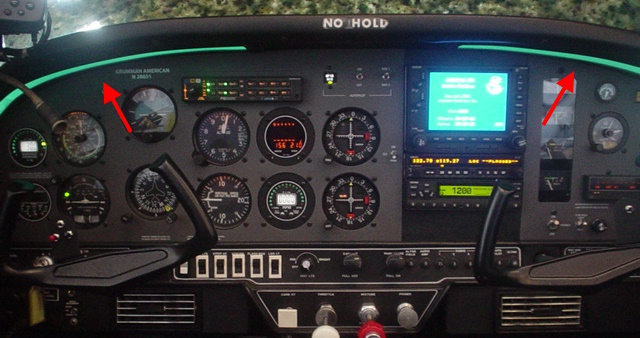
@CharlieFox00 It actually has been approved before As far as I’m aware, there is a single AG-5B flying around (N127KJ) with a G1000 suite. Although the AG5’s are more recent than the AA5’s and they have some very minute differences among them (24v instead of 12v electricals), they’re pretty much the same aircraft with some adjustments. At least, they’re close enough that I think it would make a nice reference 
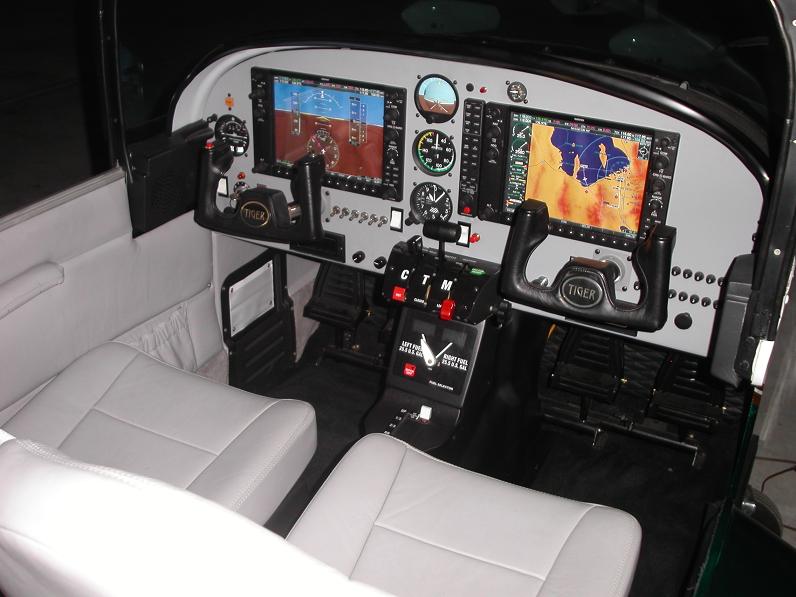
@Iflygary Thank you for the post explaining the bug-fix! Yes, this is infact what was causing the copilot to not show up - this was my fault due to some very late, just-before-release attempts to fix a bug with the pilot’s position. This will be fixed in this first patch, but thank you for posting the tutorial if anyone wants to give it a go themselves before the patch is out.
@FndrStrat06 Glad you finally got the chance to have some fun flying around! I’m really happy you’re enjoying it.
Regading the avionics glitch you’re experiencing - I think this might be due to some conflict with the button box. Just for the sake of debugging, could you create a new controller profile with the default controls, see if you’re still experiencing this bug and report back? The battery/alternator code is just using the default Asobo templates, so it shouldn’t be causing issues. But if it still behaves the same after you reset your controls, then there might be something under the hood causing it. I will investigate further if resetting the controls doesn’t fix it.
@FlyingsCool5650 Thank you so much for your help in attempting to debug the problems, and for your general positive attitude! I really appreciate it, and I’m very happy you’re enjoying the aircraft! 
I use the sim’s bindings for my peripherals, so I’m not sure that’s it. I’ll create a new profile anyway and follow up. 
This would be a great in sim mod especially if it also had the option of changing colors