Straight ahead - 9 o’ clock. We limited the wheel animation on purpose ao we can gauge trim.
In the manual on page 28, it says… “The percentage of trim will be 50% when the line is pointing down. When the line is pointing down, trim is at 50% of travel.” This suggests 50% is 6-o’clock… not 9-o’clock.
Thatbis wrong and should be corrected.
You can just go in external camera view to check the trim % exactly on the right trim readout, or use the cockpit view minimal Hud, or use an external app that reads it and also allows you to set/reset for convenience. There’s also the elevator trim position ref on the garmin.
Very sorry for the very late reply. I didn’t see it was left on drafts instead of being sent. I just came here and automatically the draft came on bottom.
Just wanted to say thanks a lot for the detailed answer! It’s very nice to see a dev so inclined to share significant input with users.
Very happy with my Kodiak 100 and started in Holland with my world-tour with this plane. Started in my country and now almost finished Africa and moving slowly to the East.
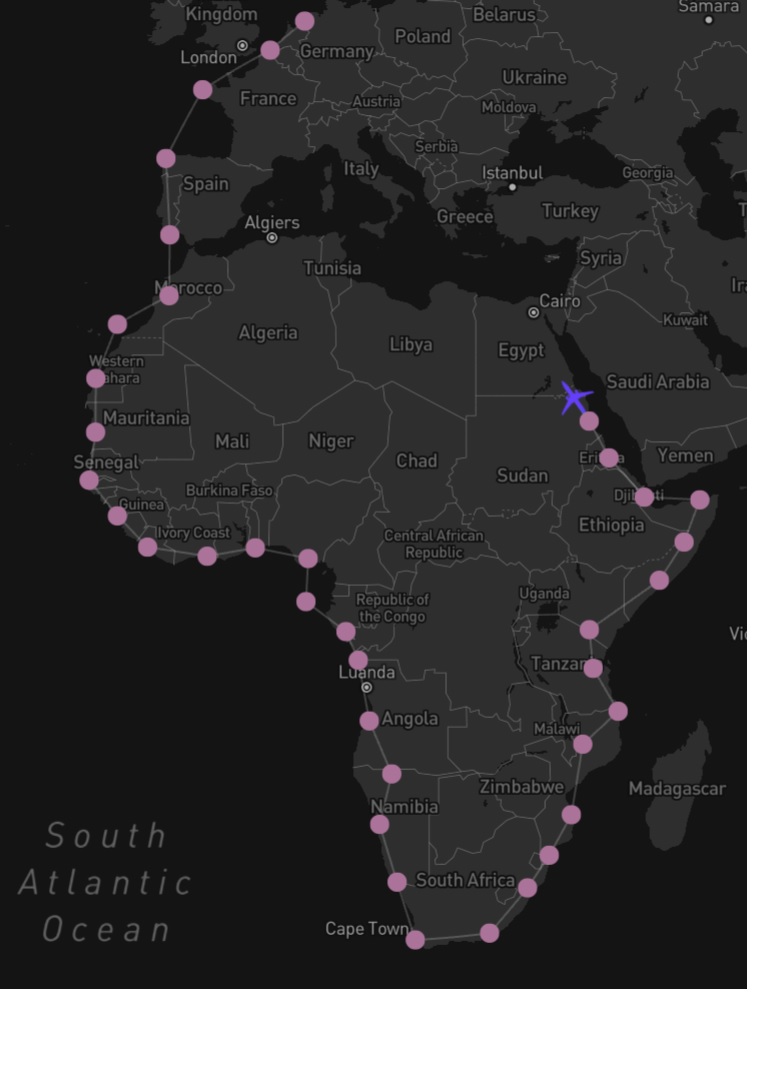
Map: https://www.google.com/maps/d/edit?mid=1XF9D1ApWaGQXzCgwkm35GEYsrLtokkc&usp=sharing
Everything real-time with local weather.
Wowzers, epic journey!! Good luck!!
By the way, did you see my poke in the Top 5 thread? I still didn’t add your votes you made last week to the charts until I get an answer to my question there (no pressure, just saying, as I just noticed your username here  )
)
I think I may have experienced some of the new engine failure functionality.
After a stunning VFR trip through the Alps with a good friend, I was on short final to LIMC when the aircraft went ‘pop’, the oil pressure warning came on and I fell out the sky, less than mile from the threshold. Ouch.
Now I normally fly very carefully and by the numbers, but yesterday we we having fun and there were a few high ridge lines to clear that may have resulted in a bit of redlining here and there…
If it was the failure logic at work, all I can say is I’m very impressed. And will not go redlining again, even when messin around!
(And btw, how gorgeous does Italy look with the world update?)
I have to wonder if SimWorks is considering developing the newest Kodiak - the 900, in the future. It certainly seems worthy…
Meet The Kodiak Advanced STOL Turboprop
A New Era - Introducing the Kodiak 900 from Daher | Short Film - YouTube
I’m totally stealing this journey 
BTW kind off topic for this thread but I made a more or less feasable journey that replicates the original Magellan-Elcano expedition. It has to be done on the TBM930 unfortunately, because it’s the only turboprop with enough range. It has 25 legs. Let me know if you’re interested, it’s currently a draft so I would love to share it with someone to improve it.
Best!
Where do you find the published Vr take off speeds for the Kodiak?
I looked in the POH and the SimWorks manual and couldn’t find anything.
Ryan has this card in the cockpit of their planes, but I can’t find this data anywhere…
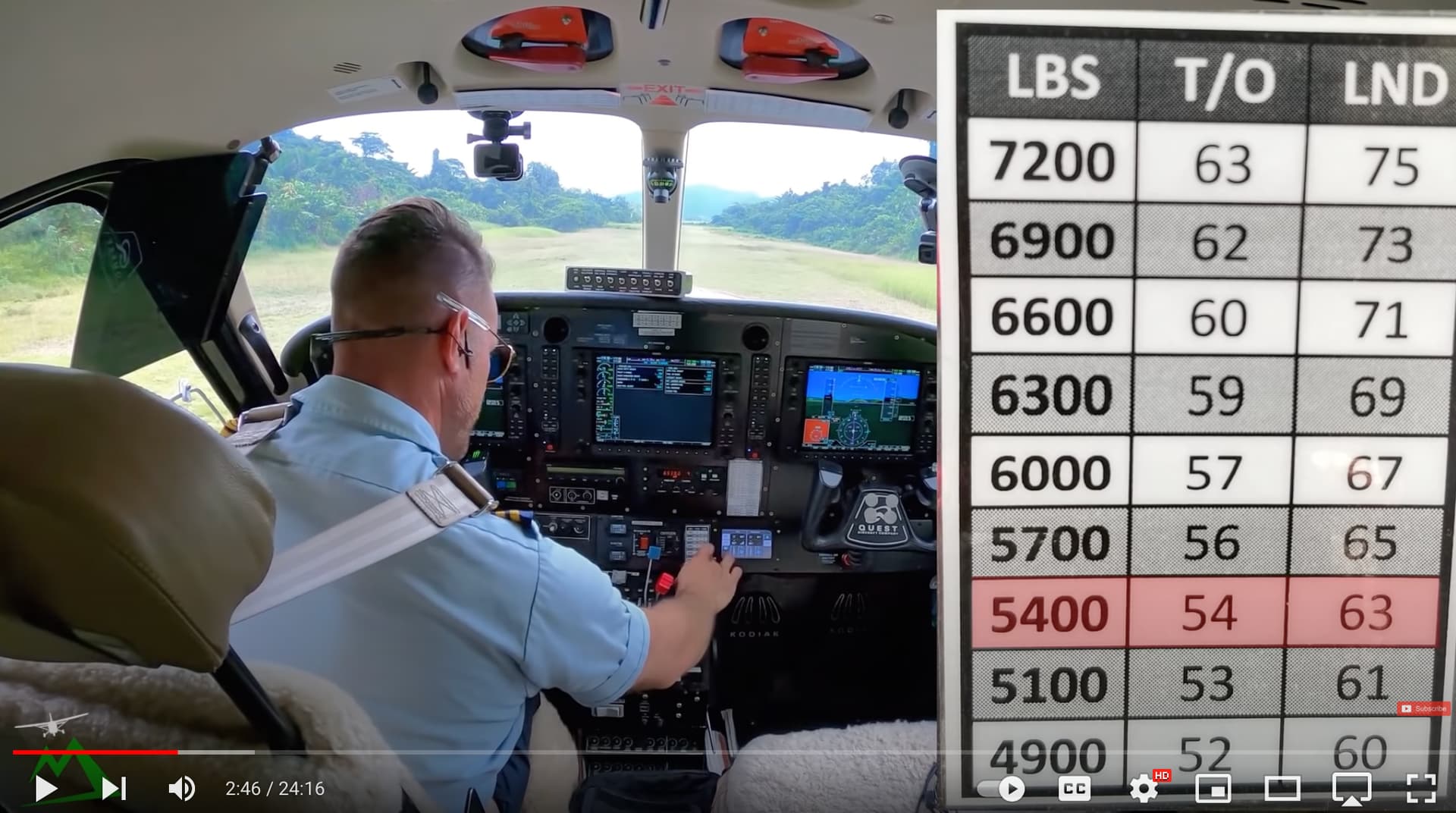
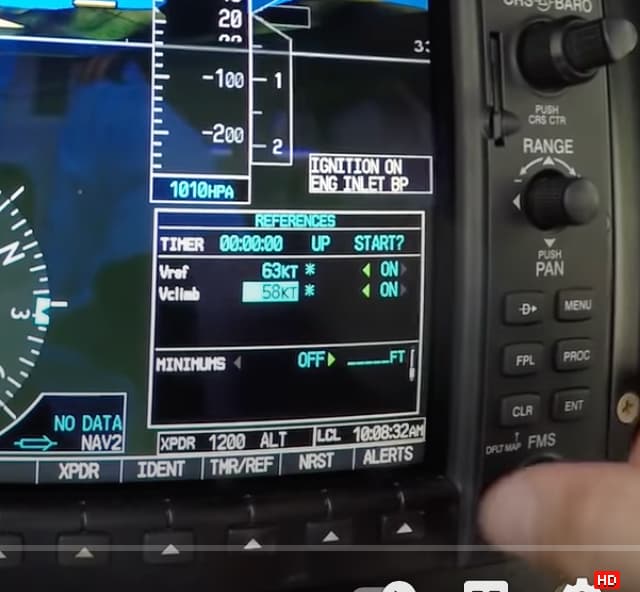
Also, he’s setting these on the G1000 in VClimb and Vref. Is that the right thing to do? Will this then show up on the air speed ticker when taking off? It doesn’t make sense that he’s entering Vr into Vclimb on the G1000, but I’m no expert.
New Kodiak owner here and very happy with my purchase. Flew her probably 8 hours over the weekend. I got only one little issue. How do i stop it from failing when i open the little window by accident. Happened twice yesterday.
Switch off Overstress Damage in the main menu options. In Accessibility I think.
Thanks will check it out.
Company policy. Ryan’s planes have the G1000 whereas the SWS Kodiak has the G1000 NXI. So I guess that the older version only shows Vref and Vclimb. In one of his videos he said that in his company it’s policy to use Vclimb as approach speed.
A couple thinggs… He’s using Vclimb as rotate speed not approach speed.
But my question is more where did he get those Vr and Vref speeds from? Have I missed something in the POH?
You can also edit the aircraft .cfg so it will stay shut. Solution posted in this thread by Woodstock.
It won’t be in the POH. Like his W&B tables, they will be company derived.
Have you seen episodes where he works through an Excel spreadsheet where he enters details such as weights of passengers, cargo, fuel, as well as temperature, altitude etc., which then spits out, if I remember right, vpseeds, and torque settings for takeoff.
He also sets his torque for a derived fuel burn per hour. I believe all of that is company SOP, not from the manufacturer.
Its ok. I disabled the failures. I am not interested in them anyway.
I just want to thank the creators of the Kodiak model. She is a great flier. Enjoying every moment of flying this. Easy to fly in my opinion. Load or no load. Just watch your CG and your trim. In love with this model.
I’ve been flying mine around the Southern point of Africa for the last few days with fairly heavy winds. Been lots of fun.