It seems for many that the Honeymoon is over. It’s too twitchy for me. I can fly it OK and land in a reasonably proficient manner (so I must be a really, really good pilot  ) but not enjoyable. I’ve been searching for the right setting in sensitivities for ages but have now given up.
I’m quite happy to accept that it may be my controller but my controller is not out of the ordinary and it works fine with other AC.
Looking forward to other AC’s now.
Can someone explain the differences between rotate and takeoff speeds? Is the 2nd one the speed at which the aircraft will actually become airborne? And I don’t get why the aircraft can take off nearly 15-20Kts lower on a short field vs a normal take off… what’s different about the config that enables that? Both are flaps 20 right?
More powwaaahhh (I think). Stresses the engine more, but when needs must. Just guessing here btw — happy to be corrected!
According to this, the take-off configurations are the same for both normal and short field, with the difference that you’re rotating at a much lower KIAS. I guess on short field, you’re essentially rotating at stall speed and hoping to quickly get above that.
In short form
Basically it’s all about technique to maximise performance for each case.
Yeah, I get that, what doesn’t make sense is that the only difference in the Kodiak manual is rotate speed… basically it seems for STOL in the Kodiak, you rotate at stall speed and hope to get it in the air a little sooner than if you rotate 15 KIAS later as you would for a normal take off.
ps. in that video you linked, the pilot says to rotate at Vx (which is max climb speed)… that’s very different from Kodiak’s recommendation. In the Kodiak, they suggest you rotate at 50 KIAS, and climb at 72, neither of those are close to Vx.
pss. The other thing that doesn’t add up is Ryan’s TO speeds are not in the POH and much higher than what Kodiak recommends for a STOL take off.
psss. Found this…
You need to add some time for the rotation to gather enough angle of attack change so the aircraft can lift off. While the pilot pulls to lower the tail and rotates around the main gear, the aircraft continues to accelerate. Also, the 1.3 factor is only required to be reached once the aircraft climbs through 35 ft (or 50 ft, depending on the certification). What happens is that the pilot starts pulling right around stall speed, the aircraft starts to produce more downforce at the tail until the nose gear lifts off, then rotates until the angle of attack has grown to maybe 10° so the wings create enough lift for take-off. At this time, the aircraft will have accelerated to around 1.15 times stall speed and starts to climb, which requires still more pitch change. Now drag will increase by the amount of induced drag produced by the added lift so the rate of acceleration slows down. Still, until the 35 ft are reached the aircraft will accelerate further to 1.3 times stall speed at this point.
That is how the take-off distance is flown for certification to achieve the minimum distance. Depending on the rotation rate (typically 3° to 5° per second) and excess engine thrust, the optimum take-off might require to start the rotation process at less than stall speed. For added safety, it is advisable to stay a little longer on the ground if the available runway permits it.
I just got the Kodiak today and really like it.
It has an hour meter as well as a Hobbs meter. The manual says the hour meter is set by a switch which I can’t find. I’ve flown about 3hrs which the Hobbs meter agrees with, but the hour meter is saying 7hrs, which is definitely incorrect. What am I missing?
You rotate at the given speed and then pitch for the climb out speed. That gives you a shallower “normal” or steeper “short field” climb. No “hoping” neccessary, it’s all physics.
The POH has values for a given setting. Ryan uses tables for different configs.
When does the update with the reduced pitch sensitivity releases?
Rotation speed is that where the plane has enough lift to br able to raise the nosewheel off the ground. Take-off is technically when the plane has cleared the 50ft obstacle.
What this means for the Kodiak is that if you rotate and get off the ground at 60-65kts you should stay in ground effect until you accelerate to about 70-75kts. Then maintain that speed and climb aggrewsively until you climb past 50ft agl.
73kts is the plane’s best angle of climb speed (steepest).
In other aircraft, especially heavier ones, rotation speed may differ substantially from liftoff speed. You often see airliners raising their nose and moving along in a wheelie pose before the main gear lifts off the ground -which is by no means a take-off.
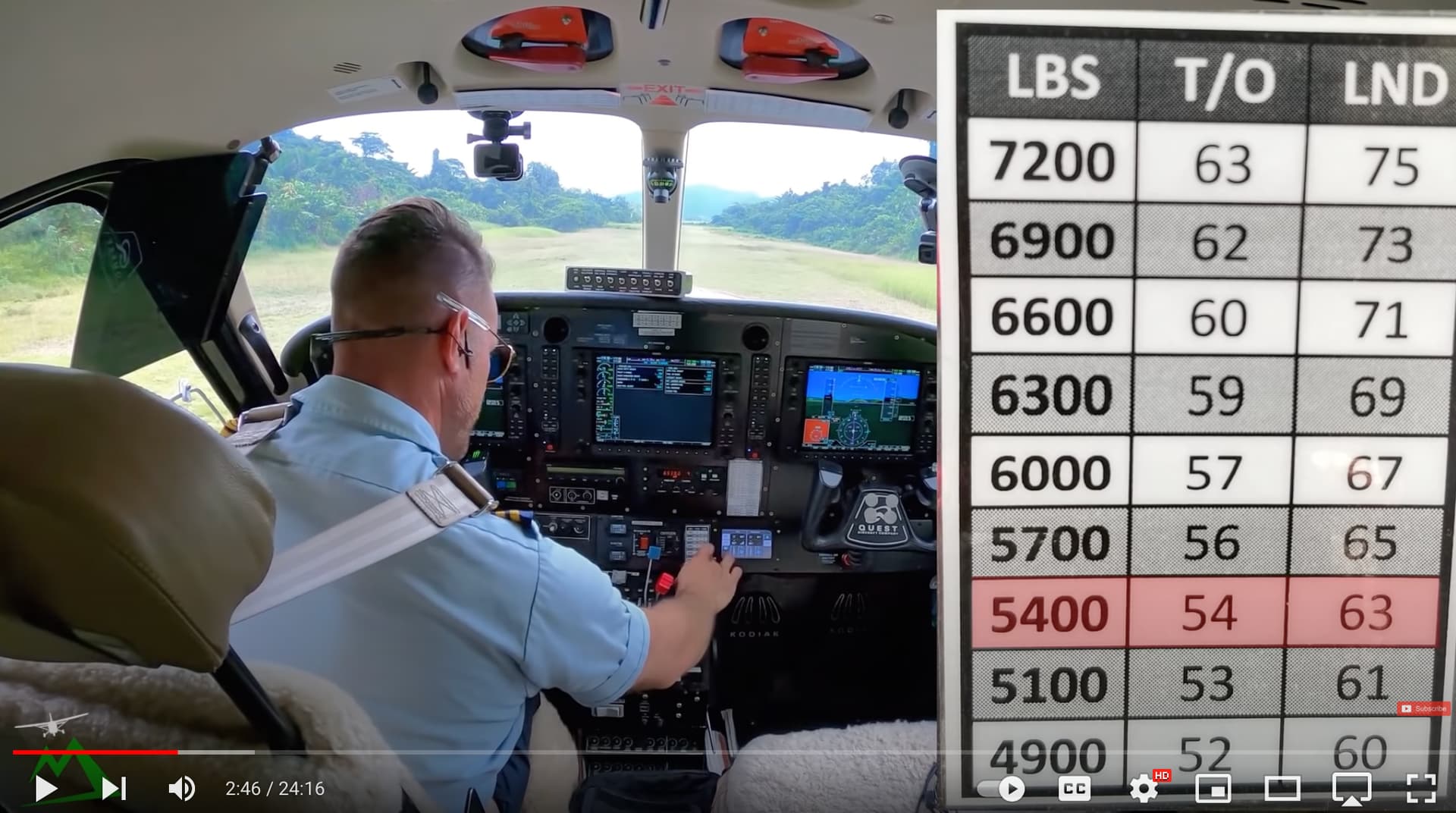
Thanks… that makes sense. Any idea why Ryan’s cockpit card has different rotation speeds based on weight. The POH says either rotate at 60-65 for normal or 50 for STOL, and says nothing about weight with regard to take off speeds. It only mentions runway length with respect to weight.
https://forums.flightsimulator.com/uploads/default/original/4X/1/5/4/154583f3094877e4bed9163b37b6953cda60d959.jpeg
Right… the POH offers a take-off distance based on weight, temperature and pressure. It says nothing about speeds other than a blanket 60-65 for normal and 50 for STOL. What confused me, is that Ryan has a card in the cockpit that shows T/O speed based on weight. Where are those values coming from?
We had someone ask that on our Diacord and I posted a snapshot of the Series II Rev.22 which shows rotate 60-65kts. His showed 50-55 so something has been revised.
I don’t remember seeing weight/speed tables but may be wrong. There’s a spreadsheet where you can put in weights and it will calculate various parametres. It is likely Tribes Aviation have done their prepwork and printed these out for their Kodiaks.
Any idea if this app is applicable to the SWS Kodiak 100 in the sim? It seems like a very cool tool.
I’m having issues with the center of gravity when loading cargo / passengers. For example filling every seat with a passenger makes the CG outside of limits. Any tips?
I have no idea, I haven’t used it.
@ACEagle6994 what you are seeing is correct. If you want to put weight on every seat your CG will go too far aft. If you have a cargo pod you can balance it by loading the forward bays with more weight to counter-balance it.
There is also an error in MSFS’ calculation of the CG that causes it to go out of limits in aft configuration. The deviation is 0% at 25%CG and about 1% more than IRL at around 40% CG. That is a miscalculation of MSFS that we can’t work around. Still, 8 adult pax will likely get you out of limits without counter balancing, I recall checking it with the real plane’s loading sheets.
Put lighter passengers at the back. Fatties in the front. lol
The belly cargo pod also helps getting the CG forward. I used to fly without it but it actually helps with the CG.
I held off as long as I could, but finally gave in and picked up the Kodiak today. I liked the analog Caravan so much, I figured the extras offered by a bespoke aircraft would be worth it. Initial impressions…
- It’s beautifully detailed
- Love all the liveries and options for pax and cargo
- My favorite copilot is sitting next to me

- It’s a handful to handfly - expecially VR where if you look down to fiddle with something, the mouse moves, you get it back, meanwhile “DON’T SINK! DON’T SINK”
- I’m reminded why I don’t fly fully glass cockpits - the fonts are too ■■■■ small!
I was finally able to get her stabilized and on a steady course, AP was working fine but failed to intercept the glideslope and flew right through it. Gonna have to figure that out. CDT just after crossing the threshold, but that sometimes happens to me with new planes.
A few questions…
I’m thinking about taking Ryan’s course on the Kodiak. Worth it?
For those of you that know the G1000, is there a way to get to an Engine screen with larger gauges? I thought I saw that on a YT video with either a real G1000 or Nxi.
Thanks!
Not sure about this but it’s worth bearing in mind that the SU10 beta G1000 (the current version of the WT G1000) is still a bit buggy in the Kodiak, so things will probably be a bit smoother after SU10 and a Kodiak update.
Ryan’s course is really interesting. However be aware he is not training you on flying the Kodiak in sim, he is running you through the procedures he uses on his companies real world Kodiak.
Hence you get a fascinating look at external walk arounds, engine basics etc and other details of the real plane you might not be aware - of but not all of it is necessary relevant to MSFS flight. He also runs you through the real world procedures he uses on his companies model Kodiak which again are interesting but not entirely relevant to the glass as implemented in MSFS.
TLDR - a fascinating look at real world Kodiak procedures and worth it for me just for that, but do not go in thinking it is going to train you to fly in detail the sim version, it is not a MSFS training package it is a run through of the real world procedures.