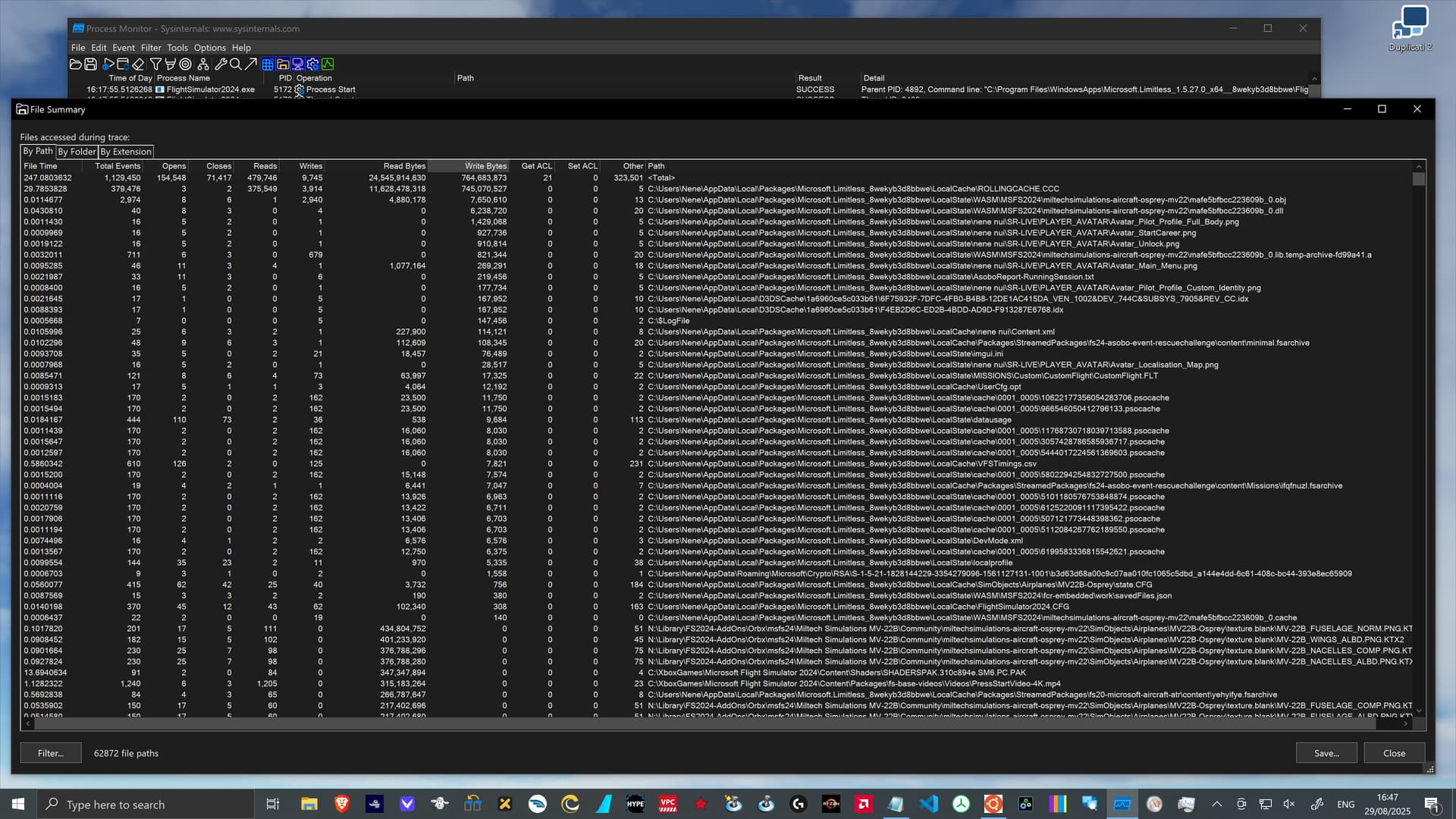
RollingCache.ccc performance debugging … under SU3

Overview of RollingCache.ccc performance … under SU3

When FS2024 launched, the problems of the entire data pipeline have been obvious and frustrating … for me and many others.

In order to better understand what was going on and if there were ways to reduce the pain, this little goose started to collect information about the Rolling Cache (RC) and documented all the findings and ideas in this thread:

Ten month and three sim updates later I am planing to revisit the subject of the Rolling Cache in order to check and document the progress.

  • This initial post will get updated over time in order to collect the key points.
  • I plan to write individual posts related to individual subjects.
  • I do not plan to repeat all the details from the initial thread
    • … but I will try to provide links for those who want to read more about the history and the technical background.

Overall the release notes for the last three sim updates all had an impressive list of bug fixes … e.g.

However, only a handful of those items could clearly be identified as related to the RC, the servers, or the data pipeline. None of the items provided “real” information about what was changed at a technical level.

So a goose must do what a goose does … I guess.


High level summary of the RC status in SU3

(the following is a quick preliminary list … while I am starting to write the more detailed background postings)

Positive aspects

  • Launch times are fairly consistent
    • … with a little under 3 minutes (on my system)
      • … instead of 3 to 5 … or even up to 60 minutes (up to SU2).
  • Backend (CDN or database) servers seem to be a lot more responsive
    • … as I have (since SU2) not seen heavily stressed or de-facto unavailable servers.
      • Only the “initial Xbox log in” connect failure still comes up … very often.
  • SU3 added manual caching to “MyLibrary”
    • … in the form of “old school” package downloads outside of the RC.
  • Online data consumption counter now is a correct bytes counter
    • … and it tracks RC data, live weather, marketplace and other downloads.

Negative aspects

  • On launch there still seem to be problems with the Xbox “game hub” related services
    • … but IMHO there is nothing that Asobo can do to resolve those issues.
  • Marketplace images (and other data) are still not cached locally (e.g. in the RC)
    • … which causes the UI to feel slooooow … and causes unnecessary IP traffic.
  • 3D globe data (textures) at “space flight altitude” are still not cached locally
    • … resulting in unnecessary and excessive network downloads.
  • Online data consumption counter does not reset on the configured “reset day”.
    • When the datausage file is first created, the “reset day” is “zero”
      • … but there is no documentation what “zero” … or any other number means.
        • … like “31” in February.

Rolling Cache file structure

  • Under investigation … but it seems unchanged … meaning:
    • There is only a single RollingCache.ccc file
      • … fully “zero fill” preallocated on the storage device.
    • A fixed index size of 512 MB.
    • A fixed index item size of 72 bytes.
      • This limits the RC to a maximum of ca. 7.45 Mio blob items.
        • With an average of ca 30 KB per blob item that translates to
        • … a maximum “really usable” RC size of ca. 220 GB.
8 Likes

Love your posts – have read every word of the prior ones. A couple of things I’d be interested in your updated opinion on:

  • What’s the optimal cache size? I have lots of space but still have my cache set to 256GB.
  • Is there anything that indicates that people should clear/delete/recreate their cache’s with any frequency? Should it be part of routine maintenance or something to do with each and every update.
  • Any new findings about what is currently being cached or not cached?
  • Does use of a larger cache reduce overall WRITE activity to your SSD drives? I know frequently recreating 256GB cache files is not good for them but hope the cache indirectly reduces the absolute number of writes to the SSD. If everything streamed (and not read from the RC) is also written someplace during use, cached data reduced write actively AND network activity.

Looking forward to the updates.

FYI, for those that missed it, Sebastian Wloch discussed the Rolling Cache in the March Developer Livestream

2 Likes

Back in March I did not comment on the dev stream because the information about the RC was not too “deep” and mainly touched those aspects:

  • Info that the RC had a lookup bug, which was fixed in SU2
    • … and that should reduce download activity.
  • What happens when the RC is 100% full?
  • What happens if old versions of a package are still in the cache?

However, I did cover the February dev stream in a lot of detail over here:

I also did a deep dive into the 100% full RC over here:

RollingCache.ccc performance debugging and tuning … How? - #134 by nenenui

To not mix too much stuff together I will try to answer your questions in individual posts.

In short …

  • I would keep the size you are already using.

@BearsAreCool510 had a dedicated thread to the question of an “optimal size” for the RC … and my answer is over here:

However, in most cases “highest FPS” is the primary goal.

In your case … @mjchernis … your tradeoff priority seems to be more about: SSD write stress

I did a deep dive about data volumes over here:

Approx data demand at “Ultra everything” for looks something like this:

  • 1 to 2 GB for the active aircraft
  • 5 GB for a major international airport … with lots of static “Ultra” aircraft
  • 1 GB per 10 minutes … “low and slow” over a TIN area (e.g. LA)
  • 0.5 GB per 10 minutes … 70 ktas and low above ground over normal flat landscape (e.g. in Illinois)
  • 0.25 GB per 10 minutes … 70 ktas and 2,500 ft above ground over normal flat landscape (e.g. in Illinois)

If I fly faster (e.g. 200 ktas = factor 3) then the volumes naturally do go up. So in the extreme “worst case” I would calculate with 20 GB/h of data downloads.

Today even cheap QLC-NAND SSDs have a write endurance of around 250 TB per TB capacity.

So for a very small 1 TB SSD it means you could fly for 12,500 hours in TIN heavy regions in “all ultra” before you reach the SSD write endurance “warranty”.

Now if you have “lots of space” and do fly over “normal” (and more interesting) landscape than I would guess that you can multiply the hours by 10 to 100 before you hit a SSD write endurance risk area.

2 Likes

This is … still … a tricky question.

I did a deep dive into this topic over here:

The one line summary would be this:

  • 50 to over 90% of all data written into the RollingCache.ccc file is useless, unchanged index area!

… and … spoiler alert … the underlying issue to excessive RC index writes is still present in SU3. I will post more details in the next week or so.

However, this is most likely “only” a major performance problem for the sim.

As I explain in the linked post, the impact on the actual SSD write activity is still unclear to me … and the official Windows documentation on “FASTIO_WRITE” is not helping here.

Regarding you point …

If everything streamed (and not read from the RC) is also written someplace during use, cached data reduced write actively AND network activity.

… I think that in FS2024 this is not possible.

  • Streamed data always goes into the RC
    • … unless it is live traffic, or marketplace, or …

But … obviously … for airports and aircraft you can now cache manually in SU3 (aka download a package). That is outside the RC … only written once to SSD … only downloaded once over the network.

That trick, however, will not work for landscape data.

Personally I am using a 250 GB RC because it clearly does reduce the network downloads and that does clearly speed up some aspects of the sim. But then … I am a sightseeing goose and do not care about FPS … but mainly about 4K-Ultra everything photos.

I hope this somewhat answers you bullet nr. 4 questions.

And … uups … I think I did hit the “3 posts in a row” thread limit … could somebody please leave a post below this to unlock this thread for me again? Mahalo!

1 Like

Great info much appreciated!

1 Like

Useful tools for the Rolling Cache analysis

Just like during the initial RC analysis I am mainly depending on information that I collect via the following tools:

  • Resource Monitor
    • Comes preinstalled with Windows.
    • Can filter system activity for the FlightSimulator2024.exe process.
    • Provides a visual high level live overview of the system usage (cpu, disk, network, memory) over the last minute.
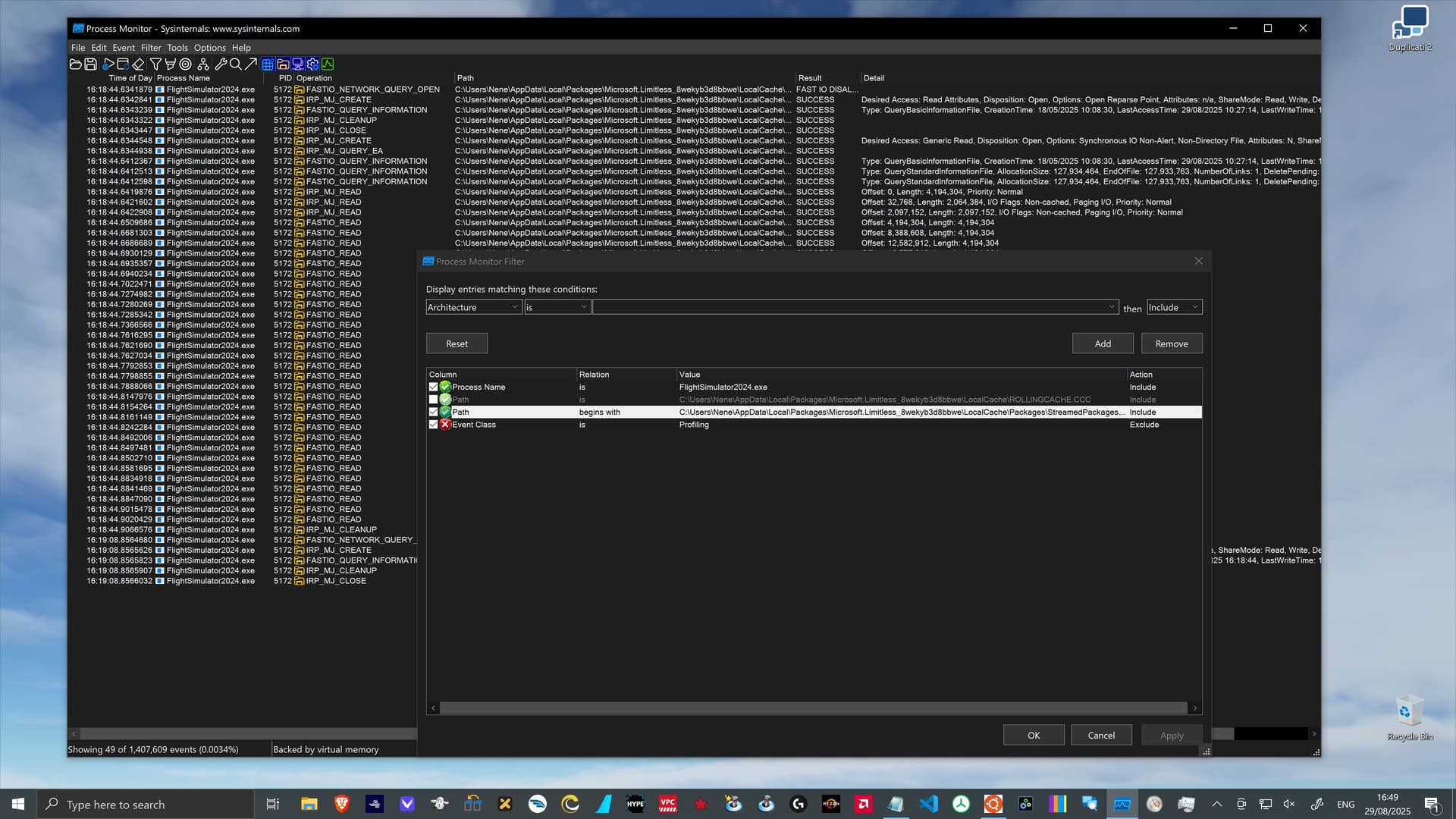
  • Process Monitor
    • Provided by Microsoft for free via the regular app store as part of the Sysinternals Tools.
    • Performs a highly detailed analysis of almost all system activities
      • … by obtaining a sampled and filtered event recording for a certain period of time.
    • Process Monitor - Sysinternals | Microsoft Learn

Resource Monitor details

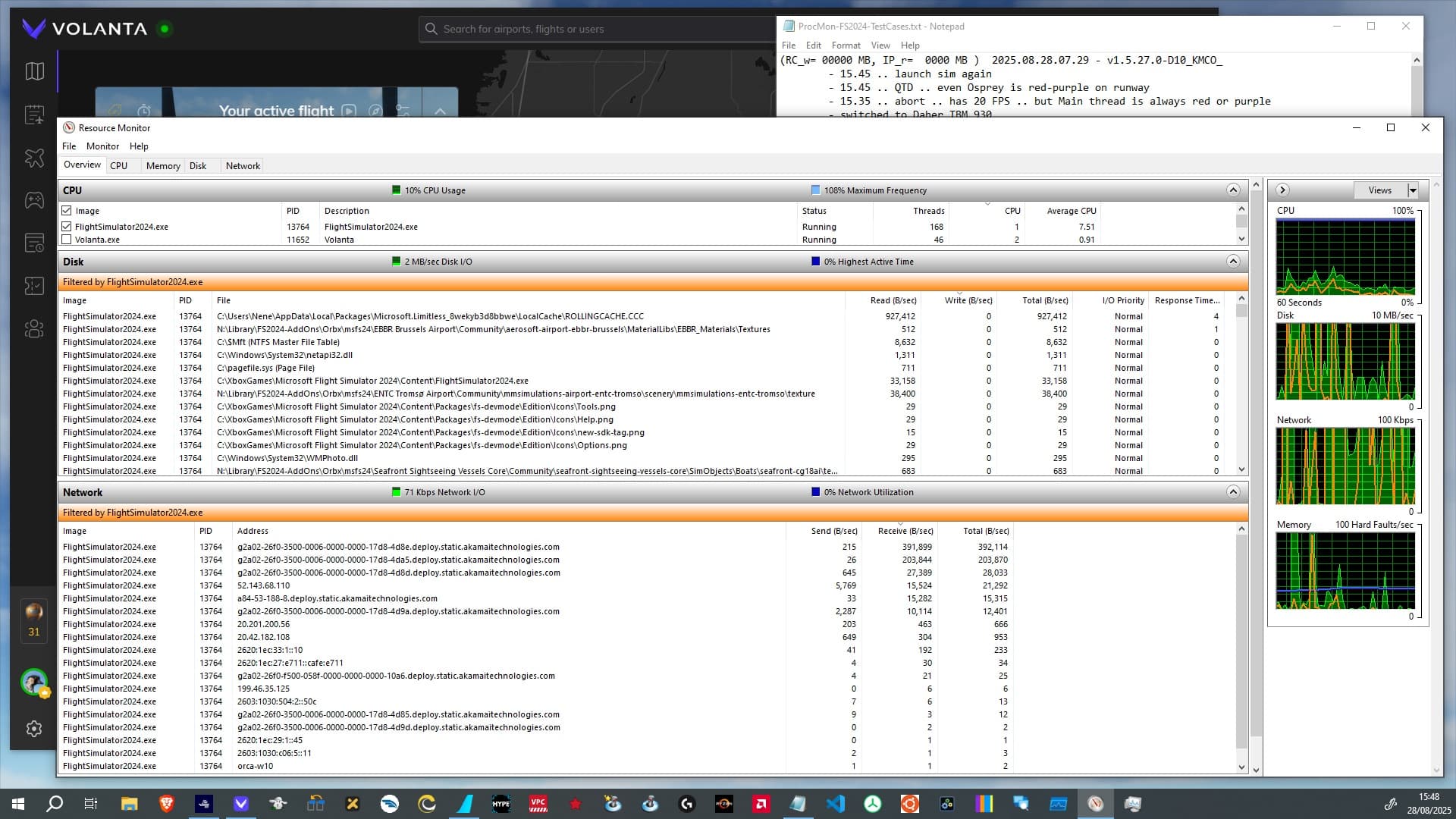
The following is a typical screenshot of Resource Monitor:

The primary features that I use are:

  • Filtering information for certain processes
    • … which usually is only the FlightSimulator2024.exe.
  • “Disk” … shows a list of all files
    • … which have been accessed during the last minute.
  • “Network” … shows a list of all network connections
    • … which have been active during the last minute.

I was never using the “Memory” view, because that IMHO does not seem to provide any practical insights for the RC related questions.

Back in 2024 I sadly did not pay enough attention to the fact that …

  • All recordings (e.g. File Read B/sec) are the average number over a one minute period.
    • So a lot of files or servers are still visible in the list even when they are no longer in active use.

It is a good idea for Resource Monitor to use this technique … but I simply was mislead a couple of times during my analyis.

However, a more serious issue is this:

  • Write operations to the RC file are not visible under the FlightSimulator2024.exe process.

I still do not fully understand why read activities are visible … and write is not. My current best guess is that this might be related to “FAST_IO” file activities bypassing some normal filesystem APIs interactions.

All in all Resource Monitor is good for “watching” the activities of a process

  • … but it cannot produce a recording for further investiations
  • … and it provides zero information about write activities into the RC.

Process Monitor details

To quote the official documentation:

Process Monitor is an advanced monitoring tool for Windows that shows real-time file system, Registry and process/thread activity.

The tool is very good for:

  • Performing a highly detailed analysis of almost all system activities
  • … by obtaining a “full” event recording for a certain period of time of
    • file (disk) usage
    • network usage
    • memory usage
  • … and then extract specific events by applying searches and filters.

The tool is not good for:

  • Collecting information over very long periods of time (e.g. multiple hours) is problematic.
    • As it collects all individial OS events the amount of data will get very large.
      • e.g. a flight in FS2024 can result in around 2.5 GB per hour of raw event data.

Sometimes Process Monitor did crash on me the moment when I tried to save very large recordings … which resulted in a loss of all sampled event data. With smaller recordings (below 1 hour) I never had any problems.

However, the most important aspect is this:

  • Process Monitor does not capture 100% of all events
    • … as it is more of a periodic “sampling” kind of recording.

The results are e.g. that some numbers simply do not add up (exactly), or that not all writes to a file are visible.

Prior to January 2025 I somehow missed that important fact, which caused me to interpret some of the numbers incorrectly, leading to fundamentally wrong assumptions about the FS2024 network downloads and the RC activity.

However, this all does not change the fact, that Process Monitor is still by far the best tool that I have found on Windows to collect low level insights without any noticable impact on FS2024.

Other tools for the analysis

Over time I increasingly started to also use …

  • Windows Subsystem for Linux (WSL)
    • … which allows me to automate some analysis with regular UNIX command line tools.
  • grep
    • … a very capable UNIX tool for filtering the lines in large text files.
    • Very useful in combination with the CSV exports of Process Monitor recordings.
  • FS2024 Debug -> Display FPS
    • A feature of the regular “Developer Mode” of the sim.

I also have some tiny tools to paint those “RC byte range usage” pictures, which I did use during the initial analysis to get an idea of the RC change and usage patterns.

Debug -> Display FPS overlay

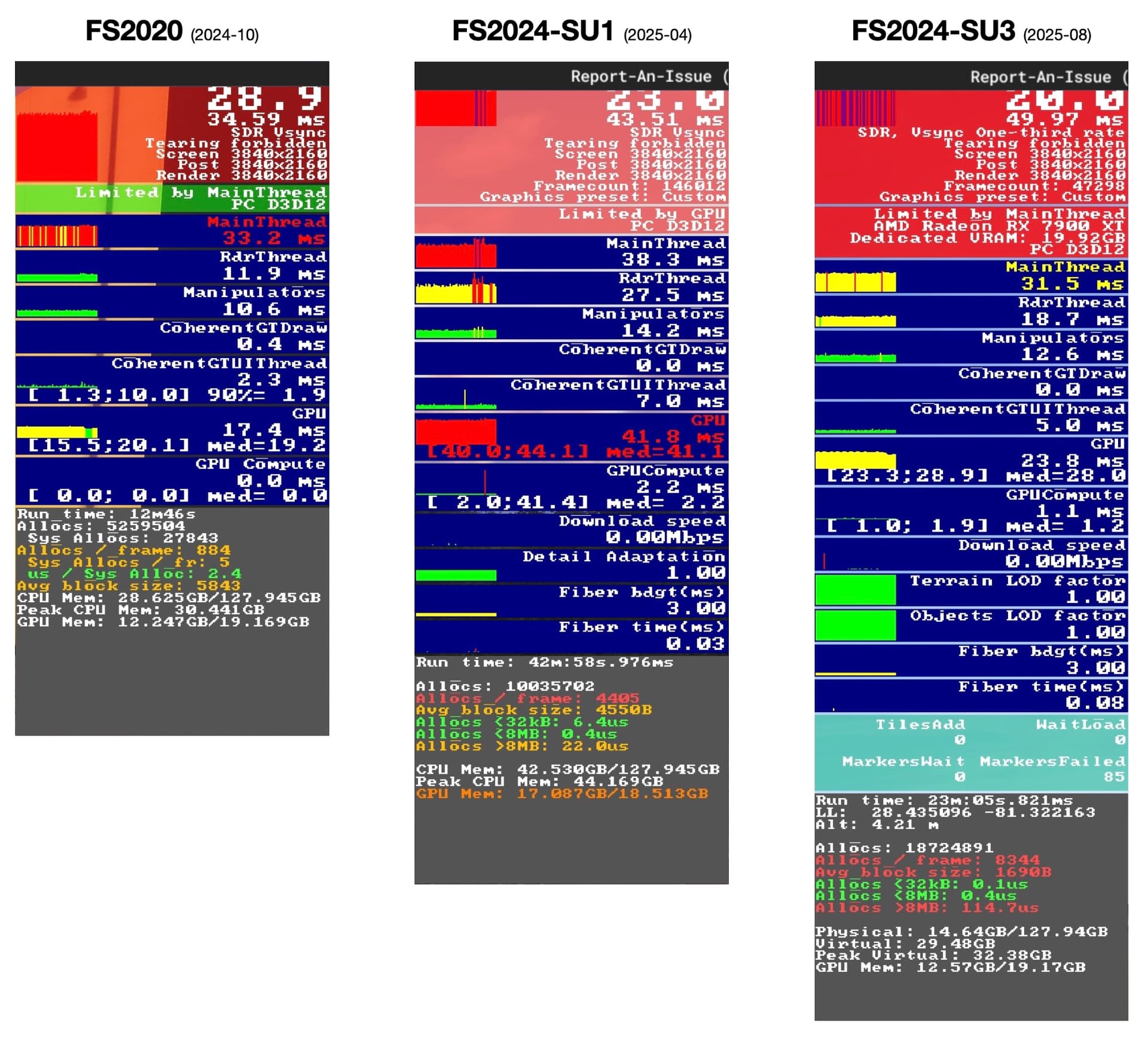
For the new SU3 analysis I especially started to pay more attention to the FS2024 Debug -> Display FPS information.

(Note: … the reduction in FPS numbers means absolutely nothing, as all screenshots have been taken under totally different circumstances)

The above image shows the evolution of the Debug -> Display FPS overlay from FS2020 to FS2024 SU3.

I am still confused about the actual meaning of most of the numbers, and I have not found any good documentation (yet).

What I am already using is …

  • The new “Download speed” indicator
    • … which I can compare to other data from other tools.
  • The new “Tile” and “Marker” related info
    • … even when I have no clue what they really do indicate.
  • The millisecond render pipeline measurements
    • … because I hope that I will find a pattern that might help to answer the question if there (still) is RC related stuttering.

To summarize this tool related overview:

  • The event recordings of Process Monitor
    • … are still my most important source of insight.
  • The new Debug -> Display FPS information
    • … will hopefully help me to get a better idea if there (still) is some RC related FPS stuttering.
2 Likes

These are questions I’ve had since I first read your initial thread on the topic.

  • Where does RAM fit into the sequence of delivering both streaming and cached data to the CPU/GPU?
  • What role do other caches play in the data pipeline (scenery cache, for example?)
  • Am I right to assume that shader caches have a direct pipe to the GPU via the graphics driver?

Thank you for another detailed thread on this important topic.

1 Like

… I am wondering about all those aspects myself.

We are (so far) constrained to looking at a very black box of “stuff” … and it is mainly an educated guessing game.

It would be really nice if Asobo would give a tech deep dive talk at some gaming conference, talking about the lessons learned, the nifty edge cases of all those GPUs etc, and all the rest.

I know … I know … but a goose is allowed to dream, or not?

1 Like

That was one of my big takeaways from your first RC thead:

“We don’t know what’s in the Rolling Cache or how it actually works, because they won’t tell us.”

I know it’s wrong of me to think this, but sometimes I think they think we are all 14 year-olds playing with toys who have Mom’s credit card.

2025.08.31 - v1.5.27.0 - Launch times and server availability

During 2024 I … and most likely everybody else … have seen the following FS2024 alert veeeeery often:

“Bandwidth too low, loading times may be extended and world streaming degraded”

This alert “nicely” correlated with:

  • Excessive launch times.
  • Incomplete aircraft and mysterious landscapes.
  • Poor or stuttering FPS … at least as far as I remember.
  • A lot of FS2024 frustration … and some “mea culpa” Dev Stream statements.

Starting in S1 the “Bandwidth” alert has became a lot less frequent and since SU2 I cannot remember having seen that alert anymore.

Server availability

On my end there have not been any changes in hardware or network connection (500 Mbps fiber-optic) since the launch of FS2024. So from that perspective I would conclude that:

  • FS2024 backend API and CDN servers seems to be (a lot) less stressed today
    • … than during the initial first month after the launch.

The reason for this improvement is basically impossible to know from the outside.

  • Either the FS2024 team did simply increase the server capacities
    • … or “tuned” the contract they have with the CDN
    • … or changed the configuration of the CDN caching rules
    • … or … whatever.
  • Maybe … the FS2024 client code did improve (a lot?)
    • … and better local caching of data did reduce the stress on the backend servers enough
    • … or mainly the interaction with the servers has become more robust.
      • (Remember the “client time out of sync with the servers” issue?)
  • … or … everything of the above.

I gave my view on data processing pipelines and especially the role of CDNs like Akamai back in 2025-01.

So far this goose feels like there have not been any fundamental changes to the Rolling Cache subsystem. So I find it most likely that all improvements are related to aspects outside the actual RC code.

Which might be good news … as it could mean that there is still (a lot?) of room for even further improvements.

Sim launch times

Right after the launch of FS2024 I did observe the following launch times of FlightSimulator.exe:

  • below 3 minutes
    • … especially if I had a nicely prefilled Rolling Cache
    • and used the sim while everybody else out there was doing something else (e.g. was sleeping).
  • 3 to 5 minutes
    • was a fairly common launch time
    • … but it also did require a prefilled RC.
  • 5 to 60 minutes
    • was rare … but still happend way too often.
    • It usually correlated with a fresh, empty RC.

So far with SU3 I have observed these launch times:

  • around 3 minutes
    • … is the common duration on my system now.
    • The shortest so far was 2:40 m:s.
  • 4 to 5 minutes
    • … so far only happen when I launched with a fresh, empty RC.
  • 5 to 60 minutes
    • … did not happen once.

Xbox server problems

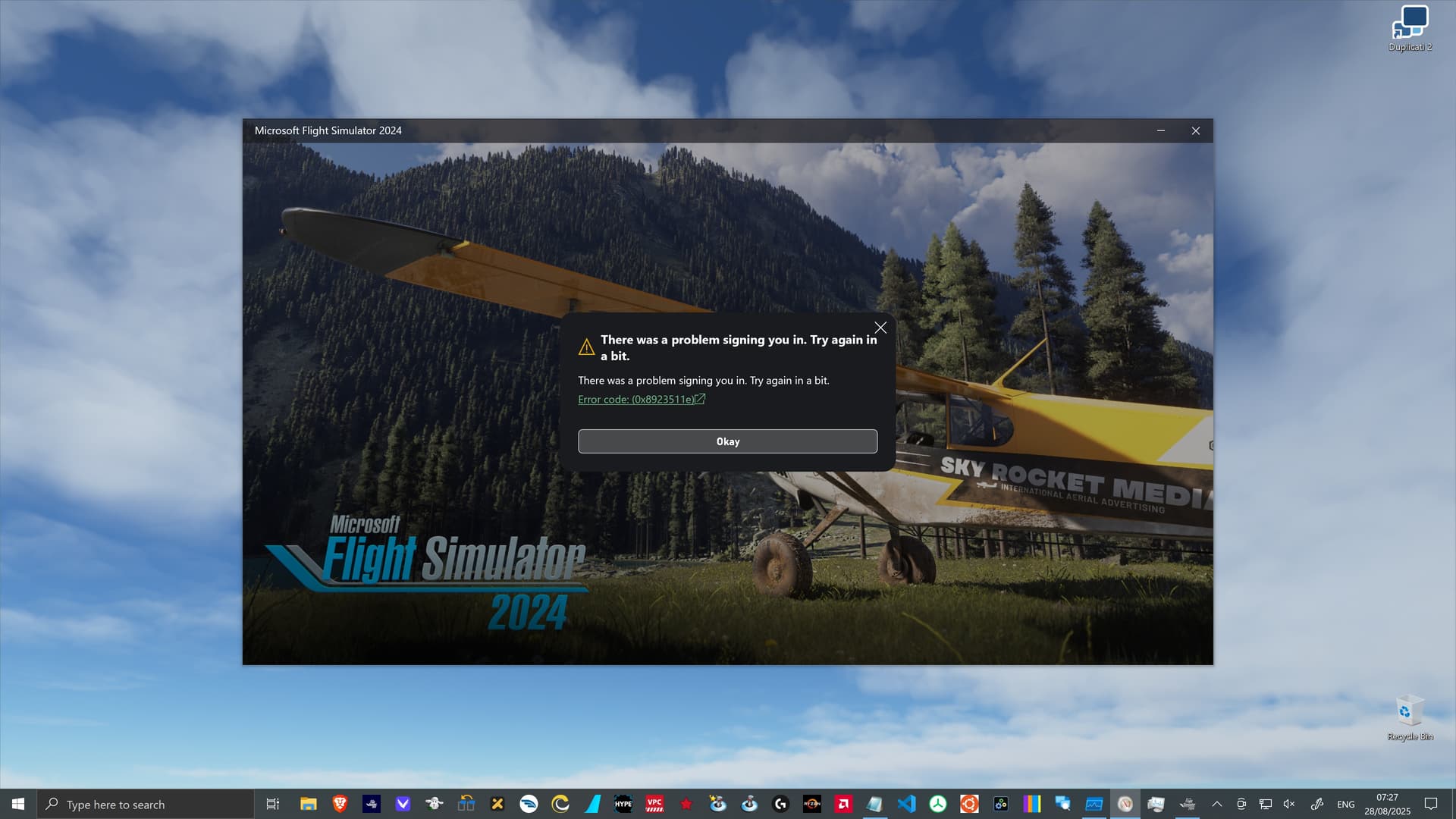
I have seen the following error when launching the sim for years now …

… and I still see it in 5 to 10% of the FS2024 launches.

However, those errors are coming from the gamelaunchhelper.exe and not the acutal FS2024 code. The problem seems clearly related to Xbox services and servers.

Usually a second launch attempt resolved this error and so this goose kind of got used to it.

To summarize this launch time and server related overview:

  • The “Bandwidth too low” alert is a thing of the past
    • … at least for me with my setup.
    • I guess the main improvements took place on the server (interaction) end
      • … and not the local RC subsystem.
  • SU3 does still need around 3 minutes to launch … on my system
    • … but noticably or excessively longer launch times are a thing of the past.
  • There still seem to be problems with the Xbox “game hub” related services
    • … but IMHO there is nothing that Asobo can do to resolve those issues.
1 Like

The RC 512MB index could be boosted to say 2GB or more for SSDs > 1TB

As you hinted, I install and download as much as possible.

It doesn’t seem to be rocket science to permanently cache scenery. Xplane and FS20 do it.

The question I ask is “why have Asobo NOT installed scenery once in FS24?”. And why not multiple (scenery) files, which may benifit from muliple cores and huge L3 caches?

Is it due to MS embarrassment of the weak Xbox storage? Or fear of admitting Azure failed? Seb once implied the whole streaming idea was due to 512gb Xbox’s hitting a brick wall. Those Xboxs are fast becoming obsolete.

One irony is that installing 3rd party scenery once, may see performance improvements.

1 Like

I did and will continue to argue that …

  • raising the size of the cache is a possible hotfix
    • … but not a good solution.
  • downloading as much as possible is an effective hotfix
    • … but not a good solution.

FS2024 needs and deserves the best cache implementation possible, not only because of the Xbox limitations which you @PilotJedi668 are refering to. Even on a very powerful oversized PC a really good cache should show real benefits and result in more user satisfaction.

One of my key arguments was, that the current RC implementation has a very poor “hit-miss ratio” aka “R:W ratio”. I tried to provide my analysis over here:

A very brief summary of that post would be:

  • The RC remembers too much “useless” data and forgets too much “important” data.
  • Overall real use “R:W ratio” numbers for the RC are barely above 1.0.
    • The RC mostly acts like a buffer (queue) and only rarely like a real cache.
  • The current RC design does not seem to take away significants load from the API, CDN or Origin servers.

I did outline a number of ideas for how to increase the hit-miss ratio in a post about a simple “Hotfix” RC upgrade …

… where the key points have been:

  • A “Hotfix” cache update should respect key constraints:
    1. Any local caching solution must be able to work at the 16 GB default cache size.
    2. No changes to the LRU Cache code base … or the present CCC file structure.
  • A “Hotfix” cache should try to achieve the following key goals:
    • Increase the cache Read:Write ratio … significantly.
    • Avoid increased cache item lookup latency.
    • Avoid too many necessary code change in the sim.
  • This could be achieved by splitting todays RC file into three cache files for different content categories:
    • HighReuse = Scenery Index, Aircraft, Airports, …
    • MediumReuse = Globe (landscape) low + med zoom levels, Challenges, Marketplace, …
    • LowReuse or AllOther = Globe (landscape) high zoom levels, Live data, …
  • Multiple cache files would allow to reduce the index area size in each file.
  • Introducing a config section in the UserCfg.opt file during a “Hotfix” would …
    • allow easy customzation for nerd pilots who want to tune their PC system.
    • prepare the ground for a “Brave New World” cache future.

IMHO the implementation of such a concept should be fairly easy, as the underlying RC subsystem would not require any code updates.

The key idea is to use different cache files for different assets.

So far I have not written about what I called the “Brave New World” cache … because we have not yet reached the “Hotfix” level. And I really think that the “Hotfix” ideas could take FS2024 a long way.

4 Likes

I definitely agree that HighReuse demands its own “cache” location. I would go so far as locking it down, if I’m happy with airports and scenery as they are. I would not waste CPU/GPU/bandwidth for something that only needs to change, say, quarterly.

The joke about updating marine charts is “the rocks don’t move” ha ha. But neither do airport buildings, mountains, hills, forests, coastlines, lakes, rivers, houses and roads etc.

I really like the XPlane approach of a world map, to choose the scenery you want.

Navionics, for boating, allows one to resize a rectangle on a map, to then download everything in that rectangle. One can navigate, using all the downloaded rectangles, without a network connection.

Google Maps has a similar feature, and 70% of drivers in the US use GMaps.

I would argue that 99.9% of the scenery you see out of a plane window never changes. So why not just install the areas/corridors I fly. Or bake a cache, of wherever I go a lot, so that it is locked until I decide to update it.

Whilst automatic caching is possible, there is a lot of hit and miss and no AI system will ever predict where and what and when I fly. I have studied Task Manager starting free flight and far too much data is being downloaded, slowing down the start of a flight.

I suggest 80% fixed, 20% smart cached. Allow users to adjust that mix perhaps?

2 Likes

2025.09.02 - v1.5.27.0 - File refreshes on each SU3 launch

Back in the first FS2024 release(s) there was an obvious problem, that many resources have been downloaded over and over again, even when they did not chance. Some of them have been easy to identify because they actually have been written into the regular filesystem.

For details feel free to read this old post:

During the March Dev Stream event Asobo did mention that they have fixed some bugs where already cached data was re-downloaded. I did not check SU2 but my Process Monitor recordings for SU3 do confirm that.

  • The number of files which get written during a launch (and entire flight) is really small.
    • Back in 2024-12 it was over 300 files.
  • The overwhelming majority of writes goes into the RC.

However, there are now two (new) types of interesting entries …

Avatar image redrawing

A number of writes are made to the folder:

.. \LocalState\nene nui\SR-LIVE\PLAYER_AVATAR\

To some degree that is nice and good … because until SU3 my avatar had the habit of “getting lost” and trying to find out how to get those pre-rendered images back into the menu screens of the sim was a puzzle.

With SU3 so far my avatar never “got lost”.

But why is the sim re-rendering the same images over and over again even when I made zero changes to the avatar settings? Shouldn’t a simple check if those files exist on the local drive (and e.g. match a cached file hash) be good enough?

Perhaps this is a “marketing” related requirement, to prevent users from painting their own avatars?

This clearly has no significant performance or RC implications … and I clearly prefer a visible avatar in the menu screens over no avatar … but I still find it noticable.

Automatic package updates?

What really caught my attention have been entries of this kind:

..\StreamedPackages\fs24-asobo-event-rescuechallenge\content\minimal.fsarchive

On 50% of the sim launches there are one or a few updates to content in the StreamedPackages folder! And this is not related to me making new purchases in the marketplace.

This is good.

I think I remember that people have been asking on the Dev Stream(s) why “streamed” packages only get updated together with the sim updates … and not more frequently. After all, a main idea of “streamed” packages is that content can and will always be updated on demand.

I think that the answer usually was that proper compatibility testing requires a lot of time and so release schedules get aligned.

However, technically the mechanism for continuous updates seems to be in place in SU3 … and it is being used already. Maybe it was added long ago, but I did not recognize it back then.

Major package updates might still be restricted to major sim release cycles. But that is not a technical restriction but really looks rather like a QA, or management, or compatibility related restriction.

To summarize this post with good news:

  • The unnecessary file downloads on sim launch have been fixed
    • … most likely already in SU2.
  • The pre-rendered avatar images for the menues get recreated on each launch.
    • This seems somewhat useless … but clearly does not hurt performance.
  • FS2024 does update “streamed” packages when needed automatically on each launch
    • … and this looks like a solid and efficient implementation.

P.S: I use the word “streaming” only because this is how Asobo does name the packages in their UI and presentations … but at a technical level I still do not consider that to be “real” streaming … it is rather an ad-hoc on demand download with different forms of caching.

2 Likes

Any findings on deleting cache after a new update or after a certain time frame?

Not yet.

I am still trying to find out how to “prove” that it is the RC which has a certain impact.
With very responsive servers the impact of the RC has become way harder to assess.

I did run into severe FPS drops (stutters) … but that always was resolved by a sim restart. So in that sense it was not a larger full RC which was the primary cause.

Tricky … but interesting.

1 Like

I’m buffled, why do you stop telling apart STREAMING vs DOWNLOADING?

I am not sure if I fully understand your remark @OldTimer003 … but you are correct that the post above might be the first one where I made a “Freudian slip” and used the word “streaming”.

So I added a remark to the post above to clarify my usage of that word.

I still hold the position that we are not looking at “real” streaming … and using that word is a (somewhat) misleading “mind trap”. So I tried to never use the word “streaming”.

In the context of the February Dev Stream …

… I did argue that there are already three … and now with SU3 four caching systems:

  • Automatically managed downloads
    • … cached (stored) in the RollingCache.ccc file.
    • … stored (cached) in the normal packages on the filesystem.
  • Manually managed downloads
    • … stored (cached) in the Community folder
    • … and soon also FS2024 packages in some special FS2024 folder.

The last bullet was implemented in SU3.

1 Like