Welcome to the crazy club and goodbye to all your OOM woes!
I was very wary of the overheating reports and so changed my PSU first-(ASRock Phantom Gaming PG-1300G ATX 3.1 1300W Power Supply PCle)-this has hardware protection as well as software monitoring to give peace of mind and is worth the small extra investment for me.
Typing up the rationale for undervolting the GPU yesterday made me question my assumptions, and take a sober 2nd look.
Having learned a bit more how my CPU and GPU behave with MSFS, I realized that my focus on undervolting might be clipping the performance in those moments when MSFS really does need to boost.
I did a lot of testing last week with 1 screen, and when finished, I went back to flying with 3 screens and of course took a hit - and noticed more Limited by rdrThread than I liked (meaning GPU limited).
Last night I backed off my GPU undervolt a bit, and extended the voltage cap from 1010 to 1025 mV, and voila, an improvement - alternating between Main and rdrThread limited. I think with ample cooling, the card natively really does want / need / and benefits from some of those higher voltages in moments of high demand, and I had been overly restrictive. I also went back and looked at the CPU voltages, and realized I had probably undervolted more than necessary there as well, and backed off from roughly -13 to -10, and again, an improvement.
Now, instead of trying to maximize power and heat savings, it will be to give both the CPU and GPU back some of that power, and just seeing where the numbers land. Less is More!
I don‘t think it matters. All your options will work (unless your old cable is so worn that sparks start to fly the moment you connect it. The best solution imo is a dedicated cable with the new Safeguard feature
Since getting my 5090 in June of last year, it’s always been on either a Corsair Rm1200x Shift or it’s current Hx1500i. Seeing these psu’s with safeguard is actually making me want to move away from Corsair psu’s, at least for my flight sim pc. That being said, no issues with the Hx1500i. It does use the two 8pin to 12v12x6 cable that Corsair uses on these higher wattage units.
As @GimbalAxis stated, perhaps I need to also look at my undervolt as well as the -30 CO I’ve put on my 9800x3d. Thanks for the idea mate!
On Saturday, I also finally moved up from 1440p. I went from a 27” Rog Swift Oled to a 45” LG Ultragear 5k2k. Wow what a difference! Back to tinkering with some settings to get the fluidity back but was so nice to see the visual difference but also a lot more green in the FPS counter.
I agree it works great at stock - but my goal was 3 screens, and so I experimented with undervolting, and MSFS settings, to see how it behaved. I was fearful of high power draw and heat, but I do have water cooling and for the most part, MSFS doesn’t demand as much wattage as running some of the benchmarks. So I’m learning that I can afford to give the card back some of that power, and hopefully find the optimum settings.
I just picked up 5090 from the store, and honestly, I don’t feel the usual excitement of a new toy - more like concern about powering it properly. I’m weighing all the options
That’s definitely one option, and you’re right about not using a used cable to power the new 5090. I’m seriously considering the PSU you linked, it’s certainly a viable choice, especially since I had read something about that protection before but it had slipped my mind. You reminded me of it, thanks. And maybe it’s a good option for now, at least until the new PSUs from MSI become available.
Congratulations! I suggest connecting the supplemental PCIe_PWR on the Carbon motherboard, which is really intended to provide some power to the GPU via the PCIe slot, which it’s designed to do, and acts a relief when the card power demand momentarily spikes. Also, MSFS doesn’t seem to draw an extraordinary amount of power, compared to some of the benchmarking software. Yes there are some momentary spikes, but I think it’s generally much more moderate than feared.
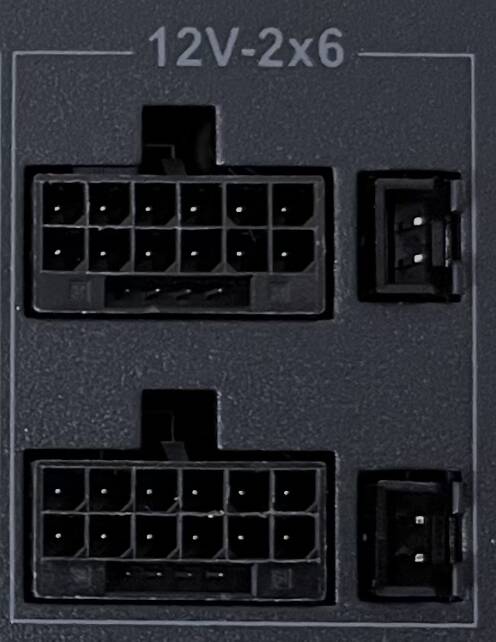
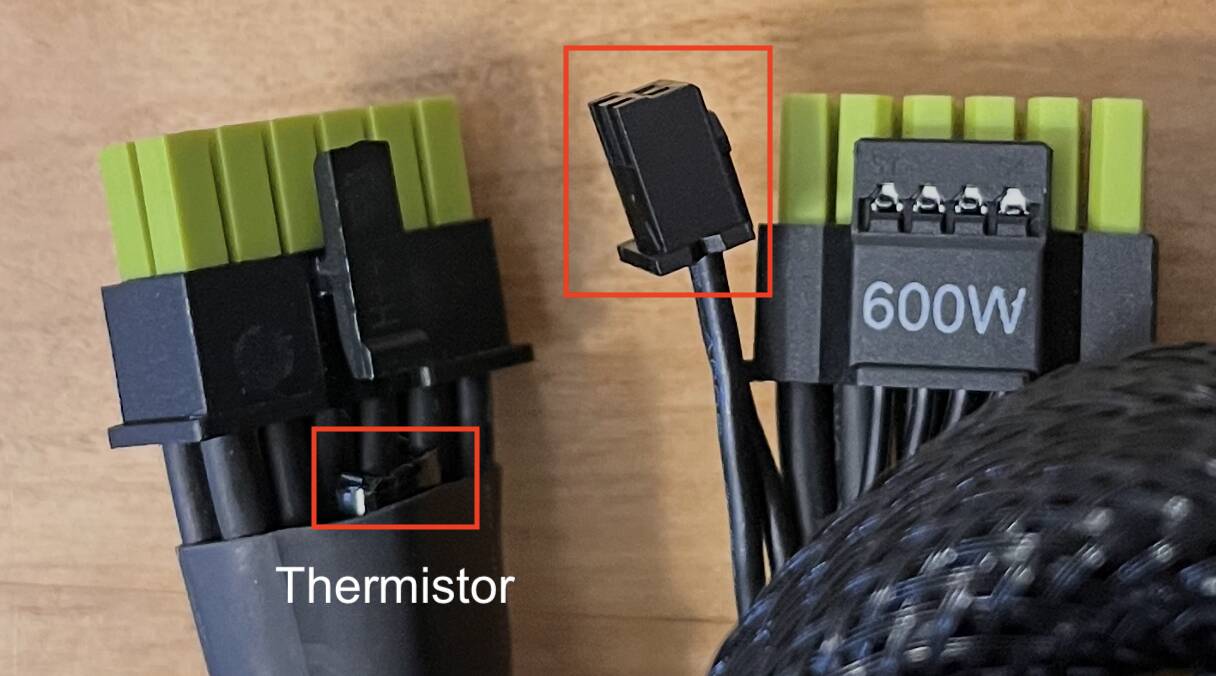
Earlier I think I said I had the 12V High Power cable - but that was a mistake. The AsRock PSU has the “12V 2x6” connector and came with a cable with the coloring to indicate seating. It also has 2 extra pins on the PSU side, which connect a “Thermistor” built in to the cable, which is at the GPU end as a temp sensor, and the PSU will cut power to the card if the thermistor is triggered. I remember I researched this PSU from Hardware Busters (PSU ratings) for this feature.
I ordered ASRock PG 1600G Phantom Gaming PSU and I should be able to pick it up tomorrow. @FireSwing867334 thanks for reminding me about that ASRock protection feature, especially the temperature sensors and auto-shutoff @GimbalAxis thanks to you as well for the other suggestions. I was debating between the 1300 and 1600 versions and went with the 1600 since the price difference was only around 40 euros. The only thing I’m not entirely happy about is the lack of Fan Failure Protection.
In any case, this will probably be a temporary PSU while I wait for the new PSU from MSI.
I should clarify that this was my first PC build - and I’m no expert. But I did do a lot of research, mostly out of fear because with the combined cost of everything that goes in to one of these PCs, I didn’t want to make too many mistakes. So - as most people told me - everything was a bit overkill on specs, and safety. In retrospect I don’t regret it, and I do like the safety features and margins. And mostly I enjoyed learning the details to make informed decisions. But the cost for each thing does add up, and I sometimes second guess…
If you think the cable decision is scary - as a first time PC builder, I took apart my brand new 5090 to put a water block on it. THAT was a day of anxiety!
Thanks for the link. I’ve seen this device before, but I’m not really a fan of how they’re presenting it, especially regarding the “extended warranty”. Just to clarify, an extended warranty usually means the manufacturer prolongs the original coverage - like Intel extending the warranty of i9 13900K and i9 14900K from three years to five. But if you read closely what Thermal Grizzly calls “extended warranty”, it’s just a 2-year limited damage protection for the GPU power connector, conditional on very specific usage and approval by Thermal Grizzly.
If I bought this device now, its warranty would expire earlier than the warranty of my GPU
That said, any device designed to protect a GPU or its power connector from melting makes sense and it’s worth mentioning such solutions. There may be people who simply aren’t aware that devices like this exist
I’m on my third 5090. The first Gigabyte was suffering from random crashes and was RMA’s without issue. The second was a PNY that suffered a melted 12VHPWR cable. PNY initially refused to warranty but eventually agreed. The third (and current) is anothr Gigabyte with the built water block.
I undervolted the card which reduced temps and allowed a slight overclock. In MSFS 2024 the GPU is usually running around 2900Mhz +/- 100. In my case it powers 3 x 4k 48” OLEDs.
The GPU power cable included with the PSU is equipped with an NTC sensor as part of the Cable Over-Temperature Protection system.
The NTC sensor, located directly on the cable near the connector, monitors the temperature in that specific area to ensure safe operation. If the temperature around the sensor reaches 105 C, it immediately signals the PSU to cut off power.
I’ll wait about two hours for it to reach room temperature (it’s freezing and snowing outside), and then I’ll start installing the RTX 5090 and the PSU.
Hopefully everything goes smoothly.
Did you happen to save any error logs or notes from when you were using the faulty cards? Maybe something you shared with support or the retailer during the RMA process?
If so, would you be willing to share them here? It could be really helpful for others dealing with similar issues.
I came across this model when reading the Cybenetics ratings, and there was an Asrock model that was actually rated higher and VERY expensive but completely unavailable - this one was its little brother with virtually the same specs - but was barely mentioned. I almost went with the 1300W version, but decided for the 1600W again because I didn’t know what the total power demand would be when driving 3 screens. I also learned that PSUs are most efficient when running at about 75-95 percent of their rated Watts (IIRC).
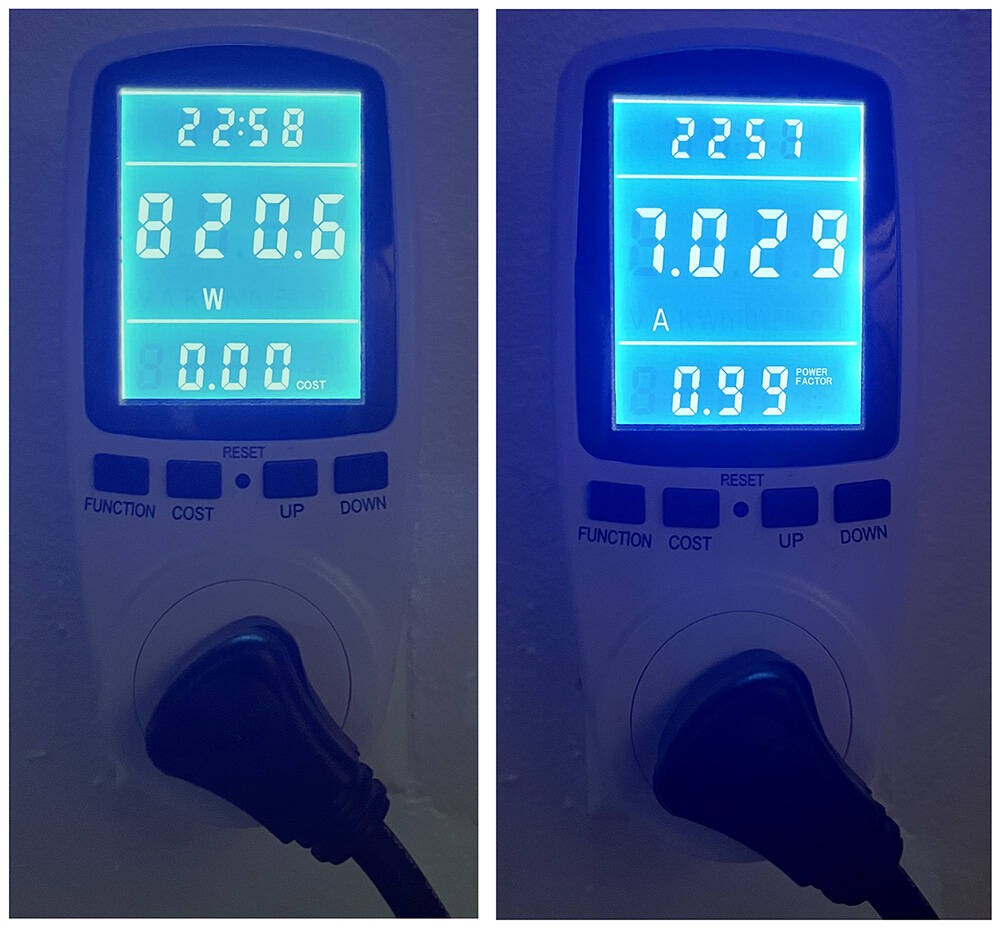
For anyone curious, I connected everything on my desk to an APC battery / surge protector, and connected that to a single wall plug with a watt / amp meter to see what the total power demand was. What I have running is:
PC (9800X3D, 5090, 2 M.2s, 9 fans and a D5 Next water pump)
3x Samsung 48" TVs
Internet router
TV receiver and AppleTV (plugged in but not on at the moment)
Desk lamp (LED bulb)
Flying the Longitude over the US
GPU is averaging about 400 W (max spike was 700 or so)
Total power at the wall mid flight, roughly: 820W, 7 Amps (on 120V mains)