She obviously doesn’t have an account here on the MSFS Forum, and appears to be fairly sane, which is another indication. 
My rig is largely for MSFS and the errors manifested themeselves in DXGI errors (mostly 0x887a0006 - device hung). The first card was doing this constantly with a variety of applications, not just MSFS. The only way around it was to massively underclock the card (down to around 1500Mhz). That one wasn’t a problem to RMA - They took it back with nothing more than my feedback. The PNY melting cable however was a drama. Nothing much to that one - the cable just melted in the socket on the graphics card….. same as has happened to 1000’s of other people.
I’ll need to check - Its under 1000mv but I can’t recall exactly where I finished up. Once I set it up and finished stability testing I havn’t touched it.
Please do, would be interesting. I’m looking to set a new undervolt for 2925mhz, apparently 940mv is realistic.
PSU and GPU are installed, and so far everything is working fine. I want to let it run for a while without heavy load first, and then I’ll see what it’s really capable of.
BTW, I checked three GPU power cables: one from my old MSI PSU, one from the new ASRock PSU, and another from a different MSI PSU. The best fit turned out to be that other MSI cable with yellow tips. Even so, I ended up using the cable from the ASRock PSU because of the NTC sensor and auto-shutoff.
Well, at first I was a bit annoyed that I couldn’t buy it, but then I thought maybe it’s actually a good thing the bank called to check. After all, someone could have kidnapped me and, instead of asking for money, demanded an RTX 5090 as ransom. With today’s prices, that doesn’t even sound that far-fetched 
Thanks for sharing that, I appreciate you taking the time to explain it. Out of curiosity, when you were getting those DXGI errors, did you try limiting the FPS, for example to 60, to see if that made any difference?
EDIT
Which PSU model and GPU power cable were you using for the PNY GPU?
If you get a chance, I’d really appreciate it if you could check, since we’re running the same GPU.
I’m having an issue which I thought was a one-off a month or so ago, but has just repeated - since many in this thread have similar set ups, I hope you don’t mind me asking here.
It seems to happen when I’ve gone through all the levels of careful testing and finally get set up, tuned, and flying on 3 screens. Here’s what happens: The main center screen seems to freeze, and the side screens will move, but like 1 frame every 2-3 seconds. And the audio does the same. I can move the mouse, and switch to other open apps, but MSFS won’t recover. And there’s nothing I can see in Event Viewer. And it’s not flight related, it can happen just loading the world map. No addons. And it never formally crashes… I have to force quit.
A bit of Googling suggests perhaps FSR3 frame gen? I also saw in the crash logs that at some point GPU Tweak had a crash, but I can’t say for sure. So I’ve uninstalled it for now and am going to run the 5090 at stock for a bit just to see.
Anyone else see this kind of odd behaviour?
I just think that because of the topic title, people running triple-screen setups (for example 3 TVs or 3 monitors, even on something like an RTX 3090) might not necessarily look in here. The topic title doesn’t really suggest multi-monitor setups.
You might get more relevant responses if you also post this in the thread linked below
https://forums.flightsimulator.com/t/multi-monitor-setup-help/553509
Sure, but before I go there, another question - you are running 3 screens also, right? GPU’s typically have 3 Displayport, and those with TVs - the TVs only have HDMI. So that requires an adapter, or DP to HDMI cable… many of which don’t support VRR.
So my question is, does anyone here have that scenario - and what are you using?
I specifically bought the Asus TUF 5090 because it has 2 HDMI and 3 DP ports, so at least 2 of my 3 TV screens would be native HDMI. I’m now suspecting the cause of my issue might be the cable to that 3rd TV, and I’m going to have to experiment. Also, the issue only started when I installed the FSLTL traffic models and BATC Experimental. Sigh - more testing.
Nope mate.
Smart move using the GPU power cable that came with the PSU. The pig tail cables that come with the GPU I would never use. As someone else mentioned, a slight undervolt will keep the power in check with no noticeable performance degradation.
The long-awaited device designed to protect our GPUs has finally gone on sale - and it’s already out of stock.
External tests and reviews
igorsLAB
MSI Afterburner 4.6.7 beta adds support for the RTX 5090 Lightning and, importantly, introduces monitoring of the 12V-2x6 connector for MSI MEG AI 1x00 and new MPG AI 1x00TS series PSU.
https://wccftech.com/msi-afterburner-4-6-7-available-5090-lightning-ai-psu-support-16-pin-connector-saftey/
EDIT
Unfortunally, I can’t check how 12VHPWR/12V-2x6 connector monitoring looks in practice because I replaced the MSI MEG Ai1300P PSU yesterday with an ASRock PSU, and I don’t feel like swapping it back just to test it
Thanks, I agree - using the GPU power cable that came with the PSU is definitely the safer choice.
I’ve already completed the 3DMark tests and the difference between RTX 4090 and RTX 5090 is clearly visible. I’ve also finished testing in MSFS 2020 (Full HD, 2K, 4K). What’s left now is to check the performance difference between the RTX 4090 and 5090 in MSFS 202, and after that I’ll most likely move on to undervolting.
I used the 3-8 pin adapter supplied by Zotac. No sense tempting fate.
So to the original question, having spent time testing on 1 screen last week, my advice for settings are - you won’t really be limited much any longer:
- DLAA vs TAA: I find TAA shows cockpit instruments better, but, the current version of NVIDIA DLAA shows so much more fine detail in scenery, mostly thin objects like light poles, thin trees, cable towers, etc.
- You’ll probably still want to set a frame cap and use DLSS Frame Gen, which works really well on 1 screen - but I was testing without a cap and at TLOD 200 things were pretty good almost everywhere
- I’ve finally understood the Dynamic setting, which will reduce TLOD when it needs to maintain the 30 FPS (real frames before frame gen) by up to 50% dynamically, and then OLOD… and then return it to you when it can. Asobo’s implemenation of this is still rough, and you’ll get minor moments of jerkiness if you are, say, 2000 feet over central London, but otherwise, it’s great. So I set mine to 400 and let the Dynamic try to do its thing… I do hope Asobo improve on this.
- In single monitor testing, I found that leaving most settings on High, but increasing Texture, Clouds, and Buildings to Ultra was a good compromise for higher TOLD. You can probably get away with everything at Ultra, but you’ll notice more of the TLOD dynamically reducing.
- I think after a few tests you’ll be able to put the FPS monitor away and just enjoy the view.
Don’t worry, I won’t call you crazy for the 5090—I’m running an Asus ROG G17 4060 laptop and I’m already jealous! We’re all a little mad here when it comes to chasing that perfect FPS. Since you’re going for the ‘God-Tier’ build, check your Windows Defender Exclusions for your MSFS folders. It’ll stop the CPU from bottlenecking that monster card while it scans scenery files. Enjoy the frames tomorrow! :-)"
I think you might have replied in the wrong thread.
Try multi frame generation
https://forums.flightsimulator.com/t/multi-frame-generation-for-all-gpus-game-changer/756881
No, your question was, 5090 any advice - seeing that you are coming from 4090, I’m just commenting that you’ll notice the limits are lifted a bit more, things open up nicely, less compromise (at least on 1 screen). Rather than trying to find settings that work, you’ll have some more choice in graphics settings is all. My advice is - if you haven’t tried it, to try DLAA and I’d be interested in the results.
Given what you spent on the 5090 you might as well try TLOD 300 and take some screen shots and switch back and for with TLOD 200. I can get away with this on my 5080 so you should be golden. You can test with the same position at the takeoff point on a runway, go to the chase plane view, and you should see runway tire marks, which make a good testing background. Blow it up and look at the pixelation.
Anyway, congrats and enjoy!
Remember, whether its a 5080 or 5090, you still have the same CPU and increasing the TLOD puts additional stress on both the CPU and GPU. The additional VRAM of the 5090 will return better performance but the bottleneck will still be the CPU, especially when running at high TLOD and/or ultra settings when flying large aircraft and at large airports.
Oh, believe me, I’ve done a LOT of testing of all Graphics levels, with screenshots from all angles in all scenarios to understand how it works.
In fact, I set TLOD 400, and I allow the Dynamic setting to manage TLOD and OLOD as it sees fit. The idea is that if it needs to reduce TLOD (usually on the ground, or approaching runway) it will - this makes sense, because TLOD is really about seeing things at a distance, and the closer you are to the ground, the less distance you can see. Asobo’s implemenation of this is still quite rough - it does tend to jolt rather than transition smoothly, but my hope is they improve on this idea.
But for testing and posting results here, I use the standard preset settings so if others want to compare it’s easier.
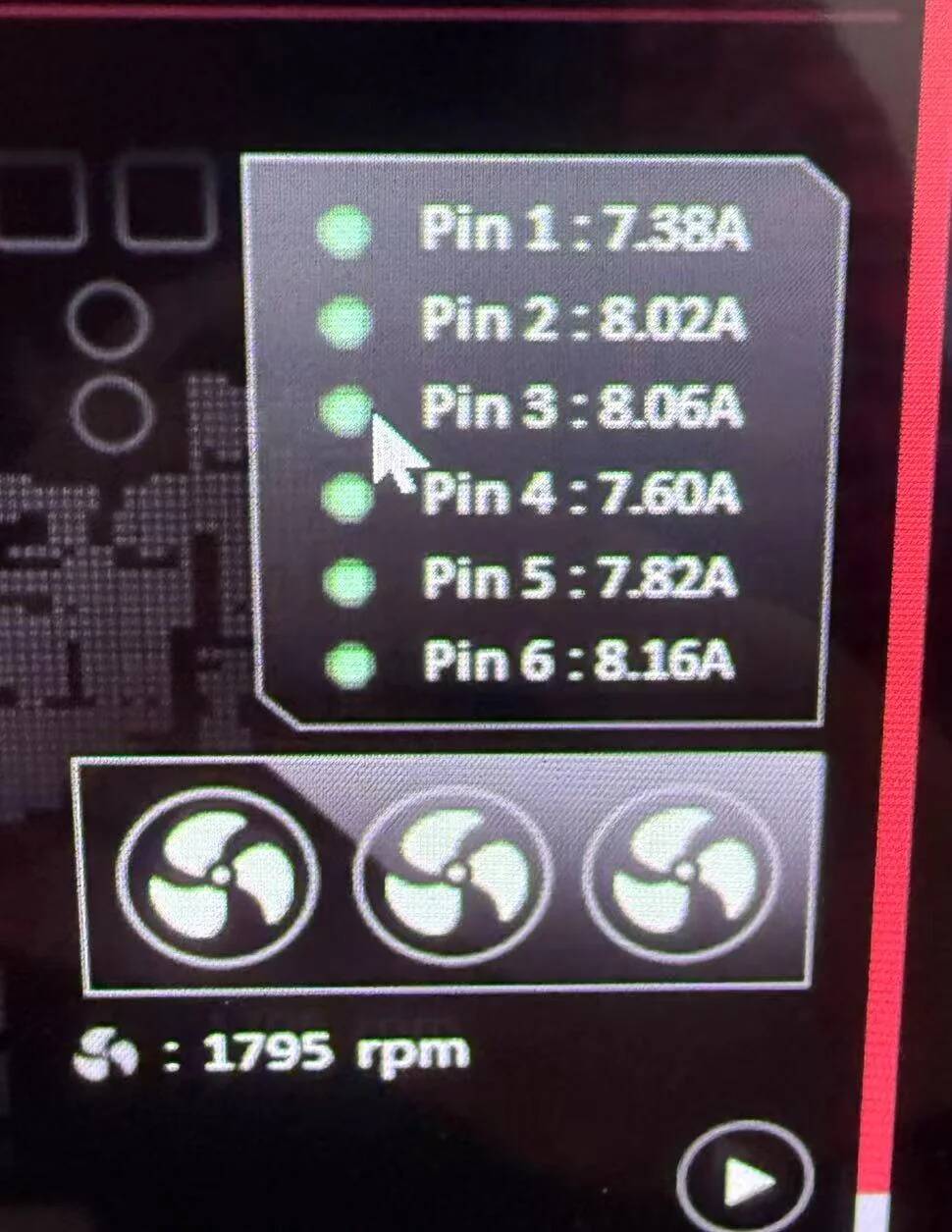
I have the ASUS TUF 5090 OC, without the individual pin monitoring - I figured the thermistor on the power cable that would cut power supply if it overheated was enough