Because almost all of the settings mostly affect the GPU, not the main thread.
Only settings that really affect the main thread are the glass panel refresh rates and the render distance sliders, and, of course, Photogrammetry is a huge hit on the CPU too.
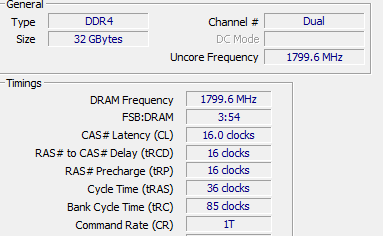
Regarding the timings, they are pretty loose (18/22/22/22). Not sure how much difference that makes in the grand scheme though.
I also tested 3600 CL16 and 3600 CL18, absolute no difference . That was also my first thought, because mine is 3600 CL 18.
Regarding the CPU settings:
Right, most of the things just effects GPU, and that’s the strange thing, that we are even in 4K Ultra CPU limited.
And I also set all the LOD’S really low and turned off ALL online services…
Didn’t had that much impact
I see the same. Whatever settings I change I can’t get higher FPS (maybe 1 or 2 FPS here and there) and am always limited by main thread. the only way I can get limited by GPU is by bumping up the render scale above 140
I have no issues in x-plane. 50-60 FPS with everything pretty much maxed out.
It’s exactly the same for me…
X-Plane, Cyberpunk, etc…
Everything in 4K is perfect, except MSFS.
So my first thought was okay, MSFS problem, but why get others good performance with the same setup?
So it hast to be something what is between our systems and the MSFS…
I’m really thinking about ordering the new Intel today and test it, than I can say, If it is the CPU or not
Don’t bother with the intel.
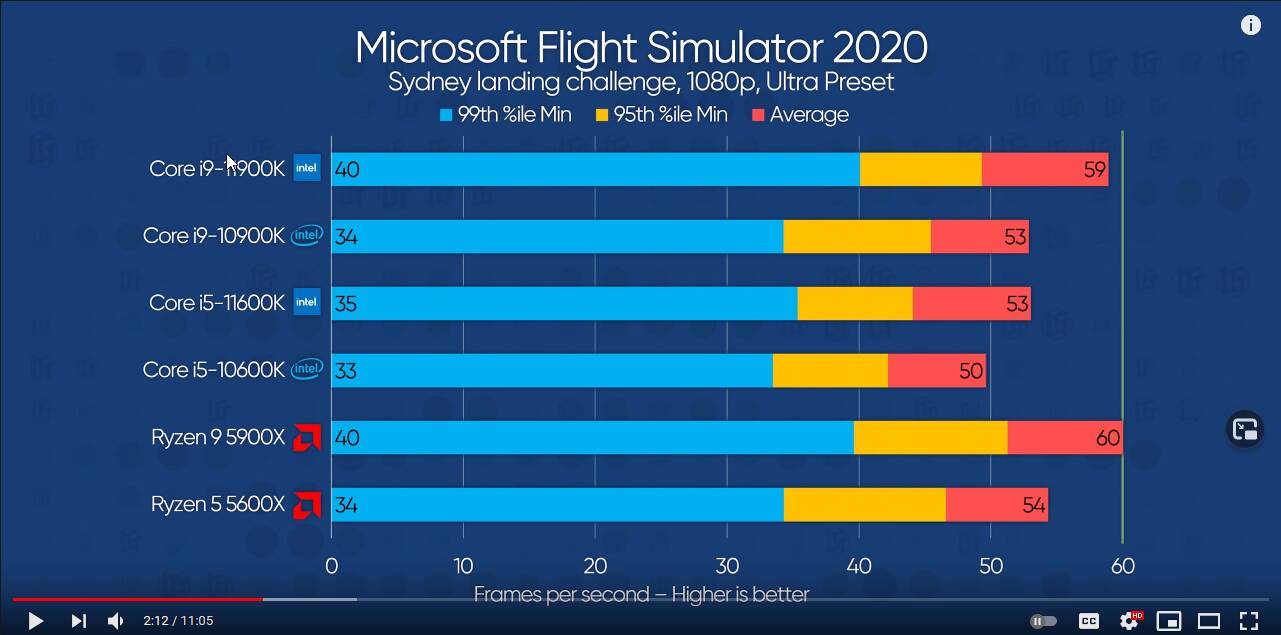
It’s just the way the game is coded. There’s a lot of simulation / calculation that’s going on, and the main thread needs to sync all these workloads back up before a frame can be sent to the GPU. Single core performance is what matters, and AMD 5000 series was faster than 10th gen, and from what I’ve seen so far, that is still the case against 11th gen.
Just wait for some (reputable) sources to benchmark the new CPU’s for you. I think you can safely keep that money in your pocket.
Well, it is definitely possible to reach more than 30fps in these scenarios, so it’s quite weird that some of us can’t.
@charliebravo737 did you try to disable SMT in the BIOS? Some people report better performance without hyperthreading.
Also check this setting and try to change it (and restart):
Just blind guessing, but maybe there’s an option that you haven’t tried yet…
Oh, I completely agree, but something else is going on, and spending loads of cash on an 11900K + new motherboard when you’ve got a 5900X isn’t the way to go
I’ve been folowing this thread as I’ve just upgraded to 5800x and first time with Ryzen cpu so Im getting used to not having a continous overclock and instead watching the cores boost on ryzen master. I’m also main thread limited and whilst this occurs I check Ryzen master and notic cores are not boosting which I’m told is normal but given I have come from an all core overclock background it leaves me a bit skepitcal. One thing i have just tried is launching MSFS as adminstrator and one thing I have noticed by doing this is that ryzen master now tends to favour my two best cores and seems to boost higher where previously it was swtiching between all cores and not really going much beyond 4ghz in general
This might be something, it might be nothing, thought I’d share just in case it made a difference.
If you want me to share any other settings let me know. Spec is 5800x, x570 rog strix e 32gb ram corsait 3600 and 1080ti
I have a 5800X myself as well, and if you’re coming from intel, it takes some getting used to, since they generally work differently.
Even though you can also give Ryzen al all-core overclock (which can be beneficial for productivity workloads), you’ll give up the single core boosting (which MSFS benefits from since it’s normally main thread limited).
The nice part about Ryzen is that there are no limited ‘tau timings’ that intel has (limiting the maximum boost speed to a maximum duration of like 50-ish seconds on intel chips).
Even without touching anything (PBO etc), my 5800X boosts the single core speed to 4.85GHz.
Make sure you run dependable monitoring software (I suggest HWINFO64), and set the polling interval a bit shorter to get a good idea of what’s happening (disable the shorter polling interval afterwards, since of course this will eat some CPU cycles as well).
On base settings you’ll likely see the workload jump around between cores/threads. This is also working as intended (it finds the fastest cores/threads, and hops between them to lower heat output).
Most important is to make sure your RAM is clocked at its XMP / DOCP profile, since that impacts the infinity fabric clock (half of DDR speed). Ryzen likes fast RAM, but it’s pointless to go over 3600 or 3800MHz RAM speed (for a FCLK of 1800 or 1900MHz respectively).
Well, you’re saying you’re seeing the same problem in Apex Legend, what is the ‘problem’ you have?
if it’s just low CPU utilization, then that’s to be expected. No current game or sim will fully utilize the 12 cores/24 threads your CPU has. So that wouldn’t be a problem, just a normal thing.
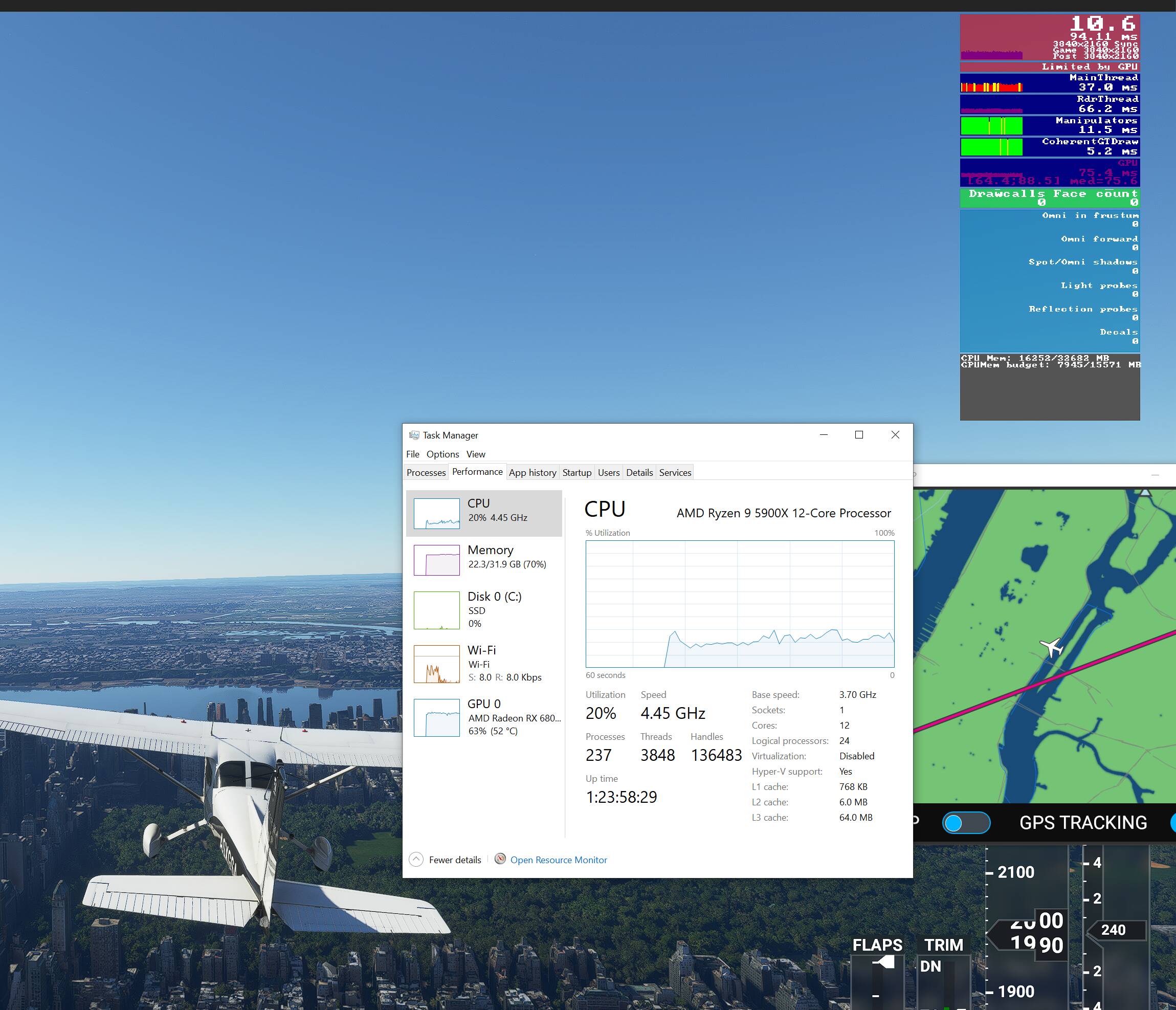
In your MSFS screenshot I notice you’re limited by RdrThread. Do you get the same if you close the VFR map?
Under normal conditions you should either be limited by the main thread, or limited by the GPU (there will always be a limiting factor).
Also, if you built the system yourself, make sure the RAM is running at its rated (XMP/DOCP) speed in the BIOS.
@SkipTalbot
So i did a complete resest of my Win 10 again (due to testing a new MB).
So I’ve a complete new system, can you check, what setting you did in Win10 and nVidia Control Panels?
Than i try exact the same
What else you got running in the back ground, just ran the sim on my 5900x and you have twice as many handles, 1000 more treads and twice as many processors going on, not saying that’s it, as a 12 core should be able to cope, just thinking if sonething you running slowing you down?
Your problem is different than this thread is about. The OP is not suffering from that RdrThread issue.
You might want to chime in in this thread, same behavior:
Also check your graphics driver settings (reset them to defaults), maybe uninstall it and make a clean install of the most recent driver. Check if you are running the most recent BIOS for your board and your chipset drivers are up to date.
 . That was also my first thought, because mine is 3600 CL 18.