Ryzen 7 9850X3D 6% faster than 9800X3D? - the world’s best gaming CPU? tests, comparisons and rumors

Kudos to @TenPatrol for falling on the grenade for us here, but personally, I just cannot justify swapping out a <6 month old 9800X3D for single-digit performance increase, especially given the price premium. Yes, I could offset a chunk of the cost by re-selling my 9800X3D, but the all important Middle-Aged-Guy Hassle:Uplift Ratio just isn’t there for me.

But that said, I do admire the effort put forth into collecting the data. It’s a great resource, especially for people considering which way to go for a new build or upgrade.

See you and TenPatrol are partial to the MSI 870 boards. I have to say that I was biased to getting an ASUS 5080 since I had the ASUS MB from a friend’s parts list. Looking at the MSI MB on Amazon there are a good number of 1 star reviews… have to say there are a lot on 1 stars for ASUS also. Solid in your experience?

I think I will be cogitating about a new build for a while since my system currently seems to be working at the limit of what MSFS 2024 has to offer so these performance gains will not buy a lot… but I have almost a free ticket for a new build since my wife is complaining about her W10 machine and she would love my machine.

I also spent the past few days testing (the 9800X3D in MSFS 2024), with a clean install of Windows and MSFS, also 2 flights around NYC, in the C172 and the default A330. It is exhausting, but I had never flown the A330, so I had some fun. I repeated both flights, in 4 sets of settings. I used HWInfo and the MSFS FPS overlay to capture screen shots at roughly the same 2 points in each flight, and plotted the numbers.

TL/DR for anyone interested - in combination with EXPO, the memory “subtimings” have a huge benefit, I was really surprised to see the numbers. I posted screen shots of results here. I know nothing about what the subtimings do, but I had read an article about the presets in MSI BIOS (and I presume in Asus and other boards) and tried them.

Thanks for sharing your detailed testing. I focused on a different kind of testing. I didn’t overclock the CPUs and I also didn’t do any GPU overclocking or undervolting. The idea was not to skew the results and keep them as comparable as possible, so others can easily line them up against their own results. My goal was a clean CPU comparison and to show the raw FPS differences between CPUs, not the impact of overclocking.

Thanks for the kind words. I’ve finished the CPU tests in MSFS 20/24 and now the worst part is left - charts and tables … which I really don’t enjoy doing. I’ll probably keep it as simple as possible and readable.

Also, thanks to the moderator @DementedCorn327 for moving some of the posts to the new thread - much appreciated!

EDIT

@A68yoSniper
If you have any questions about BIOS settings, the discussion about BIOS has been moved to the new thread. Feel free to ask your questions in the new thread.
https://forums.flightsimulator.com/t/optimizing-bios-for-msfs-2020-2024-tips-advice-and-discussion/756831

Sorry, read this after I posted a long (but successful) BIOS saga. Maybe you can get it moved.

@A68yoSniper I guess you missed my previous post. You are setting PBO in the Ai Tweaker menu which is the wrong menu to use. Leave PBO and Curve Optimizer as Auto in Ai Tweaker and goto the Advanced menu to set it. See my posting here…

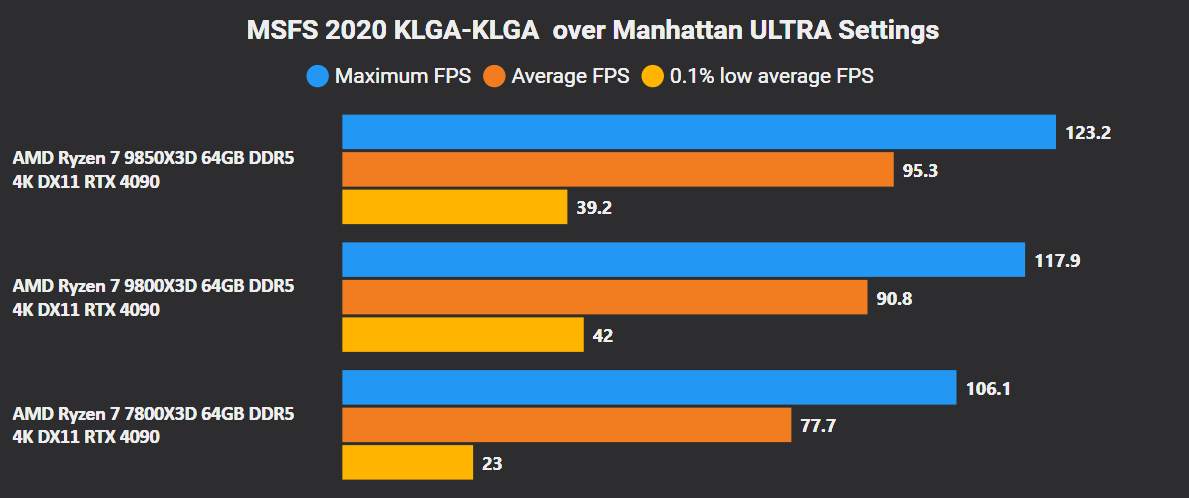
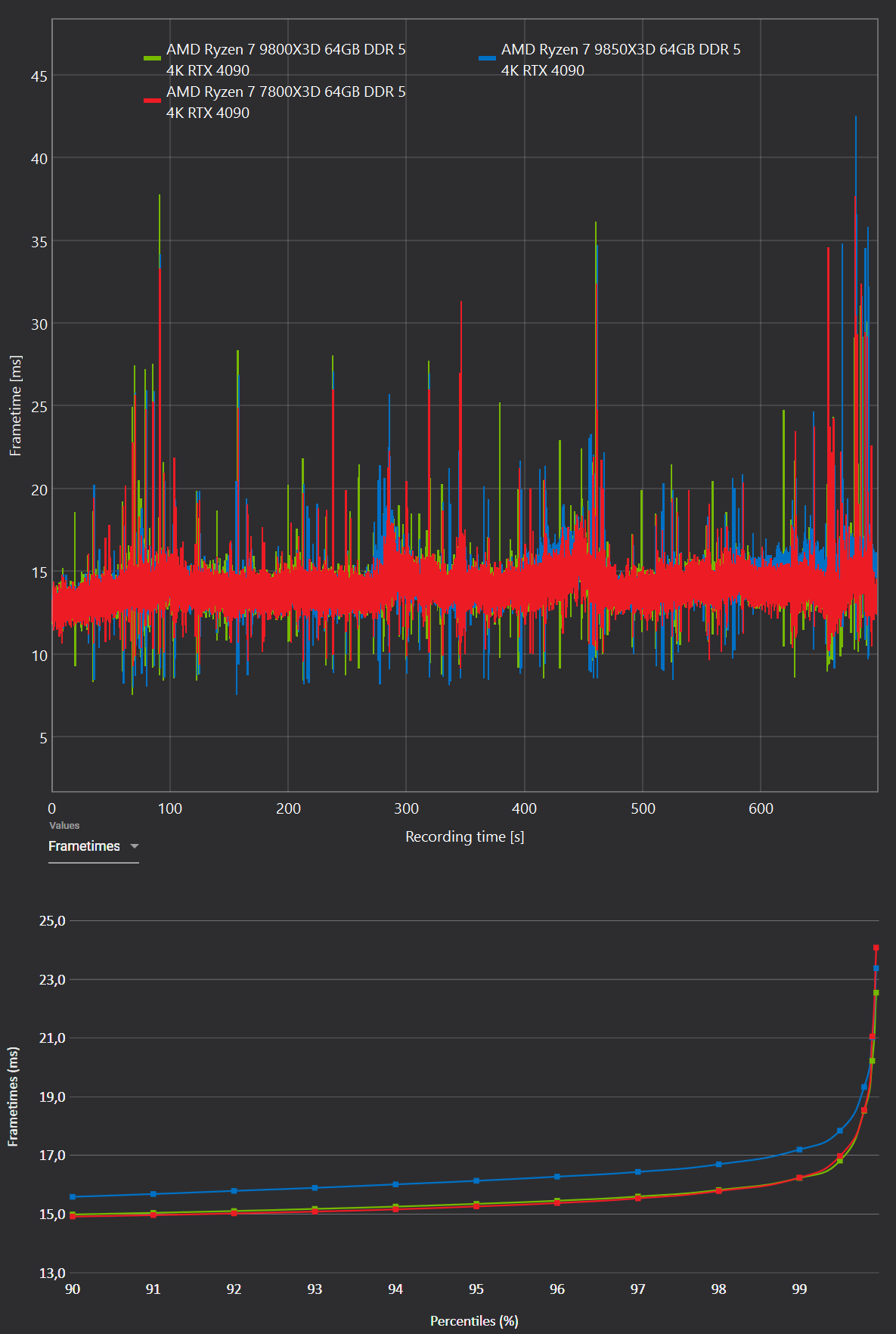
As promised, below are the test results. These are straightforward CPU benchmarks in MSFS 2020 and MSFS 2024. I could have added voltage tests and similar data, but there’s already a ton of that available online, so I didn’t want to waste time duplicating what’s easy to find.

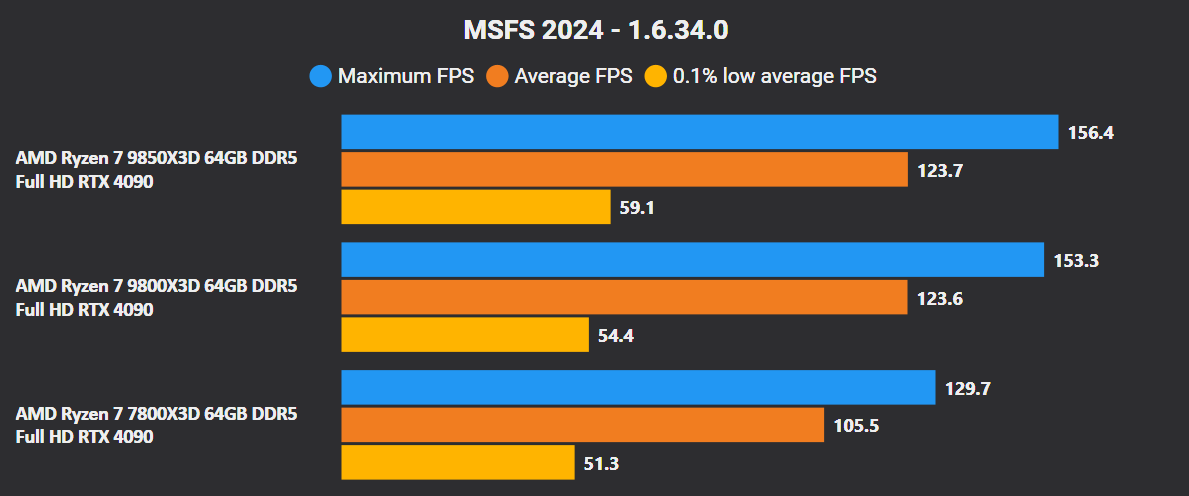
The goal here is to check whether upgrading from an older CPU to a Ryzen 7 7800X3D, Ryzen 7 9800X3D or Ryzen 7 9850X3D makes sense. The results also show whether upgrading from a Ryzen 7 7800X3D or Ryzen 7 9800X3D to a Ryzen 9 9850X3D is actually worth it.


Test setup:

  • Ryzen 7 7800X3D / Ryzen 7 9800X3D / Ryzen 7 9850X3D
  • MSI X870E Carbon WIFI - BIOS 1A8, EXPO enabled, Rbar enabled, Virtualization - off, PBO all cores -15
  • 64GB (2x32GB) DDR5 G.Skill CL26
  • RTX 4090 Gaming OC (591.86)

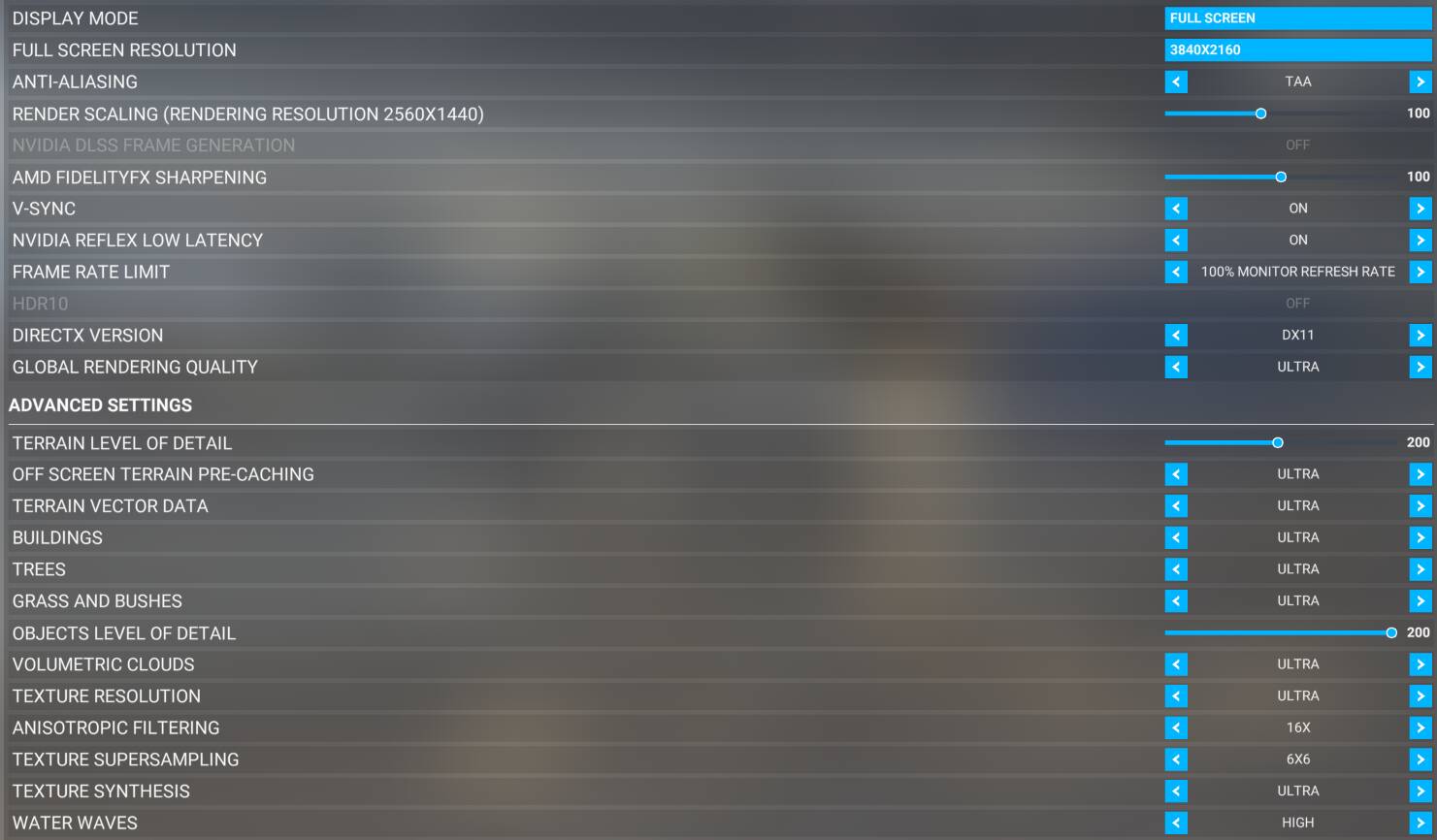
The test was conducted at three resolutions: Full HD, 2K and 4K flying from KLGA over Manhattan and back to KLGA, using the Cessna 172 Skyhawk G1000.

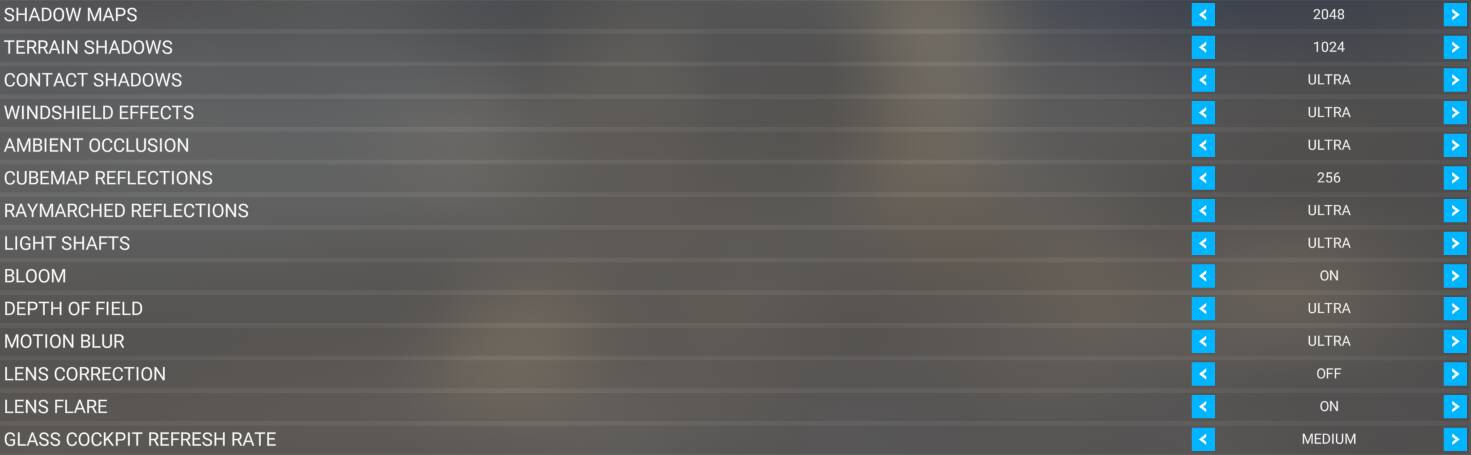
MSFS 2020 settings


Traffic -off
Multiplayer - off
Custom weather - clear skies

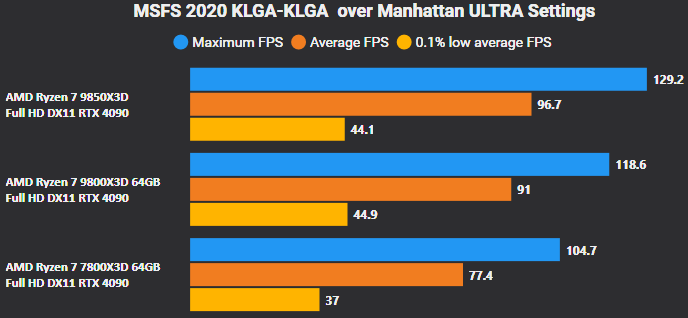
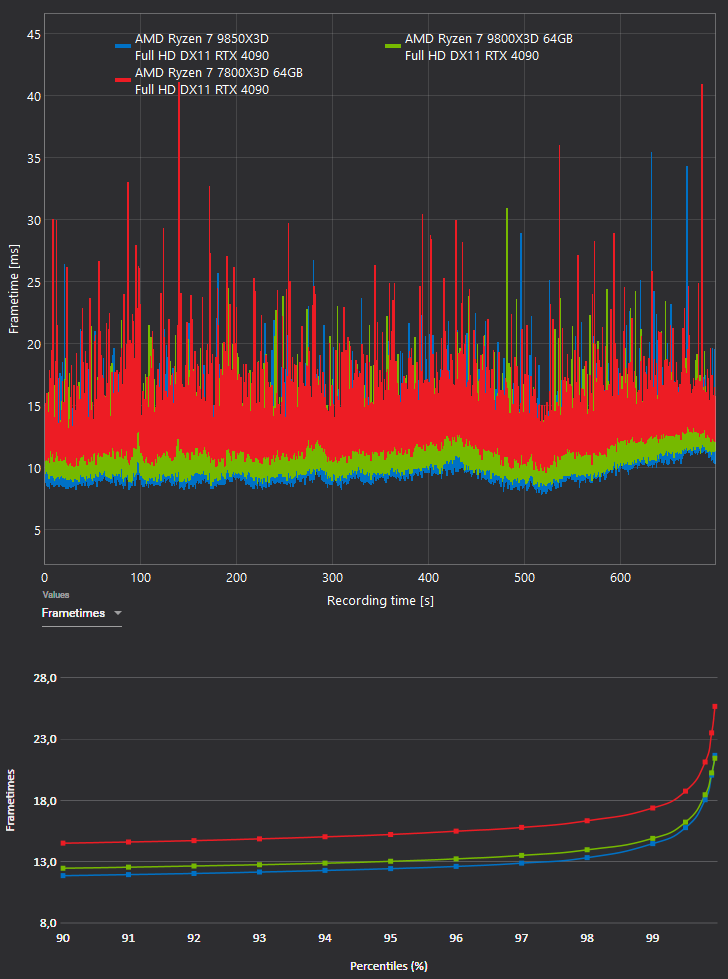
MSFS 2020 1920x1080, Ryzen 7800X3D vs 9800X3D vs 9850X3D

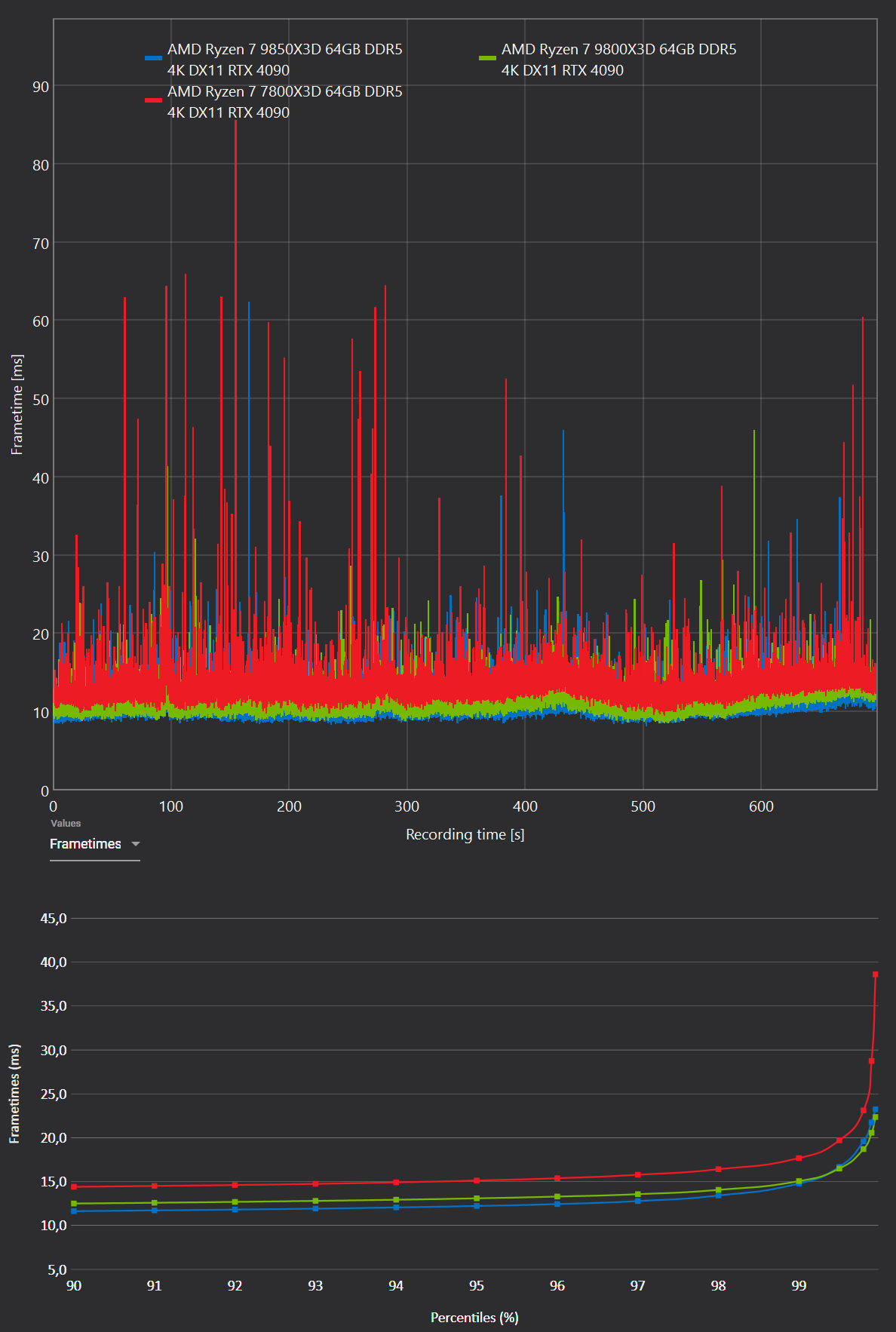
Frametimes - lower=better

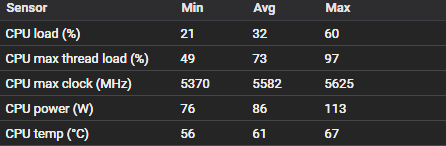
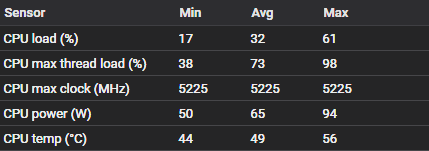
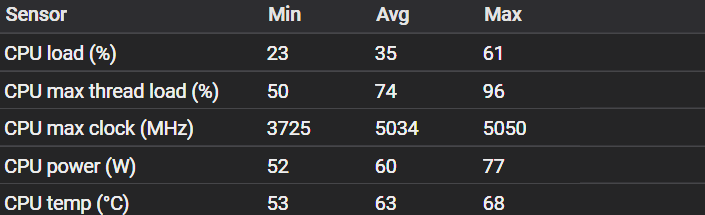
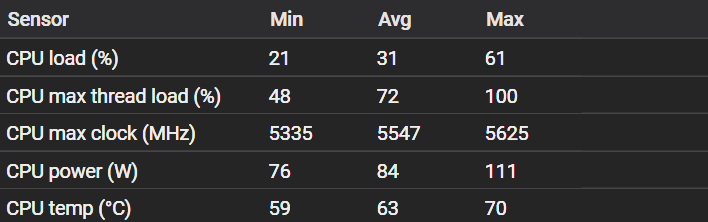
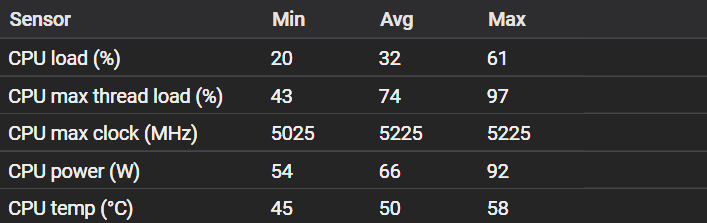
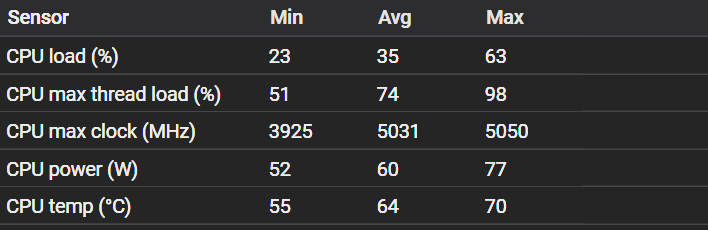
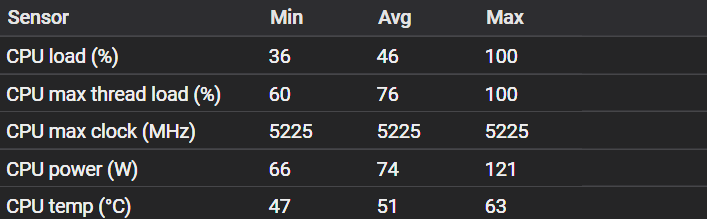
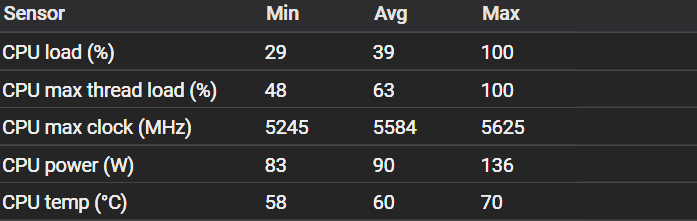
Ryzen 7 9850X3D sensor data

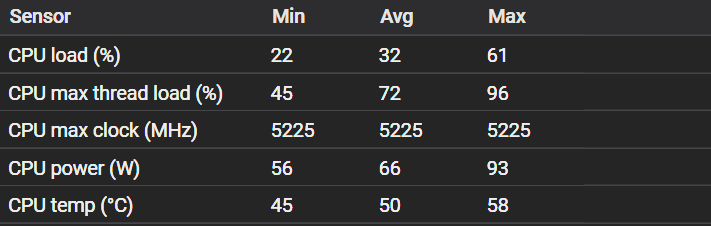
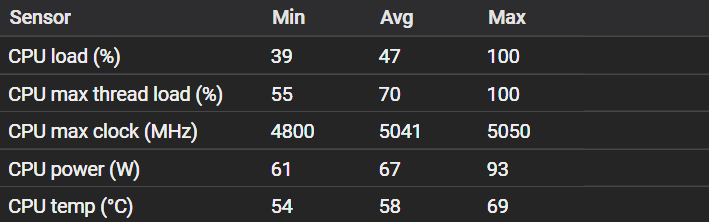
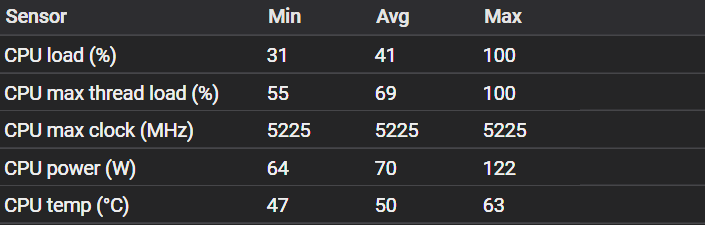
Ryzen 7 9800X3D sensor data

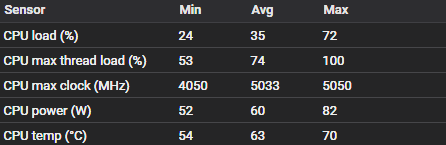
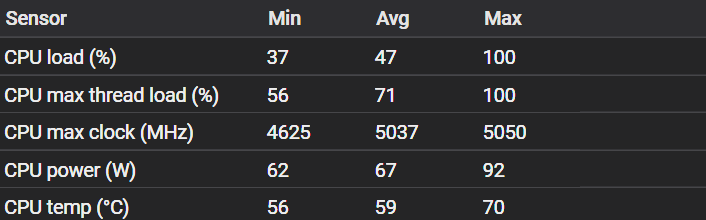
Ryzen 7 7800X3D sensor data

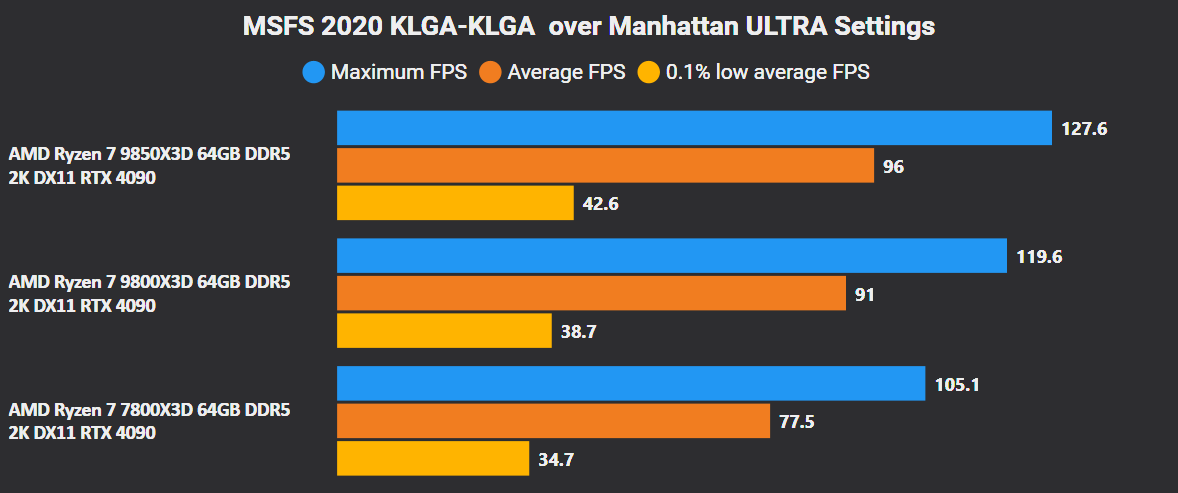
MSFS 2020 2560x1440, Ryzen 7800X3D vs 9800X3D vs 9850X3D

Frametimes - lower=better

Ryzen 7 9850X3D sensor data

Ryzen 7 9800X3D sensor data

Ryzen 7 7800X3D sensor data

MSFS 2020 3840x2160, Ryzen 7800X3D vs 9800X3D vs 9850X3D

Frametimes - lower=better

Ryzen 7 9850X3D sensor data

Ryzen 7 9800X3D sensor data

Ryzen 7 7800X3D sensor data


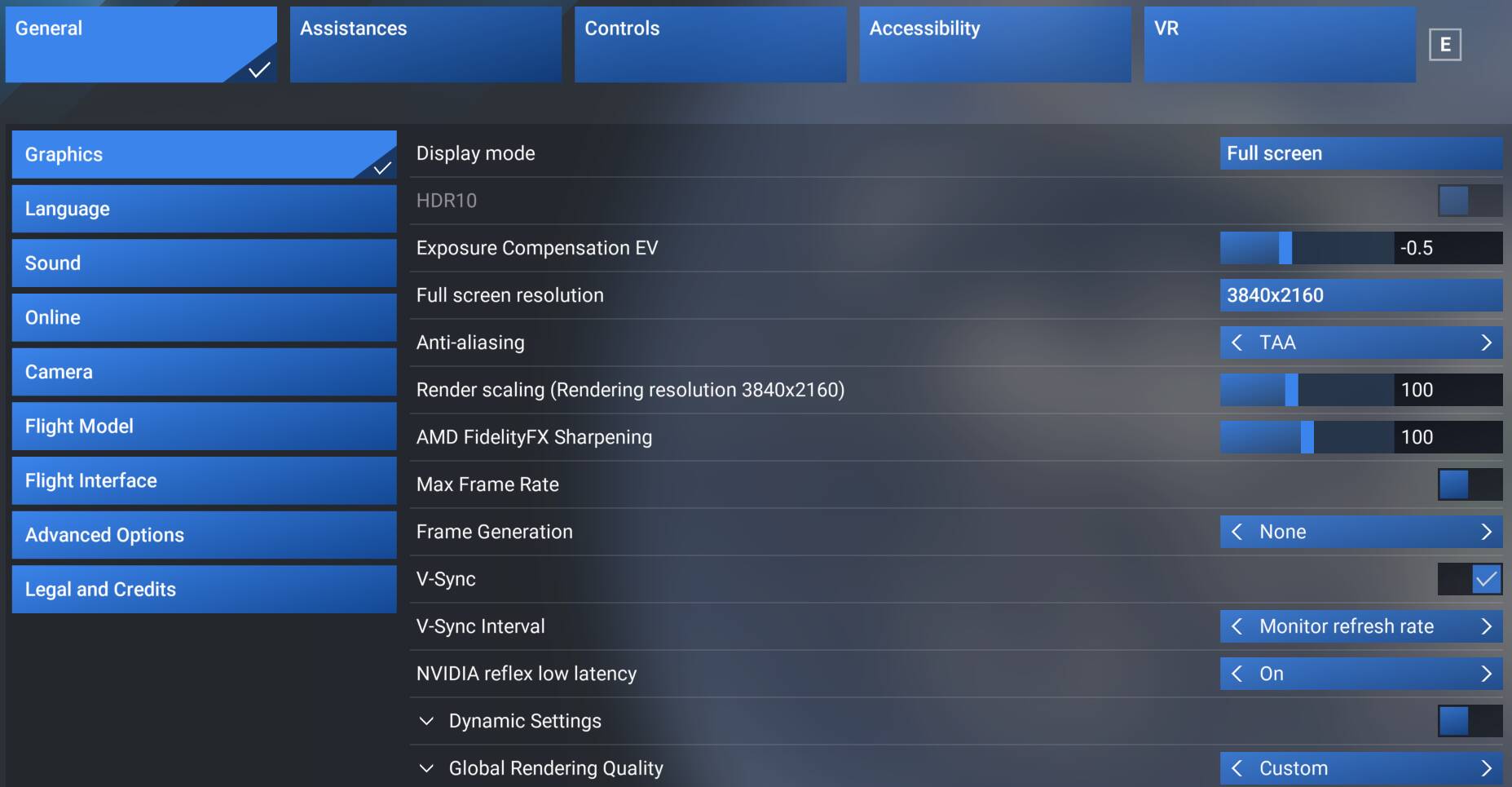
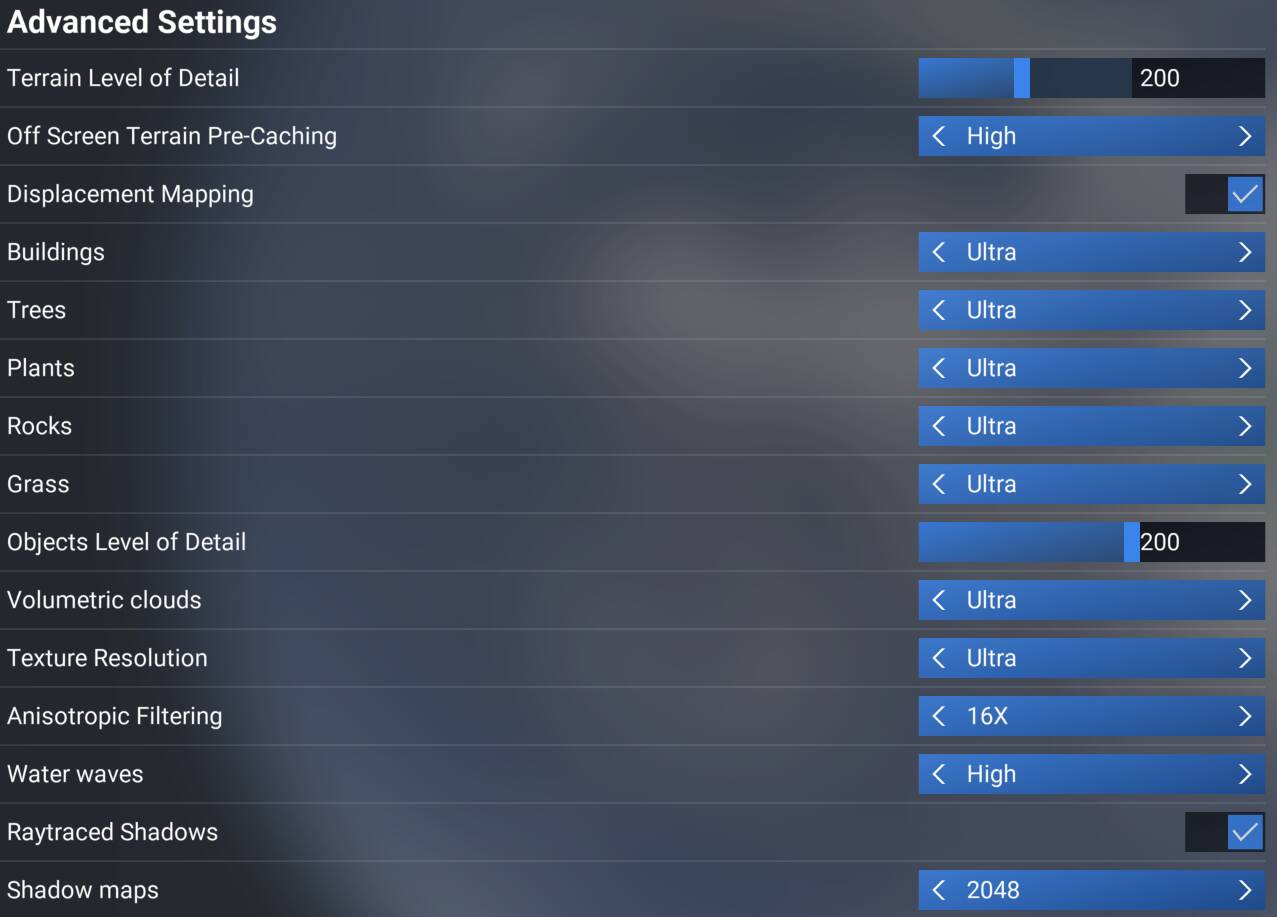
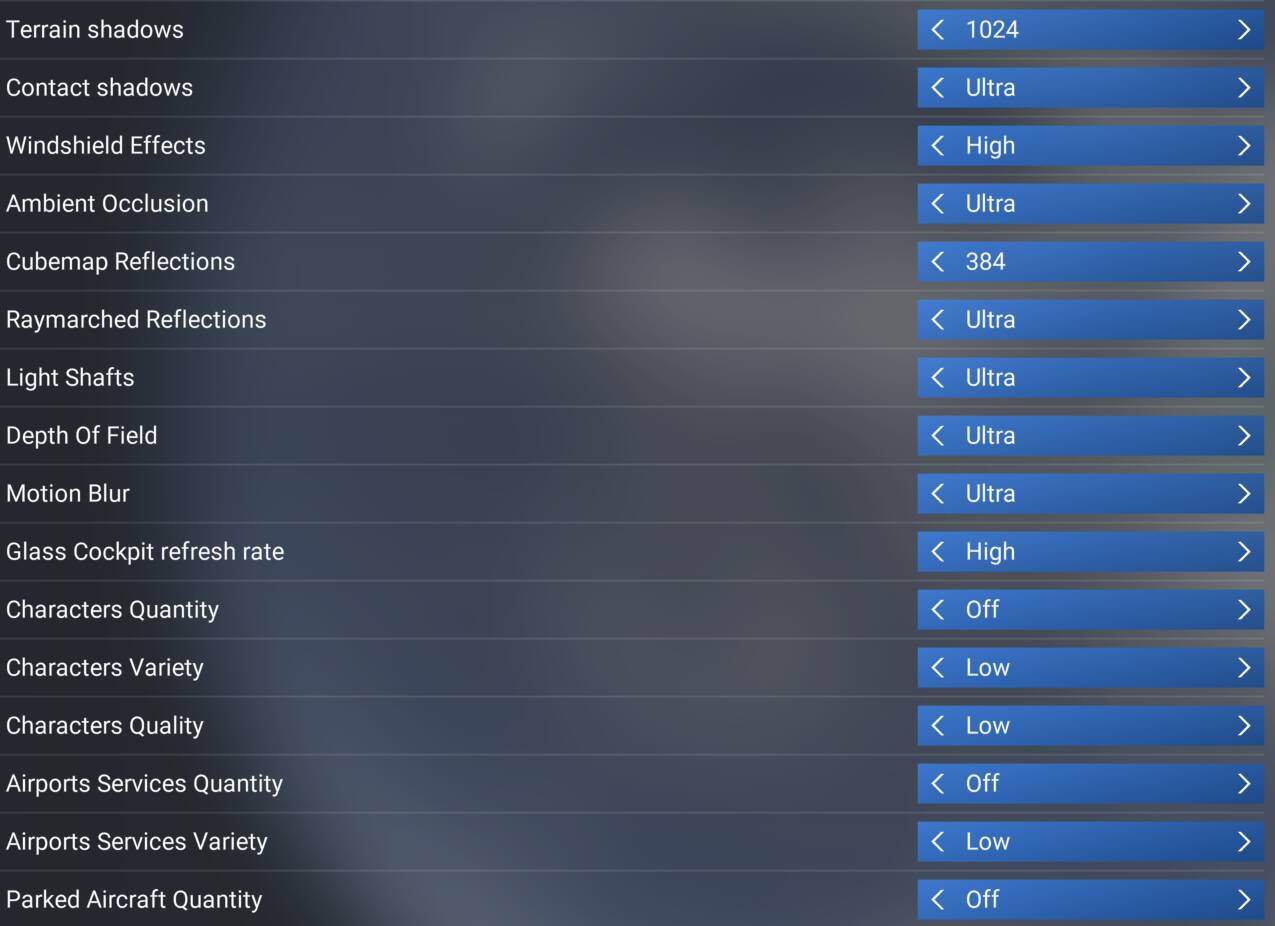
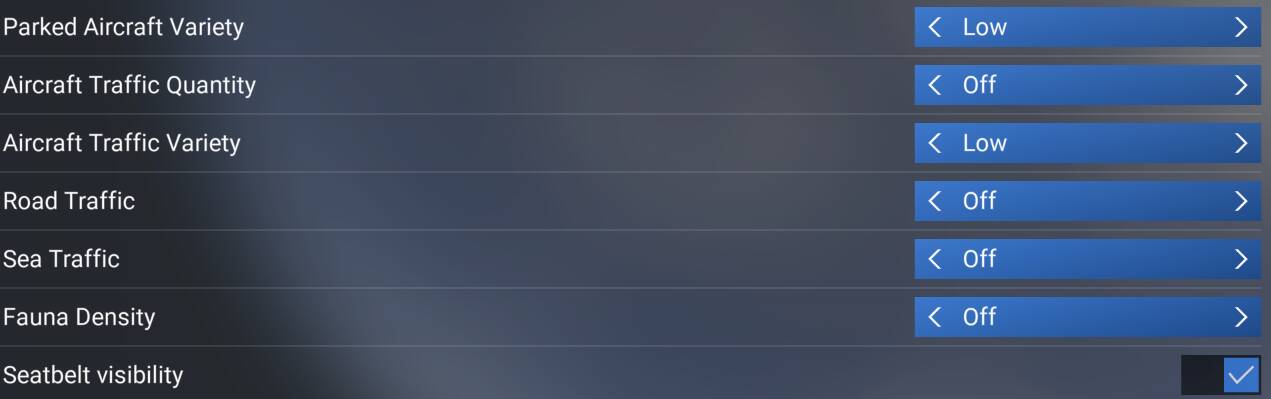
MSFS 2024 settings


Traffic -off
Multiplayer - off
Custom weather - clear skies

MSFS 2024 1920x1080, Ryzen 7800X3D vs 9800X3D vs 9850X3D

Frametimes - lower=better

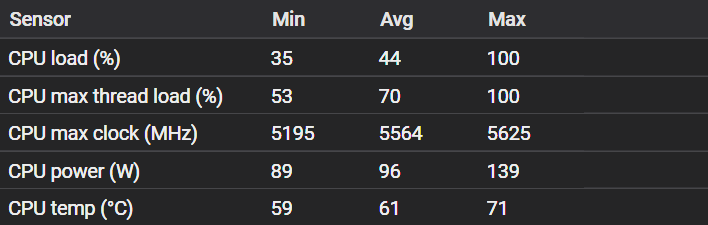
Ryzen 7 9850X3D sensor data

Ryzen 7 9800X3D sensor data

Ryzen 7 7800X3D sensor data

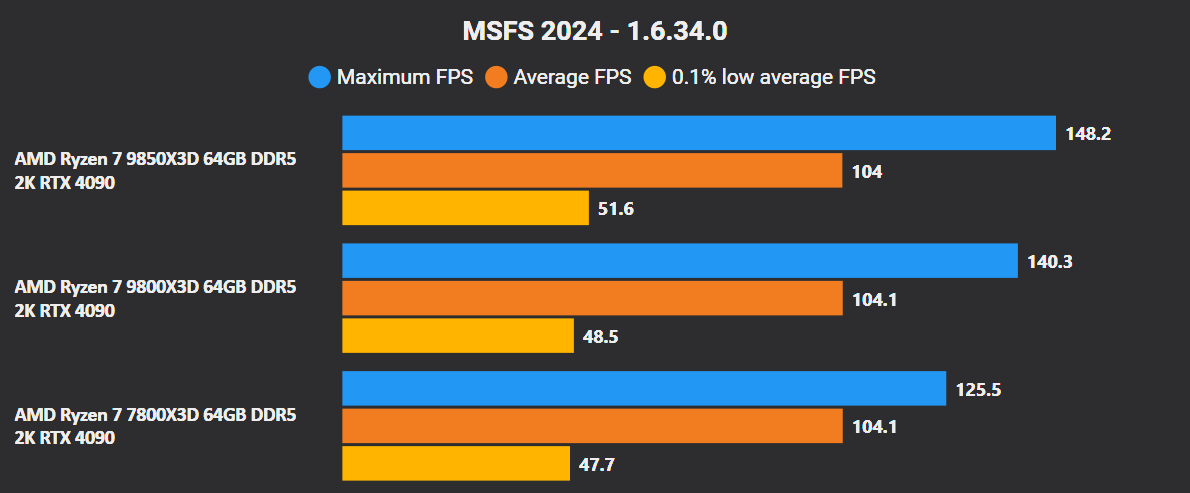
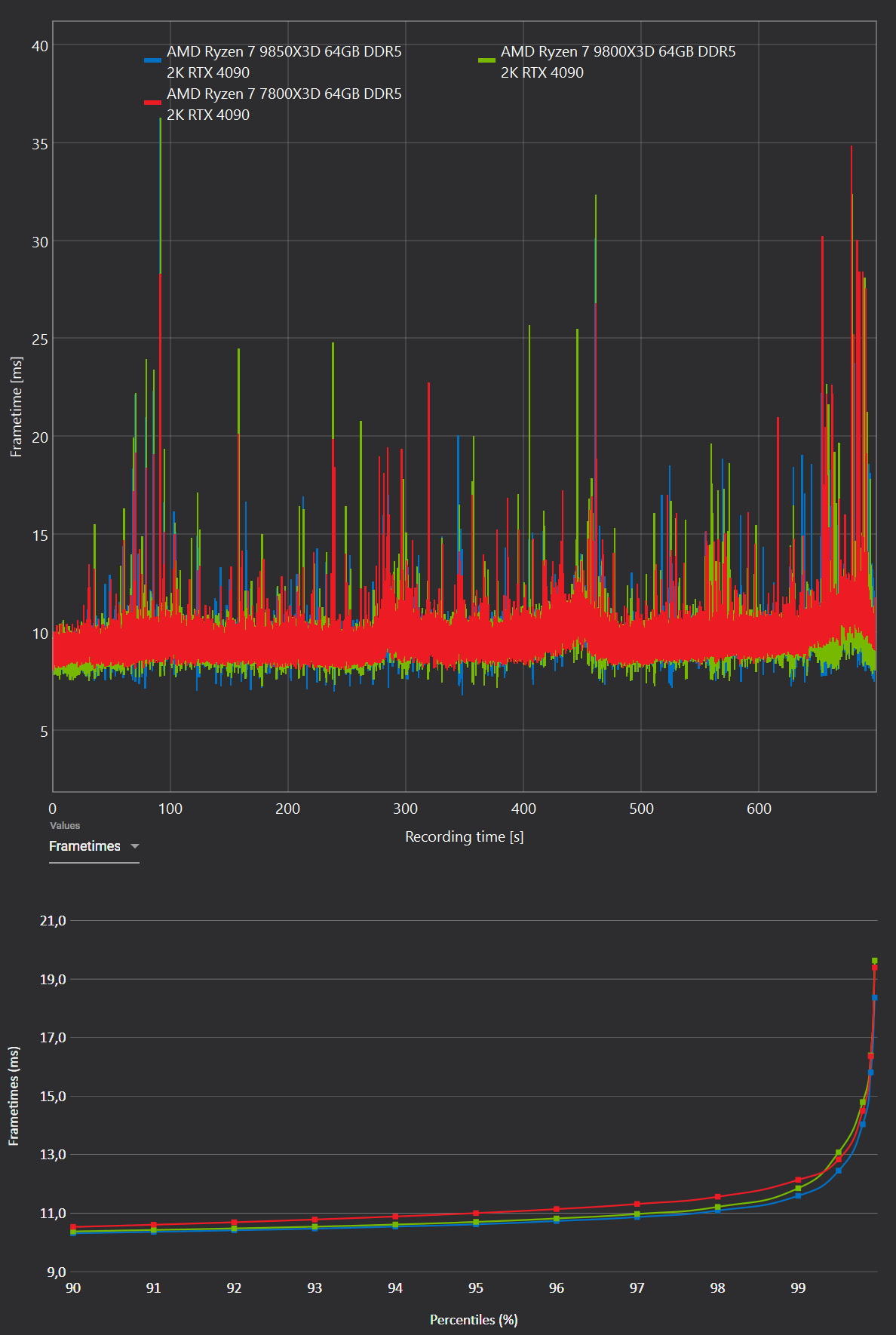
MSFS 2024 2560x1440, Ryzen 7800X3D vs 9800X3D vs 9850X3D

Frametimes - lower=better

Ryzen 7 9850X3D sensor data

Ryzen 7 9800X3D sensor data

Ryzen 7 7800X3D sensor data

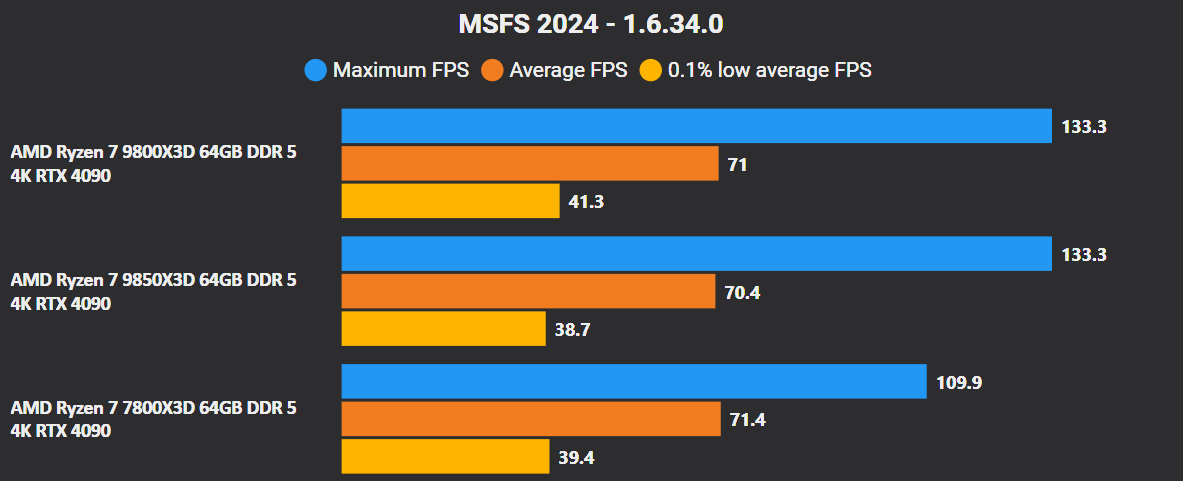
MSFS 2024 3840x2160, Ryzen 7800X3D vs 9800X3D vs 9850X3D

Frametimes - lower=better

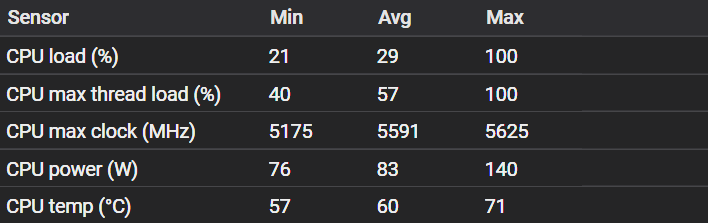
Ryzen 7 9850X3D sensor data

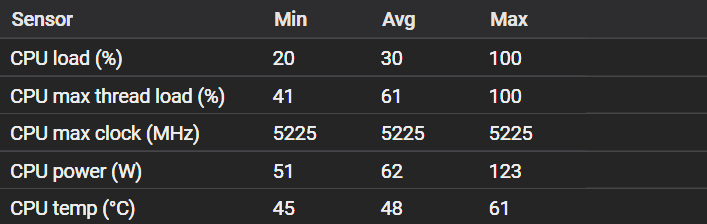
Ryzen 7 9800X3D sensor data

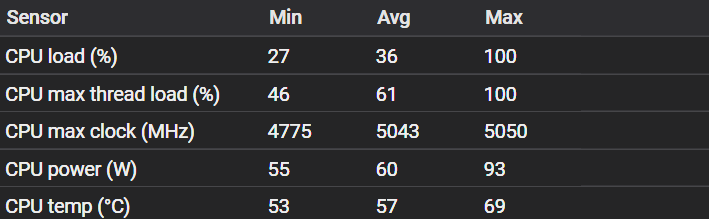
Ryzen 7 7800X3D sensor data


Verdict

If someone currently owns a Ryzen 7 7800X3D or an older CPU, upgrading to the Ryzen 7 9850X3D does make sense. However, the Ryzen 7 9800X3D runs noticeably cooler. If I were choosing between upgrading from a Ryzen 7 7800X3D to either the Ryzen 7 9800X3D or the new king of gaming the Ryzen 7 9850X3D, I would choose the Ryzen 7 9800X3D specifically because of its lower operating temperatures.

If you already have a Ryzen 7 9800X3D, upgrading to the Ryzen 7 9850X3D only makes sense if money isn’t an issue, you have good cooling and you want the new king of gaming.
In all other cases, the upgrade isn’t worth it.

Do you agree with this conclusion?
This is super, awesome work!

I have a 7800X3D, I’m a little tempted to upgrade, but not in any hurry. I’m more wanting to do it, just to learn about replacing a cpu and get more confident in upgrading parts.

Sounds like the 9800X3D is a good bet due to the cooler temps.

Thanks

Interesting. My conclusion would be, if you’re playing 2024 at ultra 2k or 4k, no need to upgrade from a 7800X3D, as they’re all GPU limited.

I would not have guessed ultra 2K would be GPU limited with a 4090. I guess, since I have a 3090 and play in 2k ultra wide, there’s little reason to touch my 13th Gen CPU until I can find a new GPU in the next maybe 10 years :rofl:

Great work. The results make sense to me, since the 9850 adds a +400 MHz boost clock to the 9800. But that’s actually impressive. If I tried to boost my 9800 to 5.6 GHz (I wouldn’t, but if I did) I think the temps would be much higher than the 9850, so it’s looking like a high quality CPU.

With good cooling and a modest undervolt, the higher temp of the 9850 shouldn’t be an issue.

When I open the CPU voltage and frequency clock graphs in HWInfo while running MSFS 2024, it is “spikey” - especially when changing camera views, or loading in, or landing. All of those object coming in to the LOD range at once. So I assume the extra boost clock might avoid the bottlenecks (stutters) in those moments - also assuming memory and GPU are on par with CPU.

First of all I think you’ve done a stellar job of evaluating the new 9850x3d against the 9800x3d and the 7800x3d in relation to MSFS - well done!! :+1:

When I first read this I immediately thought of your bad experience with your Intel I9-13900 and how it degraded over time due to issues with incorrect voltages which caused too much heat (clearly due to an Intel issue). While the max temps you recorded above for the 9850x3d were a little higher then the 9800x3d, they were no where close to the tjmax limit of 89c for that cpu.

So I’m thinking perhaps your bad experience with Intel has overly influenced your verdict?

PS: for those that skip down to the final conclusion and bypass the details I would recommend you state your verdict is specifically in relation to MSFS as there are obviously other use cases for buying a cpu :slightly_smiling_face: .

First of all, thank you all for the kind words - I really appreciate it.

I want to clarify one thing. I returned the i9 13900K to Intel not because I personally had stability or degradation issues with my specific CPU, but because Intel misled users - twice. That, combined with the significant limitations Intel later imposed on this processor, also influenced my decision to return it.

I also have test results of the i9 13900K with microcode 0x129 in MSFS 2020 at 2560x1440 Ultra, using BIOS settings officially recommended by Intel. I didn’t include them to avoid upsetting Intel users. However, if there’s interest, I can add the i9 13900K results and we can compare them directly with the Ryzen CPUs.
image

I’m mainthread limited on my 7800x3d, with my 4070ti super, maybe I need to increase some settings as I’ve dialled back a lot.

Excellent analysis and a job well done. Thanks

TenPatrol excellent work.

Seems AMD has just about reached max on the 7 and 9 versions of the 9000 series with x3d for gaming.

I own a 9950x3d rig and it should be around for awhile. I think AMD is taking it’s time with the 10 series and ram prices are so ridiculously high right now most people should sit tight and wait.

I lucked out building my rig in early April 2025. Ram (have 64 gigs DDR5-6000 CL30) was very reasonable then. 5090s were hard to find but I snagged one at $2600. Thought I overpaid due to a lower MSRP but since then it seems that was a good buy if you wanted a 5090.

Why not to have pushed all the graphics settings to the max for testing with such powerful processors?

Your data confirms my initial expectations regarding this chip, but it’s amazing to see it all laid out so beautifully and have it confirmed! Excellent work, thank you.