For sure. I’ve posted CapFrameX tests I did, where I found that using Process Lasso with Bitsum Core PArking and Bitsum Ultimate Power Plan to force flightsimulator.exe to run on my vCache cores ONLY (with almost all other processes on the non-Vcache cores) gave me the best sim performance - by a significant margin.
No - from the you tube videos I’ve watched there is no compelling reason to upgrade (along with the price being outrageous  )
)
With the release of the 9950X3D2, I went ahead and did NOT buy one lol…
But I did decide to go ahead and upgrade from my 9800X3D to the 9950X3D. I will probably end up giving my son the 9800X3D. I didn’t upgrade for higher FPS though, I already know the difference is negligible, what I did upgrade for though is productivity/multi-tasking, and better frame pacing. Since I stream and run other applications side by side, I figure it’ll run smoother at least in that regard. Also I’ve noticed slightly better 1% and 0.1% lows.
For those on the 9950X3D, how do you have yours set up for the X3D cores CCD? Process Lasso or just trust the OS and AMD Drivers deal with it?
Thank you.
I believe you are much better to do a clean install of Windows with the latest Chipset driver downloaded from AMD’s website for your board, and let the Chipset manage the cores - it should do everything to correctly assign MSFS to the CCD with the V-Cache. I don’t believe Process Lasso is needed or beneficial any longer (just from what I read, I have 9800X3D but follow the CPU series closely).
Also, quite a few people here have posted straightforward techniques to undervolt (to reduce heat and power leaving room for boost clock) and tune memory timings, for improved MSFS performance in this thread
I think you’re best to avoid manually trying to force your CPU core usage. Just let Win11 and msfs 2024 manage these imho. Even though Project Lasso fanboys post how good this is, I’ve seen a lot of local users end up with a lot of stability issues after using this.
I just received the 9950X3D and installed it, I can confirm there’s a difference when it comes to frame time pacing! I’m not getting any higher FPS but the sim overall feels way smoother now! This goes for both 2024 and 2020!
While the 9800X3D does give a great deal of FPS, it’s the frame pacing that’s winning me over with the 9950X3D.
If the sim is still expected to get further fixes with regards to AMD FSR before release, I’m hoping it will help with the overall smoothness.
I’m satisfied with this CPU, I didn’t have to reinstall the OS, just had to remove the AMD drivers and reinstall them. The 3DVCache service is now also running where it doesn’t need to on the 9800X3D since there’s only one CCD.
The fact remains though that one must spend such large amounts of money on a PC just to run this sim/hobby properly, especially stutter free.. geez lol.
I will say, I did reignite my passion though after I went flying this weekend, and honestly the wind feel in the sim is pretty realistic I’ve noticed. We don’t get to “feel” it in the sim per se obviously, but the way it’s represented with the aircraft as it cruises through the air is very well implemented IMO. That is definitely one thing that I love in 2024 compared to 2020. I just hope we can get rid of more of these bugs before SU5 release.
Just to verify - make sure your games run on the 1st CCD (CCD0) and non-games run on CCD1.
Just confirmed this through Ryzen Master, it is working properly. Thanks! 
I’ve heard the same thing with the new 9xxx-series dual-chiplet CPU’s.
My decision to use Process Lasso with my 7950X3D was data driven, and shouldn’t be construed to mean that it’s the right thing for others.
TBH, if it was me with a 9850X3D or 9950X3D, I’d setup the system and test Lasso the same way.
Based on what I’ve read, I might not (probably not) need it. But the decision would be made based on testing.
Great to hear, and interesting. The only difference in the specs of the 1st CCD on both… no, on all 4 variants of the 9800, 9850, 9950, 9950X3D2 … is the boost clock speed, which indicates higher quality units. That native boost clock speed is impressive at 5.6 or 5.7. With tuning I’m set with boost at 5.3 GHz on my 9800.
I would assume that the existence of the 2nd CCD - to handle Windows, other apps, and background processes - would also leave more headroom on the 1st CCD for MSFS, helping improve things like frame pacing. And I’m still not certain if MSFS expands or moves any threads to the 2nd CCD or not, I’d love to know.
Sounds great. I’m actually pretty impressed with the performance improvements I’ve seen in SU4 and SU5 beta so far, and by turning off a lot of Windows processes (Hibernation, Copilot, OneDrive, etc) and really tuning my memory subtimings, I’ve never seen it smoother - on 1 screen…
Hopefully next week we will see the FSR Frame Generation fixed for multiple monitors and I can really do a proper test on 3 screens. I’m trying to save money for FFB yoke and pedals, and cyclic and collective for helicopters - otherwise I’d be tempted.
My understanding is that as long as the Xbox app recognizes FS as a game, which of course it would, then Windows would know to use the gaming CCD. At least that’s what I remember reading as well as to have power savings set to performance.
Has anyone ever compared Power Setting of Balanced vs Performance on the same PC with MSFS? I’d be curious to know if it makes a difference. So far I’ve left mine at Balanced.
I’m about to do some testing for NVIDIA driver on 3 screens, so if I have any energy / time left, maybe I’ll try.
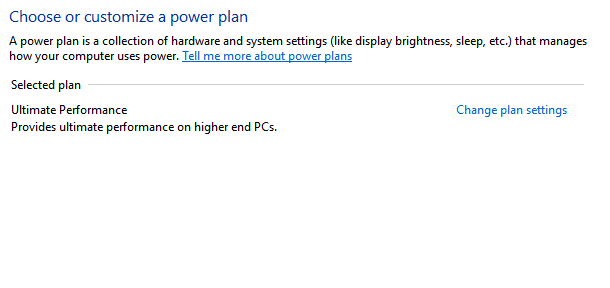

I see Ultimate in mine as well - it’s funny, it seems to show up with certain BIOS settings, like EXPO enabled, PBO enabled. But I always liked the idea that the CPU could idle when it wants to instead of running at full clock speed when not needed.
Maybe I’ll test to see if there is a measurable difference, likely at takeoff or landing at big airport in PG area.
I think you can restore (if needed) by:
powercfg -restoredefaultschemes
I have a 9950X3D. I’ve found that it’s an unfortunately common event for me to discover MSFS is running on the wrong CCD. Either the AMD 3D VCache service has crashed (showing as stopped in Services) or the Xbox Game Bar refuses to recognise either that MSFS is a game, or it just fails in some other strange way.
I did try Process Lasso but found it a real pain. And in my experience using it was more likely to introduce stutters than solve them.
However, I’ve started using the “CPU Set Setter” tool instead (together with disabling Windows / Xbox Game Mode entirely as their instructions recommend). Honestly this thing is very good - you can set up automatic rules for anything in your Xbox Games / Steam folders to run on the cache CCD, and everything else on the frequency CCD. This results in an even cleaner split than before - I know now for a fact that MSFS is the only thing running on the cache CCD and all the background programs (Volanta, ElevateX, Fenix, GSX Couatl, Windows stuff etc.) are now all out of the way on fhe frequency CCD. It has made my sim feel smoother. Might be mostly placebo effect but I don’t care 
Would I recommend it? Only if you’re comfortable with changing this sort of thing and understand what it’s doing. Most people are probably best to stick to the defaults with the chipset drivers and Xbox Game Bar / Game Mode.
Yep. I made sure I had a backout plan before I decided to remove the ones I didn’t use. I also backup the system state before doing anything like that, including Windows updates.
I experimented with Process Lasso with my 9950x3d also and ran into the same issues with games not running on the correct CCD afterwards. The only way I could fix it was to use Revo Uninstaller (free version) to completely remove PL and my chipset drivers and then reinstall the chipset drivers. I also did a repair on my gamebar software via the xbox app.
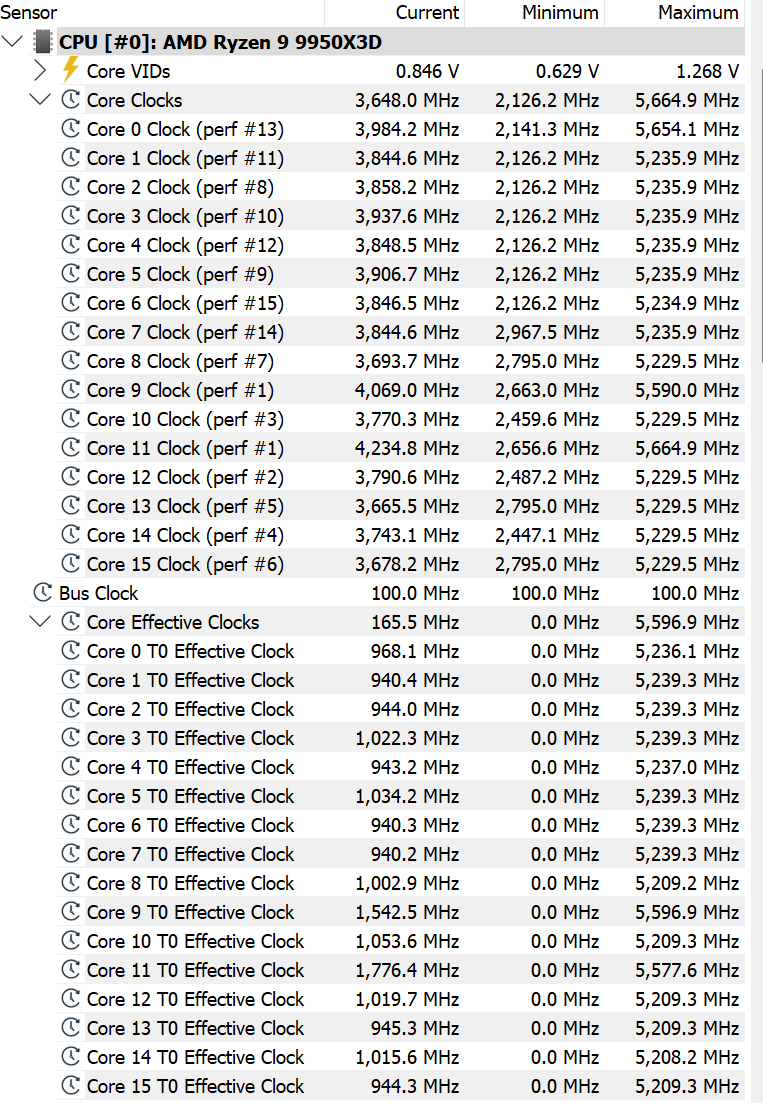
Ultimate and Performance power plans running your cores full tilt all the time is a myth. I found an old screenshot of HWinfo64 showing both core clocks and effective clocks (system was under moderate non-gaming load). If you just look at core clocks you’d think yes, my cores are running hot as the min clock recorded is 2126Mhz. However, core clocks are notorious for not showing the sleep states and if you hover your cursor above core clocks the help info will tell you that. The real indicator of how the cores are running is effective clock speed.
Looking at the core effective clock speeds below tells a different, more accurate story. The minimum column shows for all cores that at some point their clocks were zero (0) or idling. Even the current effective clock rates are below the current core clock rates so just because the cores are told they CAN run at a particular max clock rate in reality they don’t unless they actually have something to execte on.
You can think of the benefits of ultimate/performance power plan is that they keep the cpu primed and ready to go without having to pull the cores out of a deep sleep state like the parked state. This has a small but noticeable effect on improving the smoothness of whatever you are running (including the sim) reducing micro-stutters. There is no adverse hit with increased heat.
Fully agree - I confirm that. I won’t include a screenshot since I don’t have HWInfo installed at the moment, to avoid it interfering with or skewing the tests I’ve just finished.
I can confirm the same, but I’m guessing at this point you don’t really need my confirmation. 