Hello everyone. Brand new to flight simulators (and flight in general). Just started on my PPL and have 3 flights under my belt.
I spent a lot of money on a home flight simulator rig. Saitek components (yoke, quadrant, rudder pedals) - all working just find out of the box with MSFS2020. After a few tweaks of the USB settings in Windows 11, the Radio Panel, Flight Switch Panel work. I do not know if the Multi-Panel works, but it lights up when I boot the PC (haven’t gotten into that device much, but none of the buttons do anything when I fly…).
But, the main problem is that the FIPs do not work at all (I bought 9 of them). They are plugged into 2 separate USB 2.0 hubs (one powered, one not) and those hubs are plugged into the USB 2.0 ports on the PC (new Alienware desktop PC). I’ve set the power options in Windows 11 to not allow the PC to manage the power, per many recommendations I’ve seen online. When I boot the PC the FIPs and the Multi-panel light up (i.e. backlight on the FIPS, and backlight on the Multi panel with the AV indictor). So…I know the PC sees the devices. I’ve downloaded and installed the Saitek drivers (MSFT_Plugin_x64_software_8.0.313.0) from Saitek/Logitech.
However it’s clear the PC doesn’t recognize the FIPs devices as I see them in the management console as 9x unrecognized devices. I’ve also tried plugging a few of the FIPS directly into the USB 2.0 slots on the PC itself…still no dice.
Any advice?
maybe Spadnext might be able to help you. The software is not free but is an amazing tool with all kinds of peripherals and fs2020..https://www.spadnext.com/forum/viewtopic.php?t=53918
1 Like
SPAD can definitely do it, though it’s not the easiest software to use. Or rather it is, but some knowledge of SimConnect, and how cockpit functions translate to sim variables would really help.
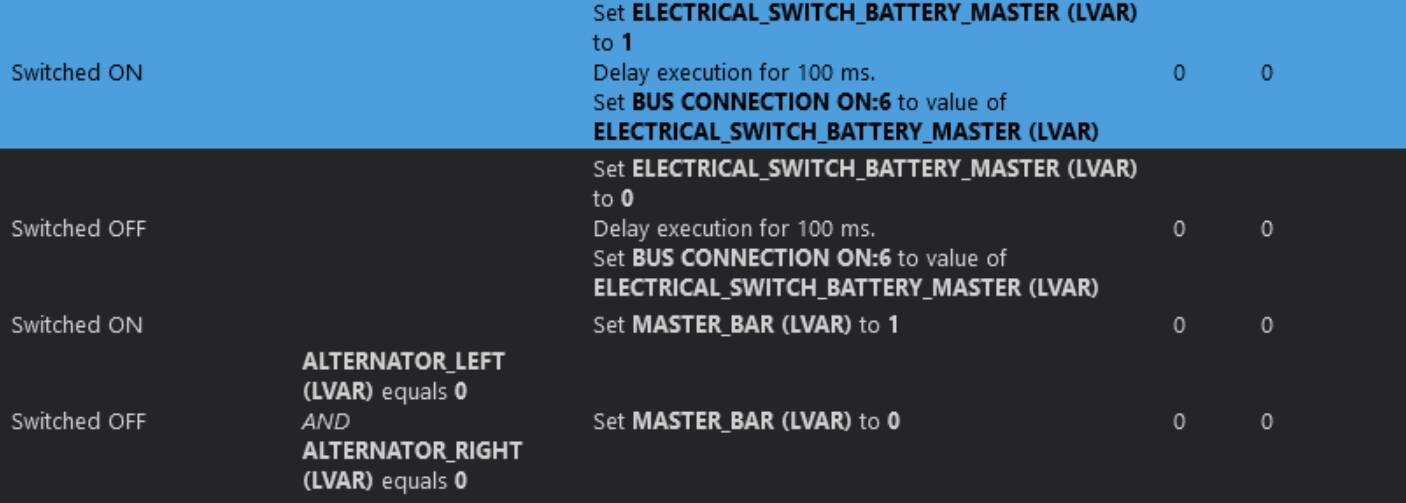
For example, switching the master battery on could be as simple as setting a single simvar to ON when the switch is flipped to the on position, and off when OFF.
Or it could require something like this:
Fortunately SPAD has an online library of profiles for a variety of planes, and simulators, accessible from within the program. Chances are you will find one for the plane you want to fly. You can then look through this to see how it was done, and learn a little bit about how it all works.
In today’s world, the FIPS are a bad choice for a home simulator rig. Their drivers are ancient, and they do not work well as sold unless you use software like Spads. There are other solutions like FsRadioPanel or Flight Display Companion, etc that you can use with any Android tablet and you can see similar information. When I first started with MSFS2020 I had all Saitek components, no Fips, and even they worked fairly well with X-Plane, it was not te case wih MSFS2020. Somebody in X-Plane made mods for Saitek equipment, and they worked really well. Even then the Fips had problems . Then Saitek sold the line to Logitech and they revised the drivers for MSFS2020, but the Fips never worked rifght unless Spad was used, and somebody please correct me on this subject, because I never owned Fips.
Then I moved on to better hardware for a more precise control of the plane. I even modified the Saitek Yoke (check youTube) which improved the control by making it smother, but there is a limit to it because the quality of the sensors. The brake pedals were a disaster, after 2 year the small board inside the unit failed, and there is nowhere to find a replacement, so I trashed the pedals and I got an MFG unit, works great, and they are very well built.
My question to you is “Did you make an extensive research on the suitable components for a flight sim rig?” Maybe my case was isolated, so my advice is make sure the pedals cannot move with full pressure on either pedal, don’t yank the cord from the unit, make sure you use the AC adaptor that suply power to the USB ports in the side of the unit, and most of all get an extra USB 3.0 powered data hub for all your connections (I have an EasyAcc) or equivalents. There are adjustments to sensitivity you can make that changes the behavior of the yoke and brakes. This is my own experience with Saitek, I’m sure there are other opinions, I owned CH and Saitek controls before, I own Honeycomb And MFG controls now, and it is a different sim for now.
1 Like
My advice:
- Replace your unpowered hub with a powered one (and make sure the power supply is sufficient to provide at least 0.5A, or better 1A) per port. Running some of your FIPs off an unpowered hub is just asking for trouble
- Have a look at spad.next, there’s a fully functioning free 14-day trial. Not only should the FIPs work much better, you will also get the ability to run gauges from fipgauges.com, which are far superior to the stock ones. And you will also get full control over your radio, switch and multi panels, with spad you can really map almost everything exactly the way you want.
I have all three panels and a handful of FIPs myself, and without spad.next they would be totally crippled.
3 Likes