I’m seeing repeatedly long load times into the 747 & 787. The progress bar hits ~3/4 and then just halts and moves so slowly that a few times I’ve thought the sim had crashed.
This is certainly a new thing with the beta.
Incidentally, I saw the same behavior earlier this AM prior to today’s 747/787 updates. The issue existed on the previous iterations, as well.
Only had a brief window last night to check it out. Loaded it up, tried to load into a flight, and it took way more time. Shut the sim down, tried again, same result. Then I had other stuff to do so I didn’t even fly it as of yet.
I should have more time on the weekend. I’ll check out the dev console then and see what errors are being spit out.
If you want top fly over the weekend, you might want to start the sim loading Today !!
3529 ERRORS & 1803 Warnings
Many from 3PD planes that have not been updated by their developers for over 4 months, but this was typical BEFORE SU13 update, and the now very much slower load time.
Simulation might be getting better for the Airline Plane, but the GA planes are slowly falling apart, (with the newer AAU changes ?)
The only plane I loaded was the C172 G1000. In the last dev live stream, Jörg said that the popout window performance issue was going to be fixed in SU13. I loaded in to check that. Big shocker - it’s not fixed. So I didn’t try any 3rd party planes, just the single default plane.
I’m going to hang off installing the beta now because of this one.
However, I previously did resolve a slow loading bug with OVRService, and the key was using Process Monitor to get insight into what was happening on loading, for any enterprising debuggers out there.
I also noticed there’s now a log option in the settings, might be some clues there (or maybe not).
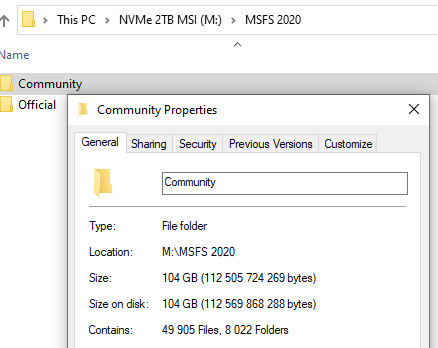
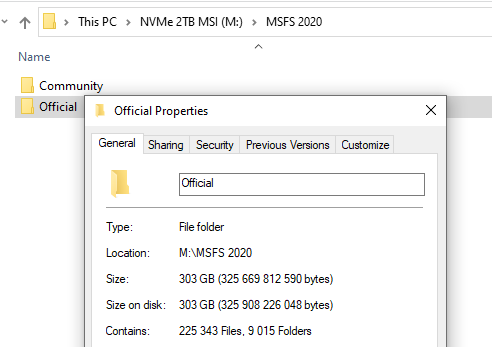
Just quit from the current beta for now, back to 1.33.8.0. My load time is now about 3.5 minutes with everything installed in my Official and Community folders. That is roughly 5 times faster.
SU13 beta is definitely cause of slow loading in my case. Will stay off the beta until this is fixed.
My load time, to where I can actually fly, with SU13, is 3:30 minutes, so I will put up with that, and be able to see what else got “Broken” or “Fixed”.
What is unfortunate, and a little frustrating, is that users will probably never be told, what caused this longer loading time, but it may, at some time, magically be fixed, without any explanation (or acknowledged embarrassment, or apology)
I wish we could have some more TECHNICAL Q&As, where the community can communicate with the actual Developers, ask technical question, and get truthful, technical answers.
So far, I believe there has only been one of these, but it did more to inspire confidence in Asobo’s abilities, than all the other PR Q&A’s, that seem to be little more than Marketing Hype, and promises of secret surprises, yet to come.
Can anyone tell me where the list of “believed to be” registered and installed items are – ie the list that appears when you go into “Content Manager”.
I assume it is stored somewhere locally on one’s computer, and also updated, out on the cloud, – with the potential to get corrupted, and / or out of sync – which may be the cause of all the extra, unwanted, previously un-installed content, that so many had forced back on them with this first Su13 beta.
I see some pretty big “Configuration / Data Store” files Growing to massive sizes, as I use MSFS over the past year, without any tools to manage them, or trim then down, or manually read them / check for corruption !!
Nothing for the user to be concerned about ? just TRUST all is OK ?
Agreed, and maybe that parsing was made more complex or comprehensive in SU13, which broke it, and now it does not know what you don’t have, but own, so it restores all you own, as opposed to only what Content Manager says you should have actually installed. ( WILD GUESS !! )
I just tried the sim on my laptop (i7 8750H, GTX 1060 Max-Q, 32GB RAM), which is nowhere near as powerful as my desktop (7800X3D, RX 7900 XTX, 32GB RAM).
It took 9 minutes 29 seconds to load into the 787 at KSFO and this was not the initial load. I’d loaded into it once before and decided to time it on the second try.
I do not believe we can call this acceptable, at all.
EDIT:
I went back and stripped my OneStore folder of anything that wasn’t Deluxe, Premium, WU, CU and Top Gun, Bullseye Landing content and tried again. My Community folder was already empty.
Again, on my laptop I timed the sim’s launch at 03:21. The load time into the 787 this time was 02:34.
There is something going on here with Marketplace content affecting the load times.
Yep, my load times have definitely and massively increased. I went from about 15 minutes to about 45. I do have a lot of addons but I haven’t changed anything before installing the beta.
One particular issue I’ve noticed is that it loads normally, but sits at 100% (full bar) for about 30-40 minutes. That never used to happen. Does anyone else see the same?
same. launching msfs takes much longer than before to get to the main menu. before I could easily grab a coffee, now also a sandwich and another coffee. once there it is ok, means flights still take some time to load but not necessarily longer than before