DONT DO IT !!!
not till its fixed at least
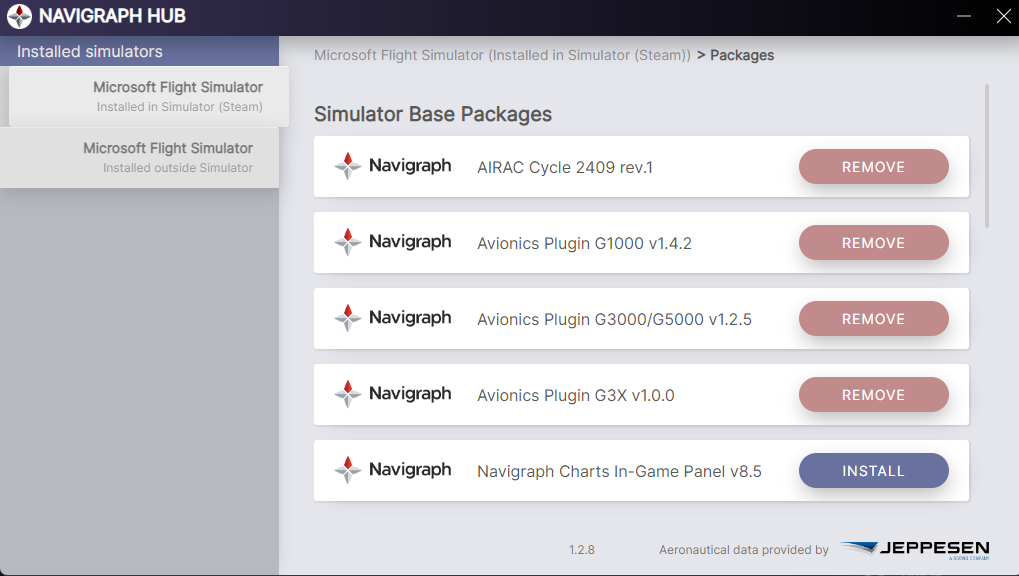
 Just to confirm, removed the Navigraph navdata, now it loads in for me too.
Any other Navigraph stuff seems fine.
Were you using Navigraph?
MSStore version, CTD 3 times. Never had a CTD at all and I’m a user since 2020.
Which party of Navigraph ?
CHARTS ?
NAVDATA ?
DATA MANAGER ?
SIM LINK ?
I´ts just brilliant. Just had it going for months without crashes. They send out an update and here we go again…
Did you remove Navigraph “cleanly” with their tool?
I’m assuming Navdata, but we’ll see.
I uninstalled the AIRAC cycle from Naivgraph Hub and the sim now loads up fine. Avionics plugins and charts are in community folder and didn’t cause the crash for me. So I’m fairly confident that particular thing is causing these crashes.
Now hopefully either Naivgraph or MS can help fix it soon for folks 
My download is stuck at 63%, says there is a problem.
Oh your’e lucky …
We are RIGHT BANG In the middle of fixing the final few issues for a major product release …
Suddenly ALL WORKS STOPS

Okay, so an easy workaround perhaps. I’ll preemptively remove Navigraph navdata when I get home, check the sim updates, and loads, then put it back again to see what happens, and report back.
Thanks for the feedback folks, we have escalated it internally at MS.
9 Likes
I confirm that! Removed AIRAC from the Navigraph Hub, now it’s loading.
We can also let Navigraph know if we’ve confirmed that is the issue. Could be as simple as those folks updating their AIRAC to fix the problem.
Edit: Posted this issue in Navigraph’s forum too. https://forum.navigraph.com/t/navigraph-airac-in-aau3-may-be-causing-msfs-crashes/17061
Removed all Navigraph folders from the community folder and the sim starts. Thanks!
I am also affected by the issue. For me, it was also Navigraph; all other addons are working.
Hi folks,
Can we get everyone who is experiencing this issue to confirm if you have Navigraph installed, and if so, if the workaround posted above has allowed you to launch the sim properly?
Thanks,
MSFS Team
9 Likes
same here I removed everything installed from navigraph hub. Then it started again.