I use simracingstudio with my motion rig and I get awful stutters, unplayable. Worked fine in the beta.
For mos flight-tracking options 1Hz is probably fine, but SimConnect has traditionally been used for applications requiring much faster update rates. Even Flight Events has a (undocumented) possibility of tracking at up to 20Hz 
Instruments, motion platforms etc, etc, all rely on SimConnect.
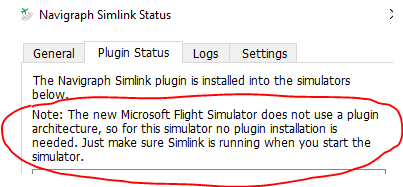
Simconnect is what allows third-party utilities to interact with the sim. That includes simple moving map apps and full EFB apps.
1 Like
+1 Brunner Yoke - haven’t been able to manually control an aircraft since release.
+1 this is a very important for so many apps. Please fix
1 Like
+1 Altitude (IVAO Client) also uses SimConnect…
Please update these controls as the real sim community uses all sorts of variations to these devices
Pauly
I am greatly enjoying MS FS2020, but this issue right here is the #1 critical issue for me right now.
1 Like
I am glad I bought a $1 Xbox GamePass for PC. If by the time the 1-month trial expires this stutter issue is not resolved I will cancel my GamePass then wait for a patch before I actually buy the full product.
It has a lot of promise and when it runs fine it is great. Cruising at 35000 ft with 40 - 60 FPS is great !
But the 100%CPU usage with 1 FPS for prolonged periods of time is a no-go.
I run DCS World at anywhere between 60 and 100 FPS with no drops. I should have a guaranteed 30 FPS with Low settings in FS2020.
Fwiw…my specs:
i4770K @4.4GHz
GTX 1080Ti 12 GB
32 GB RAM
Installation on SSD
Thanks
+1,
using spad next.
Same issue here. I am able to run the sim at 35 FPS when Vpilot or SpadneXt are connected. Normally this would be great but i am normally getting around 60 fps and the issue is that the image is very jerky even at 35 fps. It is like it is dropping to single digit frame rates for a brief instant. It even happens on the ground purely by moving flight controls. This has made the program unusable for my purposes so back to P3D until it is sorted.
+1 ! Yes simconnect nneds a fix. It’s a must have for spad.nxt users as the FS2020 seems very friendly with em !
+1. it does need a fix !
I’ve seen thousands of posts on dozens of different threads all from people who can’t use various software and hardware peripherals with MSFS 2020 and all the issues are because SIMCONNECT Client is currently incompatible with MSFS 2020 causing it to suffer enormous drops in FPS, followed by freezing and crashing, which essentially makes MSFS 2020 unusable with dozens of different flight sim software and hardware peripherals. So the choice we are left with is, to not use the potentially thousands of dollars in incompatible hardware peripherals that we have invested in for our cockpits or fly in MSFS 2020 without the many flight sim software and hardware peripherals that have become ingrained in our flight processes.
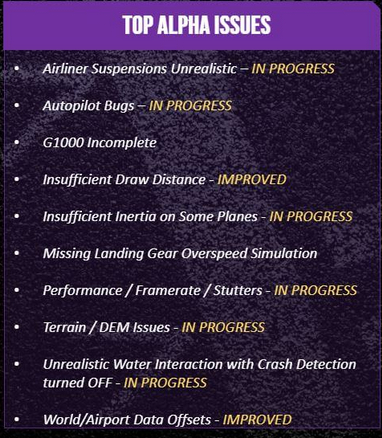
I just checked the MSFS 2020 website where they have a page listing the Top Known Issues with MSFS. The list was just updated yesterday and unfortunately SIMCONNECT is no where to be found.
Everyone who is having any issues with the any of the dozens of different software and hardware peripherals that use SIMCONNECT either because the peripherals aren’t working or because SIMCONNECT is causing MSFS to drastically drop on FPS, freeze, and/or crass, PLEASE, PLEASE, PLEASE GO RIGHT NOW AND SUBMIT A TICKET AT THE MSFS 2020 Zen Support desk and make sure that you mention that SIMCONNECT Client is causing major FPS, freezing, and crashing issues with MSFS.
Let’s get the SIMCONNECT issue added to the MSFS list of Top Known Issues.
2 Likes
+1, filed with Zendesk but adding here as well in case it helps count. FSEconomy and Tacview are my uses, so I’m not as bad hit as some.
+1 Simionic G1000 Bridge and FSUIPC. Reported bug @zendesk
2 Likes
Same problem for me, and very disgusting!!!
I was using Axis & Ohs + LittleNavMap without any problem during the alphas and beta, but now it breaks the frame rate!!!
you can add AirManager (direct Simconnect until make plugin dll) and Mobiflight/Project Magenta (use FSUIPC) to the list of affected programs
all are programs used by home cockpit builders