No need to disable real-time protection.
Try my solution.
In windows seacrh bar type
powershell
right click on powershell and select run as administrator
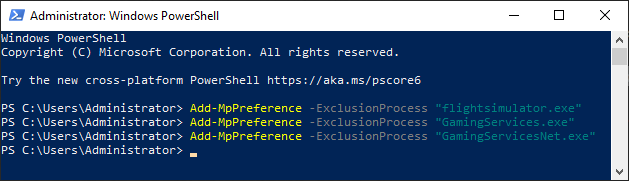
Copy/paste to powershell window
Add-MpPreference -ExclusionProcess "flightsimulator.exe"
(right click to paste into powershell window)
and press enter
Copy/paste to powershell window
Add-MpPreference -ExclusionProcess "GamingServices.exe"
(right click to paste into powershell window)
and press enter
Copy/paste to powershell window
Add-MpPreference -ExclusionProcess "GamingServicesNet.exe"
(right click to paste into powershell window)
and press enter
Run game.
Update: Gaming Services version 2.47.6001.0 should contain the fix. If anyone with this CTD issue downloads the update to 2.47.6001.0, please let me know if it resolves your CTD. Thanks!
6 Likes
Guys, before update you must delete exclusions and restart system.
Can’t see any update yet. I am at 2.47.2002.0
I paused the original update (so I avoided the CTD issue).
Is there a way I can tell what version is currently showing as an update (ready to download)?
I want to be sure that it’s 2.47.6001.0 before I download it.
Is it available elsewhere? or must I use the MSStore to update it?
Updated to 2.47.6001.0.
It can now be launched at 2.47.5001.0, but it’s also launched at 2.47.6001.0.
The problem has been resolved in my environment.
It is workink now OK after store Xbox game tag and Windows defenfer update . thx
Things appear to be resolved with the new Gaming Services update.
I could resolve CTD with ntdll.dll by updating gaming services to 2.47.6001.0.
Thank you!
Thank you! Updating Gaming Services to 2.47.6001.0 fixed the CTD issue for me. Phew!
This resolved the issue of my sim failing to start  Thanks!
I didn’t see an update and the problem is still going on…the game always crushed in „Japan“ loading screen. It’s hard to believe that there is no official statement from MS for this problem - not on Facebook, not on Twitter.
Same here, since 5 days im unable to play the game,
i am angry…
Excuse me for being so silly but how does one go about updating Gaming Services?
Share the secret please.
I cant launch the sim anymore either.
The update will be in the Store app on your PC. Open that up, click the three dots on the top right, select Downloads & Updates, then click on Get Updates.
It may have updated already, what version does it show next to Gaming Services ? It could also be it will take a little while to roll out depending on where you are on this planet or ours maybe.
I have 2.46.7001.0 , in Germany no update
All I can suggest is to keep checking in that case. You did select the Get Updates button in the top right ?
Do you mean Xbox App that launches when my PC starts?
I cant see these three dots on top right anywhere, multiple re-boots now, multiple attempts trying Windows update too. still get a black screen, a little blue icon going round for a few seconds and nothing?
Was on early Alpha and Beta, what is the procedure to update Gaming Services?
All anyone should be expected to do is click on a desktop icon and thats it, why all these new layers of jumping through hoops? I’ve set my desktop icon to start as admin too.
Update gaming services … how exactly?
Its quite possible I’m having a senior or blonde moment here, but the darn sim wont launch anymore, what gives?