You will need to use the Microsoft Store app. If you click on the Start button then select Microsoft Store from the list of apps. Or there may be a Store icon on the taskbar. That looks like a white shopping bag with 4 coloured squares on it.
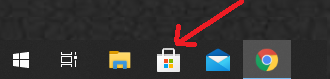
You will need to use the Microsoft Store app. If you click on the Start button then select Microsoft Store from the list of apps. Or there may be a Store icon on the taskbar. That looks like a white shopping bag with 4 coloured squares on it.
Yes i did. I can only hope and wait
Thanks EggsBoxJuan, found it already now and yes FS2020 is working again now, am old school like many who rely on a simple desktop icon to launch my sims and have them update if necessary.
Why this extra layer of complexity I wonder, why this extra hoop to jump through?
Am 61 now but been using comps for decades, must be many like me not used to this extra layer of updating, Microsoft store app indeed 
I’ll see if I can find a way to make a desktop shortcut for it … you would think it would auto update? Never needed it before.
When I found it and update button it updated gaming service and also a bunch of other stuff I never even knew I had, Candy Crush Soda etc … I never asked for that garbage to bloat my PC up, why is it there?
I know that feeling  , I’m almost 60 years young myself and things do seem to get a little more complex as time passes. Maybe it’s just us getting old. As for the bloatware I wouldn’t worry to much about it, it’s like all that rubbish you have on your mobile phones you never use.
It takes up next to no space and it’s best to not mess with things to much otherwise you can make matters worse.
Thanks Juan
You’ve been very kind patient and helpful, appreciate it.
Hope you have a great weekend.
Thanks and I hope your flights all end happily and not in a burning heap of twisted metal which seems to be my normal landing procedure. Stay safe !!
Works for me now. I updated the Game Service twice. You have to manually click on it and press update. I also did the Powershell fix wich seemed to destroy the game but now with up to date Gaming Service, the sim launches
De France,
mise à jour 2.47.6001.0 effectuée
le simulateur redémarre enfin, MAIS
phase de démarrage extrèmement lente
au point que je pensais que la mise à jour n’avait pas fonctionné
pour moi il reste un problème, même si c’est en progrès
Merci
Thanks to everyone here that tried to come up with a solution for the problem.
Since this morning new patches that were released solved the problem, and I hope thats the case for everyone.
Take care
I’ve updated Gaming Services and right now it looks like the new version has sorted it.
Nice one.
Yeah! Thank you! This shouldn’t bee like this, even if I open xbox app gameservices appeared as updated. If I would not found your post I’ve ever would click on install, in my case it didn’t appeared the advice of update.
Thanks Flowoda
Resolved
Resolved for me as well after updating gaming services.
Although I am weary to confirm too early, as there was definitely a random component or something we did not understand to this crash.
Anyone know how to force the Gaming Service update to 2.47…?
Despite numerous uninstalls and reinstalls (this is the extent to which I’m prepared to mess with my system), it keeps reinstalling 2.46.7001.0.
In windows seacrh bar type powershell.
Right click on powershell and select run as administrator.
Copy/paste to powershell
get-appxpackage Microsoft.GamingServices | remove-AppxPackage -allusers
(right click to paste into powershell window)
and press enter
Copy/paste to powershell
start ms-windows-store://pdp/?productid=9MWPM2CQNLHN
(right click to paste into powershell window)
and press enter
Thanks for the info, but it just reinstalled 2.46.7001.0 again 
like mine, still version 2.46.7001.0 
I have not had any problems with the crash at initial launch. Part of that may be due to the fact that I don’t use Windows Defender (My AV solution is ESET, which disables Defender).
But as far as I can determine, I do not have the Gaming Services app installed. It does not appear in the list of installed apps in the Windows Store, nor does it appear anywhere in the start menu. I do have the X-Box game bar - which I use while flying to display FPS and CPU/GPU load. I also use the capture function of the game bar to take screen shots and videos.
The only two FS-related items that appear in my Windows Store app list are MSFS itself, and the related digital license. I have no other Microsoft games installed on my system.
I did have the X-Box app installed on my computer when I first joined the Alpha program, as that was the only way to access and download it - but when the retail version came out on August 18th, I purchased, downloaded and activated it through my Windows Store account. At some point since release, the X-Box app uninstalled itself. I did not do anything to delete it, but it is definitely no longer present. Neither that app, nor anything relating to “gaming services” appear anywhere on my PC, but MSFS has always launched with no problems.