Most games of this scale of complexity almost always have bad VR performance. I guess it’s also a hardware issue in terms of currently available CPU’s and GPU’s.
Software optimizations included, I’m guessing we need another 1-2 years for the hardware to improve to such a level where 60-90 fps in VR becomes standard.
Probably. When DCS 2.5 was released the vast majority complained of the same things people are complaining about now in FS2020.
That was January 2018 - I actually stopped flying very soon after due to those issues. Lots of attempts have been made since to make it playable in VR and the well known Kegetys came up with a good optimisation (with several sacrifices) but even then 45fps (albeit a solid 45) was the usual maximum and target for the majority.
Last night I spent the whole evening in VR in that sim - with no mods - and got 55-70fps in Quest 2 with Link. So after 2 years (and my hardware now far exceeds what I had then) the improvement isn’t exactly mind boggling.
2060 card here also it’s fraustraing because it’s very nearly good enough i have it smooth out front and side windows but when i look directly down you notice a slight stutter and it struggles bad below 2000ft. I tried OpenXR and played around with the Oculus Tray Tool etc but not quite there. So now i have resigned myself to getting a new 3080 card in a few months time. Who knows maybe a update will improve things for the 2060 in that time.
I disagree: Flight simulation like MSFS is fully playable between 20 and 30 fps because you don’t need fast movement like in car simulation races or first person shooter …
I have a middle weight system (i7-7700K (No Overclock) 32GB ram and a GTX1070) - and it’s very smooth flying in VR with an Oculus CV1, no stutters or issues and running on middling settings.
I suggust you turn off the Frame Counter and play with the settings to fine tune it to your preferences.
This Sim have a performance problem and it start on monitor version, and land consequently in VR.
I mean, I made the test to remove all frame limiter or vsync in my others sim running on monitor 1920x1080 with usual settings high/ultra and didn’t get a framerate below 247fps. The max was with Aerofly FS2 at Ultra setting witch reached 546fps.
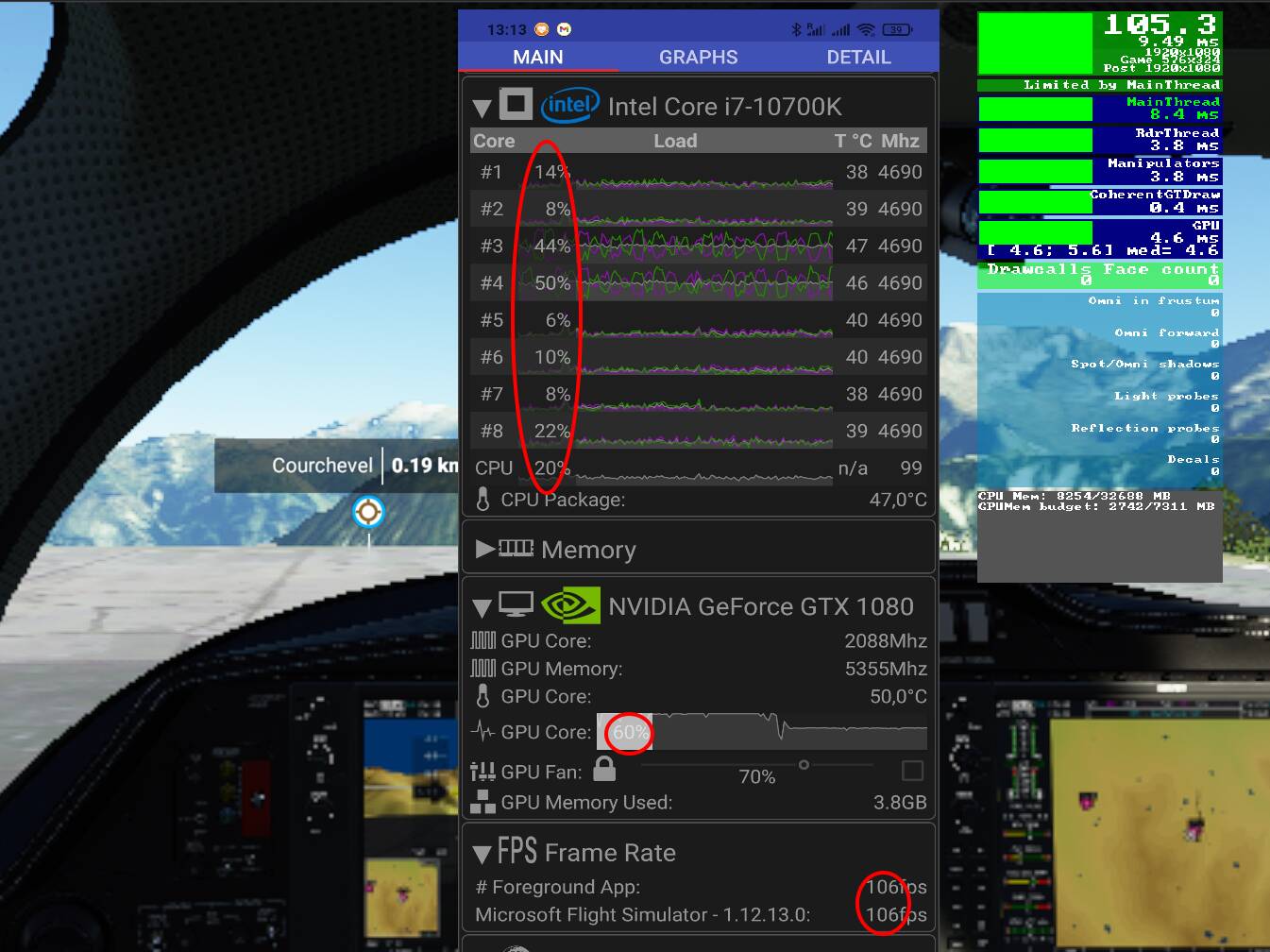
With MSFS, if I keep 1920x1080 but lower all settings to low (or off when available), render scale at 30% (from memory, the minimum you can anyway), I reach 105fps. And my CPU and GPU are under used, GPU should be at 100% (I have an i7 10700K pushing behind), so where is the bottleneck? Not on SDD or HDD or Network, I checked all.
I already posted the picture below but here it seems more accurate:
So yes, you need a Ninja machine currently to bypass this performance problem in VR too.
Sorry to sound so angry those last days but I’m so disappointed by MSFS in VR, and to see all those enthusiastic people trying to grab each possible fps using all the ways they could find (including now reducing fov, 18Hz, etc.). I’m sad I lost my enthusiasm…
The core problem in MSFS engine should be investigated instead, and I hope it will be, and not be buried, waiting for people to upgrade (if they can due to GPU lack of availability).
The max I’m getting is FS9 in a virtual machine running at 1000 fps+ (displaying as 999 or ~~~ ). There is indeed room for improvement but let’s not be mistaken either: FS2020 rendering engine is pushing a lot of pixels and a lot of shader code per pixel, and it is already quite using very advanced optimization techniques to do so.
For example, I’ve been trying a few different adjustments in G2 VR lately and for example with reprojection disabled, I’ve noticed there was not much fps difference between rendering with OXR SS 65 or SS 100 in practice (about 10% fps less only on sparse scenery). Which means two things to me: the eye candy shader code is running well on my hardware, and I’ve clearly identified the base settings in “My VR Settings” which are not getting much in the way of performance.
Having said this, there is also clearly a problem of frame cpu/gpu sync visible already in 2D, and more in VR, and both NVidia and WMR OpenXR or SteamVR have a responsibility there. It might also just be due to some inherent limitations of DX11 in itself which is most likely one of the graphics API for which there is less improvements in all drivers releases since a year or more, because vendors are putting most likely all their optimization efforts on the implementation of DX12 and Vulkan API instead.
When I can’t weirdly reach my GPU usage 100% I can only think about a bottleneck with RAM (3200MHz for mine) as it’s the only thing I cannot monitor with my tools. DevMode still said “Limited by Mainframe” like on the screenshot in that case when my CPU is 50% sleeping and GPU at 60%…
I hope MSFS devs will improve, possibly with DX12 implementation. When I see I can win 20fps on my machine by disabling “Volumetric Effect” in Debug options I think they have headroom. I saw you recently created support ticket asking for more control on post effect and I totally agree with you. Whatever you choose in the sim, even the lowest settings, and you still have a depth of field clearly visible (if I can say that). I also saw you asked for controlling Sharpening and this could be a VR game changer for sure (like in Automibilista 2 or Star Wars Squadrons, and many other apps where SS become useless).
Do you mean the Dev Mode menu to disable Volumetric Atmospheric (clouds etc…)? Yes they are taking a lot of GPU shader code time per frame and this is expected (these are voxels and even if they are spreading the computation over multiple frames - hence the ‘edges looking like boxes’ for a few frames - they are still taking some sizable resources).
Actually I’m even surprised they didn’t include Sharpen strength by default for 2 reasons:
people are reporting a wide range of critical opinions on the sharpening effect (too strong, not enough) since the simulator is released and this alone begs for giving the control to the user.
the CAS Shader they are now using since Update 7 is meant for having an intrinsic sharpening strength value and there is no reason not offering it technically*.
I thank you for your appreciation! The best way to raise the odds is voting!
*I will probably rant a little there, but I believe there is a strong leadership governing the decision making process and the more I see how it goes since release, the more I can’t help thinking this leadership is under the wraps of a very few people, most likely with Asobo barely involved in the decisions. I have no doubt this decision making process is necessary to deliver a certain vision of what it is best for the simulator as a game product in the catalog of XBox titles, but I can’t help also thinking this is done regardless of the opinion of the end users, and especially regardless of what is usually making a simulator a success for the simmers community, which I’ll sum up as: give the simmer the largest control over configuration and give developers the deepest access to the internals. I can’t wait seeing what’s next for FS2020 of course and in the long run there is so much unannounced new features and options the best is ahead still, but once the XBox gamers are done with it because they will be playing another new AAA franchise, what will remain sustaining the simulator for the next 10 years are simmers and you rather please them, and the 3rd party developers knowing their customers better than Microsoft.
I’ve lowered everything down to medium and a few ultra. Using 2080ti strix and hp reverb g2 and it looks incredible. Using the OXR @60%. Lod at 100 for both. Super smooth and photogrammetry, no need to raise the lod of you have good WiFi. Getting 120mps constant in the UK. Also have hotas warthog stick combo. Pure bliss!!
30fps in VR would make you barf. The thing is, even if the app frame rate is 30fps, you’re still seeing a refresh rate of 72 Hz to 120 Hz on the screen, depending on your headset. And regarding your other statement, this is a commonly said thing that is a misunderstanding of the concept. The ~30fps threshold IS NOT the limit of what we perceive as smooth – it is the limit at which most people no longer perceive an obvious flicker between frames, which is more related to the refresh rate than the frame rate. And even that isn’t universal – many people can still perceive the flicker all the way up to 72Hz or higher, I’m one of them. A refresh rate too low causes flicker; a frame rate too low causes jerkiness/stutters, depending on the angular velocity of whatever is being rendered. Most of the headsets people are using employ some kind of motion smoothing, whether it’s ASW, steamVR’s implementation, or just basic frame interpolation like ATW which in some cases can’t even be turned off.
TL;DR: if you really had a 30Hz refresh and 30Hz frame rate in VR without any other aids to it, it would look horrible unless there was no rendered motion and you were keeping your head still. You would absolutely see the frame tearing as well as the flicker with any head motion or app motion.
Through the lens view in the A320 with the Reverb G2*
This is really close to what you can feel in the HMD and this shows how 30fps in a simulator can be smooth as long as there is no stutters and the simulator is delivering a constant stream of images at 30hz (no Motion Reprojection)
*NB: this though the lens video is not about resolution or image quality, just smoothness.