Today I have tried to update to my Store version of MSFS 2020 1.37.19.0.
The install first opened the “Accessibility Settings” menu - pressing Next started the update proces, but it got stuck at 89% (only missing 1 package).
I waited for a very very longtime, and then restarted the sim, but know it won´t resume downloading and says “Please wait…” with 0 kb downloaded.
I have remaned my community folder and tried again to no avail.
I can see that in my MSFS2020\Packages\Official\OneStore**.fscontent**\ folder there is a file called “Asobo-airport-eham-amsterdam”, which I asume is a package file that should be decompressed, but isn´t.
As far as I know the .fscontent folder is where update files (Package files) are stored during an update download, and then should be decompressed afterwards - this doesn´t seem to happen.
I know that I have posted exactly the same elsewhere in this forum, but MSFS 2020 update process is really poor, either it gets stuck or slow.
Don’t run as Administrator as this can cause further issues.
Actually running as admin was the only thing that worked out (at least for me)
It’s been on and off the past few days. One load works, next one fails. What helps every time is simply disabling the network connection for a bit. It will interrupt the update check and prompt with a continue button. Click it and then reconnect the network. To ensure everything works right after that, load into an airport then go back to the main menu.
There was a gaming services update a couple three days ago. Haven’t had it hang on the check updates or the load screen since.
at moment it work, but i lost all settings a few days ago,do not load from cloud 
the servers are a pain,this datas need to be save on my pc  i hope ms can ad a option?
Is this ever going to get fixed??
I’m getting the update hang up EVERY time I start this!
Useless waste of time, every day, all day
I had the same issue many times and thought it was stuck . Ans I would forcibly close it. And it would go away next time and come back again later date . Not a good idea to close it . Just leave it at updates spinning and it will tale about 10-15 mins or so and slower if your network is slow or a slower computer . It will finish . If you keep closing it it will get worse snd take longer and longer .
No issues on my PC. It takes ~ the same time to reach the Welcome screen as in previous days.
Western USA
Current Xbox services versions on my PC:
2406.1001.20.0 (Xbox)
22.90.5001.0 (Gaming Services)
7.124.5142.0 (Game Bar)
Hi, not sure if this is helpful to you all. but I was able to get past the “Checking for Updates” just now., by clicking the “Clear Cache” button for the option “Clear Download Cache.”
See below
I posted this reply on another thread. I had the same issue and also a very powerful PC (with 24 CPU cores and also a nvidia RTX 4060 and also a fast SSD. while it’s checking for updates sometimes it takes about 10-15 minutes on my configuration, which means if you’re lower than this it can take probably longer. Many times I thought it was stuck and tried to cancel out and it only makes the problem worse and it would take longer in the future. As there are many things need to be checked based on what is installed , this happens. clearing the cache may help, but i heard in some cases you end up messing up and reinstalling everything. So if you have a powerful pc give it 10-20 mins and it finishes. Or if less powerful CPU/IO then 30 minutes or so.
I’ve had it running for hours while I was doing errands just as an experiment, so that’s no 100% solution either.
Anyway, it seems to have resolved itself, making me believe it was a communications/network issue on Microsoft’s end.
A tip for some, I managed to fix a very annoying bug in MSFS, which is, and at the same time, not Asobo’s fault, a lot of people complaining to support with a problem with infinite loading on the updates screen, and Bing and photogrammetry data not appearing, even in the globe menu when you select an airport you will not see the clouds around the world… This is a lack of data from bing, for those who have related issues, slow broadband messages too, the problem with all this could be In IPV6 there must be incompatibility with the servers for some users, try disabling the function in your router settings, which may work, and placing Google DNS on your computer (8.8.8.8 primary and 8.8.4.4 secondary) which may work, mine worked.
I also have had this problem since around Feb/March 2024, I have tried most of the suggested fixes but nothing seems to fix the problem without a full reset which gives me around a week to ten days problem free before the “missing essential updates…” returns. What I can add here is that it occurs even with an empty Community Folder.
One of the official fixes is to go to the Content Manager and manually install updates but how can you do that when MSFS won’t start because of the problem? Am I missing something obvious?
Welcome and thanks for posting this, IPv6 was definitely my problem.
I shut it off and the sim runs perfectly now
I can’t get into the game anymore.
It is also not syncing my save as I deleted the save and thought that may resolve the issue.
The only workaround for me right is to launch the game offline and then go back online once it arrives at the main menu.
Is this affecting everyone or only players in specific regions/servers? I hope Asobo is investigating it. So far, not a very exciting weekend!
I have massive problems at the moment - hardly ever get past the update screen. But it also affects other MS services sporadically.
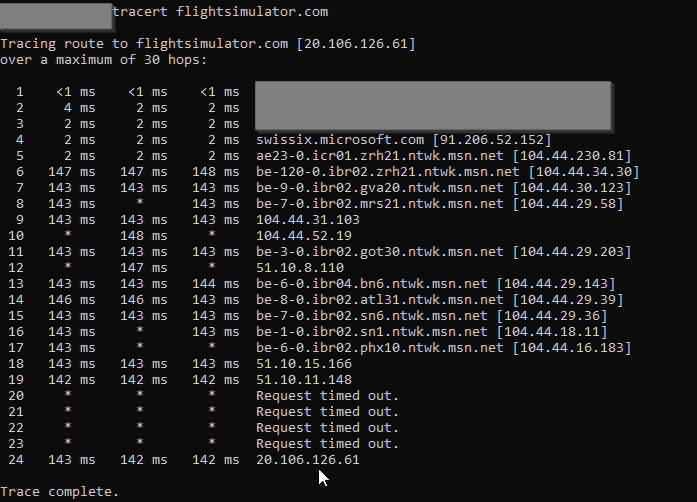
They seem to have horrible routing:
(the shown trace is out of switzerland)
This might also explain why using a VPN can help.
Getting loading issues again. Also, takes very long to load into and return to the main menu. Graphics issues too as usual.
Btw, I can’t create new posts or send a message to the mods for support. Why is that?
Still not able to start the Sim after 3 days. The above route trace hints at a possible problem in the Microsoft global network or whatever they call it.
- Hop 6 keeps adding about 140ms delay.
- Starting with hop 7 there is a high ratio of intermittent packet loss
But anyway: Does anyone know where such a problem can be reported? It doesn’t seem to be an FS problem.
And yes, I have tried tracing hosts that the simulator connects to (according to netstat) - most of them show a similar pattern. All MS bound traffic seems to get absorbed into their network in a similar way.
Hi @mrbump6704,
You could try contacting your ISP.
For testing purpose try freeware Proton VPN.