@dagwit00001
Sure - done!
This is now getting very very old and very stupid. Before I fly every ■■■■ time I first have to literally reinstall all my purchased aircraft. Backing out of SU3 - too many NEW issues to contend with.
I hate having to disable default addons anyway when I have paid for an “upgraded” version. I wish the Sim would automatically scan and disable any default airport when installing a new one. The sim should not let you run two versions of the same airport at once as it’s theoretically doubling its workload for no benefit whatsoever.
I have often wondered whether the sim double installs/streams the GAYA airports too because if you own the premium deluxe and search KSFO for instance you will see 2 entries for the GAYA airport.
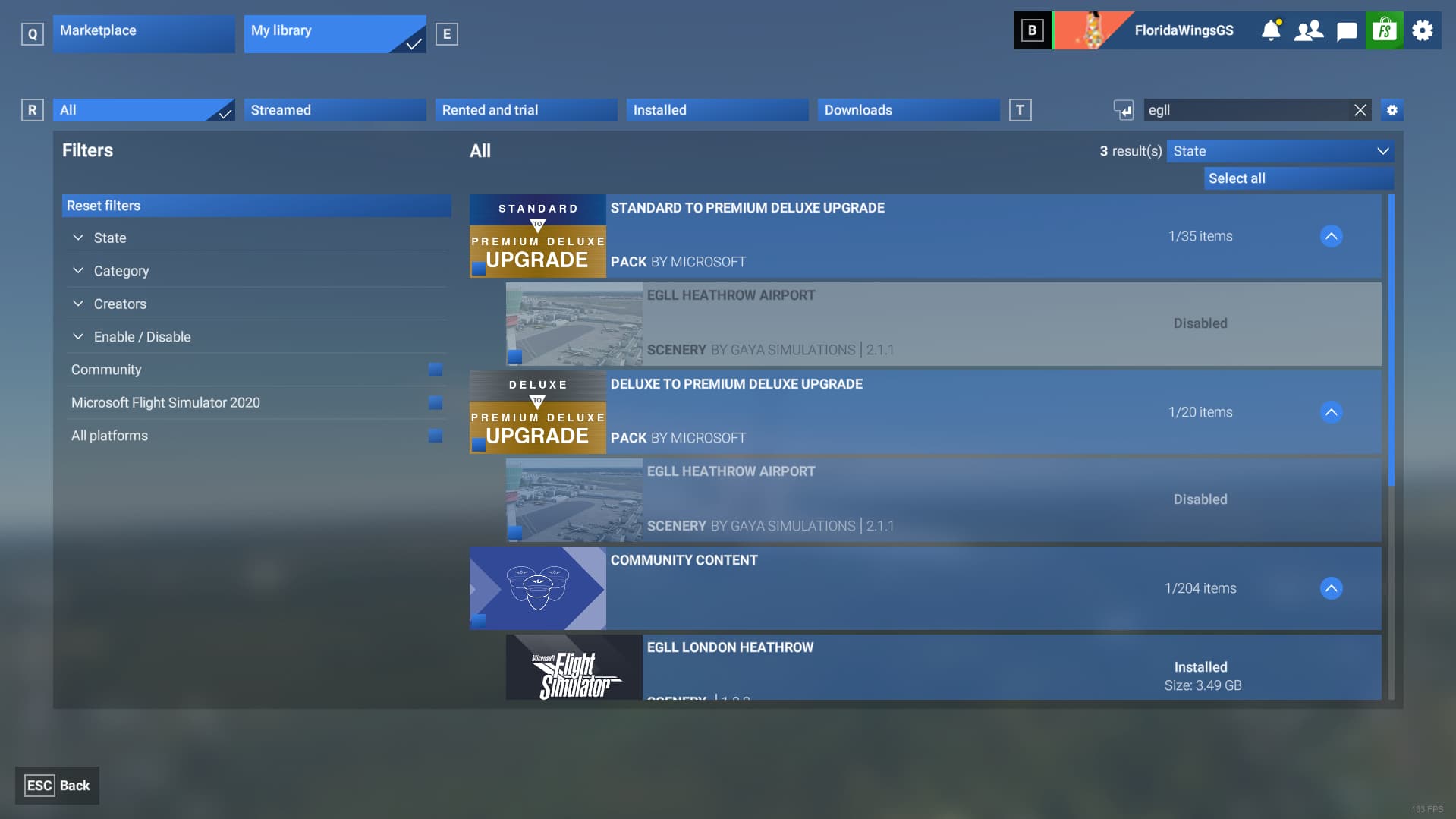
I have the flightbeam version enabled so both GAYA versions are showing disabled. 1 under deluxe to premium upgrade pack and the other under premium deluxe upgrade. They probably aren’t doubling up but seems super clunky to have multiple upgrade packs in my library when I pre ordered the premium deluxe version only.
Since the latest version of the SU3 beta, all streamed sceneries I had disabled manually in the marked place is re-enabled. They now get enabled with every restart of the sim I’m doing.
We know…
I installed a heckuva lot of items in the SU3 beta (1.5.3.0 when I did it) because some enabled items weren’t staying enabled, so I thought, why not install pretty much everything - I can spare the disk space.
But when I discovered that this significantly extended loading times, I uninstalled everything in order to establish by how much.
The result of this is that all or pretty much all content I purchased in the 2020 Marketplace shows as disabled, and if I enable it then restart the sim it’s disabled again.
Sigh.
Bug still not fixed in 1.5.4.0. I enabled the 2020 M20R then closed the sim and after loading it again the aircraft is disabled.
so we still can’t also disable default sceneries because after restarting the sim they will be enabled again.
Looks like they are having a hard time squashing this one.
Yeah beta will ended at december 
Not working here 1.5.4
Disabled airports etc re-enabled on restart
Vice versa: enabled AC disabled on restart.
I own a 3rd party payware scenery for EGLL. I dont want both my payware EGLL and the GAYA version to both be running at the same time so I disable the GAYA version which should resolve the issue.
A number of times after disabling the GAYA version I leave the sim and reboot only to find the GAYA version is still acitve and i need to disable it again. This is not specific to EGLL and seems to be occuring with other premium upgrade content such as KORD, KLAX, KJFK, EDDM, EDDF, KDEN.
Hoping that this is just a beta issue and not a bug that will translate to the stable version of SU3 when it releases.
Have any of you tried removing your Content.xml file and allowing the sim to regenerate a clean fresh copy?
I ask because that file has gone through several changes since the sim launched and if yours is old, it may be corrupted and contributing to this issue.
Also note that if you do try this, all your 3rd party 2024-specific Marketplace content will be enabled by default. However, it should remain disabled after you go in and set it that way moving forward.
My Content.xml was fresh at the start of SU3 Beta, because I reinstalled the sim, and I do not experience this bug, at all.
Same here.
Voted and now opting out of SU3 since this bug obviously makes beta testing more or less useless for me.
I’m on SU3 Beta, just deleted Content.xml, rebooted and restarted game. Does not work for me.
Most all the planes I fly still start disabled, every single time.
I’m trying to understand how this is happening. I am not having this problem. I’ve deactivated logged out checked reactivated logged out and checked like 6-8 times and everything stays the way I left it. Just can’t figure it out.
Edit: I also did a fresh reinstall of the sim SU 3 a couple days ago. Could just be a corrupt file somewhere causing the issue.
I think I have a lead on this.
There might be more than one issue going on here, but I did find out some info as to why this seems to be happening for us who are losing their enabled content upon restart the FS2024 SU3 Beta.
In my scenario, I’m on Steam and found the following:
-
The fact that my Steam account name and my Microsoft Flight Simulator Xbox account name do not match, seems to be a key factor here
-
The issue seems rooted to the fact that Asobo, in SU3, has moved the placement of the “content.xml”, and some other files, from the root of:
- “C:\Users<userid>\AppData\Roaming\Microsoft Flight Simulator 2024” →
“C:\Users<userid>\AppData\Roaming\Microsoft Flight Simulator 2024\XboxID”
- “C:\Users<userid>\AppData\Roaming\Microsoft Flight Simulator 2024” →
-
However it appears that, at least for me on Steam, a 2nd folder has been created that dates back to my enrollment date in the SU3 Beta:
- C:\Users<userID>\AppData\Roaming\Microsoft Flight Simulator 2024\SteamID.
- This folder is empty
- C:\Users<userID>\AppData\Roaming\Microsoft Flight Simulator 2024\SteamID.
-
If I copy the “content.xml” file from the XboxID folder above to the SteamID folder, I at least don’t have to re-enable all my content on every Sim startup…
- If I Enable or Disable any content from my library though during a session, I need to re-copy this updated file again to my SteamID subfolder again to get it to stick.
Hopefully this info helps someone else..
Outstanding sleuthing. I too am on Steam but in my case the Content.xml file is found in my XboxID folder and it is my SteamID folder that is empty. If I copy the Content.xml file from XboxID to SteamID then changes will stick.
This is only slightly annoying and is an acceptable workaround until the bug is fixed.
Thanks for the heads-up…
Just to be sure, this isn’t just Marketplace content. It’s happening to all content that can be enabled / disabled in the library, including all Gaya hand-crafted airports, default aircraft, ships and so on.
I’m on Steam too if that adds any further context.
Exactly. I was investigating this also yesterday, but then had to go to bed and was going to continue today. I’m also on Steam and also moved the content.xml file from the folder with my Xbox name to the folder with my Steam name and it seemed to solve the issue, but only for aircraft. I was able to activate the 2020 M20R and keep it activated. But then I tried to deactivate a scenery (LSZH) and it got activated again after restarting the sim. But I’m pretty sure this has to do with the new content.xml and the 2 different username folders.
Awesome finding, that should help the devs find the root cause quickly.
Tried it and it works, so now i rejoined SU3 beta after being able to disable the 3rd party stuff.
You’re a genius 
I also noticed the two similar name folders while searching for the content.xml yesterday, but my brain didn’t get the link between MS & Steam account differences.
Just disabled the 3 marketplace items I want to have off,
then quit the game
then copied the content.xml into the parallel steam user-id subfolder.
And all items stayed disabled as they should.
Thanks for doing MS/Asobos work to give us a quick interim solution 