SU3 beta 1.5.1 keeps activating / deactivating marketplace content

SU3 beta 1.5.1 keeps activating / deactivating marketplace content in its own.

I have now several times activated (set to “streamed”) and deactivated (“disabled”) content in my marketplace.
After restarting, the sim has set different status of these addons again.

For example:

  • Enhanced runway lights addon: deactivated → is set to streamed again
  • Enhanced airport graphics: deactivated → is set to streamed again
  • Spitfire / JU52 / BF109… set to streamed → deactivated again

Win 11, Steam version
Rolling cache file was deleted before updating to SU3 beta

Edit: using the “download” and “install” (why separate?) function makes it possible to keep the addon active, tested with the Spitfire.

The inability to disable/ deactivate aircraft I don’t want is really annoying!

Trying to remove/disable content, as I already have the content/airport by a 3rd party developer.
Like EGLL, ini EGLL installed in Community.
Trying to disable default EGLL, says Disabled.
Next time I start up the sim (exit 2024 and restart) default EGLL is Enabled again…happens to all my Disabled content that has been manually Disabled.

PC, Steam.

I have the same problem - I have a number of default planes cluttering up my menu that I want gone (looking at you, Airbus, f18, l39 et cetera) . Even when I’m given the option of disabling them it doesn’t do anything & they promptly reappear in the selection menu

Description of the issue: A previously disabled addon/scenery under “My library” is automatically re-enabled after a restart of FS2024. It should remember the state, otherwise it makes managing sceneries in the simulator basically pointless. The addon in question is located in the community folder.

There was an identical topic in the SU 1 beta discussion forum, so the regression came up again:
https://forums.flightsimulator.com/t/disabled-content-in-my-library-is-re-enabled-after-a-sim-restart/706318

[PC Only] Did you remove all your community mods/add-ons? No, as this ticket is exactly about managing them.

FREQUENCY OF ISSUE

How often does this occur for you? Always.

REPRODUCTION STEPS

Please list clear steps you took in order to help our test team reproduce the same issue:

  1. Disable an addon like this in “my library”:
  2. Exit and re-start the simulator.
  3. The addon in question is no longer disabled but enabled.

With SU 2 (release) this works as intended, so it’s a regression of the beta.

YOUR SETTINGS

[PC Only] Are you using Developer Mode or have you made any changes to it? No

:loudspeaker: For anyone who wants to contribute on this issue, Click on the button below to use this template:

Do you have the same issue if you follow the OP’s steps to reproduce it?

Provide extra information to complete the original description of the issue:

If relevant, provide additional screenshots/video:

The enable/disable function in My Library is not saving. When I disable an item in My Library and restart the Sim, the item is enabled again. Am I doing something wrong or is this a bug? Version SU3 Beta.

Do you have the same issue if you follow the OP’s steps to reproduce it?
• Yes

Thank you for the bug report.

We have created an internal ticket to see if our team already has this logged, and if not they will attempt to reproduce the issue and create a new bug report. This item is now marked as feedback-logged. If there is an existing bug report or one is created, we will move this thread to bug-logged.

Why this bug exist in second beta update. MS/Asobo do something in this updates or you just wright something in chanchelog??? With this bug every single 3rd party airport doesnt work if there is exist and enable „handcraftet airport” it is insane…

Yeah, still not fixed in 1.5.2.0 unfortunately.

How can you expect it to be fixed in an update which came out the same day the bug was just classified as a bug by Asobo. Unless … they found it by themselves already before that, which seemingly was not the case. I guess and hope it will be fixed in the update after this.

It was reported from community since SU3 started.
Fixed with today update??

No, not fixed with 1.5.3 unfortunately. Seems to be harder to solve.
My guess is that it’s related to the big changes due to the new content download feature.

Yes, not fixed yet.

Everytime I start up SU3 I find all my purchased aircraft are once again DISABLED and I have to go into Marketplace Library and enable them all over again.

Description of the issue: - See Above

Did you experience this issue before you joined the Beta? - NO

If applicable, which aircraft is experiencing this issue: - ALL AIRCRAFT PURCHASED SEPARATELY IN THE MARKETPLACE

[PC Only] Did you remove all your community mods/add-ons? If yes, are you still experiencing the issue? - YES

FREQUENCY OF ISSUE - 100% of the Time

How often does this occur for you (Example: Just once, every time on sim load, intermittently)?

REPRODUCTION STEPS

Please list clear steps you took in order to help our test team reproduce the same issue:

  1. Start PC
  2. Start MSFS 2024 SU3
  3. Try to find aircraft
  4. There it is! Disabled AGAIN!

YOUR SETTINGS - Quest 3 VR, Virtual Desktop, DLSS/DLAA

If the issue still occurs with no mods and add-ons, please continue to report your issue. If not, please move this post to the User Support Hub.

What peripherals are you using, if relevant: - Not relevant

[PC Only] Are you using Developer Mode or have you made any changes to it? - NO

[PC Only] What GPU (Graphics Card) do you use? - Asus Tuf 4080

[PC Only] What other relevant PC specs can you share? - 7950x3D, 4080, 32

MEDIA

Please add a screenshot or video of the issue occurring.

[END OF FIRST USER REPORT]


:loudspeaker: For anyone who wants to contribute on this issue, Click on the button below to use this template:

Do you have the same issue if you follow the OP’s steps to reproduce it?

Provide extra information to complete the original description of the issue:

If relevant, provide additional screenshots/video:


ISSUE DESCRIPTION

Description of the issue:

On launching MSFS2024, some items are disabled. They can be enabled, but once MSFS2024 is shut down and restarted, the items are disabled again.
One item is the AN-2 for example.
Another is the US trains adoon.

Did you experience this issue before you joined the Beta?

No.

[PC Only] Did you remove all your community mods/add-ons? If yes, are you still experiencing the issue?

Yes.

FREQUENCY OF ISSUE

How often does this occur for you (Example: Just once, every time on sim load, intermittently)?

Every time.

REPRODUCTION STEPS

Please list clear steps you took in order to help our test team reproduce the same issue:

  1. Start sim
  2. Enable items
  3. Quit sim
  4. Restart sim → items disabled again

YOUR SETTINGS

If the issue still occurs with no mods and add-ons, please continue to report your issue. If not, please move this post to the User Support Hub.

What peripherals are you using, if relevant:

n/a

[PC Only] Are you using Developer Mode or have you made any changes to it?

No.

[PC Only] Many issues may be due to an outdated graphics card. Please state your Graphics Card Driver Manufacturer (NVIDIA, Intel, AMD) and Version:

Latest nVidia driver.

[PC Only] What other relevant PC specs can you share?

5800X3D, 64 GB RAM, SSDs, RTX4090@4k

MEDIA

Please add a screenshot or video of the issue occurring.

n/a

[END OF FIRST USER REPORT]


:loudspeaker: For anyone who wants to contribute on this issue, Click on the button below to use this template:

Do you have the same issue if you follow the OP’s steps to reproduce it?

Provide extra information to complete the original description of the issue:

If relevant, provide additional screenshots/video:

Do you have the same issue if you follow the OP’s steps to reproduce it?
• Yes

Provide extra information to complete the original description of the issue:
• If I try to disable any of the items with a MSFS2020 logo in the Base Content section (e.g “WORLD POINTS OF INTEREST”), it is disabled only for the duration of that session. As soon as the sim is restarted the item is re-enabled.
Also some of these items do not have an option to disable e.g. “PITS S1 COMMON AVIAT”.

If relevant, provide additional screenshots/video:
• PC, Steam, Sim Ver 1.5.3.0
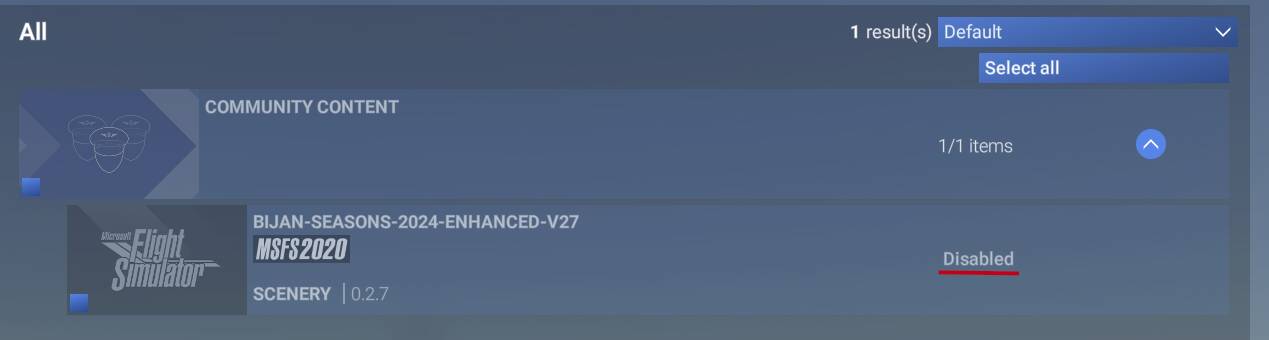
I was having an issue (not Sim Update 3 beta related) with Pyreegue’s Edinburgh Airport (EGPH). As part of my testing of this issue I disabled the airport in My library (rather than uninstalling it, which would mean having to install it again later, to the waste of my time) and replaced it with some old freeware I had.

I also purchased Pyreegue’s Belfast International (EGAA) to test if the issue occurred there. It turned out that there’s a default handcrafted EGAA, so I disabled that as well. Then I shut down the sim, turned off the computer and went and had tea.

When I returned I staged a flight into Belfast International to see if I would have the issue I’d had at Edinburgh. I didn’t but what I did have were doubled markings on the runway. Well, I could guess what that meant, and sure enough when I went into My library both the Pyreegue Edinburgh and the default EGAA were once again marked as installed.

Now I’m not reporting this as a bug, because for all I know that’s how the devs intended disabling an installed item to work, but personally I’d like something I disable to stay that way till I enable it again. Otherwise I have no option but to uninstall it.

And then installing it again costs me time and MIcrosoft bandwidth.

Anyone have any thoughts about which option for disabling items they prefer?

Welcome to the club.
This was reported day1 of su3.

Moderators, you can delete this or move it to the relevant thread. Though since that’s already bug-logged, I’m not sure there’s much point to the latter.