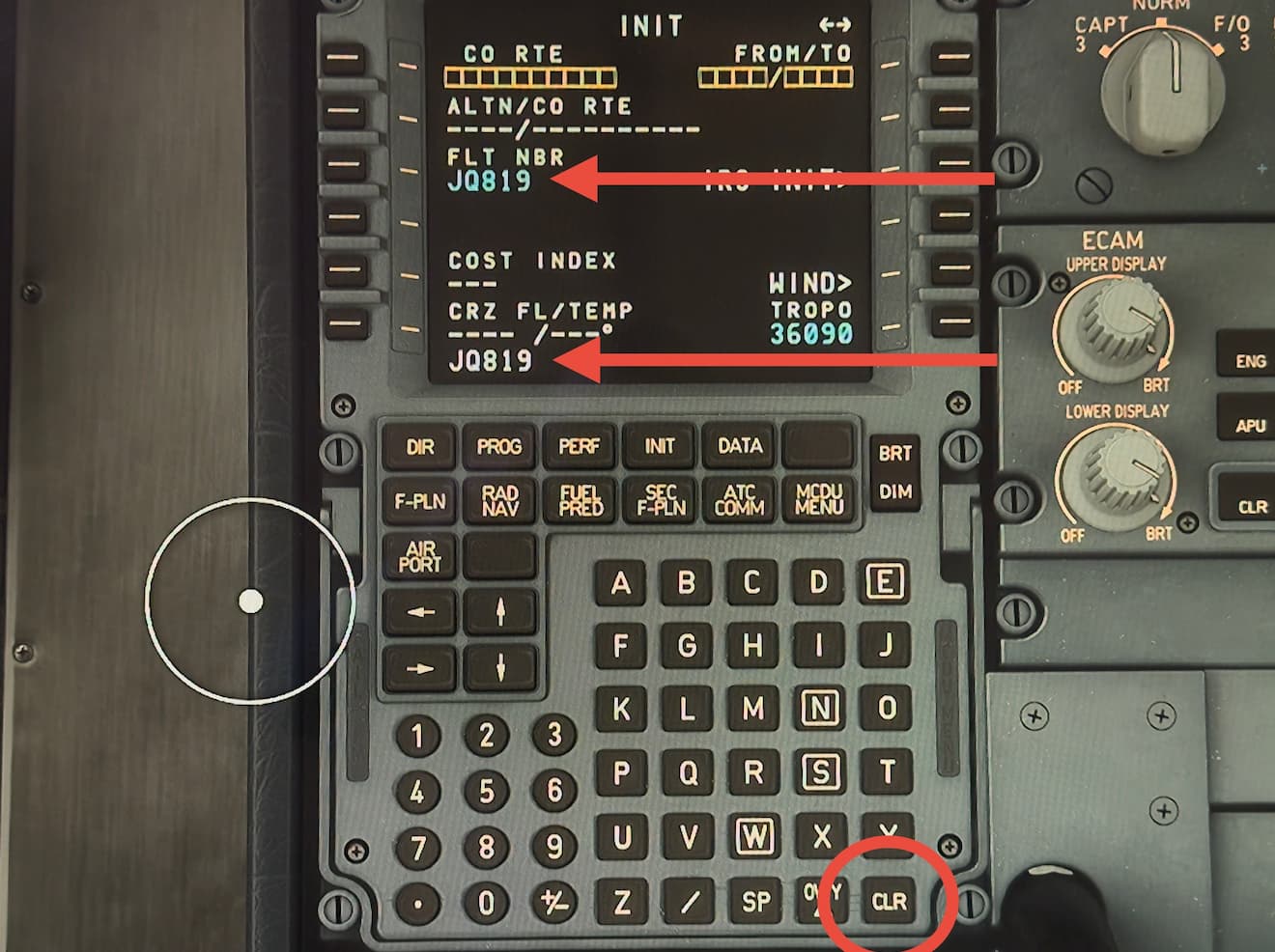
FMC text line is not clearing after the entry. E.g. entered flight number into corresponding field, however the text remains displayed at the bottom and it needs manual clearing. These are the symptoms from the earlier betas, which were not present in 1.5.7.0 or 1.5.8.0. Also, the cursor misalignment issue has come back in 1.5.9.0, which was tolerable in 1.5.7.0 and 1.5.8.0
Did you experience this issue before you joined the Beta?
not in 1.5.7.0 and 1.5.8.0 but yes in earlier versions.
If applicable, which aircraft is experiencing this issue:
a320Nv2 Inibuilds
FREQUENCY OF ISSUE
every time
REPRODUCTION STEPS
Load flight
Start entering FMC values for flight preparation
Text is not auto clearing in FMC after entry and severe cursor misalignment is back
Do you have the same issue if you follow the OP’s steps to reproduce it?
• Yes
Provide extra information to complete the original description of the issue:
• Xbox series X
If relevant, provide additional screenshots/video:
•
Do you have the same issue if you follow the OP’s steps to reproduce it?
• Yes
Provide extra information to complete the original description of the issue:
• The plane is broken in many ways.
The FMC values are not auto clearing after entry.
In flight, the plane is going up and down with autopilot on, FL380 (it’s not the wind, it has been like that since takeoff)
the radio frenquency swapper won’t work
sometimes, the radio frequency changers wont work also.
My engine wouldn’t start one time i tried flying it yesterday.
I’ve flown this plane for more than 15 times now, it’s not my fault.
The fuelburn is COMPLETELY broken, it seems like the plane is permanently dumping fuel
The APU start is too fast
And to finish, the elapsed time is also broken, did a flight of 01:18 and it finished with 6:40 ET.
If relevant, provide additional screenshots/video:
•
try this. I posted in another thread summarising all the issues I am experiencing and possible workaround that worked for me each time I followed those steps
——-
I have completed several flights in 1.5.9.0 and have been experiencing 5 annoying new issues that were not present in 1.5.8.0
My setup: XboxX, TCA Airbus Thrustmaster stick, quadrant and rudder pedals, A320Nv2 Inibuilds.
Five issues I came across:
MCDU text not auto-clearing after entry
Vertical wobble when AP is engaged
Excessive fuel burn
ENG start using thrustmaster throttle quadrant switches- the startup sequence was not working
IRS is auto aligned upon flight loading
For workaround, try following (it worked for me 3 times and all of the above issues were gone)
create a flight
load the flight (be in the cockpit and turn and power on)
END the flight
back to main menu
do not quit the sim
back to free flight menu to load the new flight
load the same flight (it should remember last entry)
We have created an internal ticket to see if our team already has this logged, and if not they will attempt to reproduce the issue and create a new bug report. This item is now marked as feedback-logged. If there is an existing bug report or one is created, we will move this thread to bug-logged.
 For anyone who wants to contribute on this issue, Click on the button below to use this template: