Im just curious because i dont know if my payware and some airport that i have is giving me the constant stutter while on the ground.
No, there is SOME stutter while doing sharp turns, but nothing crazy. It’s probably due to culling. Doesn’t really bother me. It equates dropping from 45 to maybe 25 FPS for a second but once I stop turning it’s all good. I stay away from MOST freeware with 3-4 exceptions.
I will have to give it a try without anything in my community. Because i dont know why it stutters so much i have pretty good pc . I didn’t have this issue in vr before , it all started from SU5. Its all good when i takeoff dow , its just when approach any airport .
Can’t say anything about VR. That introduces things that don’t affect me. I am probably not the best to comment on it. 
So far with SU6 I have good performance in general except for stronger occasional stuttering than before SU6 - this seems to be scenery loading stuttering, just one stutter but that can last more than a second and therefore breaks immersion - on my first SU6 flight I had one which lasted 2-3 seconds and I thought the sim had crashed. Never had that before… I certainly hope I’ll find some way to alleviate that
Had a fabulous flight in the Junkers over Lake Geneva. I chose the red livery but forgot to select the floats model, lol. Anyway live weather was fantastic with rain showers and thunder clouds all around. Lots of live traffic and a dramatic final approach to the Intl airport. Very smooth flight stutter wise, although the winds threw me around a bit.
Leaning out of the Junkers and looking around is fantastic with the G2, so very sharp and the cockpit looks amazing, although as usual I banged my head trying crawl down through the gap into the passenger cabin.
Still had mouse bugs though. This time I got an extra free small mouse cursor lower down central that simply would not move or go away. The big mouse cursor was also a pain, randomly getting in the way and never disappearing for long. Grrrr.
Update: After many flights, I’ve had 2 ctd’s! One using the Carenado C182 Skylane (terrible addon anyways). Another with the default C172. This is new.
After about 40 minutes it just all of a sudden goes black and ctd. Kinda back to early SU5.
Man I’m exhausted with all this after 15 months. I’m MSFS shy 
Update 2: Had a few perfect flights yesterday! Too good to be true! Don’t really know why, it just all somehow came together. I did however tweak some settings in Mixed Reality Portal Settings >Headset Display >Let Windows decide, 1080p, Optimize for performance, Automatic upscale, 90gz, and was able to Calibrate to my eye PD (today it’s grayed-out and can’t change it anymore-weird). That seemed to smooth out the jumping in the G2 I’ve had for months. LOD=200 
(i7-10700, rtx3080, 32G)
Update 3: This morning as I was flying the c152, for no reason it CTD! That’s about the 5th ctd with this new update. No rhyme or reason whatsoever. Didn’t touch a thing from yesterday. This has become a “Pavlov’s Dog”, new update comes and I’m wagging my tail, only to be chasing it in circles once again. It’s become a turnoff and I’m so tired of this.
press scroll button (midle mouse button) for cursor to disappear.
I have the middle button assigned to bring up the menu bar and the right button for the mouse cursor. Half the time neither of them worked before the latest sim update. It was hit or miss. After the update the menu bar works OK but the mouse cursor has gone nuts.
Edit. After reading up on other people’s problems with the mouse cursor in VR, I remapped the menu bar to a button on my HOTAS and set the mouse back to default. It just didn’t like my earlier mapping. Middle button now works OK to enable and disable cursor in VR.
I was one of the people whose VR experience was severely affected by SU5. Not the latest gear (Oculus 1 + i7 + 2080) but the game was playing fine in VR after a bunch of tweaks. Then SU5 came out and after a week of trying everthing I found here and elewhere on the web, I gave up. It was just unplayable. Yesterday I saw something on twitter that mentioned a new SU with VR fixes. I tried it right away and the most random test flight that I started just to see if anything improved turned out to be a few hour journey with the biggest smile under the Rift 
THANK YOU devs for fixing the game (for me). It runs even better than before SU5. I can’t wait for the long nights I will spend making up for the lost months ;). I will happily remap all my lost controls
I was having problem from su5 with a lot of stutters with the quest 2 +airlink. When I try su6 I saw the same stutters while on ground flying in Alaska. Today out of curiosity decided to give it a try using T-45C GOSHAWK to my surprise the stutters stop while taxing on the runway . Very wonderful experience both on takeoff and landing also in air . I don’t understand why I had the stutters with the default aircraft and not with this payware. I will have to try with the default aircraft and see if it’s all fix.
An update: I was initially experiencing annoying occasional heavy stutters (just one long stutter every 30s or sometime longer) - I suspected something linked with scenery loading, so I got rid of the rolling cache (set to 8GB on a SSD) and the stutters are now completely gone. Really smooth experience in fact, so much that I’m now considering increasing some settings at last!
Interesting I also clear my rolling cache setting ,mines was on 30gb because of all the free space I have on my ssd. I now have that option disable and the sim is now running smoothly so far .
Interesting point! I will try that as well and share the result tonight.
Why don´t you set the Rolling Cache in the RAM? It´s even faster?
Looking at the rolling cache, it was on by default but was showing 0 Gig for size and not the 16 G I had set up before SU6. So trying to restore something besides zero resulted in a hang on a window saying to wait while it made the changes. After an hour of watching the wheel go round and round, I pulled up the Task Manager to discover this curiosity
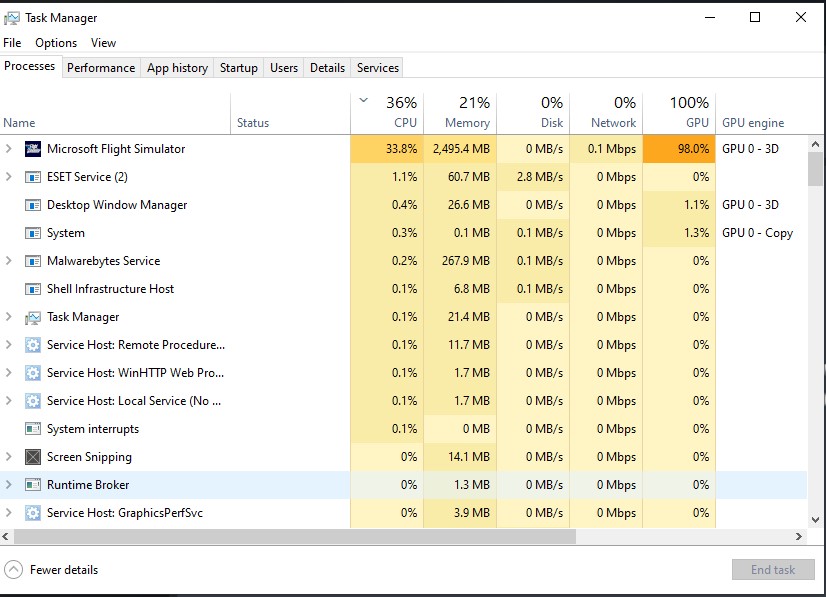
I’m not into that kind of head scratching, so I turned the rolling cache off, cleared the file and set up the manual cache with 16 G. Result: It sure looks smoother to me. Go figure.
Since SU6, I’ve experienced a strange effect with my Rift S when a flight starts in cockpit and again when the ‘Ready To Fly’ button is clicked: the left eye goes black momentarily. This is an uncomfortable sensation since it is only the left eye that goes black while the image is steady in the right eye. However, I haven’t seen this mentioned anywhere else so I’m wondering if it’s a common effect ?
Otherwise, I didn’t notice much change in performance other than the brighter lighting and the issue with the mouse cursor not disappearing when not in use.
Yes I get this as well with a Reverb G2.
Yep. Some peculiar flashing going into and out of VR (G2). Center mouse click clears cursor here.