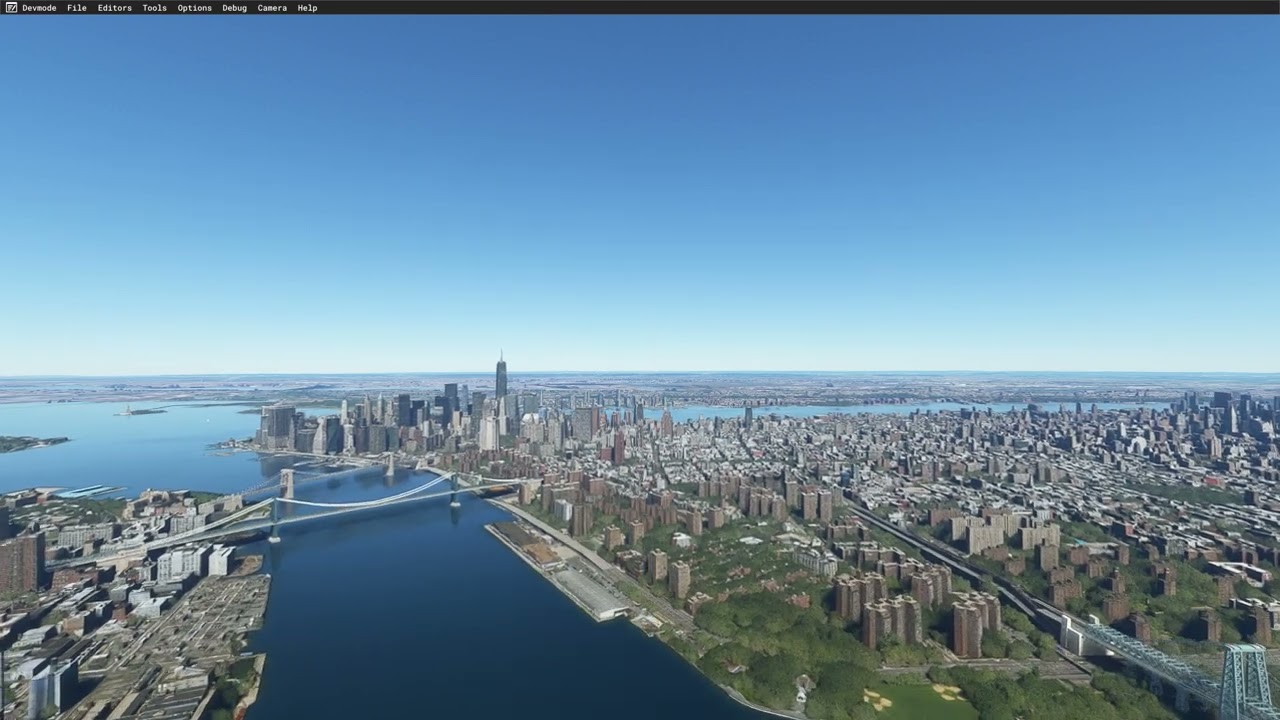
I’m mind boggled that people argue about this topic… like they aren’t seeing this themselves? I too have a 4090 and 95% of the time, nothing looks ‘normal’ unless I am literally flying right over it. The LOD absolutely has gotten less/weaker and my “guess” is this is all performance driven – the less LOD, the better FPS, in theory.
Typically this is very easy to see – fly any airliner (not a GA where you’re flying maybe 100 knots and 1,000 feet above) – right after takoff or even on approach, most skylines don’t even render correctly unless it’s 3rd party (i.e. downtown Dallas in the Dallas Love scenery renders miles and miles away, but Asobo/MSFS native cities do not)
I hope Asobo can tweak it again. It used to be fantastic in alpha, then even during launch – then SU5 it went to bad, then they tried to tweak it later, but it’s still not there.
And to be clear – the melted photogrammetry buildings isn’t what most of us are discussing… we’re talking about skylines that look like pyramids and just don’t render in the sim correctly from any sort of distance.
With my test earlier in this topic about tree settings i just want to point out that i don’t argue against about the visual quality has decreased since release 2020. I’m pretty sure it has. Especially after su5.
I know VR were not a thing in this sim at release 2020. I think VR is one of the reasons they needed to tune down quality. I think also they have set hard limits of the LOD because it’s hard to report performance issues if some has values that are set higher than the sim supports as in sim settings. I also think they decreased quality because of the load on the servers. When Asobo released xbox version there were even more users that needed to download data frome their servers.
Only speculations though. I know it has been complains about popins of objects since release and that thing has improved. I also know it has been complains about performance since this sim got release. Maybe we had balance between performance and quality at release 2020 and nothing needed to be changed?
Sorry but I can’t not comment. There’s nothing wrong with the LODs or New York on ultra settings, LOD 400 and if that’s not what you have there will be compromises
I’m in the process of uploading a video to YT, with a drone flight across to Manhattan, and beyond.
I didn’t see that tiling in of changing LOD as was shown in the 4090 video. My video looked just like the previous one that I uploaded here, minus the plane around me, which should have no effect on distant LOD.
The video is processing now, but should be done very soon, and I will post the link when its ready.
So it makes me wonder why they were getting that LOD pop in, and the only thing I can think of is they have their LOD sliders set really low. That was 300/200.
In general PG and ground texture quality has gotten worse.
I used to be able to fly over Copenhagen, and the entire city would be visible and beautiful.
Now it’s like Paris. Just melted patches everywhere and city loading in an out in huge chunks.
It still makes me wonder why my footage looks not much different to that I recorded 11 months ago, and that video by 737NG Driver has that very obvious blocking in of different LOD for objects.
We’re both using the same sim, so it has to be something on their computer doing that, and the only thing I can think of are their LOD settings.
Yeah, I’m pretty convinced that these anomalies are the results of user settings, though I don’t think you showed your LOD settings in your video, just the top half of the graphics settings.
As I predicted earlier in this thread, when they up their terrain LOD to something higher, their visuals will improve but their performance may suffer, and the conversation will move over to another thread.
The thing is that when we are using more complex aircraft that demands more cpu we also need to tune down t-lod.
If we are using default aircraft we can set higher t-lod.
higher t-lod mostly demands more of the cpu and higher resolution demands more gpu. If we buy a new GPU we can only increase the resolution. if we upgrade cpu we can set higher t-lod or more traffic and stuff like that.
True, its a see-saw, and in most scenarios we have to pick one or the other. Visual fidelity vs. performance.
I opted to notch down TLOD to 300 to preserve performance. That was about 6-12 months ago though, and I never revisited it, so its possible I could bump that back up to 400 now.