That’s very strange indeed! 
Your settings are not saved to the cloud. They are stored in this path in Windows:
:\Users\USERNAME\AppData\Roaming\Microsoft Flight Simulator
Some (all?) files in that folder are persistent when you delete and re-install the sim.
This is what happens whenever I land:
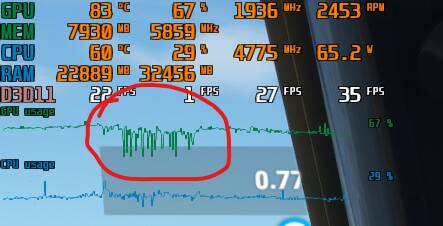
And when GPU utilization drops is because the 3d objects in front of the airplane (including the airport buildings) disappear and then respawn. That is what taxes the CPU and leaves the GPU standing still. You can see that FPS drops to ONE.
Edit: This happens to places I´ve been before, so not a cache problem. I´ve tried next to anything: Traffic off, LOD all the way down, slowly increasing LOD, playing with all levels of settings, and the problem is the same. 3D objects dissappear while landing, @ about 700ft AGL. Then gets redrawn ahd performace drops as shown on the screenshot. (FPS as displayed are: Actual, Min 0.1%, Min 1%, Average)
My performance barely changed at all since the update (still pretty terrible), but since yesterday like a few other people the sim will seemingly randomly drop to about 10fps during cruise. My GPU will almost idle, CPU usage doesn’t seem to change. I’ve literally not changed a thing, it’s so confusing.
I7 9700, 3070, 32gb ram, m2 drive
Right up there with you. Been more than forgiving given my history with this franchise… but x-plane works, is predictable, and I can be sure it won’t break in the middle of a flight.
Maybe because in your first flight, all the world data in the area is stored in your rolling cache. Of course you’ll get better performance on the second flight.
Good theory but I’m referring to places I fly to often, so I’m sure they are already stored in cache.
Some days ago I had a 10fps flight from Lukla to Paro which I had to abort because I was not going to be able to land. Previous flights around that same area were fine and so did more recent ones, including one immediately after restarting the sim to test.
The only change from that low performing flight is that before that one I did a long flight around the Boston area, so I had the sim up and running for 2+ hours. I normally don’t fly for that long in single or combined flights.
Before that I had a similar issue in South Africa after 90 min or so when the performance went from 60fps to low teens. It doesn’t happen always but it seems to be related to flight duration or sim’s uptime, not caching.
The only thing I can say to that is that for me, it was, and it was clear cut. With HT on, I was running fine. I turned it off, and found myself having symptoms like those mentioned here and after turning it back on, those symptoms went away. Whatever it is that might make me special somehow I can’t begin to guess. My system is, relatively speaking, pretty stout, but I’m running an i5-10600K married to an RTX2070 Super, so high-end (when ignoring the 30-series, which is kind of safe to do since nobody can find one), but nothing special.
Eh, it is what it is, and I just can’t believe that I’m the only person on the entire planet that can be helped by this.

Trust me, I believe you. I’m sure that for many people changes like those are at least worth a shot, but if a modern game engine can’t deal with HT then sure as hell it shouldn’t be OUR problem.
Incompatibility with HT is usually represented as a consistent performance degradation (perhaps that was your issue), but for many people reporting in this thread, the performance hit is gradual. Flights start fine and after an hour or so (or when approaching certain airports) it goes to hell, often falling into single digits.
I’m going to have to rebuff you with a stern unwavering … uhh it kinda sorta depends?
http://www.redgamingtech.com/does-intel-hyper-threading-hurt-gaming-performance-i9-9900k-analysis/
Sometimes it helps, sometimes it hurts, depends on the game and the resolution played at.
Edit: And as always with MSFS YMMV (your mileage may vary)
Whoa, lol, I just spent the last 3 hours apparently having wobbly pops and testing different settings.
I can say beyond a shadow of doubt that disabling hyper threading gives me an ever so slight boost.
I took many many screen shots telling MSI Afterburner to in fact capture that info with each screen shot … which apparently it refused.
I also took three screen caps showing the work distribution between cores and only saved one.
burps opens another adult beverage
However what you will have to trust from my lying eyes is this.
With my 8 cores split up vituarallily to 16 I still had one core full on 98%ish percent and the other 15 collecting a check. Now the change isnt as drastic as all that because as we all think we know we have calls that need to go in order so there’s only so much that can happen.
So in a way of looking at it instead of a 8th of your machines capabilities tapping out you have a 16th hitting the max, for me with Hyper Threading disabled I get a tiny little boost.
I’m talking about going from 24 to 27 FPS maximum over Heathrow from Gatwick, not huge but it exists.
I’ve just realised that this has actually happened after an update after all  There was the 787 fix a few days after SU4 which I forgot about.
After the 16.2.0 update I was getting a splash screen as soon as I clicked on ‘go’ and the performance was definitely the best it’s been for me in a long time.
Then came the hotfix a few days later. The splash screen has now gone and the performance is definitely a fair bit worse. I’d say that anecdotally 25% of the fps I was experiencing has just vanished with zero changes to my PC, hardware or in-game settings.
yesterday i deleted rolling cache as i clearly see now that it makes NO difference to performance
I assume everyone else was getting the splash screen and now isn’t? A mate has confirmed he’s no longer seeing it.
Last week over Nevada I was getting close to 60fps in the cruise in the FBW 320. Same place, same aircraft, same weather and it’s now barely making 40. The GPU is sat at 50-70% utilisation.
It’s really frustrating to have seen the sim performing great and then for no obvious reason it’s back to where it was a month or so ago.
Settings are saved (in the cloud I guess) yes. I did reinstall the game twices after fresh OS install, and the settings were still the same (even controller settings).
just now,out of nowhere the sim became a slideshow of 15-20fps while also decided o make use of my cpu(Ryzen 7 2700) by 20% and my gpu(Sapphire 6800xt nitro+) by 30%
This thing decides when to let you fly or not.
I also changed every resolution and traffic settings while restarting every time the same scenario(landing at LGVA Athens-Greece airport) UNPLAYABLE all of a sudden.
Haven’t played the sim in over a month. Was forced into Sim Update IV. Noticeably slower at the start. However, several hours in the sim was unplayable - stutters, 1-2 FPS slideshow - unplayable with no control, lucky to get 3 FPS. With stutters and erratic aircraft behavior. It never did that before. That is unacceptable.
To make matters worse, I had the sim warn me to turn off photogrammetry due to a slow internet connection?? I have 1 Gig internet and was getting >700 Mbps from multiple speed tests before and after playing the sim. That makes no sense.
On my system (9900K) the only difference with HT off was the peak core temps dropped by a few degrees. In game did not see a huge difference.
On the photogeo
Were you connected to your local server?
Also in your Windows XBox settings you can check xbox networking, just open it and watch, takes a few seconds till it blurts out info
I found that I needed to reset my windows firewall settings my …
“PC was unable to establish a Teredo IPsec connection to the Quality of Service (QoS)”
You may well be right that prolonged up-time is the key here, but I think you contradict yourself about the rolling cache. That two-hour flight around Boston may well have overwritten everything in the cache from the Lukla-Paro area. It’s a rolling cache, not a history-based intelligent cache AFAIK, so I don’t think it makes any difference how often you have visited an area in the past.