In this locations i have almost same result.
With clear sky 40-50fps
With broken clouds 35-40fps
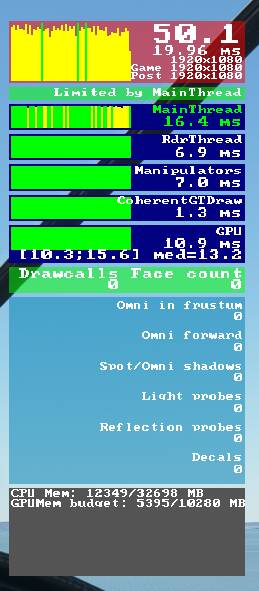
I have i9900k/32GB/2080Ti
1920x1080 resolution
KSEA/KLAX and other big airport - performance 10-15fps (pre 1.16.2) 25-30fps
Sounds like the performance hit is related to airports or city objects rather than low level flight and scenery in general.
I keep getting 30 FPS limited by CPU on my 8700K @4.8Ghz, it’s really ■■■■■■■ me off, all AI (Land, sea, airport, planes) are disabled but still I just can’t get it to be higher, don’t know what else to do
Your resolution is far too low for a machine of that spec. Your GPU will pretty much be sat at idle the second the CPU is being asked to do something.
You won’t get any better performance because of DX11 and the way modern games are coded. I’m sure that when DX12 makes an appearance you’ll see a difference. I’ve got a 3900X and 2080ti and can say from experience that you will be able to get the same FPS in 4K (with 80% render scaling) as you’re getting in 1080P. I’ve got the awesome FlyTampa Vegas and I’m seeing 40-50fps with very high settings and the aforementioned resolution.
In a nutshell, you need to load up your GPU much more. You should be seeing utilisation of 85%+. The days of lower resolution & lower detail = guaranteed higher FPS are past us.
KLAX is default scenery. It’s strange because before 1.16.2.0 i have stable -25+ FPS, now i dont have.
I can confirm that there seems to be some kind of memory leak as outlined by many people here.
Same here, performance degradation over time (around 1 + hour), started my flight at 40 fps, by the time I was approaching my destination I was at 20-15fps with lots of stuttering, no matter what I changed in my graphics settings the FPS never improved until I closed and launched the sim again.
Same observation here: first hour of flight is as usual, then FPS just keep degrading. And memory usage gets through the roof (I have 32Gb on my machine, it was almost full)
Seems to be time related, mine became terrible after just sitting on deck for a couple hours. I suspect a memory leak since nothing changed over those 2 hours except the passing of time.
I have the same experience, during about 1 or 2 hours my fps drops from 50-55 to abour 20-25, not sure about a memory leak tho, on this last flight the sim was using surprisingly low memory (about 3.5gb in cruise and about 5.5gb after parking, numbers by task manager process)
It really seems to be a function of time tho, I’d love for some community manager to acknowledge the issue, I hope we can get a hotfix also, I’ll lose it if we have to wait till sim update 5 in july to fix this
Same here, performance degrading over time. Started with 35 FPS gpu limited, after 2 hours only 18 FPS and stuttering once a second and limited by main thread.
Ram usage is not that high though. And none of the cores is used 100%.
Performance degradation during long flights isn’t really a “memory leak” but rather a combination of available hardware resources and non-optimized coding. Every flight in MSFS is approximately the same. As an aircraft flies or sits on the ground, MSFS CPU has to find all of the graphics data for objects and terrain needed by the GPU to create the frames displayed on the monitor. When a user specifies all ULTRA graphics settings, the CPU has to find and process A LOT of graphics details. As the CPU collects the graphics data, it has to go into real memory to be processed. Memory utilization skyrockets while it appears the CPU and GPU are both loafing around. When memory utilization is very high, the CPU cannot process all the graphics in memory fast enough to send graphics frames to the GPU because as the aircraft continues flying, more graphics data needs to be collected and processed by the CPU to send to the GPU. FPS slowly drops as memory fills up.
Several options to fix this without hardware upgrades include:
For option #2:
If you want maximum FPS without stutters or pauses @ 4k or 2k or 1080p, then adjust the graphics settings lower to push graphics processing to the GPU to drive the GPU to 90-100% utilization. Start by changing LOD settings to 50 - 80.
If you want maximum quality and detail graphics frames @ 4k or 2k at 1080p, then adjust the graphics setting higher to push graphics processing to the CPU. Start by changing LOD settings to 150-200 or use a hack to set them to 400-500.
With maximum LOD settings and highest quality graphics, my flights are limited to about 90 minutes depending on location.
With medium LOD settings, there are no problems or performance issues with long duration flights >5 hours.
YMMV.
You may need to drop your LODs back a bit, they have a huge effect on CPU.
The gradual performance degradation happens to me as well (even before SU4) and it doesn’t necessarily has to be during long flights. Doing shorter flights but in diverse locations (say: Boston then Nepal) also triggers this performance collapse.
Man, I know I’m late to this thread but I just wrote a freakishly similar post to the first half of yours in this other thread: FPS since last update - #15 by EricGonzalezM
This is indeed a memory leak (or something else that behaves just like one) given that the sim is choking on longer flights or after loading different locations without fully exiting the program. IMO it has nothing to do with mods, windows or system settings and at most those are a placebo effect.
Is there any explanation for having this issue, without it being a memory leak. I’m having gradual performance degradation aswell, but my memory is fine and cpu and gpu are 30% at cruise.
Technically, a memory leak is when a process allocates memory and fails to free it up again before terminating. I’m not sure this is what’s happening here.
But if I look at the disk access LED, it goes totally bananas when the performance degrades drastically. My guess is that the CPU is frantically trying to swap data between SDD/HDD, RAM and VRAM, maybe because it’s not too smart when determining which assets to unload.
Sebastian of Asobo claimed that they have managed to reduce the memory usage in the DX12/XBox version to between half and a third of that of the DX11/PC version, allegedly without sacrificing the visuals.
I have been having major issues with this update. I’m running a Ryzen9 64gb ram Dark Hero MB and a rtx 2070. Game crashes after about 20 min. No matter what you do. If you leave it in the menu or enter a flight. Ram seems to overload and it crashes. I have also seen a major spike in GPU temps. Something isn’t right.
I am experiencing the memory leak after the last update. I have to reboot after a few flights. It could be MSFS, the OS or both. Regardless, the ownership falls on MS. At least rebooting resolves the issue.
In order to prove that there is a memory leak, one must run tooling that examines process private bytes. If there is a leak, it can be seen as private byte allocations growing without bound over time. Memory leaks cannot be diagnosed from Task Manager. Nor is memory exhaustion synonymous with a memory leak. People are obviously having issues, but uninformed speculating about the causes detracts from the credibility of the actual complaint.