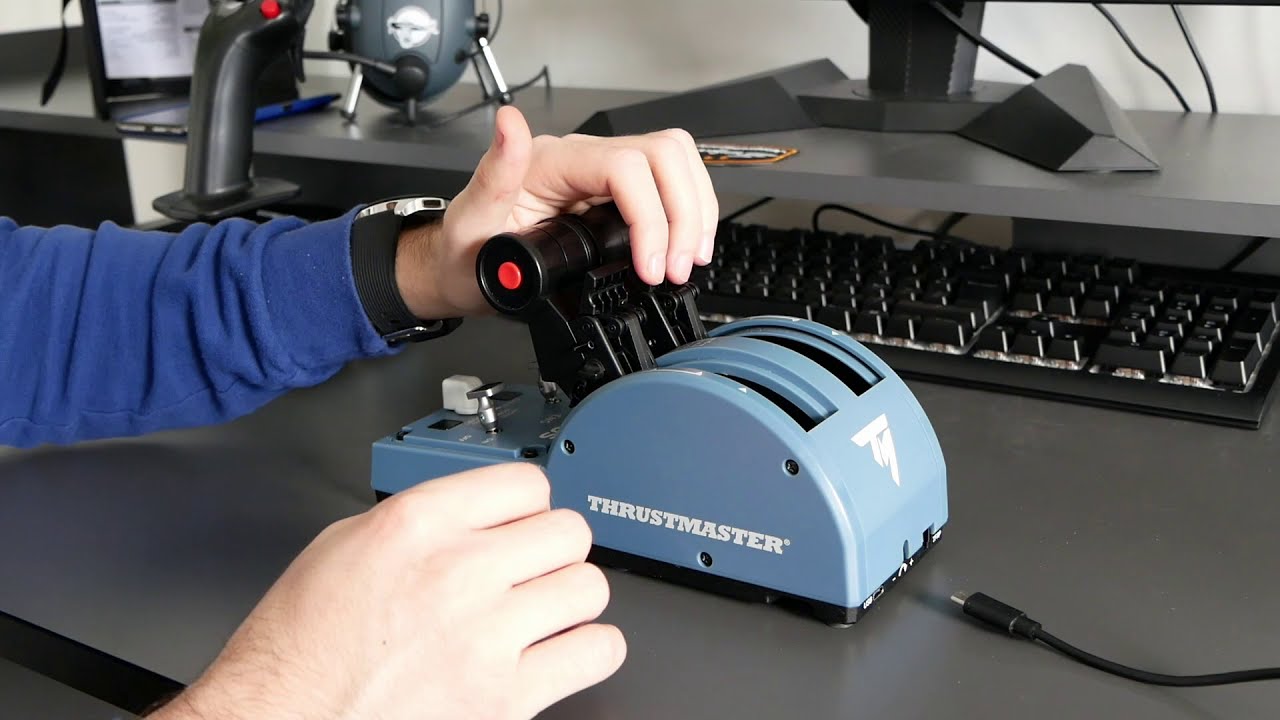
Recently purchased the Airbus officer pack from TM.
Like a lot of people, I love the joystick… but am losing my mind trying to get the throttle quadrant working.
My problem is unfortunately much worse than the detents not quite lining up properly…
Issues:
In the default MSFS2020 A320, my engines idle at the climb detent.
Anything below climb detent is reversers.
Anything below climb detent is reversers AND at the same time - both throttle axis jumping wildly from 0 -100%. In the virtual cockpit the throttle levers also flicker back and forth from 0 -100% throttle at this point.
Full reverse is TOGA (so is full throttle for what it’s worth)
Moving the throttles around randomly deploys spoliers (least of my worries)
Fixes tried so far:
Hardware calibration (multiple attempts, correct method including reverse position).
Up to date firmware
Reinstalled drivers/software.
Disabled throttle on TM Airbus joystick.
Tried other USB ports.
Default controller profiles selected in MSFS2020.
No other controllers plugged in.
The Thrustmaster control panel shows the same wacky behavior so this is happening outside of MSFS. It is the actual signal from the quadrant.
Here is a link to a video of the signal coming from the quadrant in the TM control panel
youtu.be/BBIATwcDWLw
(I am moving the throttle slowly up and down through its axis in the video)
If you have the Thrustmaster TCA Officer pack, it’s recommended that you use the FlyByWire A32NX Development version mod. It would not only adds more features compared to the default A320. It also has a custom flybywire mechanics and custom throttle calibration.
You might also need to upgrade your thrustmaster firmware, as well as do a hardware calibration.
I’ve read the dev version has a calibration tool - would that even be helpful though if the actual output from the hardware is crazy?
This behavior has continued after physical hardware calibration procedure. I have done a firmware update but to be fair, my throttle had the latest firmware out of the box anyway so I don’t think that’s gonna fix it.
I think you will get the same in the FBW you have done everything I would have done, maybe just drop an email to Thrustmaster? But TBH if its Brand spanking new I would return it for exchange or refund. I had to calibrate mine as one throttle was slightly out of sync with the other.
It looks nothing like yours, its a Halls sensor so maybe that has moved or something.
I think it’s just a calibration error. Even if you return it and get an exchange, you would still have the risk of getting another uncalibrated hardware, which will make you end up back to square one while you’ve done all that effort of returning it, only for you getting the same issue again.
You just need to update firmware and do a recalibration process yourself for to eliminate everything that needs to be eliminated before returning it.
But first, you need to install the drivers and the Firmware update. You can read how to do them here:
Then you can proceed with the hardware calibration by following the steps here:
Or follow this video. you need to be aware though, that both of these methods have a missing step. Which is moving the throttle to full reverse, and press the red buttons. If you follow the steps to the letter, without adding that extra missing step, the calibration would still be off and you would get a jumping signal again:
In summary, the process starts and ends the same way as was written in the guide. But the detents itself need to be done in the following order. The things I wrote in brackets are for when you have the Spoilers and Flaps Addons attached:
Throttle to TOGA (Spoilers Up, Flaps Up) → Press the two red buttons.
Throttle to FLX/MCT (Spoilers 1, Flaps 1) → Press the two red buttons.
Throttle to CLB (Spoilers 2, Flaps 2) → Press the two red buttons.
Throttle to IDLE (Spoilers 3, Flaps 3) → Press the two red buttons.
Throttle to FULL REVERSE (Spoilers Full, Flaps Full) → Press the two red buttons.
Then continue on with the rest of the steps in the calibration guide. If these are done properly. Hopefully it would solve your problem. (I know it solved mine)
I dunno… maybe tighten the screw at the back. But not too hard though, I broke the tensioning screw the first time I took it out of the box. I’ve been flying for months on a slippery throttle. If it weren’t for the detents, it would be unflyable for me because the throttles never stay in position outside of the detents.
I dont know my elevators were doing the exact same thing on Sat. with my X56 I thought great a 2 month old joystick that has failed already. Pluged in the old joystick and it was doing the same thing,
tried it again on Sun (mothers day) and both sticks worked perfectly. The machine wasnt even shut down or rebooted.
I think its more to do with the server connection you have then the hardware. Did you try to fly use the stick with another game? If so and it does the same thing then yeah its probably garbage. If it doesnt then its an issue with the game…$0.02
As mentioned in my original post - I’ve performed the calibration (multiple times) and wiped & reinstalled the drivers/firmware, also more than once.
I get the same result on a second PC with up to date drivers/software and calibration performed.
Same result/effects in FBWa320 dev build.
The fact you can see the scrambled signal in the TM control panel means it’s coming out wrong straight from the hardware. Correct? Has nothing to do with which sim you might use or any sim software settings.
Personally I think TM should have even a simple calibration software for this product - so you can at least get some sort of visual confirmation/feedback that it has worked or not.
The case may be that it just needs calibration, but that it’s the calibration procedure that is infact failing.
Either way - due to the stores return policy, it needs to go back today or I risk keeping a brick that I can never get to work.
Right before I went to leave for the store to return it I tried one last ditch calibration based on the advice here… and whaddya know?!? I have smooth throttle axis inputs!! From top to bottom. Success
My problem now is the problem everyone else has with sorting the sensitivity and matching the detents as close as possible.
Tried using the A320nx flight computer to set the detents there but I still seem to go from idle straight to full throttle before I even get to climb let alone flex or TOGA.
Will start researching. If anyone has a good link to a settings/setup walk through (for my now functioning throttle quadrant!) I would appreciate the time saved.
Awesome news… That’s great that you don’t need to return it.
If you’re using the FBW A32NX mod, make sure your sensitivity curve is completely linear. That means everything needs to be at 0,0,0 except for the reactivity which has to be 100. The simplest way to do it is to open the sensitivity curve page, and just click Reset. That should bring each axis back to fully linear.
Then when you open the FBW A32NX calibration page in the EFB FlyPad, just follow this video. The only difference I did with mine, is I don’t use Independent axis, since we already have a properly calibrated throttle for each of them. We can just use the same axis for both throttles. So I don’t turn on independent axis. I also use 0.05 on the range. instead of 0.03 that’s shown in the video. But you can use any range that you feel comfortable with.:
Yeah I’m stoked! Doing one more calibration was literally the last thing I was prepared to try before boxing it back up and taking it back to the store.
I’ve managed to do the calibration in the FBW A320. I did have to reinstall the aircraft though but now it works fine. I’ll try some tweaks like the range and independent axis settings you’ve suggested.
Now I can pre-order the addons (flaps, spoilers etc.). They’re on back order everywhere in my country, but I wasn’t prepared to order them with the throttle behaving that badly.
Good to hear… I had to get mine from scalpers in China because I couldn’t find the addons anywhere. $300 just for the addons… the shame… but I really enjoy using it..
I’m going to expect you’re gonna go back to me with how to bind them properly for the FBW team when you get yours. Because I end up removing the Spoilers Axis from the spoiler lever binding. The reason being, if I have it bound to the spoilers axis, the autospoiler won’t deploy. (exciting stuff, huh). Hahahaha
I’m sure I read about someone binding the spoiler position 1 (spoliers fully retracted) to “spoilers armed” so they’re ready to auto deploy on landing.
Even though it isn’t realistic, I probably wouldn’t mind manually putting the speed brakes out on landing. I feel so much is already automated on the Airbuses that at times there isn’t enough to do. I enjoy a bit of controlled chaos in the cockpit lol
No, that still wouldn’t work because the axis position will always override any other inputs. It’s still armed, and the status is armed, it just wouldn’t deploy because the lever is technically still in the retract position.
So I removed the spoilers axis from the spoiler lever to avoid them being overriding the deployment and instead using the spoilers detent position to trigger them.
The first top position is triggering the Spoilers Retract command.
The second detent is triggering the Set Auto Spoilers Arming.
The third detent is using the Spoilers Retract command as well.
The fourth detent is the Set Spoilers Full
The final bottom position is the Set Spoilers Full as well.
The only drawback is that I can’t use half deployment of the spoilers, so it’s either going to be fully retracted or fully deployed. There’s nothing in between, but since I never really need to deploy half spoilers, I can live without it. Then at least if I want to arm it, I just pull the lever into the second detent and it will be armed without having any axis overriding the position which prevents it from being deployed. On the plus side, it behaves similar to how Boeing arms their auto spoilers.
------------ Never mind. I solved it -------------
Even though my Turtle beach throttle quadrant was not hooked up, my TB yoke was, and that made msfs keep the quadrant profile for it. That intereferred with the TCA quadrant (not a surprise really). Now I just wish I could keep the yoke, and use the TCA quadrant. But that is another story. Keeping my post below for anyone having this same issue.
Hoping to revive this. My throttle jumps around like crazy just from vibration. Every time I let go of them they settle at full reverse. If I move the levers to CL for instance, they kind of move there, but as soon as I let go, the levers (on screen) sink back to full reverse. In msfs’ sensitivity window, the movement seems fine on the graph. Dot moves as it should and there is no jitter or erratic behaviour. Problem is the same in both Neo v2 and FBW.
I did the calibration, including the missing step, twice. No change. Everything is updated, and movement seems fine in TM control panel.