I have it set to use the airbrakes…
You can just bind the speedbrakes to a button. But then again it depends whether you want full manual control over the deployment. I usually just either fully deploy them or retract them. I never really need to deploy half spoilers.
So I’ll just add to this due to a decent amount of frustration during the last days. 
Got it 2 Weeks ago worked just fine and then after a Windows Update it went full on backwards.
The Yoke works perfectly but trying to use the Throttle, Idle is not at Idle, the Throttle Steps (CL,FLX) don’t fit at all in the FlybyWire mod.
So I thought doing the Calibration Thrustmaster sent with it and checked with the Game Controller Properties Panel that the Virtual Buttons work, and they do.
If anyone could help I’d be very happy.
Also, the Sensitivity Settings is a Mystery to me 
Check the control settings, if the throttle is backwards, tick the “Reverse Axis” on the throttle bindings.
If you haven’t used the Experimental Custom FBW version of the A32NX mod, delete your other versions and install that one instead. It has a custom configuration using the throttleconfig.ini file specific to the TCA quadrant. You can set it up to have the perfect throttle detents by following the steps mentioned in this topic.
I’m wondering if anyone else has purchased the DC Designs F-15 and updated with todays file at justflight.com? If you have are you having any problem getting to Mach 2? I can get to 600+ on TO but then 450-500 in level flight and of course no Mach for me. Developer hasn’t heard of this problem from anyone else yet. I’m wondering if has to do with a throttle setting on the quadrant.
The quadrant works perfectly on all the other aircraft using the experimental custom FBW and another set of profiles for the stick and quadrant for non-Airbus aircraft.
Supersonic flight is currently still in development from Asobo. They’ve announced this in their latest aerodynamic announcement. But it’s not implemented yet. So until it does, I wouldn’t expect you to be able to reach Mach 2.
Neo - that was my understanding too. But DC Designs says there is a way to achieve Mach 2+ and he did so this morning with the update to the F-15. With or without mach speeds I like the plane. Just wanted to see if perhaps it is a quadrant issue. Jeff
Hello there,
the a320 works fine for me after i followed some of the steps discussed above.
Has anyone a good configuration for general aviation?
When I want to fly the TBM930 my idle position in real is reverse thrust in game. This is the case for all of the general aviation aircraft.
How do you deal with it? Or are you flying only the a320?
1 Like
Ok, I, had the same issue, every suggestion did not work. I recalibrated about 4 times. cleaned out the Fly by wire aircraft. changed the sensitivity setting as bellow
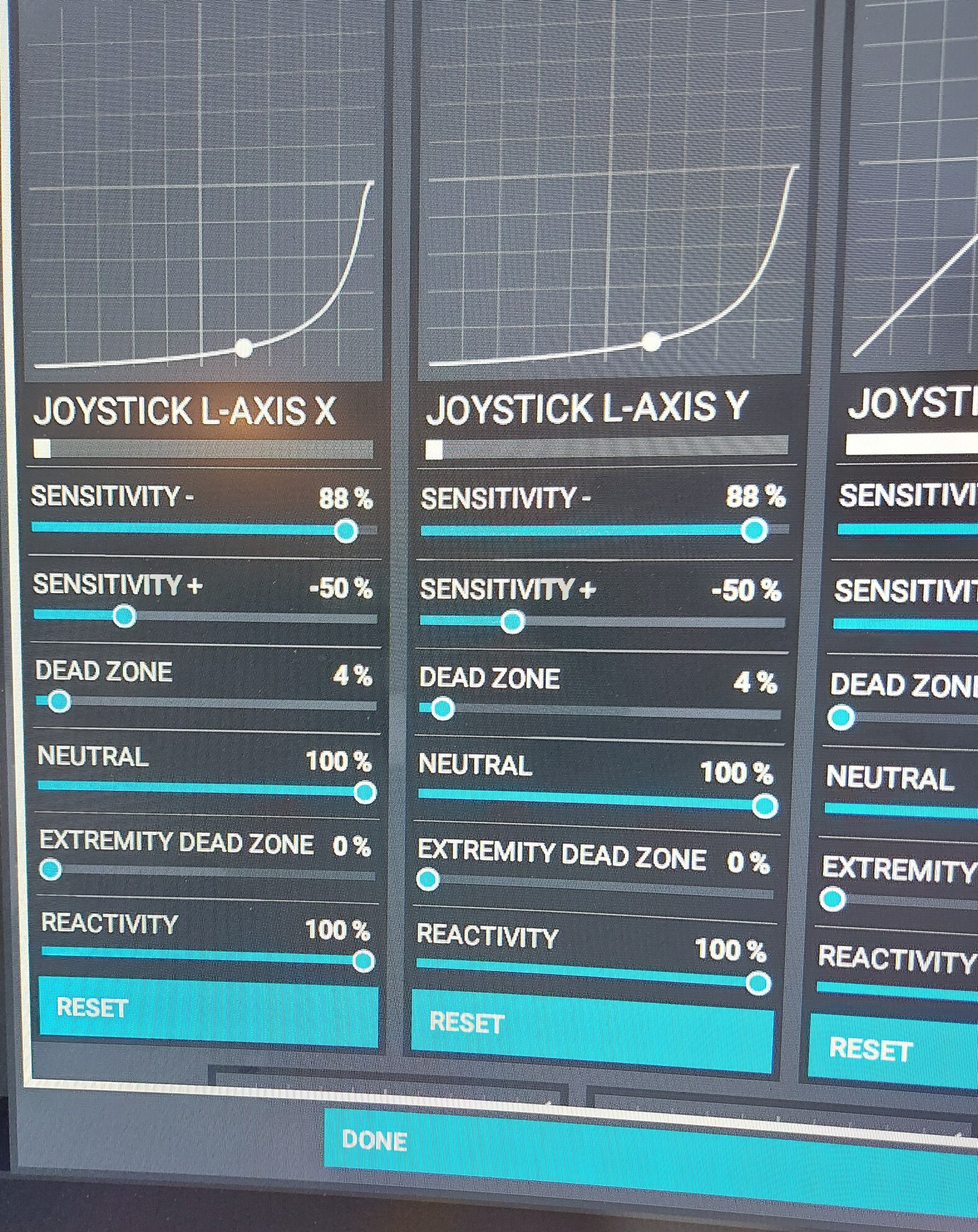
Put neutral to 100%. the only thing is the reverse thrust does not work.
Cheers
I just got mine and had the same issue with reverse not working. With the below configuration, everything works correctly including reverse. Note that after calibrating, you have to set the sensitivity to linear. Then apply the settings below to ThrottleConfiguration.ini. For the full documentation for setting this up in A32NX, see here. Thanks to everyone who posted previously and provided all of the necessary information to get this working.
This example shows a calibrated hardware with linear sensitity in Microsoft Flight Simulator (all values 0% with reactivity 100%). It uses also the idle reverse detent.
[Throttle]
Log = true
Enabled = true
ReverseOnAxis = true
ReverseIdle = true
DetentDeadZone = 2.5
DetentReverseIdle = -0.90
DetentReverseFull = -1.00
DetentIdle = -0.42
DetentClimb = 0.06
DetentFlexMct = 0.53
DetentTakeOffGoAround = 1.00
Too bad I feel your frustration, make sure when you re load the calibration software then calibrate you go past the idle to reverse thrust. Then reload the firmware.
did all the steps and the reverser only goes to 26% for me …
The thrustmaster web site in support, there is 2 things to download, the driver update, complete not as instructed but continue to reverse thrust hit 2 red buttons the the 2 lower black. Download the firmware up and run that
I really appreciate your help, just to confirm:
reinstall the driver
reinstall firmware
do factory calibration with 5 steps (including reverse thruster hit 2 buttons with everything in reverse including flap and speed brake???, or hit 2 buttons when throttle and speed brake and flap on idle position?)
reinstall the firmware
change the throttle config as per dev
would be helpful if you could post all steps that’s require, picking it up from pieces is so confusing…
Problem is the dev need to find the solution and fix it, us calibrating hardware to make it work is dumb  I wait for stable and not listen to newbs You do same cheers. I would pay for this rather than have it free and broken all the time. I’m dev and this is really a joke
1 Like
At 665 you got a complete step by step manual from the two users. Do it this way and copy the throttle ini maybe you have to adjust it a little bit but it works great. I copied the whole post just for not forgetting it in the future (next update is coming…).
26% on the ECAM, or on the thrust lever when you hover your mouse over it?
1 Like
external cam with airbus quadrant
does work for 26% reverse thrust
External cam? Ohh you mean the HUD on the external cam? I tend not to follow that information. Sometimes I’m getting conflicted information between the HUD and the internal ECAM.
There’s no such thing as 100% reverse, right?
the throttle shows 5% and yes is not full reverse. something wrong with latest model. I just did all upgraded to lalest firmware clean up nx install as in 66X calibrated ts with 5 steps and changed the config in work folder and have 0 all except the one for 100. reverse is going back 5%. maybe i send pictures as i rolled back to dev stable version.