Sadly the pedals will be boxed up and shipped back tomorrow. More testing lead to a conclusion that they did not work. Less than 30 seconds working with PMDG in MSFS 2020. They never worked with any USB port from 2.0 through 3.2 in a reliable way. I was never able to take a flight with them in MSFS, the software I wanted to use them for. I see that Honeycomb has a new rudder that I will try but I will have to wait until June.
I am in agreement with you. The pedals are bad, it will not run more that a few minutes without disconnecting if plugged into the back of the computer. Works longer when connected to a powered hub but it will still fail. So I will swap it out.
As for the other problem that has messed with me for a while, hidden configuration that forced the right toe brake to be on all the time, I found a fix and I have been able to taxi aircraft I have never gotten off of the apron because the brakes were set in some corrupt file setting that I could not locate. So after doing the following I was able to taxi my PMDG aircraft without problems (other than the TPR rudder disconnecting).
I first renamed the Rollingcache.ccc that is under the LocalCache directory. You can delete if you want.
I then renamed the wgs folder that is located under SystemAppData.
I then deleted the files in the cloud with this command from the command prompt
“start shell:appsFolder\Microsoft.FlightSimulator_8wekyb3d8bbwe!App -DeleteCloudSaves”
You will delete your flight logs with the above command but I needed to prevent corrupt files from returning to my sim.
I then restarted MSFS and after a few questions it started up and I could immediately see that the issue with the brakes was gone and it was a joy to taxi around the airport with passengers running after the plane.
I will have to reinstall some apps and get my graphic settings the way it was but I am now on the right track to spend many hours driving my 737 900.
FWIW I’ve had very similar problems – sometimes they work for 20 minutes, sometimes for a few hours, I think it depends how much input I’m giving them.
I’ve replaced my unit with a second unit and still have the same problem, so I’m not sure it’s the unit at fault. I’ve also replaced USB cables and purchased a PSU-powered PCIe USB extension card and plugged ONLY the pedals into, to ensure they’re not power starved and I still run into the same issue.
I’ve had them working when I go to bed, and when I wake up, they no longer work. Even without MSFS loaded. The quickest way I verify this is going into the USB Game Controllers panel – when they’re not working, it takes about 5-10 seconds for the T.Pendular Rudders to show up after double clicking, and none of the axis respond. That also leads me to think it’s not specifically a MSFS issue.
At this point, I’m not sure what it could be, I would think motherboard, but as I’m not the only one having it.. unless they just pumped out an entire bad batch of pedals.. when/where did you get yours from?
I got my pedals from Amazon. I think a survey should be conducted to see how many people are having problems with their pedals disconnecting and where/when did they buy them. The tech support team will look at my pedals to see what they can find. However I will be grounded until I get them back.
Not a motherboard USB problem since it is an issue with different motherboards. I used at first a ASUS TUF Z790 Plus WIFI D4 but upgraded to a Z790 AORUS ULTRA with DDR5 and still had the problem. I have also used USB 2.0 and up to USB 3.2 and still had the issue. Would like to pin down if Thrustmaster had a run of bad pedals that are being sold at Amazon. I got my pedals this year.
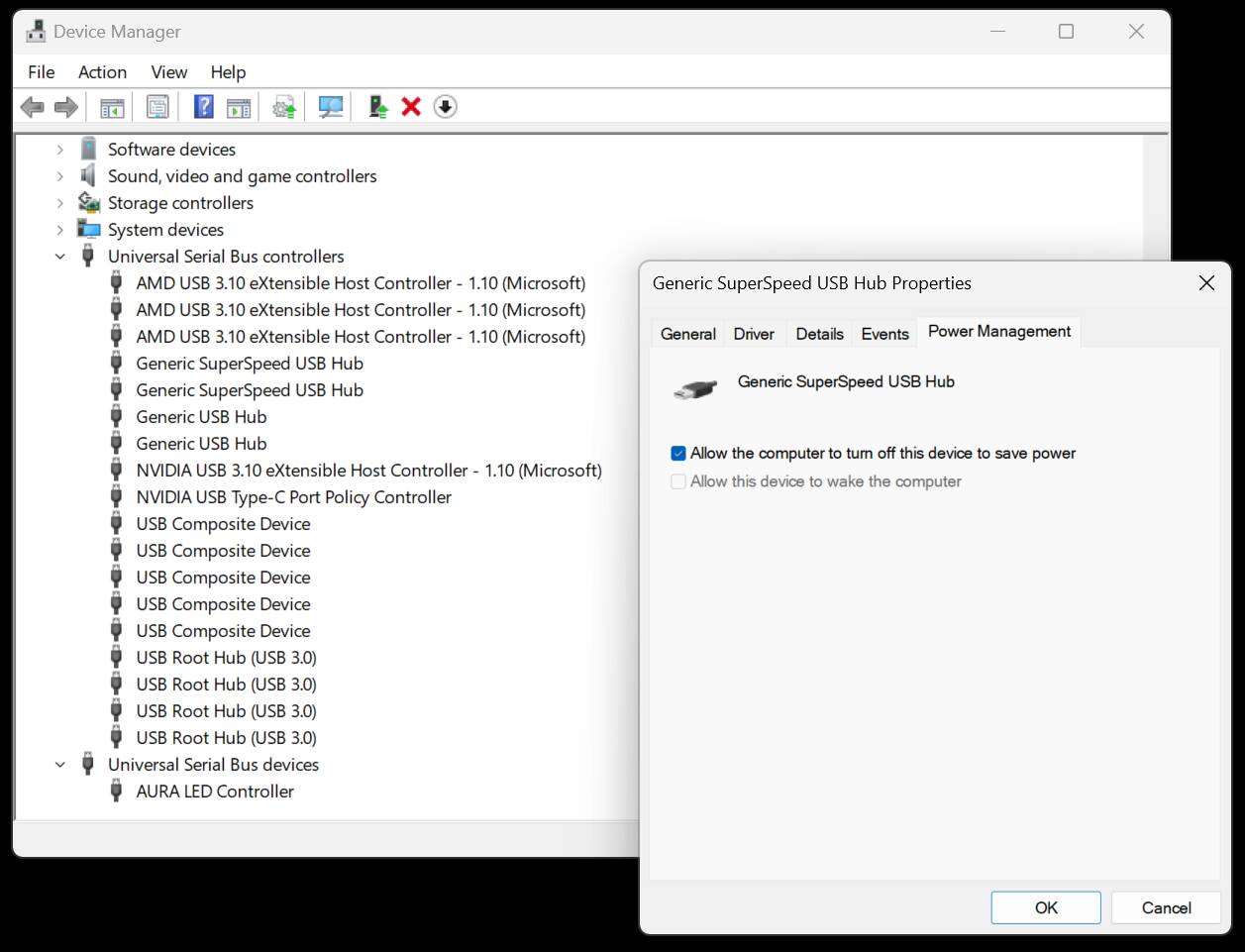
I don’t think anyone else asked, and I forgot to… did you disable the power management feature on your USB controllers / hubs? I’m going to guess no, because unless you know this can be a problem then you probably weren’t even aware of it.
Basically, by default, Windows can turn off a USB device for power-saving reasons if it thinks it is not currently in use. The device should be able to handle this and should simply transparently reconnect when it’s being used again, but this doesn’t always work on the software side.
In the past, this has resulted in devices spontaneously disconnecting in flight and failing to reconnect for me. It’s a common enough problem that Spad.neXt actually detects it and can automatically fix it for you. MSFS usually handles it fine, but possibly in the case of the pedals it is not doing so.
Fixing this manually is a bit time-consuming and user-unfriendly, but here’s how you do it:
Open Device Manager
Find the ‘Universal Serial Bus controllers’ node in the list, and expand it. You’ll see several USB controllers listed (your MB will have more than one)
For each of them, right-click and open ‘properties’
If you have a ‘power management’ tab, go to it (not all controllers / devices have this feature)
Uncheck the box that says ‘allow the computer to turn off this device to save power’
When you have found and changed all of these, your USB devices will no longer sleep. This may fix the problem. But OTOH you may just have a faulty set of pedals. If you’ve already sent them back then you won’t be able to try this solution until they are returned.
Also, check your power plan. For a desktop PC used for simming, you should have the Performance plan selected or create a custom one. If you have Balanced or power-saving, then you may get undesirable effects.
I should have mentioned that all USB ports have power management turned off and I was using Performance plan in each windows build. Thrustmaster will be looking at the pedals to see what is going on. The issue with them dropping connection was repeatable so the should be able to locate the problem.
Here is an update. I contacted the team at Thrustmaster and they shipped the pedals to a facility in Florida who worked on the pedals and then shipped them back to me. Last night I flew a quick route to KSLC and had no problems with the pedals disconnecting. It was a smooth uneventful flight. They did not tell me what was fixed on the pedals. I am just glad they are working
I cannot confirm this. My Joystick and the former Thrust Control (both Thrustmaster) worked fine with a hub. First with one on a Steelseries Keyboard and now with a new external one. And are there computer with USB2.0 still?
Yes, I am satisfied with them. So far the pedals have been working fine. I am glad that they were able to fix the problem, which seems to have been experienced by other people as well.
This has been an ongoing issue for me since March. On my third Case with Thrustmaster. They quit. Worked again. Quit again. Lucky I couldn’t sell my old Logitechs. They’re still working. Trying for an RMA.
Thanks for the post Nikon1109855. However our posts are about a hardware failure with the pedal. In my case, Thrustmaster replaced the electronics in the pedals and it has worked perfectly since. Your post should help people who are setting up for the first time.
Thrustmaster has emailed and they are shipping the PCB for me to replace myself. I accepted the offer and will follow up. I realize it’s expensive for the shipping and return.
Are You all sure that Your calibration software fm the site is used in a correct way? After unplugging the device, You have to calibrate the pedals correctly. I was sufferig the problem and it helped immediately.
As mentioned in this thread before, with a new set of pedals you are better off not installing any TM software and just plugging them in and using the OS game controller calibration.