I think the factors are both distance and convenience. According to the maker, it ideally needs to be between 45 - 95 cm away from your head, so basically where the monitor would be in 99% of desktop PC users cases.
I think this range is a bit low, as I’ve often noticed that if people are behind me and watching the screen, the tracker occasionally picks up their head movements from a much greater distance than 95cm. So yes, it could well work attached to a monitor behind a control panel. You might need to fiddle a bit with angles and mounting, but the device is adaptable over a wide range of positions.
I couldn’t find many pictures, but I think the suggestion of mounting it on top or on the underside of an instrument panel / glareshield in front of you should work absolutely fine, as long as you can find an acceptable route for the cable. It’s not the same exact case, but something like this:
The monitor in this case is behind the panels, and so long as you can have it within the 45 - 95 cm range from your head, it would likely be much better placed there compared on the panel compared to a more distant screen.
Yes, if it’s configured to look up rather than down, if you see what I mean.
Thanks. Both of these are possibilities. I’ll do a little more digging.
Tobii was the one with the minimum distance, right ?
That was a dealbreaker for me.
Long time ago I bought an el-cheapo TrackIR solution, and I have to say it’s really a game changer, the level of immersion by that simple change is amazing.
I have my Tobii mounted directly on my cockpit panel and it works jusr fine.
It’s great but no matter what it try I cannot get the ■■■■ thing to stay properly stuck under my monitor. Any adhesive strips (including extremely strong ones) I try just fail after a while and every trick I have tried to keep it straight and level fails at some point.
Light scuff and clean area with slightly damp cloth. Let dry and use a small dab of clear silicon in a couple areas. Tape in place and let cure overnite. It can be removed if needed with a sharp razor. 
Funnily enough I had this happen last week. Product support offered a replacement mount. I decided to some use adhesive velcro strips I have which so far are holding up.
I was tempted to go for the Tobii but bought a TrackIR 4 as I wear varifocals and thought eye tracking may cause issues with looking out of the wrong part of my lenses. I too can confirm that head tracking has changed my simming experience immensely and I would never fly without it.
The varifocals issue made it difficult to get on with VR but I also found it a bit of a faff along with poor performance and low quality visuals. Once these issues are resolved and headsets become better and lighter, I can imagine VR will become the norm for flight simming in a few years.
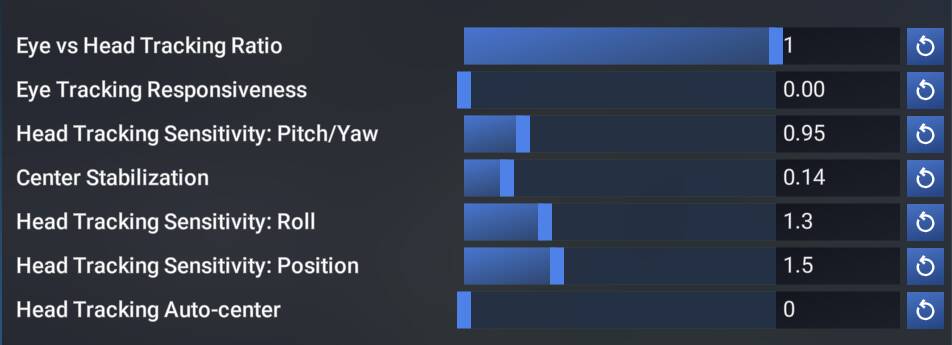
Ok I have to the Tobii but it is not easy to get to work properly. There are some settings inside MSFS but the labels are truncated so I do not understand the settings. Is there anyone who can explain? I have a wide screen and have set the font size inside MSFS to the lowest possible (18) but that does not help.
A bit later…. Ok, the below settings seems to work ok. I turned of Eye tracking completely since I couldn’t get a stabile frame with it. From my try-and-error fiddling I guess that the third option from the bottom sets the left-right sensitivity and the send from bottom is the forward/backward??? Not sure if there is an up/down setting for if that is the same as left/right??
After a bit more flying… Ok I guess there is a learning curve here to use your eyes and head in a coordinated way (eh, coordinated turns) to get the brain to understand what you see! It is actually a bit amazing. The trick is to find the correct balance between all the settings. I have had TrackIR for several years and also tried that Beam software. I’m a bit tired of having that extra piece on your head and also the web cam solution was not good enough so I purchased Tobii at a BF sail. It was a video from that Sim Hangar YouTube guy who pushed me into this. Below are my latest settings!
… Ok increasing the Center Stabilization seems to get a more stable image, when you focus something the image is more stabilized? I pushed it to 0.2 now.
…More learning, impossible to land using eye tracking since you want to look at the runway and also quickly look at your speed. While moving your eyes to the speed gauge you loose sight of the runway and when you have it in focus again it is to late 
I usually disable during short final. Can anyone post a snip of settings they like for a small twin? I’d be grateful.
Been using it happily for months. Lately issues. Turns out the unit is a USB power hog. So connected to a powered USB hub helped.
Issues mostly fixed, but I still get that annoying drift and failure to recenter. Never previously.
I simply disable Eye Tracking 
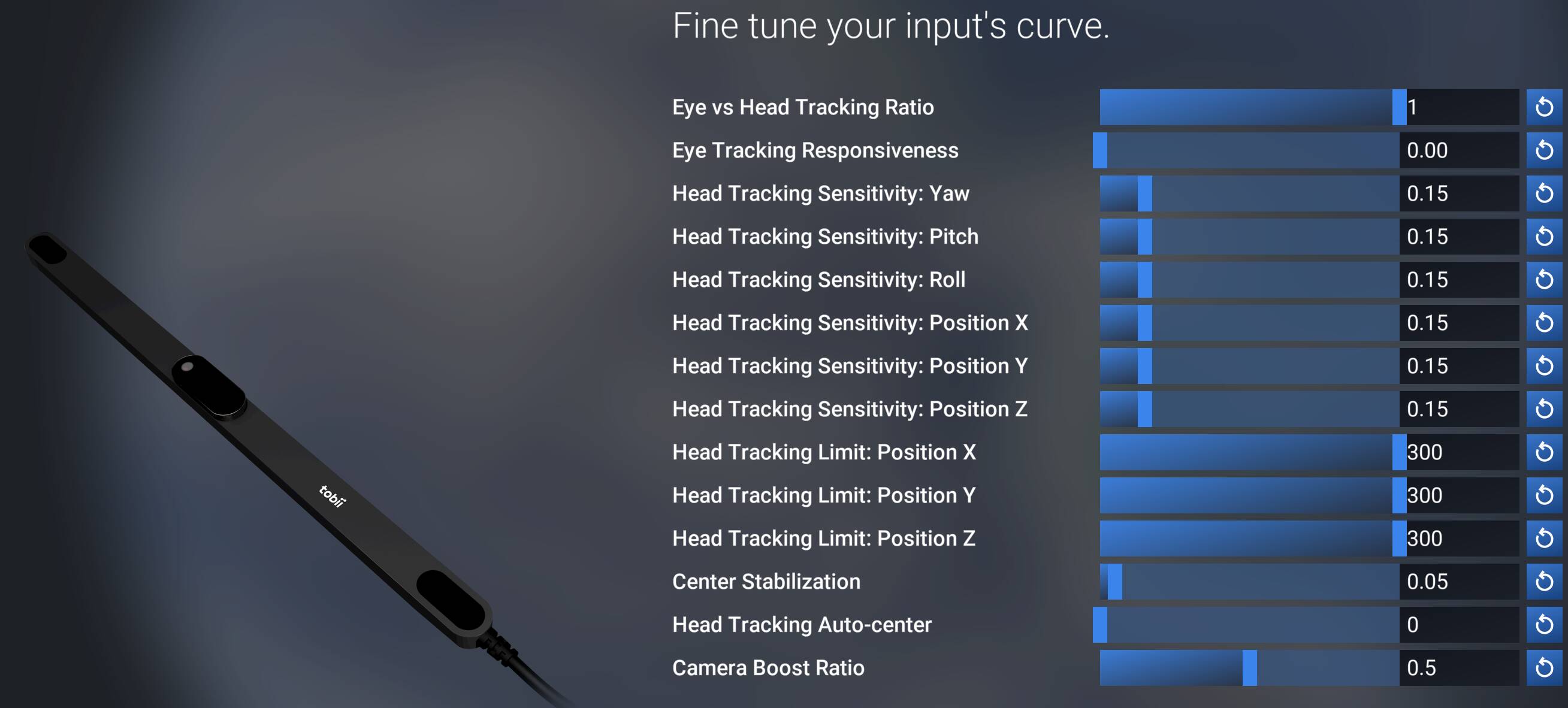
Here’s mine although it’s all a personal preference.
That was the first thing I did when I got it a few years ago. I love the idea, but in practice it was fiddly to use.
2020 here, Tobii and OpenTrack. All mounted on top of my main 34 inch monitor and absolutely love it. Tobii software is a pain for me, hence the use of OpenTrack, which is a joy to use. Necessary buttons and toggles bound to buttons on my yoke.
My new settings with SU5. I am really very satisfied with how it works.