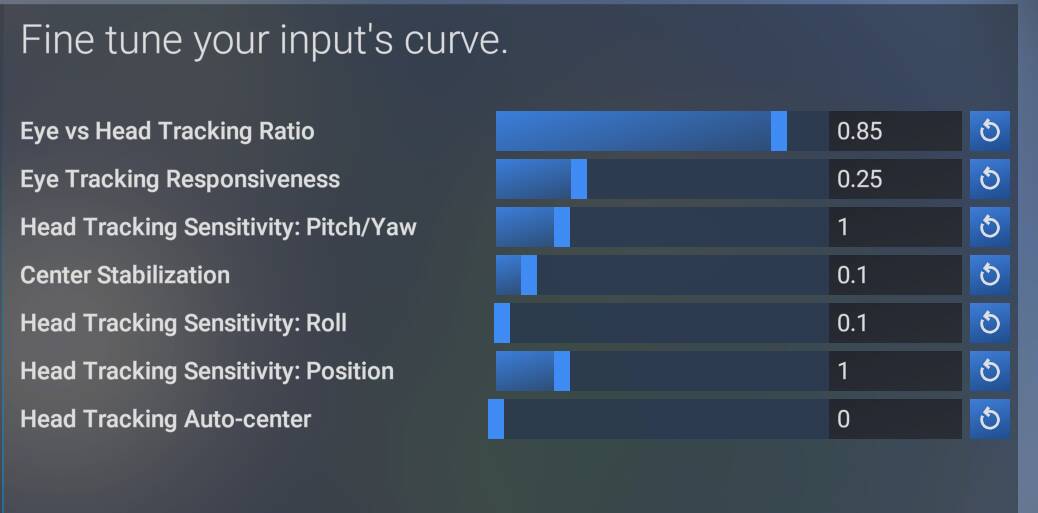
With the latest implementation of the Tobii SDK, Tobii’s headtracking is “lazy”; meaning it has a perceptible delay when you move your head. It feels almost like it’s following after your movement rather than being in sync with your movement. This is not a sensitivity issue, but is more a delay in headtracking being translated to in-sim camera movement. It feels like the camera has to “catch up” to the user’s head position. This delay does not occur in the current Retail Release (SU4 and prior) of the sim.
FREQUENCY OF ISSUE
How often does this occur for you (Example: Just once, every time on sim load, intermittently)?
Every Time
REPRODUCTION STEPS
Please list clear steps you took in order to help our test team reproduce the same issue:
Setup Tobii as follows (Hardware settings from top to bottom): 1, 0, 0.2, 0.15, 0.05, 0.07, 0.07, 0.05, 300, 300, 300, 0, 0, 0
Enter a C&D flight
Center Tobii
Move head then hold still and observe continued camera movement as camera movement “catches up” with head position.
YOUR SETTINGS
If the issue still occurs with no mods and add-ons, please continue to report your issue. If not, please move this post to the User Support Hub.
What peripherals are you using:
Tobii, 32" 4K Alienware display
[PC Only] Are you using Developer Mode or have you made any changes to it?
No
[PC Only] What GPU (Graphics Card) do you use?
AMD RX7900 XTX
[PC Only] What other relevant PC specs can you share?
MEDIA
Please add a screenshot or video of the issue occurring.
We have created an internal ticket to see if our team already has this logged, and if not they will attempt to reproduce the issue and create a new bug report. This item is now marked as feedback-logged. If there is an existing bug report or one is created, we will move this thread to bug-logged.
Yeah I have just switched back from Open Track to the in sim Tobii controls after seeing the numerous new options. Movement feels somewhat smoother but there is an obvious delay especially when head movement stops IRL and continues briefly on screen
I’m experiencing this too. Also, the view seems to get ‘stuck’, it can last for a couple of seconds. I did not experience either of these issues on the .9 build.
(I’m thankful, you’re checking in on this. I am worried it might be one of those things we get stuck with.)
EDIT:
I’m in the sim right now and it’s definitely still an issue. There is a detectable delay in camera movement as it tracks head movement. As described – lazy – you move, then it moves after a delay.
I’ve only had one flight in 1.7.11.0 (A2A Comanche over Antwerp in CU14 - excellent by the way!) but I will test more tomorrow in different aircraft.
The responsiveness of the Tobii was much improved for me. No noticeable lag and no freezes. There was another problem in the last couple of builds in which I couldn’t look up or down fully - this didn’t manifest today.
I had a couple more flights in the Comanche and also the JF RJ Professional. Both were fine, no problems.
Today though, I’ve been flying the standard 2020 version Kodiak off and on all day. The first flight was fine, subsequent flights however have seen the same problems I experienced previously, laggy inputs, losing focus, getting stuck/unresponsive etc. I tried restarting the sim and it didn’t help.
There seems to be some weird acceleration and dampening going on. I’m having a bad time setting it up to where I used to have it with the old system (both in SU4 and in 2020). Can’t we just have that default back?
Yes, I’m also finding it really bad in SU5 - the movement is far too twitchy, and even with my head held very still, I’m seeing the image zoom in and out and slide around all over the place. Reducing sensitivity even further and increasing centring doesn’t help the jerkiness and erratic movements.
It’s so bad for me I’ll have to leave the beta. If it makes it through to the update final build I’ll revert to MSFS 2020 again, like I had to do for most of the second half of 2025.
I’ve found that if the tobii goes haywire I can get it working again mid flight by pausing the sim, opening the tobii experience app and running the calibration again. Tried this a couple of times and it successfully restored normality on both occasions.
What I haven’t found is what triggers the abnormal behaviour.
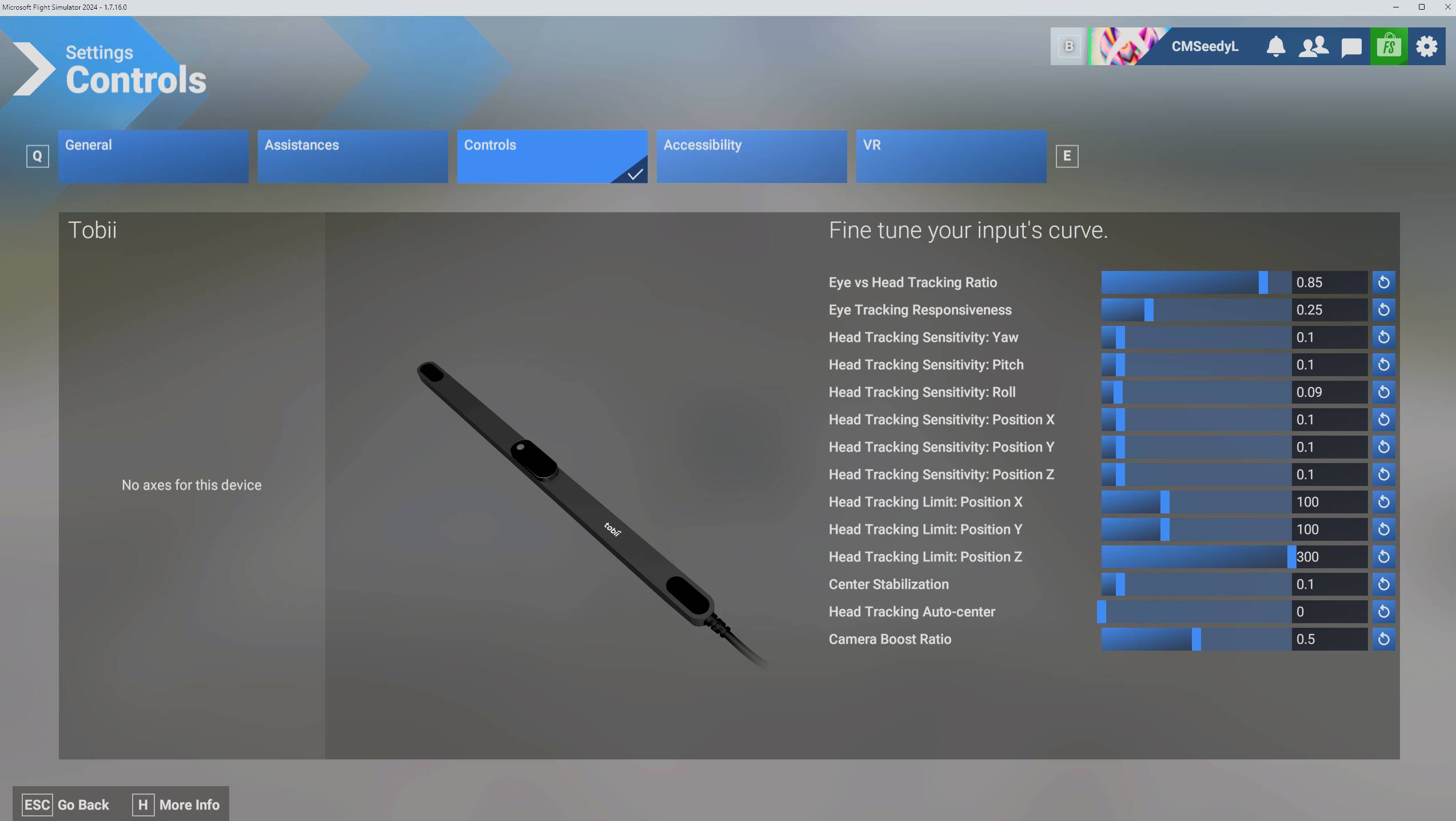
For those of you experiencing the “laziness” issue in the SU5 beta, can you post a screenshot of your in-sim Tobii settings? I just tried using my Tobii Eye Tracker 5 with SU5 build 1.7.16.0 using the settings shown in the below screenshot, and it didn’t feel any noticeably different than what I’m used to from SU4 and earlier.
Note that my Pitch/Yaw sensitivity in SU4 is set much higher (1.0 in SU4 compared to 0.1 in SU5). It seems like one of the changes after upgrading to the latest Tobii SDK in SU5 is that you should significantly reduce your Pitch/Yaw sensitivity to have a similar experience to what you were used to previously.
Also, if you are experiencing this “laziness” issue, are you using the default Tobii software or another solution such as OpenTrack?
I’m wondering if Frame Generation or some other possible factor is having an effect here.
Mind you, the laziness is slight, but clearly noticeable when you move your head, see a brief delay before the camera moves, stop moving, see a brief delay before the camera stops moving.
I can reproduce this every time I use the sim. It is never not there.
I’m not using OpenTrack. I am using the default Tobii Experience software. I do not have any other Tobii software installed.
Hmmmm. This is very strange indeed. I’m not seeing that effect at all in SU5. My Tobii camera movements respond pretty much instantly to my head movements. In fact, if it wasn’t for this thread, I wouldn’t have even thought to check if there were any differences with Tobii beharior in SU5 compared to SU4, aside from some of the sensitivity sliders needing to be adjusted as described in my previous post.
I wonder what deltas there are between your setup and mine. Of note, I’m using AMD FSR framegen on a GeForce RTX 3080Ti GPU. What are your framegen settings?