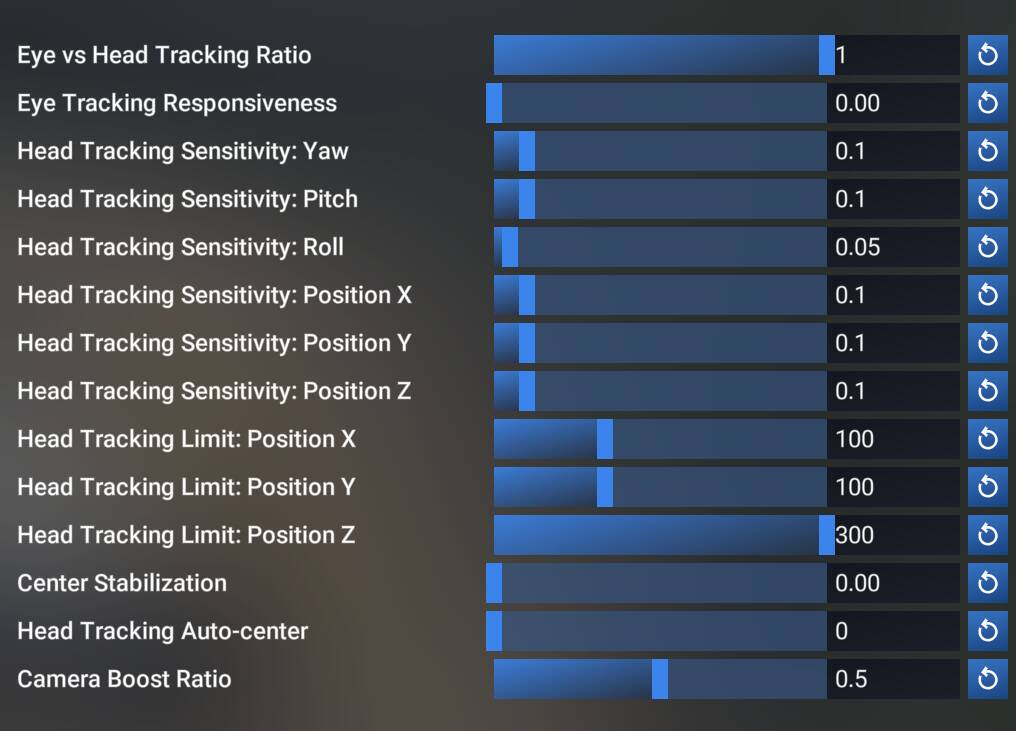
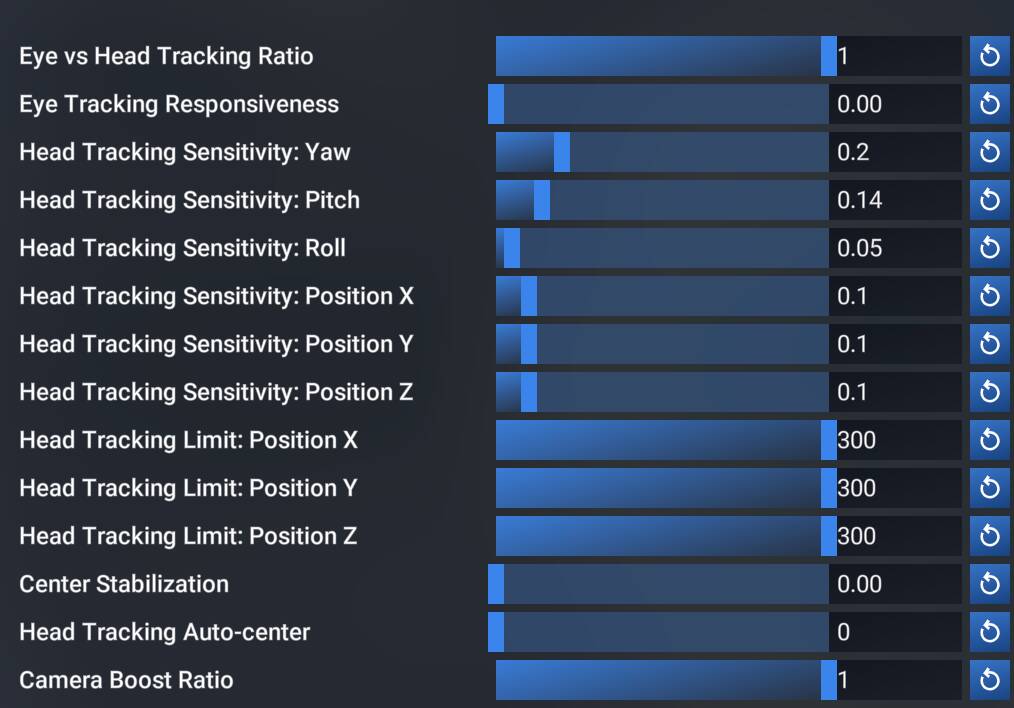
I just tested my Tobii in SU5 once again using the same sensitivity settings you posted in the OP, and I’m still not able to reproduce this issue. My Tobii’s camera movements respond virtually instantly to my head movements, just like in SU4.
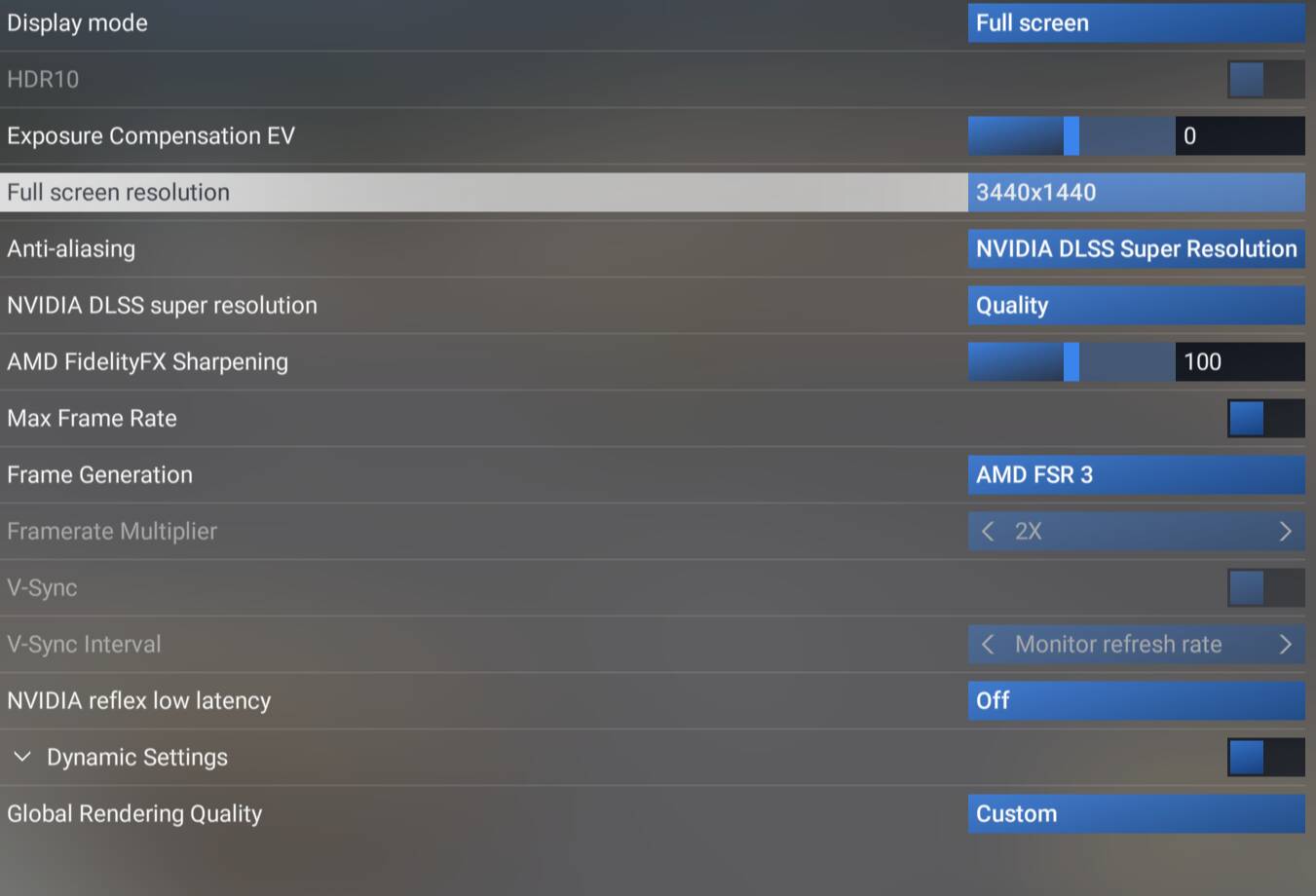
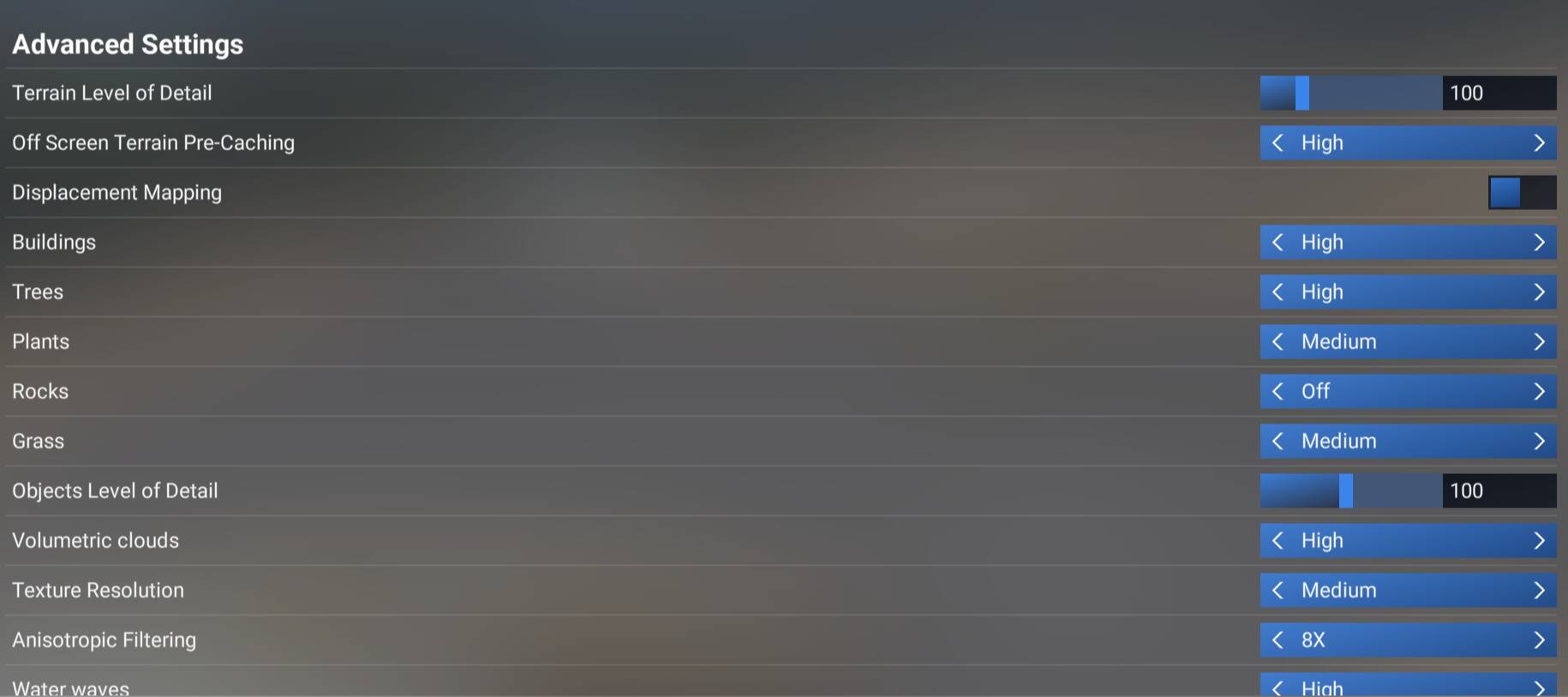
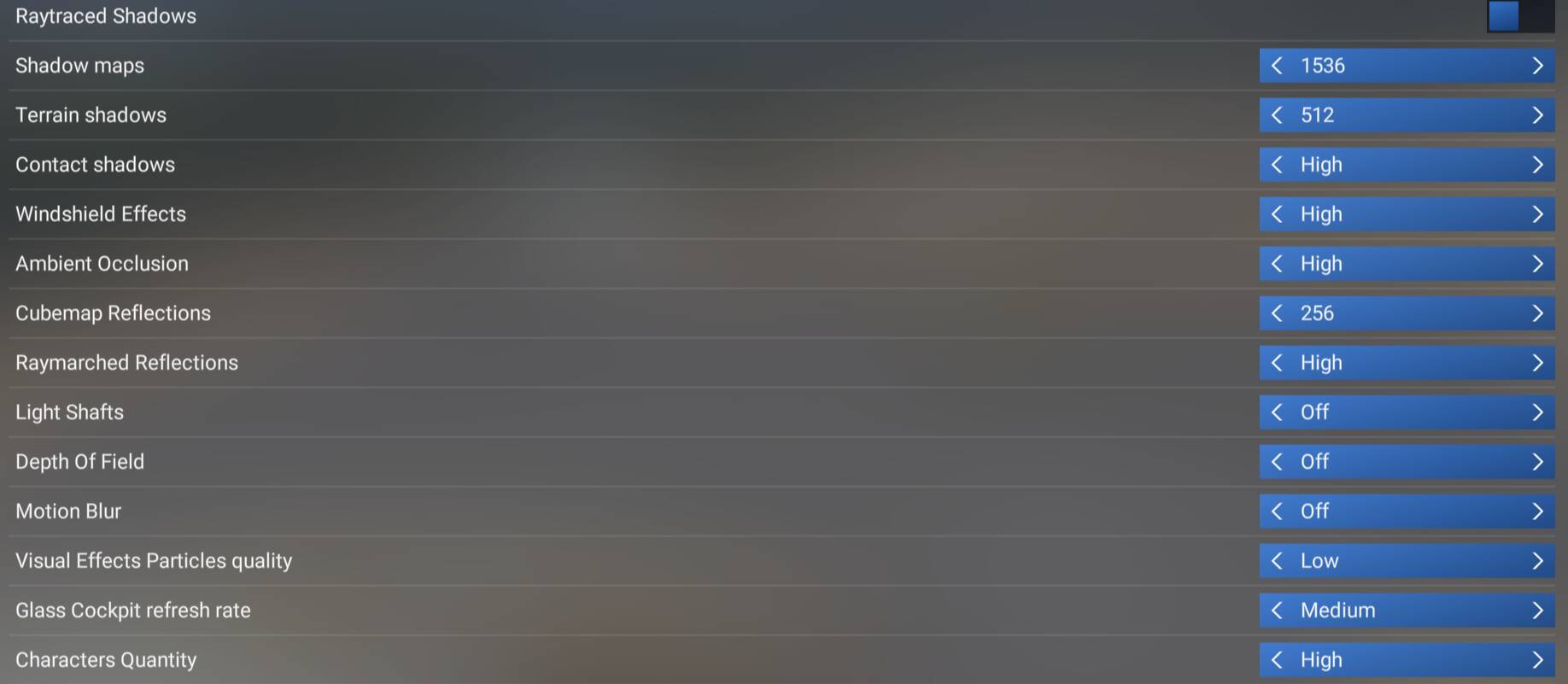
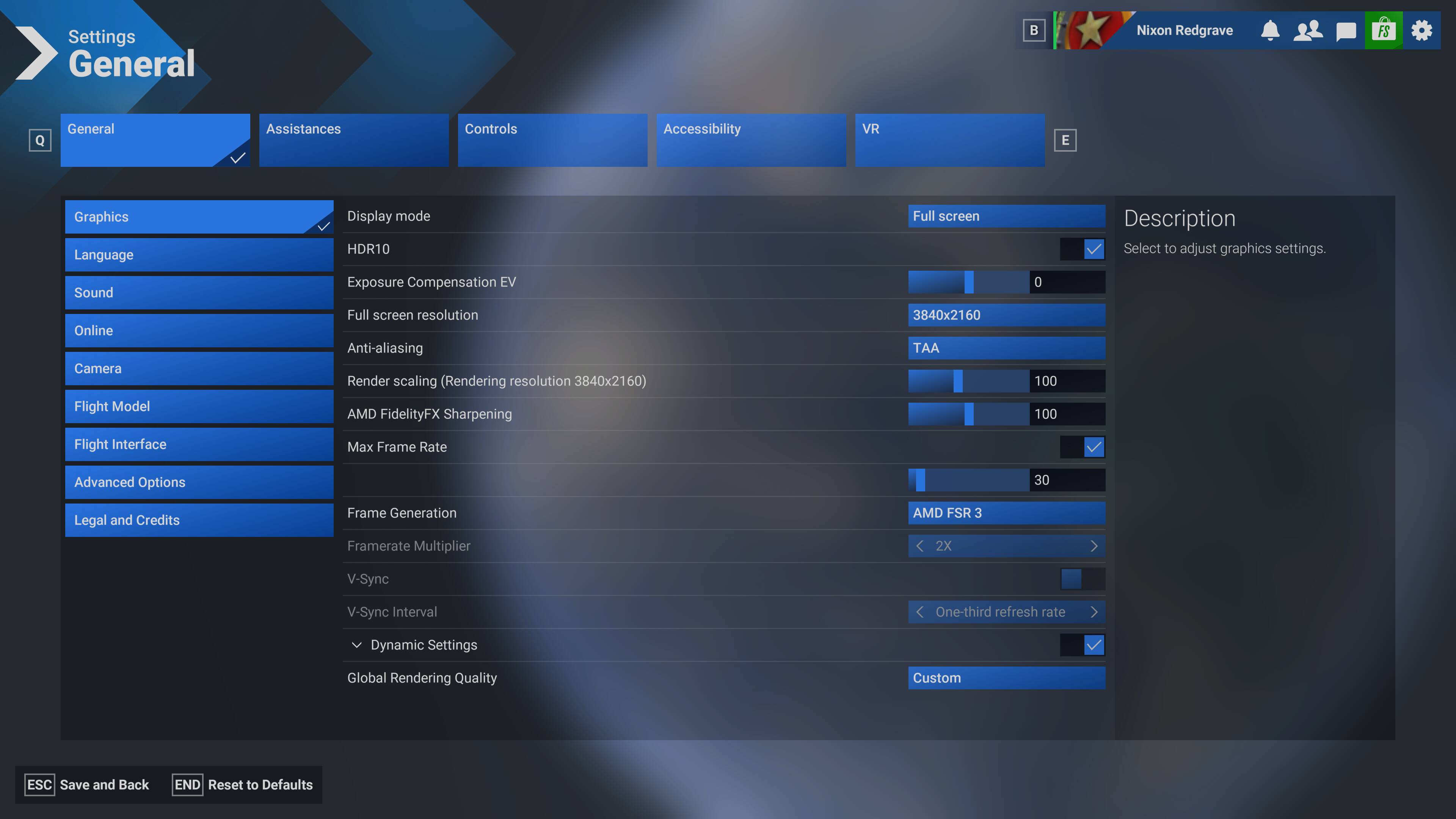
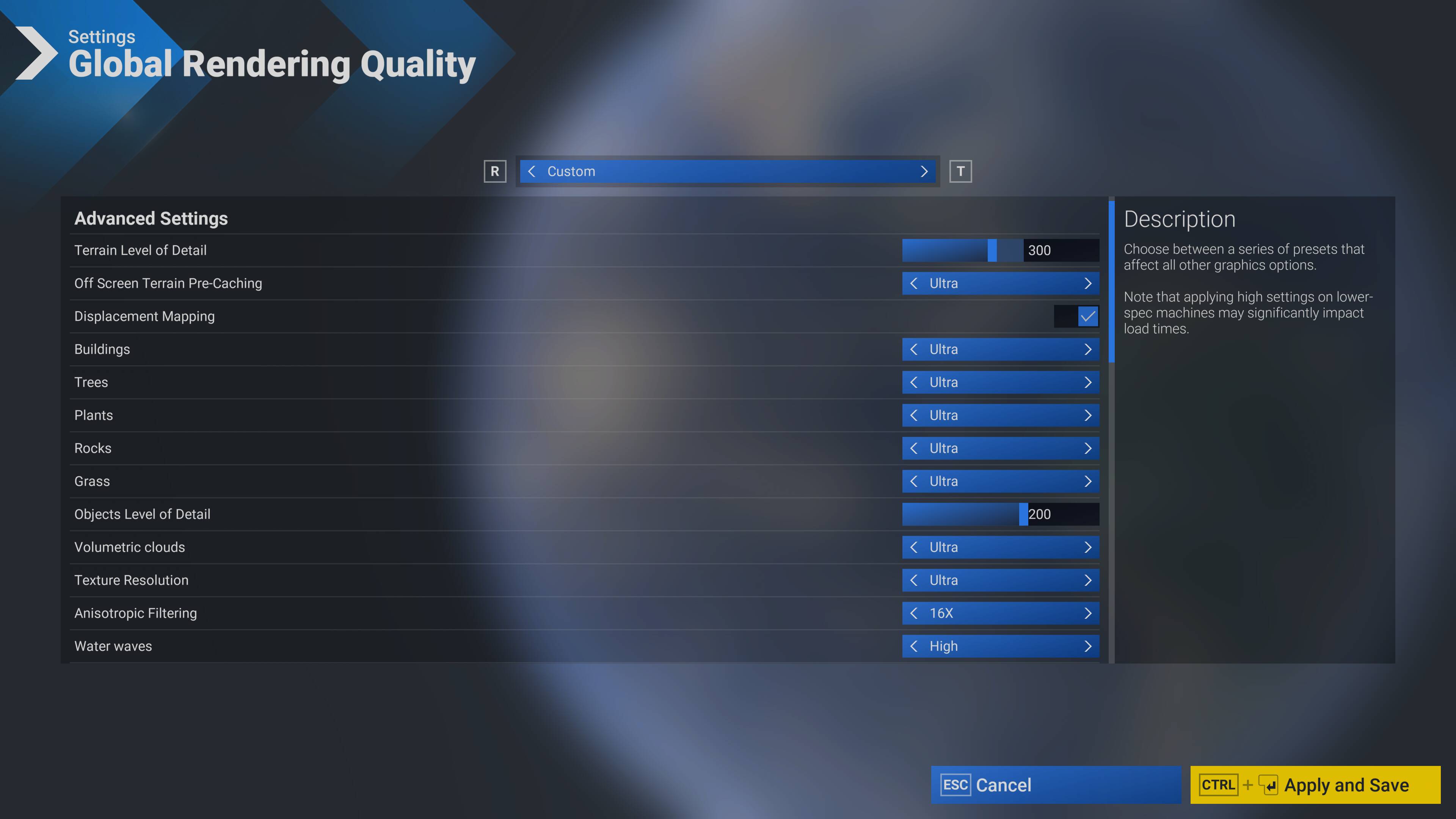
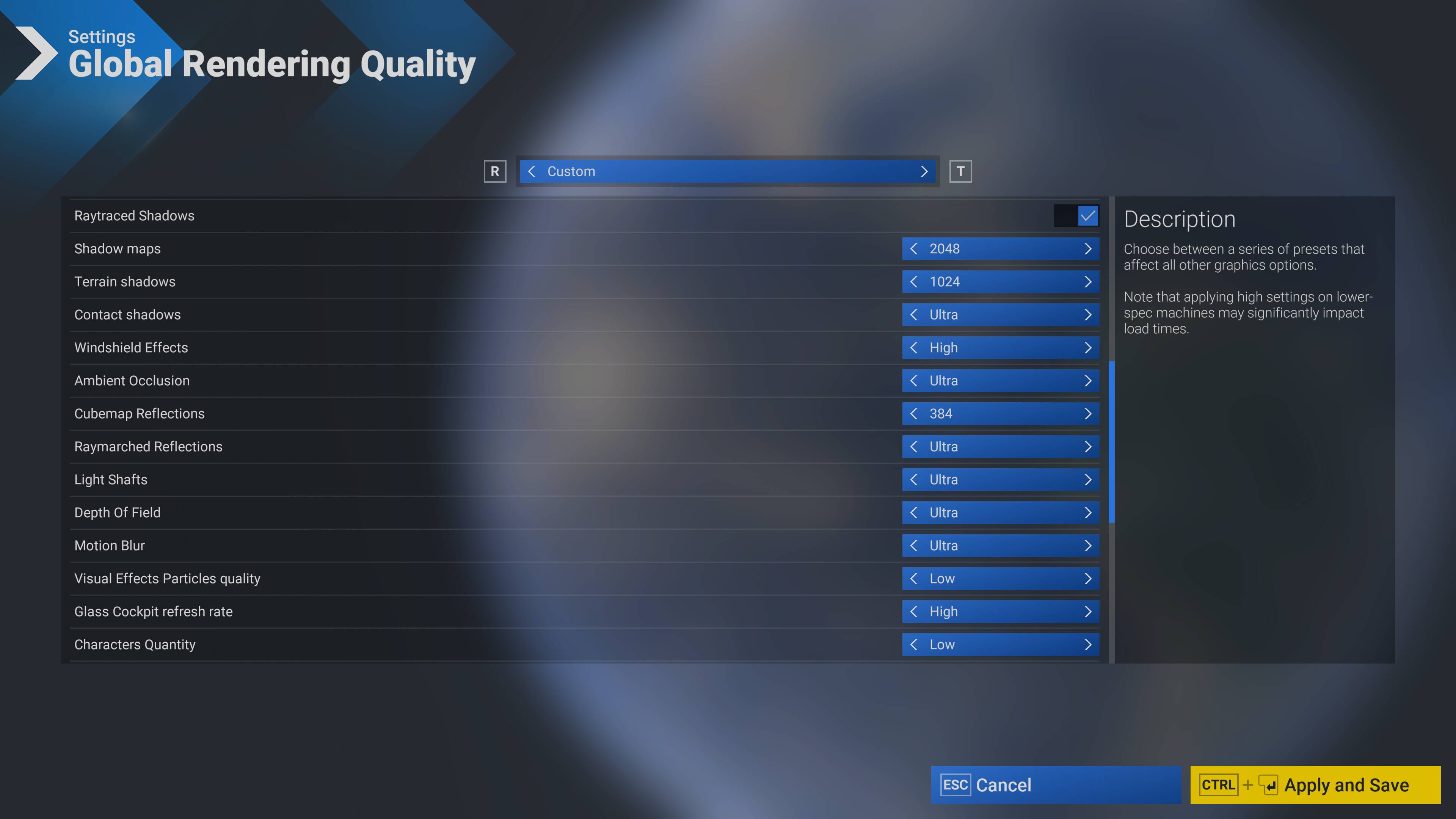
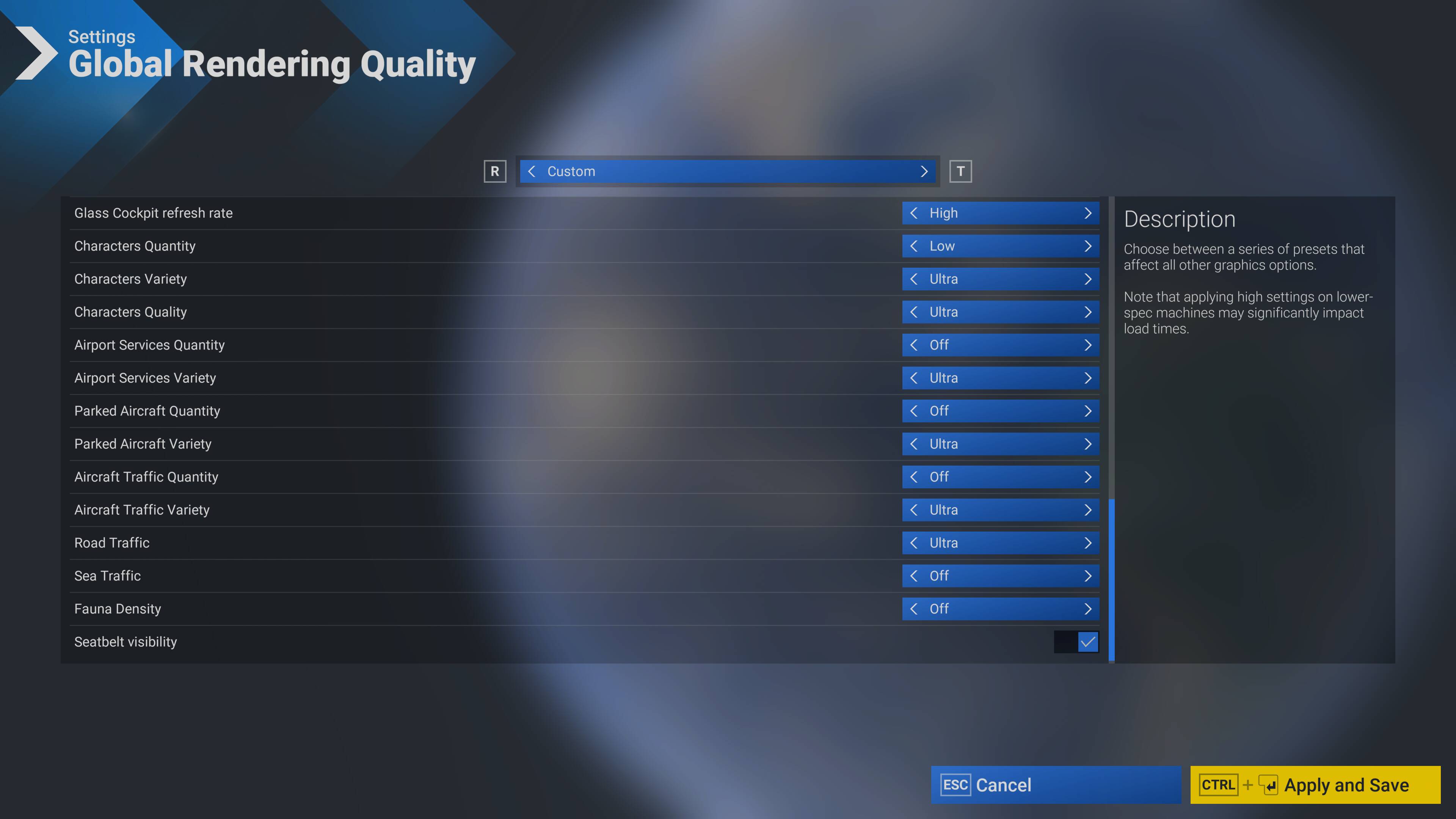
Can you share screenshots of your other in-sim options (like graphical settings) so I can try to find a root cause to explain why you and others are seeing this but I am not?
Got back into MSFS and applied your SU5B settings, with a few changes:
no eye tracking
I prefer just a minimal roll
still trying to figure out the X/Y/Z limits
While I’ve found that playing with the Camera Boost Ratio, the effect can be minimized but is still there. With your setting of 0.5 the laziness is still there but feels manageable. I’ll have to play with different values but it seems like lower ones exaggerate the laziness effect? But if it’s set too high the movement becomes too twitchy for my tastes.
When sitting cold and dark at a small airport, the above will net me a solid 50fps (100fps with FSR 3) on a 100Hz monitor, 3080ti and a 7800x3d.
To be honest I’m now unsure how the Camera Boost Ratio affects things. In previous versions of the beta this made the camera almost uncontrollable but now it seems it’s effects are more subtle.
I just tested it at 100% and seemed to reduce the laziness effect to the point where I’d consider it useable, whereas setting it to 0% seemed to increase the laziness.
I saw that too, re: Tobii settings getting changed. I marked that down as beta software doing beta software things
After spending some time in flight today, I just can’t get the in-game Tobii settings to work properly and consistently.
Can’t go longer than a few minutes without having to reset the view. I suspect/guess that the laziness effect (which I can reduce but not eliminate) is adding up and results in a drift.
Switching back to OpenTrack, everything is working as expected - much more responsive and it better handles regaining tracking after “out of scope” head movements.
Which is too bad…ever since MSFS 2020 and up to 2024 SU4, I could get away without running Tobii Experience and just making sure the relevant services are running. This meant that the Tobii sensor bar was only active when MSFS was running and I didn’t need to have any other external programs.
But…c’est la vie…if OpenTrack gets the results then that’s what I’ll use but I’m happy to continue testing!
And I got to say: aside from this Tobii business SU5 beta has been a pretty smooth experience for me.
This morning, I decided to try a few things to “work the problem”.
First, I disconnected all my peripherals save for the keyboard, mouse and Tobii – no change in behavior
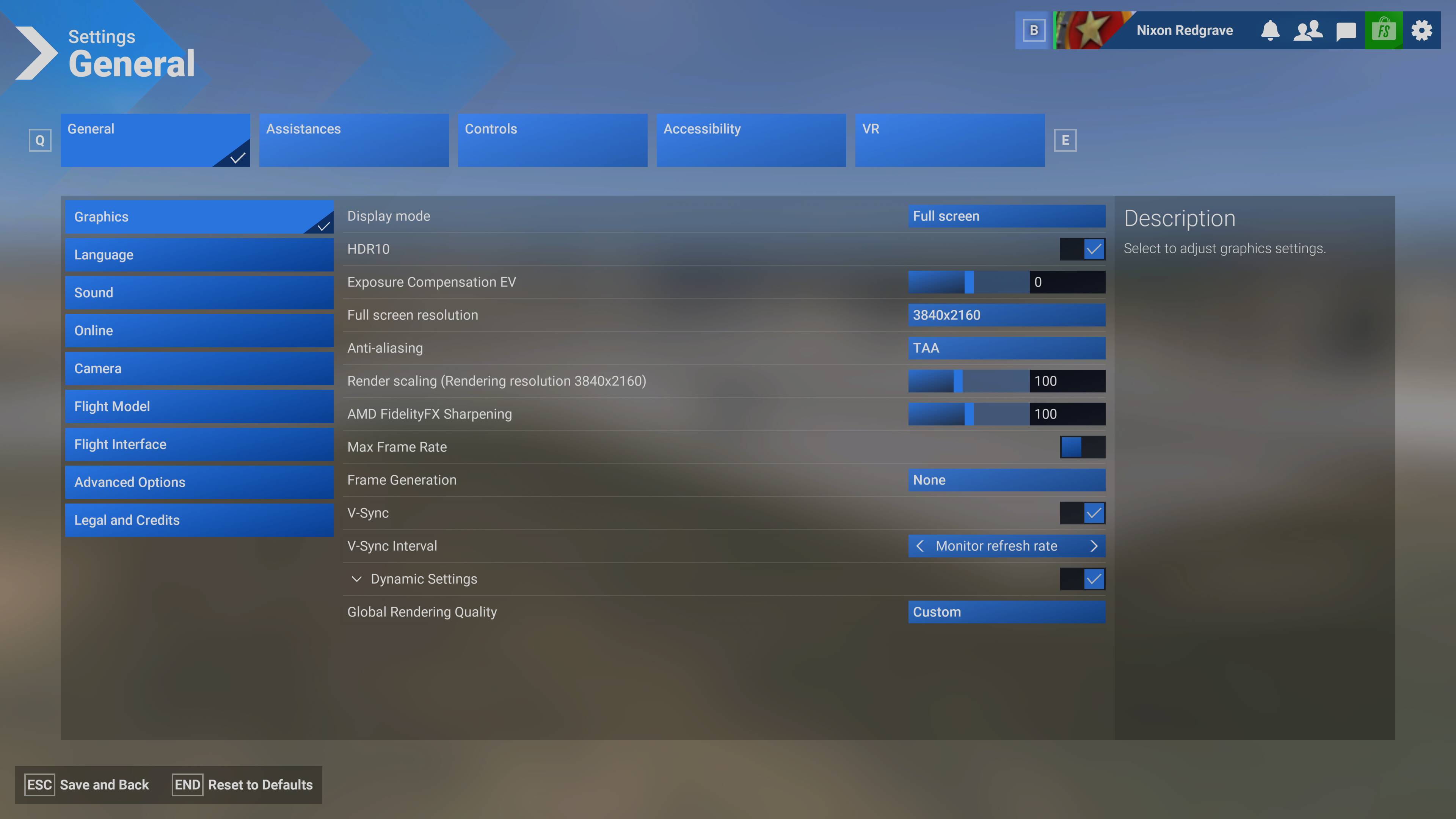
Second, I played with different graphics settings.
Turned off FG (in-sim FSR), so with Max Frame Rate set at 30, as I had it, I now had 30 FPS – no change
Turned off Max Frame Rate – no change
Set V-Sync Interval to Monitor refresh rate and, via Windows, set my display from 240 Hz to 60 Hz – Here I begin to see a “change” but what I believe is really going on is that the smoothness of the camera’s motion has been so impacted by the reduced Hz that its much easier to miss catching the delay due to how much less smoothly the entire camera motion has become. It is far easier to catch the delay by ever so slightly moving your head rather than doing large range motion
Someone earlier in the thread said it felt like there was some sort of dampening going on, and that is what it feels like. I’m finding holding my head/view still much easier with this new SDK, which makes selecting controls with the mouse much easier. Often in <=SU4 I’d have to pause head tracking, use the mouse to position the camera (or use an instrument/custom view), and then manipulate a control simply because the camera wouldn’t hold still well. I find that behavior nearly gone with SU5 and this new SDK. I cannot help but wonder if this dampening effect is what I am noting as the delay. What I simply cannot understand is why you and some others are not seeing it. Is it a perception thing? Are some of us just more sensitive to this or is it a refresh rate value in conjunction with FPS that is a contributing factor.
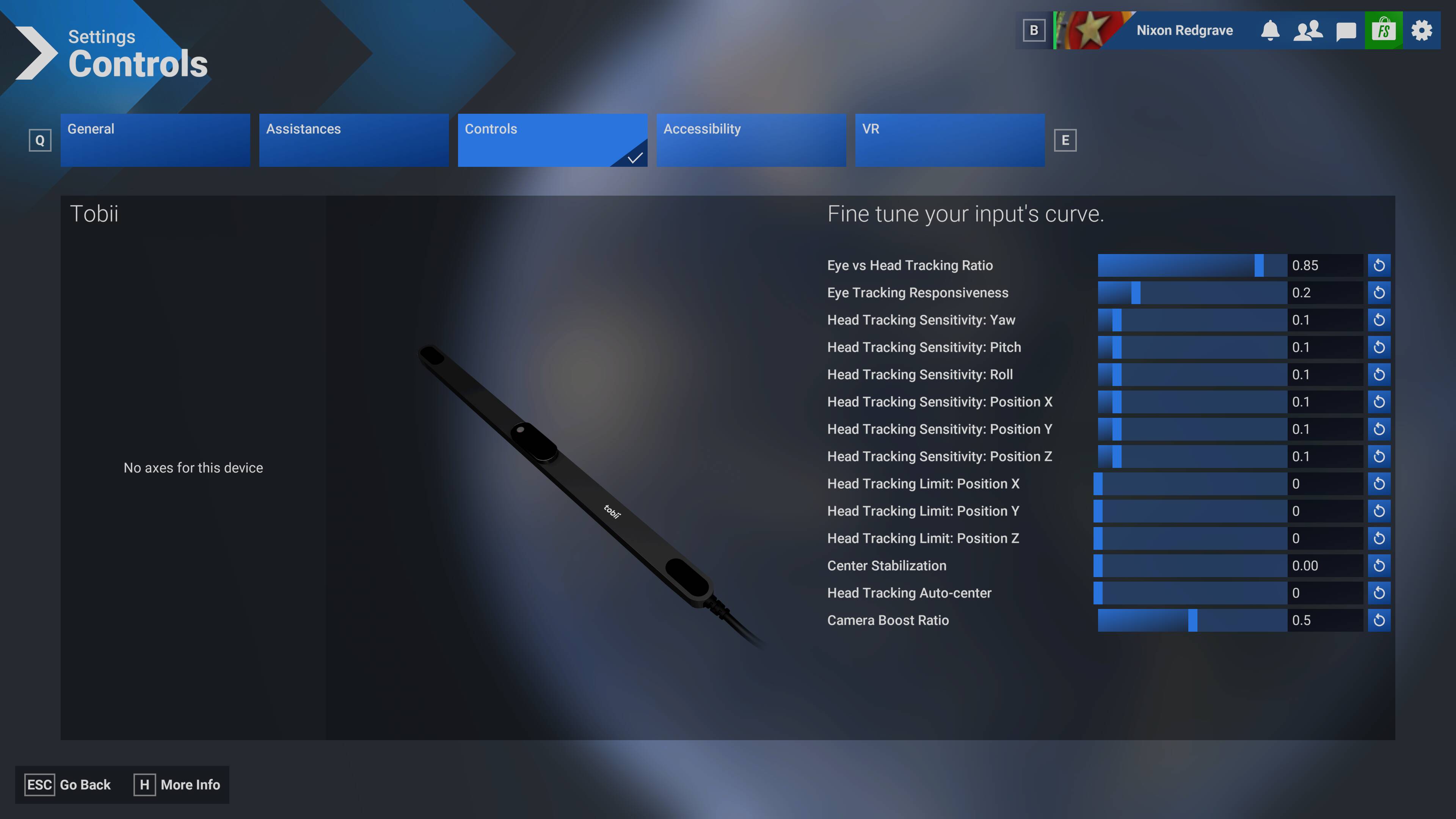
I’d also like to know what is going on with the Controls interface in that my Tobii settings are displaying something other than what I had initially set them to, however the behavior of the Tobii in-sim feels no differently to how I originally set them, so are they actually different or just displaying that way? I’d like to know what my actual settings are here, and if some aspect of those settings is contributing to this delay.
I’m looking forward to some further input here from others. In the meantime, I am going to further trim back the sim by uninstalling vJoy, disabling content, and testing with a super simple base aircraft. There has to be an answer here somewhere.
I uninstalled vJoy and disabled every-single-thing I could, including MS content that is allowed to be disabled via My library.
I am sitting in the Seastar at KPRB (autogen) with a very stripped down sim. I’ve kept all my peripherals disconnected save for the keyboard, mouse and Tobii.
These are the only graphics settings changes I’ve made to those I posted yesterday:
I’ve been swapping back and forth between my display set to 240 Hz and 60 Hz. I thought, at first, there was a slight improvement at the lower refresh rate. However, after hyper focusing on this, as I have, I can’t tell any longer.
In short, I still see the delay, but it is markedly better.
Before I hit “Reply” to post what I typed above, I set my graphics back to how I had them originally:
The delay is back to how it was that prompted me to make this thread.
There is something here in the difference between these two different graphics settings along with, possibly, my refresh rate at 240 Hz vs. 60 Hz that is contributing to the delay being more pronounced and, therefore, much more noticable.
Again, these conclusions have been made with a system and sim heavily stripped down to basics.
I’m not at my sim computer this weekend, so I’m unable to do some more testing for a few days.
Just to throw another variable in the mix:
Are you aware of the “overclock mode” available on the Tobii Game Hub app settings? I know you’ve said you’re only using the Tobii Experience software but maybe you have the Hub software installed as well?
There’s very little information out there about the overclock mode but what it’s supposed to do is bring the Tobii Eyetracker’s polling rate up from 30Hz to 60Hz (I think?). Personally I haven’t seen much difference myself, although it’s unclear to me if Game Hub is required to be running for this overclocking to work.
Since you’re deeper into the weeds in testing the Tobii vs monitor refresh, I thought I’d point it out.
Thanks for participating here. I appreciate it, and the more of us contributing the more we can help Asobo get this addressed.
I do not have the Tobii Game Hub installed. I was reticent since I tire of all the “extra” apps and services that run in the background and potentially lead to issues.
I wonder if that higher polling rate would be valuable, however.
I hear you on the extra stuff. Things are already getting a bit crowded with the extra apps I actually use (spad, Navigraph, BeyondATC, traffic injectors, ship injectors, etc, etc) and would prefer not to run more apps just to make a “natively supported” feature work properly.
While in the SU5 beta, I have had the Hub and Experience running, and also just Experience running. Can’t say I noticed a difference to the laziness effects we’re seeing here. But I haven’t done a proper organized test yet either.
Tobii Hub may also introduce another layer of confusion as it also has settings for MSFS. How those interact (or conflict?) with the in-game settings I have no idea.
I wonder if Seedy is using the Tobii Game Hub, and if so what their settings are? What is the Asobo recommended app combination? How are they testing when developing official compatibility with this bit of hardware?
Since Tobii headtracking seems to be working well for you, and you’re not running the Game Hub, I think we can safely rule that out and just concentrate on what’s happening in-game.
The thing I’m finding really whacky is that of my settings. When this new SDK was introduced a few SU5 Beta builds ago, the default setup was way over sensitive and out of hand. That is when I saw another user’s post with the settings I utilized in my OP, which I copied as I setup a custom profile.
The strange part, beside my settings now indicating something other than what I had originally setup and the behavior of tracking remaining the same as how I originally set it up nonetheless, is when I use the default “Tobii” profile, it doesn’t feel any differently to my custom profile.
First, a big thank you to each of the users who have contributed to this thread about the current settings and issues with Tobii eye tracker. I opened the control settings for Tobii two days ago and found all the new settings selections and was a bit overwhelmed. Trying to adjust the new settings, without understanding what the new settings are, was a big challenge and stressful. Then a kind user MagicQuasar1176, pointed me to this thread. Now I see the light at the end of the tunnel. THANK YOU, again for your work and contributions to this community. I will be contributing as I work through this.
I am not currently experiencing the responsiveness lag as described here. Except for needing to fine tune my parameter settings, it seems to be working normally. I am on SU 5 Beta, the latest Nvidia driver, using DLSS frame gen, with max frame rate at 30, resulting in steady FPS of 60 on a 60HZ TV/monitor. The only issue is slight screen tearing when the tracker camera is in motion.
i7-9700, 32 GB Ram, 4070S. Not a high end system for sure.
I used the settings that SeedyL3205 posted above from his system. They are working excellent for me. No delay, no jerkiness, smooth responsive tracking. Big thanks to SeedyL3205!
Finally got back to my sim PC, updated to SU5 Beta 1.7.17.0, and here’s my story (forgive me, it’s a long post):
Appears that this issue might be fixed? I think? Maybe?
NOTE: Tobii Experience has to be in the foreground for the gaze bubble to render over MSFS.
My Test
enable “Show My Gaze” in the Tobii Experience settings. This will show a bubble on screen of what the Tobii device thinks your eyes are aimed at. As we all know, your eyes naturally scan and move around involuntary and this results in the Tobii gaze preview twitching around significantly. But with some practice I was able to hold a relatively steady gaze while moving my head around
load into an aircraft and decide on a feature to focus on, that was straight ahead. In the A2A Comanche, this turned out to be where the prop appears to intersect the engine cowling
while doing my best to keep my eyes steady, I moved my head to look to the left. My aim point was the LH nav light box on the wing.
again keeping my gaze steady, return to the original focus point
repeat a number of times, alternating left and right views
under OpenTrack, this process could be repeated any number of times and would always provide consistent and accurate results. For this test, OpenTrack was uninstalled and I was using the native MSFS implementation only.
NOTE: I understand that tests in beta should be done with a clean Community folder. The above was done as a description of my method only and has been verified with stock Asobo aircraft as well.
What I expected:
when I stopped my head, the MSFS view would continue rotating slightly past that point and stop somewhat aft of the nav light box. This would be the “laziness” effect I was seeing. The motion of the camera would slow down but past the point of where I was “looking”.
rotating to look straight ahead the view would be slightly off from where I started
What I actually saw (in 1.7.17.0):
when my gaze preview stopped (ie - I stopped rotating my head), it was pretty close to where I expected it to stop
when returning to the forward view, it was also much closer to where I started
Now, this is very much not a tightly controlled experiment. And I haven’t done a proper full flight to see how the improvements (if any?) of 1.7.17.0 work. But from where I sit now, the “laziness” of the sim reacting to the Tobii device seems to be greatly improved, almost to the point where I’m not sure if it’s happening at all.
One thing that has been noted is that the headtracking needs more frequent resetting than what would be considered normal. Previously I attributed this to accumulated errors due to the laziness effect. Again, I haven’t had the time to do a proper full flight so at this time I simply don’t know if this has been fixed or is indicative of another bug.
All that being said I think headtracking with the Tobii has definitely improved!
Sorry for the long rambling post but I hope it’s been helpful.
@SeedyL3205 has posted his current in-sim Settings for the Tobii in SU5, which one user has stated has given a big improvement to their experience now. Have any others in this thread had an opportunity to replicate these settings to see if they help resolve the issue for you? Tobii Headtracking Responsiveness is "Lazy" - #18
Please let us know as the Development Team are looking for feedback!
When commenting on a user who had stated they’d had a big improvement, I was referring to this comment, which was posted sometime after their fist comment (which I assume means they’ve since found these settings to have improved their situation from their previous comment):
We always do our best to interpret user feedback within the context of the wider thread it has been posted within.