Can confirm, works great now
As anybody tested SU7 to see if things have changed. I will probably make some test very soon.
I have found what may be a universal solution. I was also having trouble when I loaded a saved flight. I also found after update 7 (Game Of The Year) that my world map would not turn. I could zoom in and out but no scrolling around. The post (which worked for me) said to go into profile and reset the mouse in that profile. Voila, I could now rotate the map. I thought that the mouse is also used for manipulating the toolbar at the top of the screen, so I saved a flight and then loaded the save file and to my delight the toolbar reappeared. The weather icon and all the others were now visible. I sometimes take long flights of many hours and saving and continuing is a must. Everything is now back to where it was before Update 6 which killed the toolbar for me. Give it a try and I hope it solves your problem as it did mine. Good Luck. Ed A. A.K.A. The Fisherman
1 Like
@FasterSquire122 That is fantastic news and also a warm welcome to the forums.
Can I encourage everyone else who has been experiencing this issue to see if the steps taken in the post above also restore saved flight functionality of the toolbar? If so, please report back.
That hasn’t worked for me, other than to allow scrolling the world map with the mouse - the in-game menu bar is still not available in a saved flight.
1 Like
Hello, I did a reset on the Mouse Profile in Control Settings.
It worked for me! It was rather difficult to route out my flight plan without the ability to move about the World Map.
Thank you so much for the solution! @FasterSquire122
For Xbox players I assume we would reset the controller profile?
If I choose the airport, aircraft, and weather in Main Menu, then I see the toolbar at startup. If I then save that flight and try to return to it by loading that flight that I saved, I don’t see the toolbar and can’t get it to show with TAB or any other key. This happens in 2D as well as VR
same problem here guys. reported 2months ago, just tried again with GOTY update hoping they’d fixed it but no. After loading a saved flight, can’t get many of the basic control panels to come up, no toolbar. It’s unbelievable. I can’t bring myself to do a single serious flight because of it knowing I can’t save and go back in later. So it’s still DOA this game for me right now. I only bought the basic version just in case, wondering if I should try get a refund given no responses to zendesk. others on reddit reported it and I can see other tickets in this community too. Unbelievable.
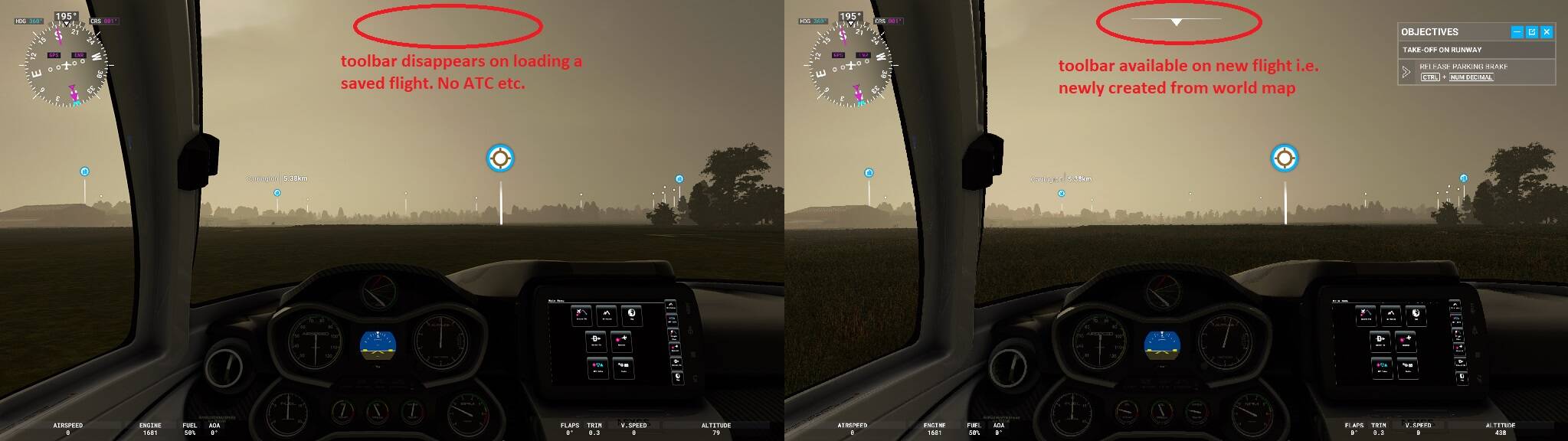
After loading a saved flight, there is no longer a menu bar at the top of the screen. My keyboard and/or yoke hotkeys also no longer function e.g. I can’t open the VTC panel or checklist box. I can’t therefore communicate with ATC/ground, game is ruined effectively unless starting a new one from scratch but this means I can’t do long flights where I save/load because as soon as I do, all of this functionality disappears including a number of mapped buttons to my yoke e.g. ATC
. Seems as though it is a simple bug surely?
Steps to recreate: start any new flight from world map, choose plane, airfield etc. once in-game, observe toolbar works. Now save the game (esc, space, save option, .flt file etc.). Now exit the flight you were in, back to main menu. Go back to world map, space bar, load flight (.flt file), upon in-game observe the toolbar is now gone, no way of retrieving(!)
more info:
upon loading a save flight file, the in game 3d UI cockpit seems to be there and can click things but the white triangle, menu bar etc is absent. also the keys that work for VTC or checklist upon starting a new game, no longer function so I can’t bring up these boxes in-flight meaning the game is rendered useless really. I’ve tried different aircraft/scenario, same result every time 100% reproduceable.
RTX 3080, x470, zen3 5800x, win10 64 fully up to date, 32gb DDR4
Its bn like that since the beginning alpha. I forgot about that, I stopped using the save and load feature because of it. Maybe this will get a foot hold with Asobo updates.
I also gave up on Save/Load over a year ago when I could not change the weather after loading.
Instead, I click on Profile - Log, select any previous flight, and then click Fly Again. This will reload the departure and arrival information I originally set using World Map for the flight, plus any waypoints I added. I have the toolbar, I can change the weather, and use the Garmin 1000NXI to change any aspect of the flight plan, so it does everything I expected Save/Load to do, but Fly Again does it better IMO.
Subsequently, you can click on any logged flight that started with Fly Again, and you can fly that flight again too.
2022-03-06 Correction: The log stores selected IFR approach and departure waypoints, but the log does not save any waypoints I add with the World Map, so I do have to add those waypoints for each flight in either the World Map or in the Garmin.
2 Likes
wow.. good info.. tnx.. im gonna try that right now..
Same problem
I’ve got a possible solution here for you:
thanks
All occasions where I have lost the Toolbar, have been due to bad Tool bar Addons in Community folder.
SU7 broke Unreal-Weather, that now, since SU7, causes the Toolbar to not appear. I believe the Unreal-weather Dev is working on an update, but anything Weather related is difficult, ( due to lack of required info in the SDK. ? )
thanks for info, suggestions guys. we’re looking at workarounds however for a basic piece of functionality that should have been working at launch so it’s important to keep shouting until they fix it. how else do you fly cross-continents, refuel, fly back. Work around family life, re-attempt approaches, etc. etc.
1 Like
Sorry to say this came back with SU-7, and is not fixed in today’s update. Loading a preconfigured flight to expedite flying, there is no toolbar on the flight screen. Using a preconfigured flight improves “productivity”. With the current state of the sim save/load can not be exploited.
@rgp1942: I just tested it (I hope I understood you correctly). I planned a flight on the world map and saved it. Then I loaded another flight I had saved earlier today and flew around for bit. After that I loaded the preconfIgured flight I had saved 10 minutes earlier and also flewa round for a bit.
In both cases the toolbar worked perfectly while I was flying. I could change the fuel amount, open the ATC window, talk to ATC and so on.
Hmmmm. OK. Thanks for testing. I can’t get the toolbar to appear on a loaded flight. I’ll fuss with it some more.
1 Like