Ahh. I have the Windows Store version, so my game files are encrypted and difficult to access. I think that’s going to also explain why the X button sucks for losing settings.
1.0.6 looks good. Landing gear lever looks and works well for me, mouse wheel only but with a large hit target. I thought I saw something around icing but it was my fault.
Thanks for the update. Glad it’s working.
So I’ve been thinking about the HUD and the position of the brightness controls. They’re in a pretty awkward place (I realize it’s correct) relative to actually seeing through the HUD. What do you think about adding an invisible clickspot (scrollspot?) on the edge of the HUD rim that would change the brightness? This is just the best idea I’ve come up with, maybe we could bind it to keys or some other alternative.
Even saving settings doesn’t really help here because of day/night concerns, and generally I think people like to get the HUD “as dim as possible” so this would make that easier and make it possible to tweak it while flying more easily. I guess unfortunately this applies to all the screens, and also isn’t unique to your plane.
I was actually planning on addressing that in the next few days. There’s a variable to monitor the day/night cycle and I would have the brightness set dimmer at night and brighter during the day for all the screens. I was also going to make the top “Panel” potentiometer(that no longer serves any purpose) adjust all the displays’ brightness at the same time. I understand it’s not true to life, but adjusting the growing number of knobs is getting tedious.
Another option is a menu entry in the PFD, “Set all Displays” => “Dim, Bright”, or something like that. Today I’m working on the persistent data, so I’m going to need a “Sim Settings” menu option soon, and that’d be a good place for it.
New release. Check top post for details.
Thank you so much for this it is so much fun.
Yesss, thanks!
Did a very quick test. Knob works great.
The automatic day/night changes only apply to the non-HUD panels right now right? And possibly only IF the flight was started within day/night?
It’s curious how much the lighting in this game can change. Both of these screenshots are with the HUD at the lowest lighting level:

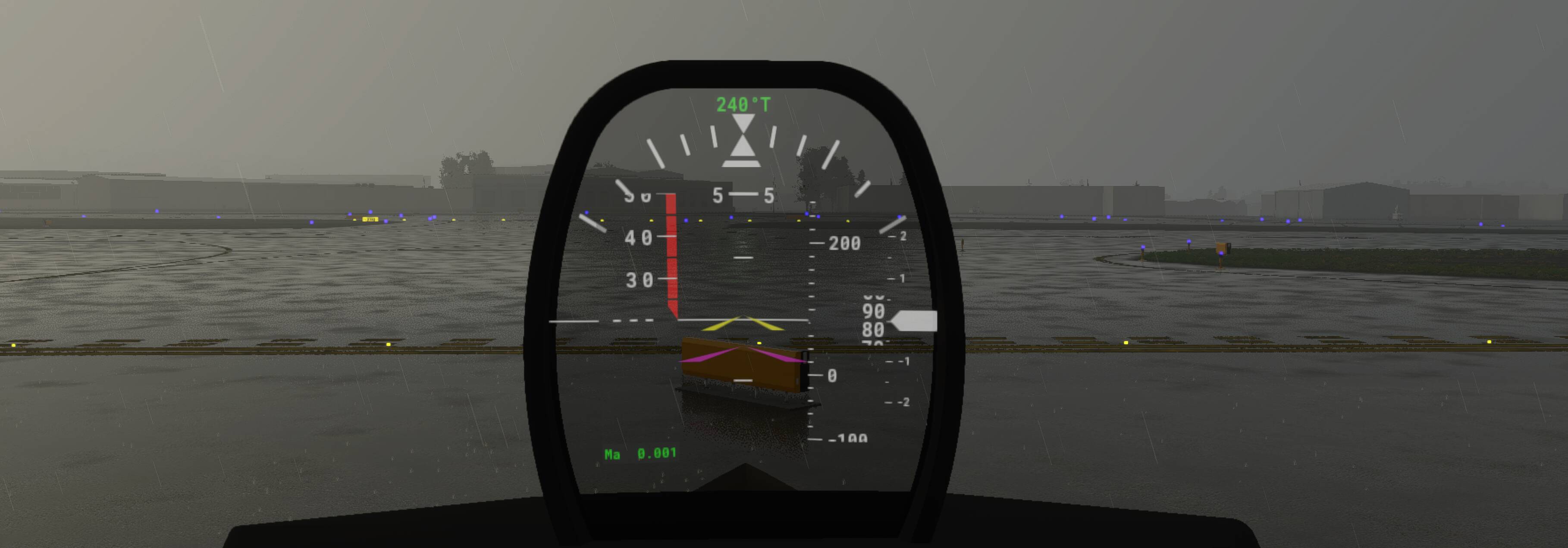
I mention this because I think the knob should go even lower (for the second screenshot), but adding a ton of travel kind of sucks too, and people might be confused when they spin the knob and it barely changes.
The day/ night setting should work on the HUD too. I have it set to be 5% while the rest of the panels are set at 10% brightness.
I made it get dinner than the other panels a few weeks ago, but I could try to make it go even dimmer. The potentiometer already has 20 steps, so I’ll have to figure something else out than the linear step system that it uses. Not sure if the modelbehaviors support logarithmic functions or not, but I can look into it.
And yes, only dim if starting flight at night.
New update. Changes listed on top post.
Yeah, this is good. It might need some tweaking with the initial value for day/night, but these are great updates. Thanks!
Re: disconnecting the flight control surfaces.
I think the FADEC/ECU patterns would also apply to ailerons and elevator as well. If the A320 FBW stuff doesn’t pan out maybe a wasm gauge can intercept the commands and replace them.
Thanks, I’ll take a look at it. I haven’t touched simconnect since like 2013, so I’m super rusty. I tried the WASM approach already. The update speed is too slow to mask the yoke inputs to the ailerons and elevators and they end up cycling back and fourth between the two systems.
A simconnect approach would be much faster and should be able to mask the inputs no problem. Going to have to relearn VS though. All my C++ background is on linux using either QT or Vim/g++.
Looking at the source… I’m a little confused on what WASM actually is. Thought it was referring to the HTML/js gauges.
Just downloaded the release for the cj4, going to look at the file structure and how everything is compiled.
Yeah, I’ve also been struggling to understand this part of the SDK, but I think I get it now. wasm is used ONLY as a way to isolate the code, like running it in a VM. Apparently the entire old school SDK is imported in via the wasm module imports. How much of the CRT and stuff there is an open question (for me) for now.
I’ve done years of Windows C++ development with VS, so let me know if I can help. A generic FBW module seems useful for lots of projects… my suspicion is that we could just have a table of altitudes and limits/scaling params and that may go a very long way to making different flight regime control profiles.
Thanks for the offer. I may take you up on it.
For the FBW, I was thinking about using pitch and roll rates as the output of the controller. That way speed and altitude wouldn’t be a problem. I’d have to make a PID controller, feed the yoke inputs into it and change the pitch and roll rate with the amount of yoke deflection. When the yoke is at zero, the aircraft would just hold whatever pitch/roll angle it was pointed at. After that gets done, in the future something could be added to have the aircraft slowly return to zero roll, and zero VS.
That’s what’s been swimming around in my mind since I started looking at FBW anyways. Let me know what you think.
Yes you’re definitely thinking in the right terms for how real FBW works based on what I’ve read. Ultimately though I think the bare tools here are:
Run a loop at 60hz (hopefully something very high and with little variation between frames (regular cadence))
- Read control input from user each frame (will also have not changed very often) as an axis value
[Determine current angle/rates (saved state basically) vs possibly newly requested rates]
[Do calculations based on things like alpha floor, max-G, smoothing]
[Turn requested roll rate into output data … this probably requires a PID but would need some kind of scaling/limits for high/low speed/altitude] - Output elevator/aileron axis
How well PID will fit this problem depends on how fast we can read data and issue update and if the sim is really processing the ‘physics sim’ faster than the UI refresh rate. If it’s 60hz or better and super stable that’s good news.
What I’ve found in the past with things like this is what using PID to model for things like roll works ok, except how your want to roll in/out of the turn won’t match the params for holding a roll. And for things like pitch, you find that 0 for level doesn’t work because up or down has a huge cost or very low cost associated, and this cost will change based on your climb rate and angle… and it just becomes an infinite puzzle of variables and tuning. Possibly coming up with the right equations around speed/air density would mitigate a lot of this.
There are really exciting possibilities down the line here though, like GPWS/TAWS that will do aggressive maneuvers to avoid hitting terrain. LittleNavMap uses some kind of GLOBE terrain dataset that I’ve been eyeing for months for a really accurate terrain radar/avoidance system.
Yeah, it’s definitely going to be a daunting task, but I’m up for a good challenge. You’re right about it being something that others could use on their aircraft, so I’m thinking about separating the project from the F22, and making a separate repo for it. Looks like the compiled file is a .wasm so should be easy to just add that to the panels folder for the aircraft.
It’d also be much easier to keep development separate, as I’m guessing it’s going to take a lot of time to get it right(going to have to relearn a lot of math), and I can split efforts between working on the FBW and working on the rest of the plane.
I read somewhere that the sim rate is much faster than the frame rate, but can’t for the life of me remember where I read it. Should be easy to test in the wasm module though. Could bounce a constantly changing simvar off a timer and see the time between changes.