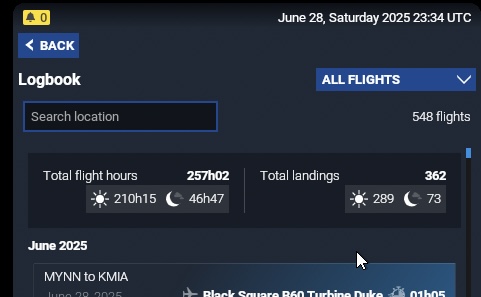
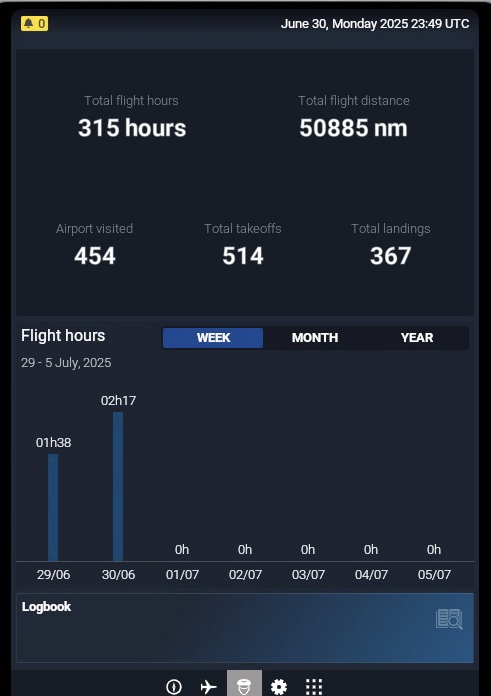
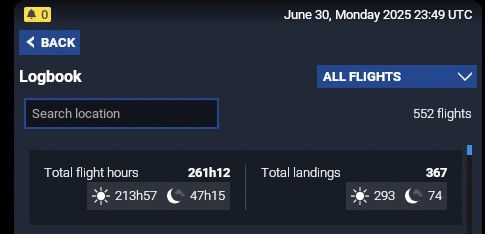
Total flight hours do no longer increase in the Pilot profile overview and in the Pilot book in the EFB

ISSUE DESCRIPTION

Description of the issue:
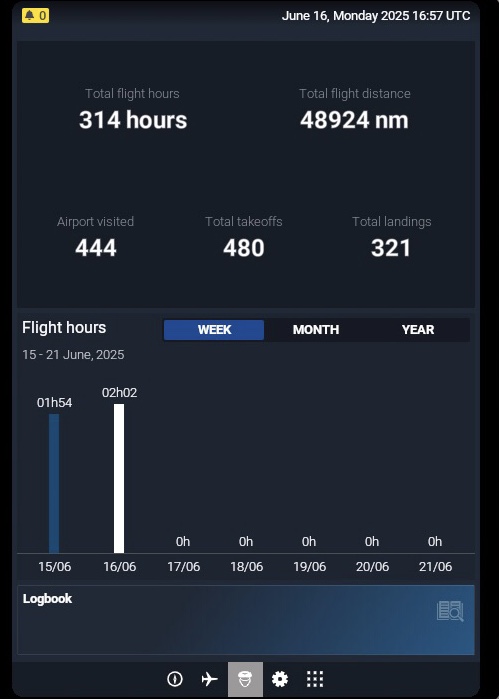
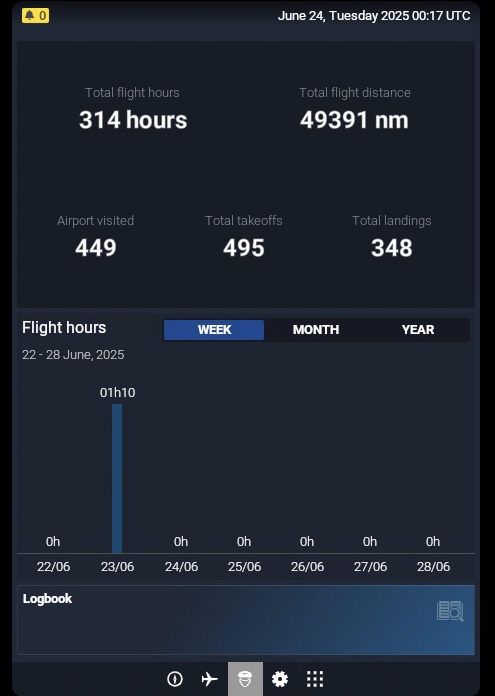
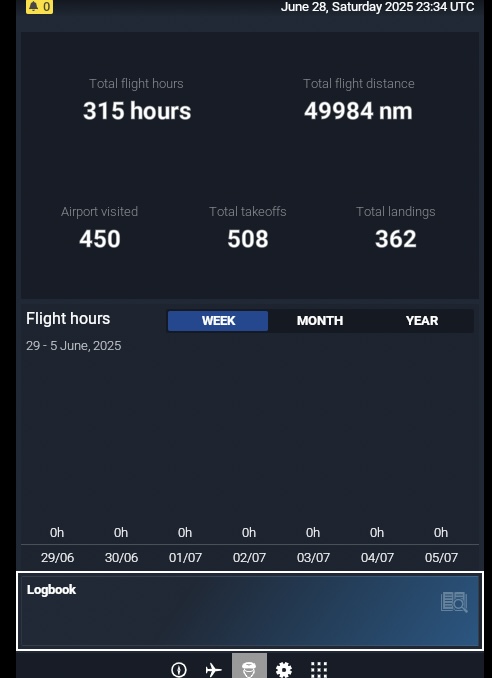
I have noticed that my total flight hours, in the pilot profile overview, do no longer increase. I can’t say for certain when this problem started, but I noticed that it’s been stuck on 314 hours for quite a while. Maybe since SU3 began?

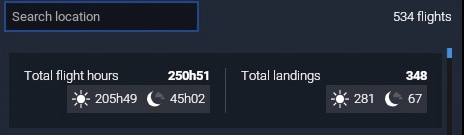
Now, you will see that the total flight hours in the log differ from the overview, but this is because of a different issue, where flights are dropped from the logbook. Still, even with this discrepancy, the total hours in the overview were previously still going up, when you completed more flights.

I’ve tried flying different planes, both first and third party, native 2024 and 2020, with no difference.

Since I started taking screenshots, my total hours in the log have increased with more than 10 hours (and this exlcudes all the dropped flights), and I’ve flown ≈4,000 Nm, according to the overview, but no increase in flight hours, in the overview, during this time.

Did you experience this issue before you joined the Beta?
No

[PC Only] Did you remove all your community mods/add-ons? If yes, are you still experiencing the issue?
N/A

FREQUENCY OF ISSUE

How often does this occur for you (Example: Just once, every time on sim load, intermittently)?
Permanently

REPRODUCTION STEPS

Please list clear steps you took in order to help our test team reproduce the same issue:

  1. Observe “Total flight hours” in either the Pilot profile overview, or in the Pilot book in the EFB.
  2. Complete a flight that lasts at least one hour.
  3. Observe no increase of “Total flight hours”.

YOUR SETTINGS

If the issue still occurs with no mods and add-ons, please continue to report your issue. If not, please move this post to the User Support Hub.

What peripherals are you using, if relevant:
N/A

[PC Only] Are you using Developer Mode or have you made any changes to it?

[PC Only] Many issues may be due to an outdated graphics card. Please state your Graphics Card Driver Manufacturer (NVIDIA, Intel, AMD) and Version:

[PC Only] What other relevant PC specs can you share?

MEDIA

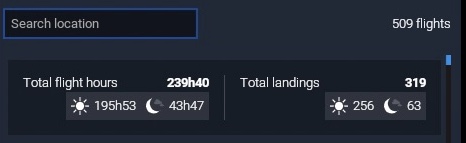
Total flight hours stay the same
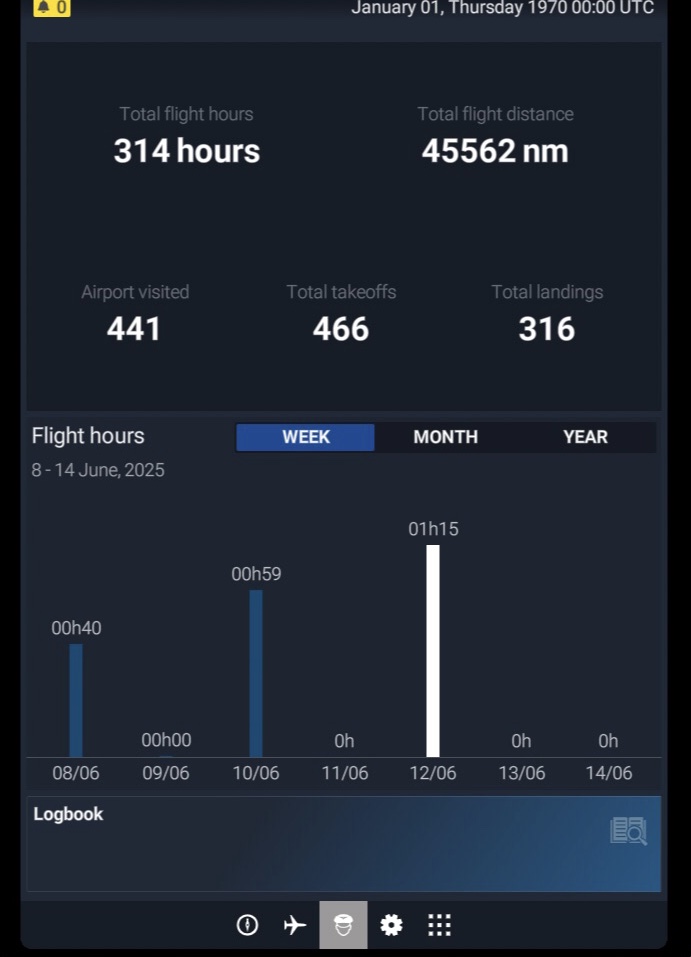


From the log, during the same period of time

[END OF FIRST USER REPORT]


:loudspeaker: For anyone who wants to contribute on this issue, Click on the button below to use this template:

Do you have the same issue if you follow the OP’s steps to reproduce it?

Provide extra information to complete the original description of the issue:

If relevant, provide additional screenshots/video:

So, the total flight hours did finally increase by one (1) hour, after at least 17 hours of flight. This is just the hours that are logged (and didn’t get unlogged because the log is dropping flights) since I started collecting screenshots. It’s definitely been going on well before that.


Will have to follow up, if this is now functioning normally, or if it’s still a problem.

Nope, not functioning. Logged four more hours, total flight hours unchanged.


Did you get anywhere with this? Mines stuck on the same number but mileage is going up

Do you have the same issue if you follow the OP’s steps to reproduce it?

• Yes.

Provide extra information to complete the original description of the issue:

• Career Mode flights are no longer included in the Logbook.

If relevant, provide additional screenshots/video:

I did not find any solution, unfortunately, no.

I’ve re installed. Not flown yet but if that fixes it I’ll update you. Hoping to get on tomorrow for a few hours

Done a 4 hour flight time went up a hour

2400 miles and mileage went up around 4000

I did use set Zulu time on this flight so maybe that’s the issue if you use it ?

Just done another flight today with out setting Zulu time and the time went up correctly with mileage so I belive this is down to a Zulu time problem causing it not to count properly

Logbook was bugged due to missing and disappearing flights. I had 180h Total Flight Hours and 130h in Logbook. Yesterday it showed me 325h Total Flight Time after a 10h Longhaul and now izs freezed there. Very disappointing

1 Like

Seems we’re not the only ones.

I’ve double checked dev mode isn’t on also checked that the cfg isn’t on read only as suggested by the devs and also making sure the Xbox app services are running etc ( one always isn’t running for some reason but it is on automatic ) I’ve also tried making it run and was currently testing but crashed into a tree after a 6 hour flight zzzz

Mileage went up 13 miles witch normally goes up during the flight but I’ll try a short hop on my next days off in 3 days and if it doesn’t work I’ll be leaving it until it’s fixed

Seems strange everyone isn’t effected by this

1 Like

Mine has been struck on 140hrs and a lot of flights that were previously logged showing have now disappeared on MSFS20.

The hours haven’t gone up for a long time but it still showed the flights,

When I signed up again for the beg updates for MSFS20 and 24 couple of weeks ago that’s when I had issues with both flight aims.

It why I opted out last time because I had to completely reinstall both MSFS20 and 24, trouble is with MSFS20 it a massive reinstall getting on for the over 800GB,

And when you have to do it twice, you’re wary about opting in for beta or updates before the the general public gets them

Its why I don’t do the windows one anymore because some of them have really messed my gaming pc,s up

And everything had to be reset or reinstalled lol.

Whats the old saying, Once bitten Twice shy and since the last update for MSFS24 from a distance now the water looks washed out and MSFS20 seems to look better altogether.

Abut the hours mine stuck on 140hrs it should be much more closer to 1000hrs .

Also reported in the SU4 beta - see:

1 Like

Glad I’m not the only one suffering this. Mine does go up 1 hour from 10 hours of flight I’ve reinstalled, make sure the Xbox systems are all running and set to auto, dev mode is deffo off

Any update on this ? My mileage is going up kind of. I’ve done 3 miles according to the tablet but I’ve really done 100 miles.

Done some more testing and seems to work fine in free flight. Career not so much so I think this is purely down to career not using live time etc, flights still vanish from the logs but the hours and mileage go up correctly

can anyone confirm this is the same for them ( works fine in free flight but career hours and mileage don’t go up )

1 Like

Is it that the hours aren’t increasing, or that flights are being dropped from your logbook, resulting in no increase?
Flights being dropped is a known issue.

So in career the hours and mileage don’t increase

sometimes the flights will stop logged but hours don’t go up sometimes they increase very small amounts say every 1000nm might go up around 20nm

I’ve now done 4 flights in free flight and the hours and mileage have gone up as expected but the logs do seem to drop off the flight log history but total hours and mileage don’t reduce because of this

Seems odd how career just ain’t counting hours or mileage and I think this has something to do with the time slider or something so for now my career is over and I’ll strick to free flight as I’d love to smash a million miles on it ( sad I know )

1 Like

I’m on Xbox series X and have got 357 hours logged on FS24 flying since release with only 9 hours logged since the 4th of May - randomly 2 flights have stayed logged in PMDG 777 and A330-300, August 16th and October 19th respectively. And I have been flying many days and nights per week consistently since SU3 released. Number of landings, total flight hours and total number of flights only go up when a flight randomly logs. Challenge league flights seem to log consistently but that’s it. I don’t do career mode or anything like that - just free flight

Edit: according to my VA records, I have done 170 flight since May, most of which have been on FS24 and ranging in duration between 1.5 hours and 13.5 hours. That’s a lot of dropped flights and hours across a fair few builds

The flight will always appear in the log book after I end the flight and go back to the world map. My hours and completed flights and landings will increase to match the completed flight. But as soon as I exit the sim and go back in, the flight is gone and everything is reset back down as though it had never been done

1 Like

Do you have the same issue if you follow the OP’s steps to reproduce it?
• YES

I’m having the same bug and I’ve identified what’s wrong.
I mostly fly on my Xbox S in career mode, and I kept seeing my flight hours stuck at 356 hours.

I also own an Xbox X and a PC laptop (not very powerful, but enough to do some tests). So I tried it several times. In any case, I have no problem with the flight log, all my flights are recorded correctly.

For flight time, I look in the statistics where it is displayed in days/hours/minutes/seconds. Yes, I know that this display is a bit “silly”, but here it is useful to me because it is precise (unlike the “full” number of hours displayed in the profile).

• When I fly on PC, there’s no problem; everything is taken into account (career, free flights, etc.).
• When I fly on Xbox, only free flights are counted. All career flights, whether as an employee or freelancer, are not counted. However, I have them in the flight log.

So the bug seems to be specific to Xbox and only in career mode.