Has anyone noticed how when you are approaching the airport ATC will tell you to make a downwind nearly always on the opposite side of the airport? Say, with a wind out of the east - if Im on a north heading, south of the airport, and the runway runs east-west, ATC will tell me to make a left downwind for runway 09. So I have to fly the crosswind before turning downwind, rather than simply being told to enter right base or downwind for runway 09. I think the ATC on FSX was more accurate. And ATC almost ALWAYS clears me for a downwind takeoff. “Cessna 345T, wind 270@18 cleared for takeoff runway 9!”
Wth? I am wondering if Asobo might have some confusion as to what a left or right traffic pattern is.
And I wish Asobo or whoever is programming the ATC would actually read the FAA manual on ATC communications. They say they have improved it, and I noticed that they are trying, but it is still way off. And they should also reflect the differences in ATC in Europe and elsewhere if possible.
I think this problem isn’t as simple as that. There’s another layer to it based on my recent observations.
The runway assignment tends to be correct based on the actual wind direction in the sim. So taking your example, when you’re assigned runway 9, the wind is actually coming from heading 90. Except when it’s a handcrafted custom airport and they made a mistake with the runway assignment in their metadata, but that’s a completely different issue.
The ATC tends to say the wrong wind direction, different than the actual wind. So even though the wind is blowing from heading 90. The ATC says the wrong direction telling you that the wind is from heading 270.
The wind sock near the runway, seems to also show the wrong wind direction. Opposite to where the wind is coming from.
Maybe number 3 issue is affecting how issue number 2 is occuring. The clearance to take off by adding wind direction and speed is only introduced in the latest Sim Update. There might be a bug in there somewhere when they report the opposite wind direction than the actual wind direction. But the runway assignment tends to be correct so far. I think the issue is only on when they say the wind direction in the ATC chatter.
I actually wish that ICAO should be regulating this in real life, so that everyone everywhere in the world is following a strict standardised ATC guidelines. So everyone say the same thing, and everyone can understand the same thing.
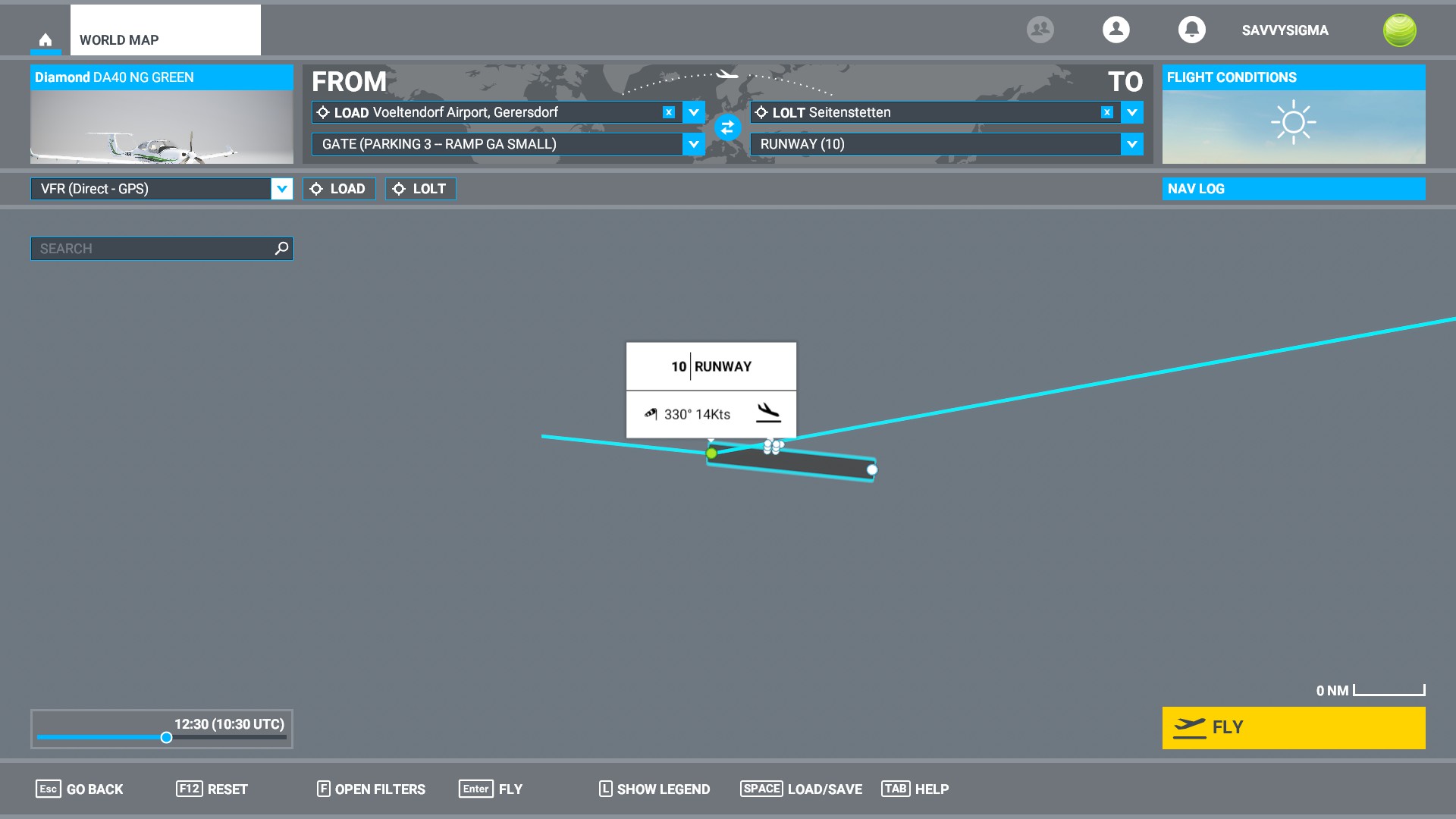
I’ve found this ATC bug to happen when the World map also (graphically) makes a hash of departure/arrival runways. If you get something that looks like below, try resetting your flight plan.
This can happen especially if you are using 3rd-party weather mods and/or modded airports.
Left hand circuits are most common ITRW, though local noise abatement requirements may dictate differently. I can accept that MSFS may not be able to include all local variations, but the most annoying thing is ATC directing you to a downwind landing.
In my experience flying in the UK ITRW is getting overhead rejoins and there is no option to request these in MSFS.
Well, since we (or at least me) cannot use live traffic or multiplayer due to infernal stuttering and freezing, I suppose ATC is not necessary either. So much for it being a simulator. It is simulating something, but certainly not real-world aviation.
I have seen this happen on a VFR flight and when it does, it’s perplexing. Saw it on a flight from KADS to KSAT. KSAT has 3 runways, 2 of them parallel with the other about 90 degrees to the parallels. Pretty close to the airport ATC gave me some bizarre pattern to fly that would never happen in the real world. I had to stare at the runway diagram for a moment to figure out how to even accomplish this without flying through the approach or departure ends of another runway while in the pattern.
If you don’t like the pattern they give you, just fly the pattern you desire. They will still clear you to land with no mention that your pattern is not as assigned. But, don’t do that in real life.
When you need to overfly the airport to get to the downwind leg, what is the proper altitude? I remember from some reading that you cross about 1000 feet above the pattern altitude. Is this correct?
I simply ignore ATC when it’s obviously mistaken. Everyone flying IFR will have had occasions of ATC requiring you to climb to FL210 (or something) when you’re on final approach. Or asking you to descend to 2000ft when there’s a mountain up ahead of 5000ft. Or cruising altitude being reset to 1000ft when you’re changing your flight plan during a flight. Etc, etc…
Ignore, fly your plan, live happily ever after Or consider VATSIM.
That doesn’t sound right, as 1000’ is a lot to lose between crosswind and downwind. Also, I think it’s best to be at pattern altitude (usually ~1000’ AGL) when in the pattern, such as entering on a crosswind. You probably don’t want to descend into the pattern – very unsafe.
I think you could fully overfly the airport, flying away a good distance before turning back, descending, and then entering the downwind on a 45, and then that 1000’ higher altitude would be good, but that’s a lot of extra time. Probably best to just enter at pattern altitude on a crosswind.
For Europe see airport / airfield charts, as many have quite specific patterns mainly for noise abatement, traffic separation (e.g. powered, glider), (and or geographical limits).
The point here, I think, it’s not disregarding the ATC instructions. It’s obvious that if ATC ask you to climb to FL210 when in approach mode, you just can’t. And if you want to land, you just follow the most reasonable procedure disregarding the instructions. The point is that if you want to simulate RW, that should be the core of a simulation software, the ATC should stop giving bad/wrong instructions. It will take a while. I’m not a programmer, but I imagine people working behind the scenes have a huge listo of things to do to improve all the points we experience while flying. Let’s keep pointing the problems and let’s be patient untill our sim gets better.
By the way, speaking about bad ATC comms, my ATC gives me instructions half English half Italian. I set IT language in the options, ATC messages on the screen are translated in Italian, but the vioce reads the message half EN half IT, with the IT words pronounced as a EN motherlaguage will do. Really fun… not real though.
Check your flight plan’s altitude crossing restrictions for waypoints. If there aren’t any restrictions I think ATC can use waypoint altitude climb instruction up to the cruising altitude.
This is interesting! According to ICAO regulations, in foreign countries tower controllers and pilots can use their native language instead of English if BOTH are fluent. Doesn’t help other pilots who don’t know the language.
I believe in the airport facility directory, each airport has it’s listed traffic pattern altitude and direction.
Listed like this. They are not always listed there, however.
TPA- 2639 (2300’)
It is FAA standard procedure to make left traffic unless indicated otherwise.
On Sectional VFR and terminal area charts, they are listed at the bottom of the information block of the airports. Left hand patterns and as they are assumed are not indicated in the info block but right patterns are listed on sectional charts as:
RP, 1L,19R, meaning right hand traffic pattern for those runways.
RP* means a special condition exists for the pattern and to refer to the chart supplement info.
If the airport has a full-time tower, right patterns if they exist are not depicted in the info block on the VFR charts.

 Or consider VATSIM.