So many air strips have trees, sometimes one solitary tree, at the runway threshold. I can’t believe this is real. Any logical airstrip owner would cut a tree from final approach path. Sometimes in case of short strips a tree will render it almost “unlandable”. Plenty of them in Alaska and New Zealand for example but elsewhere too.
Anyone knows of a good addon to fix this crazy situation? Free or payware, I don’t mind paying.
This will hopefully be one of the big benefits of the promised community hub. Many of the great community members contributing numerous simple fixes like this into the base sim for the benefit of us all.
All - This is something that we need to bug if not done already. The PTB (Powers That Be) look over this forum, but not sure it makes it into the bug list some of the time. Do not fret, the same exists in XP, both 11 and 12. As one poster stated above, it’s the way the software looks down on the map image and translates that into the sim. I bugged the trees at one Runway I test out of in XP and maybe with the latest release they have removed them. I know by checking Bing maps and google that in RL they are not there. Some buildings are really there and some are not. Hopefully this is going to be fixed on some update.
But there is another problem. Even when Google shows a cleared area, the sim is adding trees. Other end of the same runway, a satellite view shows a large cleared area but the sim shows 10’ trees up to the top of the slope.
To me it is not that important if MSFS misses showin a few trees, as long as a standard approach is flyable. So I would think there are, within MSFS scenery, global parameters for runways that will create a reasonable dirt/grass area off the end of any runway. Perhaps this has already been done for the large airports. Its the smaller ones where I have seen the problem. Makes me wonder if the length of the paved runways and/or the exact location of thresholds, is real world accurate.
A global fix from Asobo is really needed. Editing airports one by one is really only fun the first time you do it but there are so many out there with the same issue. Payware would be an acceptable fix for me but it’s probably unreasonable due the huge number of small airports.
I tried this fix but it didn’t reducd the size of the short trees (about 15’ tall) that appear at the very edge of the tarmac at Catalina Island and can cause a crash on a reasonable final approach glidepath.
The best solution is use the SDK in Dev mode to create a simple mod for the airport.
Once you know what you are doing it takes less than 5 minutes to remove (or scale if you prefer) trees.
I’m working on a simple step by step YouTube guide as all the ones I found were either a bit dated and didn’t reflect the current way the SDK works, or contained a lot more info than you need if all you want to do is get rid of a few trees.
Very recently, Aug 2023, Catalina KAVX looks like it has been completely re-simmed and is very close to RL. No trees on approaches and the lights are on runway level. Thank You Asobo!
only a soluce SDK It’s not the SU that causes this but the mandatory updates that precede the city updates. so since they don’t seem to want to take the reports into account, I’ll correct it with the SDK
This was not a problem in FS2004 and FSX because obviously they ensured airport sceneries had mask polygons to prevent drawing trees and other objects on aprons, taxiways, runways, and clearways. It’s bewildering to me that both the MSFS team and the LM team (P3D v5 has similar issues with other objects) have not fixed this issue, as it used to be both easy to define these areas and a standard for all native and add-on sceneries just a few years ago.
I’ve submitted over 50 airports in the World Hub and have found that the tree issue is usually one of two things:
Trees that were once there have been since cleared.
Trees that are being detected in the aerial and drawn as such in the sim have been misidentified and are actually low bushes or brush.
The first one is going to be dependent on when the aerial was last updated. The second is going to be dependent on better AI detection. I actually don’t like entirely removing vegetation as it looks silly with the imagery showing things clearly there. But as far as the world hub is concerned, there’s no effective way to force vegetation into being low/bushes/brush. This needs to be an option.
Further, if I was designing the AI rendering for 2025, I’d two things:
One, I’d implement better bush detection and provide those objects.
And two, I’d err on the side of too few trees and figure out a way to make a clearance plane that is universally applied, under which vegetation are trimmed, out to a certain distance. If trees that penetrate the plane exist in real life, I’d rather those be added manually.
But as far as the world hub is concerned, there’s no effective way to force vegetation into being low/bushes/brush. This needs to be an option.
There is a way. It should not be difficult to define a rectangular area from the extended centerline of the runway, and setting an instruction that anything within that cone and, let’s say 500 meters from the beginning of the runway, and 50 meters to either side of the extended centerline, will be no higher than brush level. That should be easy, and would correlate with safety standards. You can even turn that protection off for disused airstrips, as that is a category in the MSFS database.
You’d think that’d be a standard, automatic implementation, but it’s not. However, to my point, there is currently no effective way to do this in the world hub.
There’s an ineffective way, which is to place a series of polygons that increase the size of the vegetation as they get farther from the runway, but those don’t incorporate bushes/scrub, and it’s incredibly time-consuming for a pretty imprecise result. I’d rather see a clearance plane selectable to either FAA or ICAO standards and flagged on or off. And then a “clearance plane exclusion” polygon that restores the presence and/or full height of obstructions within the plane.
Edit: thanks to mods for moving this to a more appropriate thread. I don’t like stepping on the bug reports, but the forum is not setup well in regard to avoiding that. The original discussion is quashed by it being moved to a bug report, and a proper parallel thread isn’t always easy to find.
Hello everyone!
As of September 2025, this is still a bug.
In my case, in career mode, when I have to land on small runways, they are usually full of trees at the start and end of the runway, creating a problem when landing.
If I follow the glide path, I’m sure the mission will end because I’ll hit the trees (and in career mode, they make you land jets 1000 meters away!!!).
Asobo should implement a runway proximity adjustment and remove trees at the start and end of the runway.
Or maybe it’s an opportunity for a very capable 3rd Party developer to give us a reasonably priced add-on to fix it! Mamu Design comes to mind as their very good with processing massive amounts of data on a global scale…
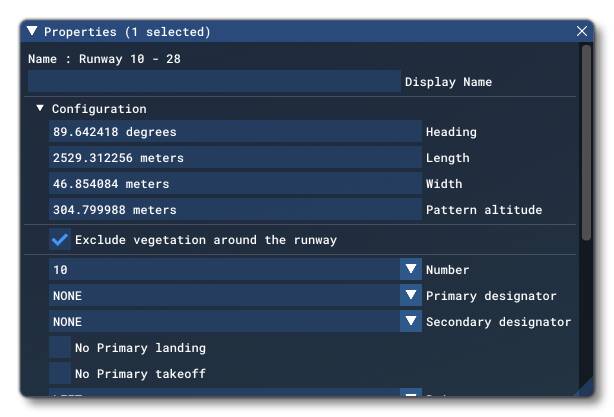
This is already implemented as runways, aprons and roads assets have settings to remove vegetation inside and/or around them. If I´m not wrong, this type of setting is activated by default in editor once you place those assets, as seen on the next screeshot from SDK:
However something has recently changed in some of those assets because I can find a lot of trees in the middle of roads as well as near runways as you describe and they were not existing before SU3, as that setting indeed removed them. I noticed that during the updating of my addons.
Vegetation polygons also have a super big falloff distance as well now, even when set to 0, which just makes the situation worse as trees spawn several meters away from the original polygon boundaries. I don´t know what they are doing but touching such basic things simply ruins any existing scenery. Unfortunatelly you also need those polygons to remove unwanted trees so this can affect both generation and also removal precision, in case addons use that method to remove trees.