I’m working on Ultra Turbulence Live (UTL) for MSFS 2024 and wanted to share a first look.
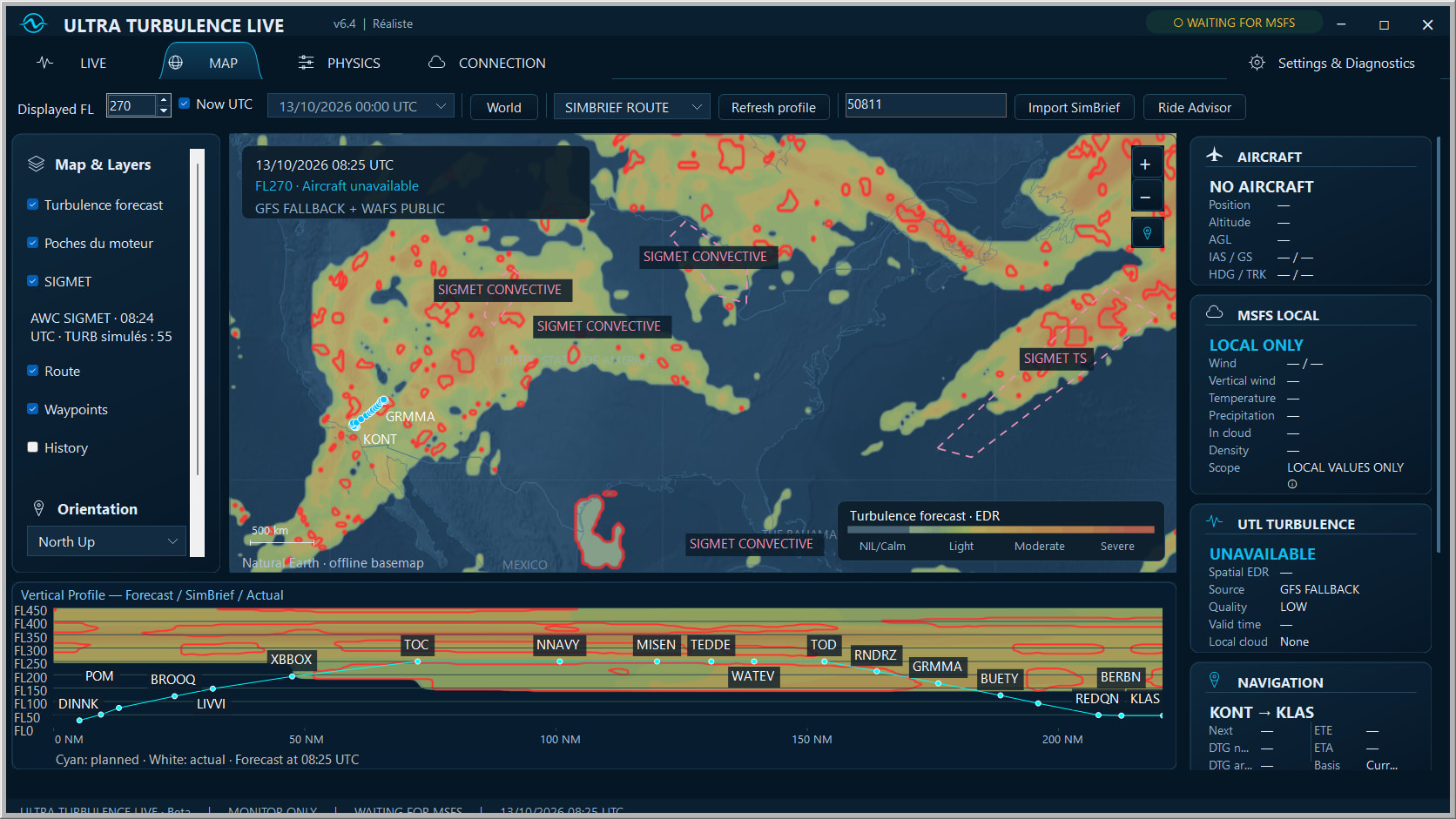
The main idea is real-time turbulence driven by real-world weather data: WAFS and GFS forecasts, combined with local conditions from MSFS. UTL builds changing air masses with rough patches, stronger pockets and calmer stretches, rather than a constant level of shaking.
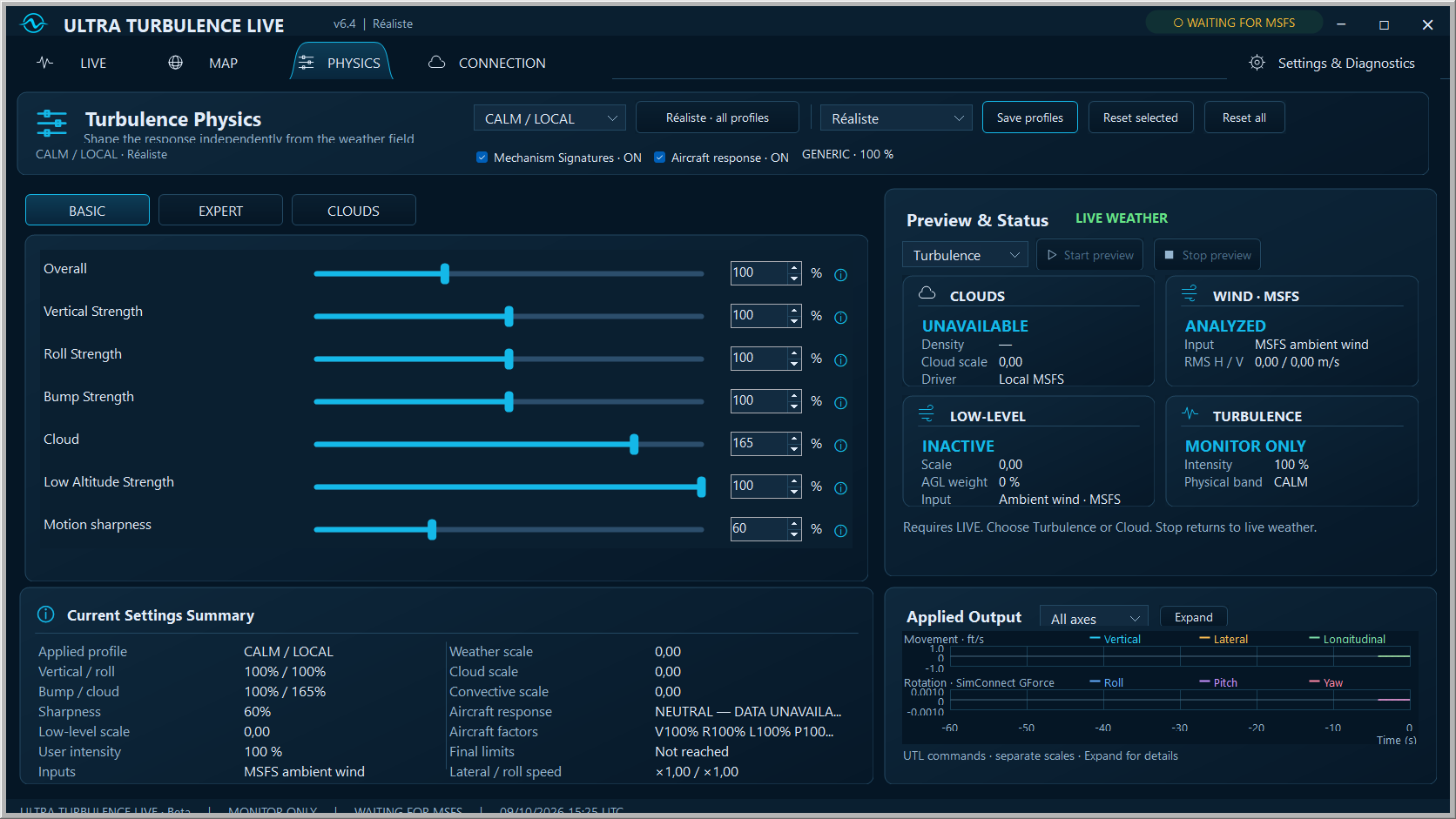
The aircraft matters too: its mass, speed and available characteristics influence the response, so a light aircraft and an airliner don’t react in the same way. There are also dedicated cloud and low-altitude effects, personal profiles for each aircraft, and cabin sounds synchronized with the movements UTL adds.
To help anticipate the ride, UTL includes a turbulence map, active pockets, a vertical route profile and a Ride Advisor with SimBrief import and an EFB briefing.
Here’s a first demo comparing native MSFS and UTL cloud turbulence, plus MODERATE effects and the influence of aircraft mass:
Flying through clouds and not even a twitch from the wings is just all kinds of wrong. Would be great to have proper realistic turbulence in the sim instead of the random built in one that treats an airliner like a paper plane
Thanks! That’s the idea behind UTL: real-time turbulence driven by real-world WAFS/GFS weather data and local MSFS conditions, with rough patches, stronger pockets and genuine calmer stretches.
Aircraft mass and speed also influence the response. The aim is to give each encounter a more coherent character, with adjustable effects and a Realistic profile as a starting point.
Clouds and aircraft response are two areas I’ve been focusing on with UTL. The cloud effects use local MSFS observations, including cloud presence, density and vertical wind, with progressive transitions when entering and leaving.
For the wider turbulence field, UTL uses real-world weather data and generates the effects in real time. Aircraft mass, speed and available characteristics then influence how those encounters translate into movement. The demo includes a first look at that difference.
@Kayembee370 What better than some proper early-morning cloud surfing after a flight aboard the giant!
@TranquilitySea I’m hoping to release UTL in around two to three weeks, if everything goes well with the final work and testing. That’s the current target rather than a confirmed release date. I’ll keep this thread updated!
Is there any method of introducing camera/head bounce effect too. In the other simulator I really like the way the aircraft responds to turbulence, but the sim also does a head bounce (physics based camera) too. So think of a bad patch of turbulence and trying to mouse over a dial on the MCP to change a setting and finding it challenging because of the movement of aircraft and head bounce. It really adds in an element of uncertainty when encountering turbulence. I’ve had very immersive times in the other sim due to that, rather than just seeing wing flex and some side to side movement of aircraft and first person cockpit camera in sync.
I do like the look of this mod, it definitely adds immersion, but I also think this should be default part of the sim, but sadly we don’t have that.
Thanks! Aircraft movement and camera/head movement are two separate things. UTL generates real-time turbulence using real-world weather data and local MSFS conditions, and applies movements to the aircraft itself. It doesn’t control the cockpit camera or add head bounce.
For that extra layer of immersion, it can work alongside camera effects. I’ve tested the camera behaviour with ChasePlane, with FSRealistic Pro, and without either, and everything worked perfectly in my tests.
You can adjust those add-ons’ camera effects to your own preference while UTL handles the aircraft’s response to the turbulence.
Just one thing though. I already have an app I bought from a 3rd party app store called ‘Real Turb’. I am just wondering in what way your app will be better?
I just found a free mod on FS.to that does the FS Realistic (which i don’t have) head bounce camera. It looks promising, the default sim camera shake is non existent (maybe it needs a slider as opposed to an on/off switch). Maybe this mod will work with this turbulence mod. I don’t use head tracking either so I need some cockpit motion and camera shake.
I did a quick test in the E190 and it does cause bounce effect on the runway, Will test it more extensively later. You have to turn default sim ‘camera shake’ off for it to work. It’s called MSFS Physics Camera, but I haven’t tested it for long enough to come to a conclusion.
I’ve been flying in Flight Simulator since 1998. Weather is such a fundamental part of aviation, yet the experience in the sim still hasn’t quite reached what I’ve been hoping for in terms of immersion and realism. After years of waiting for an add-on that would really bring the atmosphere and the aircraft to life, I decided to build the experience I was looking for myself. I wanted more of those sensations you notice aboard a real aircraft: the air constantly changing, the airframe responding, rough patches giving way to smooth air.
I actually own RealTurb myself. One thing I was missing in my own flights was a more noticeable experience when flying through clouds — the cloud turbulence felt almost nonexistent in the conditions I tested. That was one of the motivations behind UTL.
The biggest difference is the weather information feeding the engine. RealTurb V2’s description explains that it analyses simulator wind variations, terrain and cloud density. UTL also uses local MSFS conditions, but adds an external, worldwide turbulence forecast field using public WAFS data, with a GFS fallback estimate and SIGMET information.
That gives UTL a picture of turbulence across different flight levels and along your route, beyond what the simulator reports around the aircraft. The engine translates that weather context into real-time aircraft movements, with varying intensities, stronger pockets and genuinely calmer stretches. The fine-scale pockets are modelled by UTL from that weather context, rather than being individual real-world observations.
There are a few other parts that matter to me:
Dedicated cloud effects: cloud presence, density and vertical wind influence the motion, with progressive transitions into and out of clouds and separate cloud settings.
Detailed control over the movements: you can adjust strength, pace and character across roll, pitch, yaw and the three movement axes, rather than relying only on a global intensity slider.
An aircraft-aware response: mass, speed and available aircraft characteristics influence the result. You can also save your own settings for each aircraft and have them recalled automatically.
A visible connection between the forecast and what you encounter: the map and vertical profile show your SimBrief route, forecast turbulence, active engine pockets and SIGMET areas.
Briefing inside the MSFS EFB: Ride Advisor lets you review the route and compare nearby flight levels for potentially smoother conditions. Crew reports add another layer of immersion, with available public observations and simulated UTL encounters clearly identified separately.
You can start with the Realistic profile, then use the Turbulence and Cloud previews to adjust the experience for your aircraft.
For me, the aim is to bring together what you can anticipate along the route and what the aircraft actually encounters, with enough control to tailor the response to your aircraft and preferences.

 Aircraft movement and camera/head movement are two separate things. UTL generates real-time turbulence using real-world weather data and local MSFS conditions, and applies movements to the aircraft itself. It doesn’t control the cockpit camera or add head bounce.