Hi.
Tell me, is it because I’m on SU 3 beta that I can’t draw a polygon to correct water or trees ? Using the Ctrl key, I have only the red cross but can’t see the red line ? Very annoying. I edited for months into 2020 without any problem.
Any help ?
Polygone sounds like a spell from Harry Potter. The wizarding world’s equivalent of back-face culling I guess.
From memory the line appears as you build the polygon with each mouse click. A double click at your last point completes the polygon.
I spent some time doctoring some strips in PNG, and it was a fun experience, and made for more realistic approaches.
Sorry, I corrected the spelling of polygon.
That’s the problem, I know I have to click the mouse, but the line doesn’t appear to the next one and I can’t create a polygon. Very strange as it was working so good with 2020.
IIRC I hold down the left CTRL key as I click. I’ll check again this evening.
I’ll check again. Thanks.
It’s what I always did in 2020 but it doesn’t work in 2024 ! Very annoying. Where I can check the keyboard shortcuts into SDK ? I didn’t find anything about this.
I’ll try to remember to check tonight.
I just had a quick play.
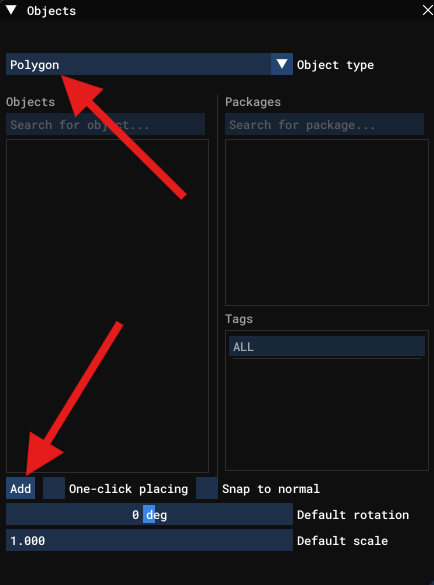
So first, from the Objects menu, I choose a Polygon, then press the lower left Add button:
You should now see to the lower right of your mouse cursor a red X. Keep the left CTRL key down, and left click once. A mark should be placed. Now move the mouse around, while keeping CTRL held down, and you should see a red line being drawn. As you left click, while still keeping left CTRL help down, a shape will be drawn. Double left click when you are done with the shape you want. You can now drag this object around, resize it, rotate it etc.
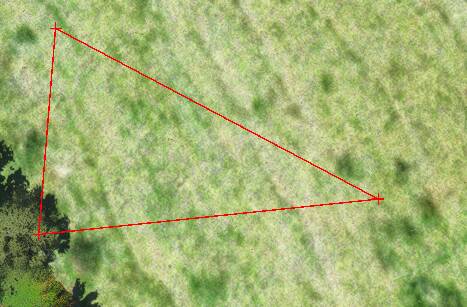
Here is me mid way drawing a rectangle:
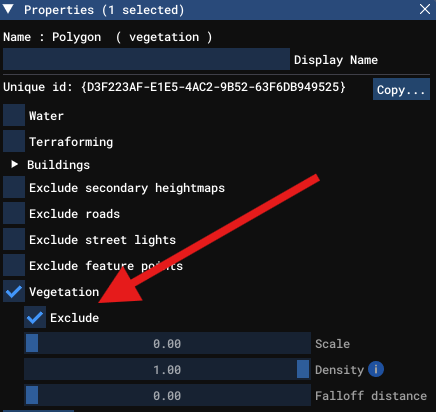
You can now right click on the completed polygon, and turn it into an exclusion polygon, which I use to remove trees from the approaches to airstrips. Or override the current biome to get different trees placed.
You are so kind to take time to show this to me but I know all this as I used SDK for several months editing rivers, lakes and trees in Quebec, Canada into 2020. That’s exactly the problem. I click ADD, click on the map but the red cross don’t fix on the map, still follow my mouse pointer and don’t draw a line.
I don’t know why it isn’t working for you, but its working for me exactly as I describe it. And from memory it was just like that for 2020 I think.
It was working perfectly into 2020. Are you on SU3 beta ?
Sorry, yes I am. But I’m sure it was working during the SU2 beta as well.
Man, I really don’t know why it’s not working and how to fix that. But it’s extremely annoying and frustrating because I need to edit some terrain problems.
On this short video, I holp down the left Ctrl key trying to draw a polygon without any success. Any idea what’s the problem ?
https://www.youtube-nocookie.com/embed/h1mnSsNvODs
No idea, it looks the same for me, but works. Are you on the SU3 beta? If not, maybe give it a go?
Make sure to go into settings and select the Transversal keyboard layout. I had the same problem and that solved it for me. Note that when you do, your keyboard layout may be different than what you’re used to - like Q is down, W is forward, E is up, I think S is backward, stuff like that.
Yes I’m on SU3 beta and I thought it was conficting with the SDK.
Are you talking about settings in the project editor window ? In this window under settings I have only two options, clear setting and open setting file location, that’s it.
No, I mean settings as in clicking the Gear icon when you start MSFS.
Settings / Controls
Select “Keyboard” on the left side
In the lower section, change the profile for “General Controls” to “Keyboard 2024 Transversal” and give that a try.