I gave the 1st version a go earlier and had no problems. It converted everything without issue.
1 Like
Can this script cope with DDS files? Many thanks!
No it can’t. The part I wrote is basically shuffling files around, renaming stuff and generating accompanying XML files. It then calls the SDK to do the heavy lifting of converting images from PNG to KTX2.
I can absolutely see the appeal of going from DDS to KTX2 in one shot, however it’s an entirely different technical challenge.
My approach is to drag and drop all my DDS files into Paint(dot)net and save as PNG for each. Using a few keyboard shortcuts you can crank few a bunch of files in a few mins. While I do use photoshop for most things, Paint(dot)net is actually better for this particular task as it converts the DDS files more accurately.
Thanks for that. Agreed on the complexity/variations of the DDS format. I opened all my originals in Photoshop and resaved them as PNG. The script (correctly) fired up Package Manager and created the KXT2 files with all the additional .json files etc. However - the new KXT2 textures still aren’t being recognised by MSFS 2024. I’ve updated the SDK since then and will also resave the PNG files and have another go. I’ll also try your Paint.net method. Wish me luck!
Which aircraft are you converting textures for? The problem might not be the process you are using.
It’s for the AH C-47. I have a new RAF livery (from flightsim.to) that works perfectly. I’m trying to convert an existing RNZAF livery (that worked fine in 2020/DDS format textures).
As far as I can see, I replicated the RAF file/folder structure painstakingly. The relacement textures/json files are the same in quantity, naming and filesizes. The aircraft.cfg is identical (apart from the obvious changes). I have to remove the two RAF fallback entries in texture.cfg so it doesn’t display those if the new ones fail.
I kept the .PNG export settings in Paint Dot Net as default. For the 2024 SDK, should I also be enabling any plugins when updating? I used Core plus the latest 3D Studio (2024).
I only have the DC3. But it is an interesting aircraft as it uses the old 2020 file structure but only works with KTX2 textures. I refer to it as hybrid aircraft, since it isn’t a 2020 legacy aircraft, as it doesn’t use DDS textures. Nor does it use the new 2024 file structure. Since both were developed by AH it is likely the C-47 operates the same as the DC3 in MSFS 2024. Existing textures should work once converted to KTX2.
Indeed! The RAF livery works fine, so it’s got to be possible! I’ll back up the RAF livery and copy over my RNZAF textures [only] - leaving all else as is.
I’ve converted several of my C-47 liveries using my script and they work. Sorry if this is a dumb question but did you remember to regenerate the layout.json?
Aaah the very man!!! (I hadn’t realised it was you!) It’s your RAF livery that I’ve been using as a template. The answer is YES - it’s a habit I’ve always stuck rigidly to. The problem is that the DDS files I’m trying to convert aren’t mine, so I can’t/shouldn’t really share them. I did my own version (almost identical) for FSX and P3D but can’t use those as the models are totally different.
Technically, I supposed I could PM you a link to the DDS files and contact the author to see if that’s OK.
If I can crack this one, I can concentrate on re-doing some of my own liveries.
I’m delighted to announce that I now have a working RNZAF ZK-DAK for MSFS 2024!
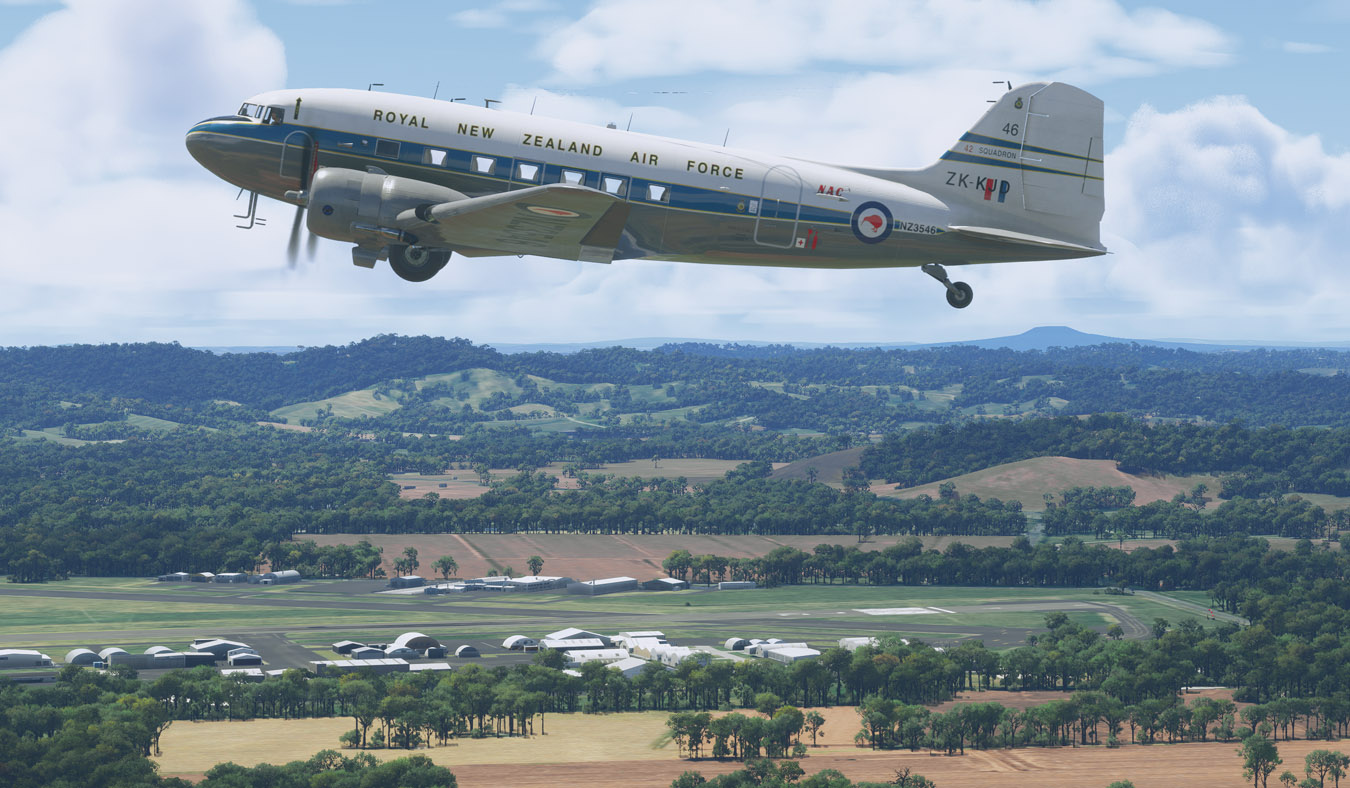
Many thanks to Flak99 for all his help and patience. It turns out it was “user error” (wrong model being used) - and his script worked perfectly!
All I have to do now is work out how to get rid of the MSFS default registration, as all the usual voodoo didn’t work 
1 Like
That is covered in the guide.
Yes (thanks) … I tried all that, but still no luck
UPDATE: I re-did all the steps (using the Caribou HTML files) … BINGO!! You’re a star!
One of the recent sim updates has broken about half of my liveries for the FlyByWire A32NX and the ATR. If I select them in the sim, no preview model is ever loaded, I just get an endless spinning circle, and the same goes if I try to start a flight. Then, when I try to close the sim, it hangs up and I have to close it with the task manager. I’ve wasted hours hunting through the files for a common denominator which might be causing this with no success. Here are a few examples if anyone with more knowledge than me cares to take a look:
https://flightsim.to/file/24056/jetsmart-argentina-lv-hvt-8k
https://flightsim.to/file/20124/icelandair-tf-fir-vatnajkull-80-years-anniversary-livery-8k
https://flightsim.to/file/12048/azul-brasil-a320-8k
https://flightsim.to/file/55027/aeromexico-atr-72-600-4k-fictional
https://flightsim.to/file/65137/asl-airlines-ireland
Are you on PC/MS Store, Steam or XBox? I’m on MS Store and could give the two FBW A320 liveries a go. Have you tried just installing them one at a time?
I have a few old 2020 liveries for the FBW that didn’t need any tweaking at all … they just seemed to work - so I’ll have something to compare those two with.
I’m on PC, bought from the MS Store. I tried one of the A320 liveries with nothing in the community folder apart from that and the A32NX itself, and it did the same. I had a bunch of other liveries which wouldn’t load all textures, and found that this was because the file size in the layout.json needs to exactly match the actual file size (2020 doesn’t care about this, but 2024 does), and was able to fix all of those, but this is a different problem which I still can’t identify. It’s like the livery somehow prevents the sim from loading the model. I don’t get it.
It works perfectly, I didn’t know about the tool, you saved my life, I had already thrown in the towel haha Thanks!
1 Like
@ TomLamarre
I tried the three A320 liveries. They’re riddled with all sorts of errors … maybe best left alone!
Thanks for the feedback - I’m really glad the batch file is proving useful to others!
2 Likes
Just a thought … would it be possible to create a batch file like this to create the various thumbnails? For a man of your talents 
 … it’d be a really useful time-saver!