Could be but never happened in one year of 5070TI and 3 years of 3080TI, VR intensive player, and a lot of controllers on usb.
Ok, I´m getting really good results now. I missed a setting in the G-sync setup and updated the graphics driver, and voilá: Frame Gen works like a charm, with the CPU being not in the red anymore, and the GPU utilisation is up from 10-20% to 40-60%!  The sim is buttery smooth.
I was really happy, until I discovered, my clouds look like this:
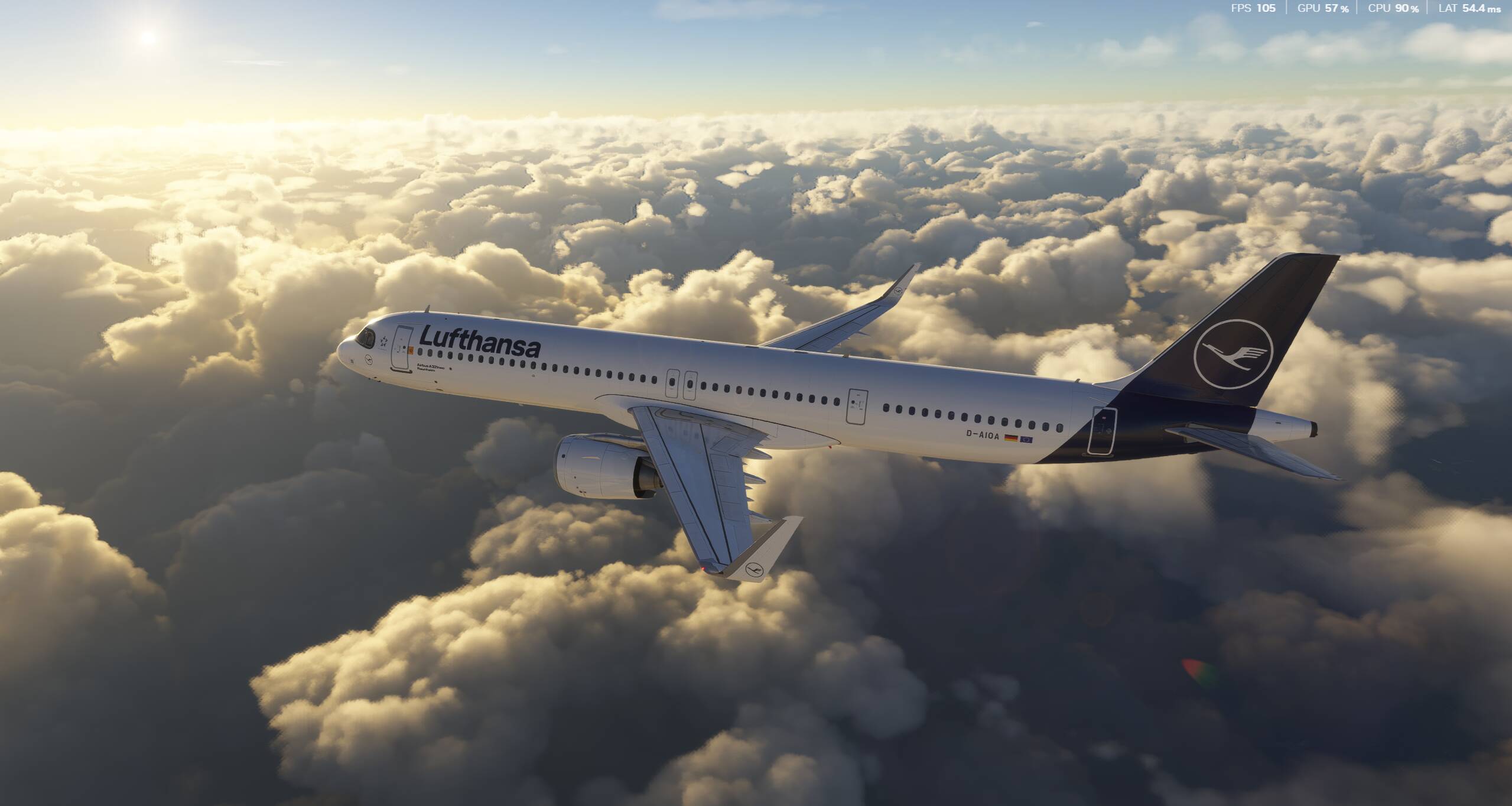
Why are they so pixelated? Is it a problem with my system or my settings? Clouds are set to ultra.
Yeah it’s possible but a PSU constantly working on it’s edge will wear out faster than a PSU working on 60-80%. It’s better to spend a few dozen bucks more and stay safe in the long run.
Not to put too fine a point on it…but if you search ‘clouds’ on the forum you will see a LOT of complaints that clouds need improvement. I wouldn’t expect perfection.
True. And no solution, other than turning off DLSS. But if I watch some MSFS2024 streams on YT, the clouds never look that heavily pixelated, grainy and shimmery…
Happy to see your 5600X can cope …. yeah clouds, the only time they ever looked great you needed a top 5% computer to see it … I can still remember needing clear skies just for 30fps on my then minimum spec rig.
Thanks, it seems as if I found the “perfect” settings for my system. So you think, GPU and/ or CPU are just too weak to get better clouds?
I’m no judge with my set up, but if you’ve already maxed out your textures and aliasing there’s not much else you can do
True. For now, I´m really happy. I think I´ve reached the maximum I can get with this weak CPU. I´ll look into further upgrades later this year!
Weak ?!?! … 5 series cpu’s were best you can get not that many moons ago 
In terms of computer hardware, years are very short!
What settings did you settle on?
I use DLSS Quality now (Preset M) with 2x Frame Gen, Dynamic Setting to 25fps (to really only help when its getting hefty on big airports with complex planes, kicks in rately), Clouds to Ultra, Water to high, OLOD and TLOD on 110, Pre Caching Off Screen Terrain and Texture Resolution to High (both on medium for the FSLabs A321neo only, to safe RAM), Glass cockpit refresh rate High, Windshield Effects to High, everything else to Medium. Except Ambient Occlusion, Aircraft traffic and Fauna to Off, Road and Naval Traffic to low. Raytraced Shadows On, all other shadows at medium settings.
Sim runs super smoothly, ground textures are sometimes a bit blurry, clouds look very grainy and pixelated in some circumstances.
In GA planes, fps reach 150 frames. I could easily increase some settings. But I want pretty much one profile for everything, and always enough overhead, especially on landings.
I’ve never quite understood that dynamic setting. I presume in your case of 25fps dynamic setting, that if fps dropped below that some form of reducing LODs would take effect.
Is that how it works?
No one knows exactly what that setting does. But I think your supposition is correct.
Yeah, thats why I have it off because no one really knows.
Your new settings look good to me except this one, which I leave off. Glad you got to a solution!
Correct. It can reduce the TLOD (and the OLOD, which it never did for me yet) down to half of its preset value. It helps to keep, in my case, taxiing smooth when I’m in a complex aircraft (such as the extreme resource hungry FSLabs A321neo) on a complex airport (such as Aerosoft Frankfurt or inibuilds Heathrow). Coupled with FG x2, I get at least 50 fps, and, apart from some micro stutters, no stuttering.
You can see it work quite nicely with the Dev Mode fps counter. TLOD and OLOD can go down from 1.0 to 0.5. Especially on the ground on an airport, I don’t mind the terrain around me looking worse. It’s great that it is an in sim solution. I’ve downloaded AutoFPS as well, but the UI was a bit too much for me. 
In game Dynamic settings will lower TLOD when one’s target frame rate cannot be met due to the demands on rendering. I have a 60Hz 4k HDTV, so I set 60 FPS as my target frame rate and my TLOD at 300. When at demanding airports, Dynamic will lower TLOD to 150 at first, which usually is just fine on my PC. It will lower it again, I think to 75 as needed, but I have never seen this happen. In flight and at most airports I get my full 60 FPS and 300 TLOD. Since SU4 Dynamic settings works really great, especially with DLSS 4.5. Hope this example helps, cheers!
Same here. I tried it once but visual quality deteriorated too much at a setting that made any difference. I know others use it with success, but it didn’t work well for me. Linking LOD to FPS can work, but not with this ham-handed approach.
Vsync is a better solution, but we need a linear scale, not just 1/3, 1/2, Full monitor refresh rate options.