A good detailed post there phutyoo, thanks for that.
Half the stuff you said in the first paragraph is beyond my comprehension
Love the setup though, very cool.
I’ve picked up the binding fix by Van Dijk a few days ago, so will have that on standby.
The yoke is responsive ATM and springs back nicely from both forward and back pressure. Time will tell and I can install the fix when I see the spongy issue arise.
I’ve now got used to the configuration I’ve set, and the location of all the buttons: POV pretty much as you have, A/P and PTT on right and left. I use the Xbox buttons for GSX, Flow, Tobii, parking brake. On the throttle the buttons are all about A/P functions.
I have a Logitech Switch Panel for lights and starter etc, and my x-touch covers all my necessary A/P rotaries (CRS, HDG, ALT, BARO, NAV, COM etc)
I’m absolutely loving the trim wheel, which is one of the reasons why I changed over. It’s a ‘game changer’ as they say.
I’m going PC soon so definitely looking forward to a switch box.
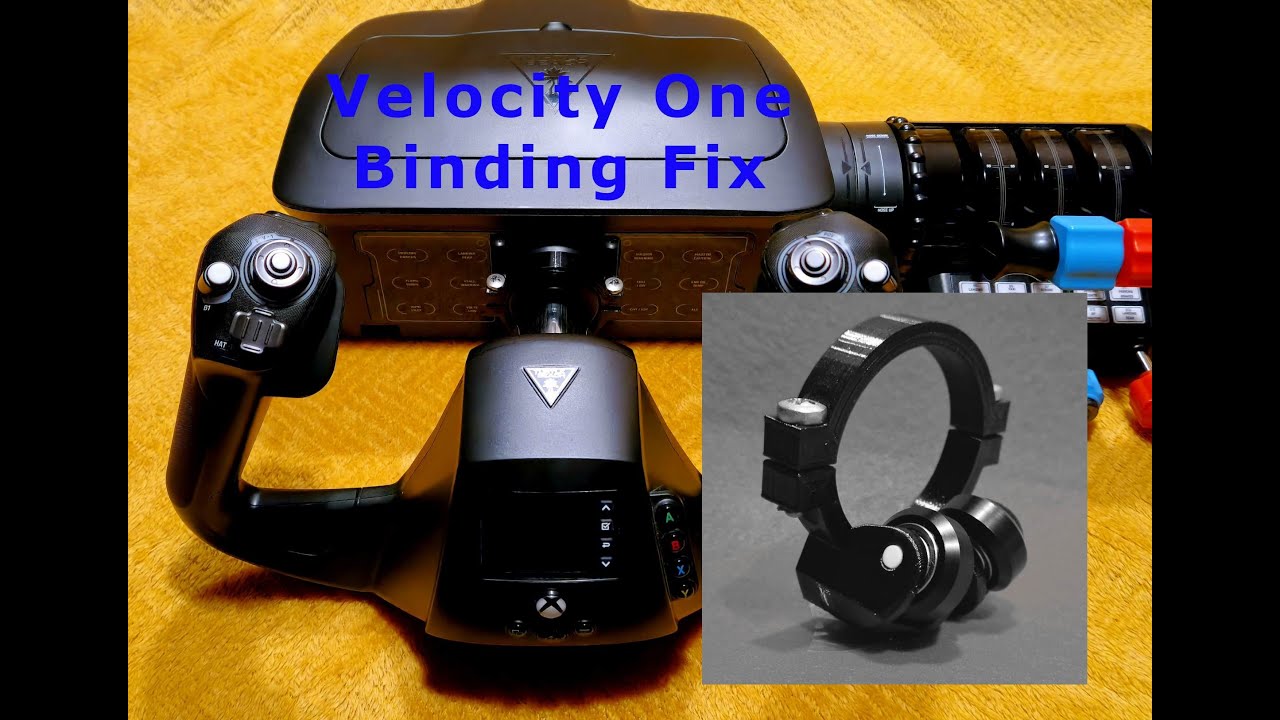
If you don’t mind, hit me up with a link to that ‘fix’. I caused a bit of a stir pulling mine apart and tinkering a couple weeks after they launch d the V1 and want to see if someone made any progress since then.
I bought one of those gadgets for my V1 yoke and was amazed at the difference it made. No more binding when pulling on the yoke with one hand. It made the yoke more enjoyable to use. I highly recommend anyone with a V1 yoke to purchase one.
I’m in like Flynn in that one! Thank you for the link. Remind me of when someone worked up a quick release for the fanatec P1 wheel. Simple is good. The only thing you can’t tinker with inside the V1 is the main center yoke bearing/bushing.
TB does weird stuff like the flightstick is exceptionally accurate but the main spring is a ■■■■. Which I fixed with a dig through the r/c parts bin.
ETA ordered! I’m jumping to PC and this should make the V1 seem more ‘PC level’ for $40 rather than making me feel like I need fancier perhiprials. I can’t see giving up the incredible versatility of this yoke for something else.
Just ordered the V1 yoke binding fix the other day. The binding issue was my only complaint of the V1 yoke & throttle quadrant so looking forward to receiving it!
That’s great - how many days did it take to receive yours from when you ordered it? I saw mine was shipped within a couple of days of ordering however there is no way to track it.
I’m in the same situation – I ordered it in early February and the Etsy page says it should arrive between Feb 15 and Apr 15. I’m not sure what to do if it doesn’t arrive by Tuesday; I’ll contact Etsy, I suppose.
I ordered Etsy 3/28, got a ship notification about 5 days later, crossed the ocean by the 7th then switched from NL post to USPS, cleared customs about 4 days ago and just checked, it’s in the mailbox this morning!, of course on an office day.
ETA snuck in on before dinner and WOW. Can’t wait until the critters nod off, might be sick tomorrow…
Works like a charm and took 19 days to get here. A bit fiddly to install. The mail tracking service was pretty useless, they still don’t know that I have received it!
From the TB site: Firmware update 1.3.0 enables SIP functionality for Xbox users. Please note in order to have that functionality, you must have MSFS Software Update 10, or be a Software Update 10 beta tester.
To perform Update 10, please do the following:
When in MSFS 2020 main menu, you should see “Profile” on the top left (next to “Welcome”).
Click on Profile and then select Content Manager. If there are any available updates, those updates will appear here.
If you see Update 10, perform that update, and then proceed to the steps below to enable the SIP functionality.
To enable this SIP Functionality once the MSFS Software Update 10 has been applied:
First, download the Control Center, if you have not yet done so. You can do this by searching for the “Turtle Beach Control Center” app.
Once the Control Center has been downloaded, open the Control Center app, and connect the VelocityOne Flight to the console. The cables for the VelocityOne Flight need to be securely connected to their corresponding ports – the VelocityOne cables are color-coded, so make sure the cables match the ports they are connected to. For a full detailing of how the unit should be set up, please click here.
The Control Center will show images of the VelocityOne Flight, along with the Recon Controller and the Recon Controller (White). Select the VelocityOne Flight. Then, follow the on-screen instructions to reboot your device into the Update Mode. (The VelocityOne Flight’s FMD screen will read “UPDATE MODE”.)
Please note: While your VelocityOne Flight is in the Update Mode, please use the controller to navigate.
The Control Center will check for – and automatically apply – any available firmware updates.
After the firmware update is complete, the Control Center screen will read “Your Device Is Up To Date”. Once you see this message confirming the firmware update has been successfully completed, navigate to the top-right corner of the window and confirm you want to exit the application.
Once the firmware is updated and the Control Center is closed, disconnect and then reconnect the VelocityOne Flight unit to the console. This will reboot the unit back into the normal operating mode.
Make sure the firmware version (bottom right corner of the FMD screen) is correct.
Make sure the Input Mode (bottom left corner of the FMD screen) is set to Xbox.
Make sure the Profile selected (top left corner of the FMD screen) is the one you want to use.
You should now be able to use the SIP on your Xbox.
Oh ok, that’s why I asked if anyone knew how to customise the panel, couldn’t find anything about it. I did that update a while back, but thought it now had additional information.
The sip does about as much as you’d want for most any ga. The low fuel needs to be adjusted down a bit though. And egt often stays on when it shouldn’t.

 .
.