Very interested in VR, however from what I’ve seen even with the G2 you have to accept quite a reduction in quality. I am set at 1080p with everything in Ultra and single monitor head tracking. (Tried 3 monitor, dont like it until its officially supported).
It looks like even with the G2 and a high end system you need to reduce everything to Medium? If that is the case I can’t see where sacrificing a beautiful realistic sim is worth VR. Is that the common feeling?
It’s a tradeoff, with flatscreen you are completely axing 3rd dimension and feeling of being there in the cockpit. It’s up to you to choose what works best for you.
for simulations like cars or planes, VR is bringing your immersion of actually being “in” these things to a whole new level. in my opinion, it’s absolutely worth it to sacrifice some of the ultra/high resolution stuff, just to be able to experience this “reality”.
be careful though, it’s highly addictive. 
2 Likes
If you enjoy the sensation and immersiveness of being inside a cockpit, VR can give you that. But if you are a videophile who are picky about image quality, color balance, gamma correction, etc. then you might not like the image fidelity from the current VR goggles not to mention poor performance.
The thing is, you can also do both. I don’t always play in VR or flatscreen exclusively.
I have a PC above the medium spec stated by Microsoft also a high spec Monitor.
Enjoyed MSFS immensely with local Add On scenery and airports.
Everyone seemed to be saying VR was wonderful so bought an Oculus Quest 2 VR Headset.
It has taken me 2 days and lots of reading in this forum to even get it to display VR.
All I was getting was the effect of sitting in a virtual room in front of a large curved TV with the Desktop of my PC looking far worse than my real Monitor of course and not 3D VR at all.
You need to drop back to Oculus Beta Software and download OpenXR and change Registry settings and Run Oculus Debug Tools and change Graphic Card ASW settings but finally my large Monitor showed a double image as expected.
It still did not run until I assigned keys for VR in MSFS and changed graphic settings as described in this Forum.
At last it worked and I simulated a flight from Barton Manchester to Liverpool in a Cessna which I used to fly for real as a PPL.
The cockpit appeared about two thirds real size but was very convincing but in the Oculus Quest 2 the instrument panel was overall blurry making setting frequencies very difficult outside nothing was sharp either.
During flight moving your head causes a bit of stutter and the flying controls not immediate causing a stall which did get my attention like the real thing.
I switched to autopilot and approach mode and just let it find its own way and certainly regaining manual control and landing was more like the real thing.
When I switched out of VR to PC my Monitor display looked pin sharp in 2D making me wonder why I bothered.
It could be good eventually but I don’t think it is anywhere near Plug and Play yet and my advice is to wait a bit longer and read all the moaning about VR in this Forum.
Hope this is of help to you and others thinking of spending a few hundred pounds on a VR headset.
4 Likes
What did you think of the instrument panel in VR ?
Could you read the instrument settings such as frequencies for nav aids and comms as I can’t unless I toggle the key to get close and even then there is that blurry effect Photographers call the Vaseline Lens.
Switching to PC mode after that my monitor is pin sharp.
In planes i fly, mainly C152, everything is readable from pilots position with Pimax 5K+. I’d expect that with something like G2 or 8KX readability should not be an issue.
In my opinion, going from 1920x1080p (Single Monitor) to 2160x2160x2 (G2 VR) is not a reduction of quality at all but quite the opposite instead. Only if you were coming from 4K you could say it is a reduction of resolution only.
Quality loss is so high that it breaks VR immersion in my opinion. Stutters, wrong cockpit scale, blurry panels, shimmering, this all together completely breaks any immersion to me. Actually it is immersive, but is a blurry low fps world…  Also it is a time consuming process to get it running in a playable state… playable, not great.
On top of that, try flying on big cities. Try a plane with complex avionics… those will stutter like crazy as the fps drops. You drop the render scale and you suddenly cant read anything…still stutters… cut the buildings render… awesome, suddenly Tokyo looks like a country city, cockpit shadows are a blurry mess, no reflections, sparse trees, low glass update rate, etc etc…
It is hard to understand that people are recommending motion smoothing/asw off, saying things like: getting 24 fps butter smooth with Asw off… hahaha not, it is not smooth at this fps with no reprojection. May be playable, enjoyable for some people… not smooth.
This game looks so fantastic in 2D on my average system. I turned my headset off and I am now having a good time again, after a week of tweaking settings, black magic and snake oil fixes.
Now I am waiting for performance optimizations and bug fixes to try VR again. I have a Q2 and Oculus seems to be specially bugged at this point.
2 Likes
Quality is much more than resolution and no system is running G2 at max res. Most people will get it running somewhat ok at 50% max, optimal, res.
1 Like
Leaning to the side to stick my head out of the window on the Savage to look down is way more immersive than all the pixels you could ever have on a monitor  Or looking up to see out of the top of the screen as you make a sharp turn etc.
Sure, maybe the image isn’t as sharp as a monitor but I’ve spent the day flying the Savage Grravel all over the place and after some tuning am more than happy with VR on the G2 + decent PC with 2080Ti.
As a first release it can only improve as well.
4 Likes
I agree fully with this statement!
There are ways to do better:
My 2070 SUPER VR settings and suggestion (Reverb G2 - WMR)
I’ve also posted this yesterday (on a system with a 9700K+2070S):
FS2020 A320 at 90fps (30hz with reprojection), stutter free at about native resolution
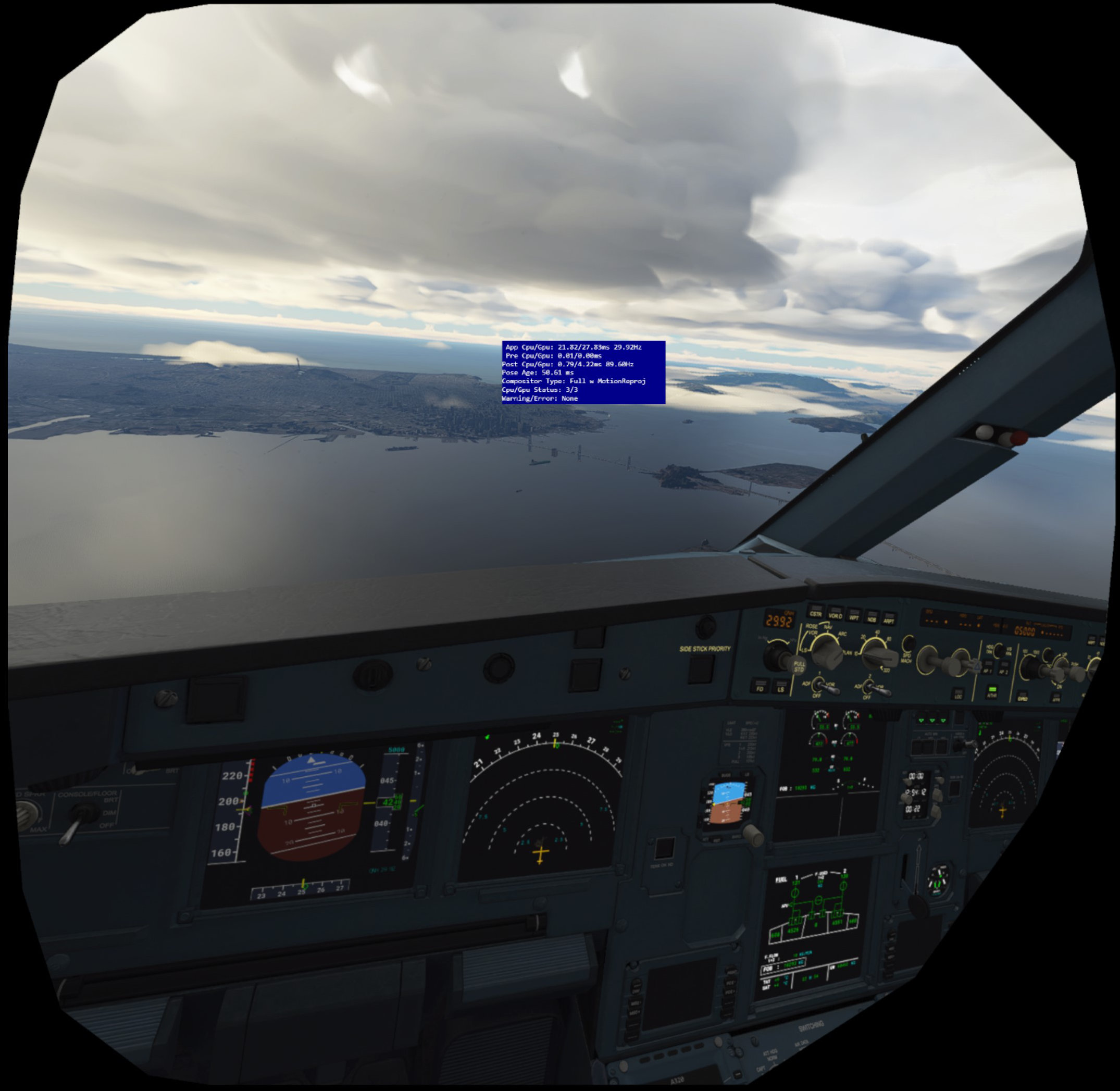
PS: I’m reading your other comment about ASW and you might find this interesting:
Why do I prefer 30fps stable with juddering rather than 90fps with motion smoothing
PS: You can also watch a through-the-lens video in the A320 cockpit over photogrammetry region, in “My VR Settings - G2”, which is showing how 30fps without stutters feels smooth in practice without any reprojection.
2 Likes
If I want full eye candy I go the 2D 4K route in FS2020. VR in and of itself is definatley worth it. The G2 I us for a multitude of other VR titles, including IL-2 which I run in max settings. It’s a beautiful thing.
I would think being both VR for FS2020 just hit the masses and the G2 is in the same boat I would count on further optimization and tweaks from both parties in the near future.
Your experience of Oculus Quest 2 VR on FS2020 is pretty much identical to my own.
The sim’s performance and visuals non VR are amazing but for me the VR experience from the initial set up of a Facebook a/c to finally actually getting it working with FS2020 and the resulting massive downgrade in visuals and fps made me initially wish that I had left VR alone for another year or so. Thankfully I tried the OQ2 in DCS and it performs great in that. Not wishing here to compare both sims VR or be too critical of FS2020 VR since it has just been released but just grateful the OQ2 is pretty impressive in at least one other sim and that I haven’t completely wasted £300 plus.
My advice for anybody looking to get the OQ2 for use only in FS2020 would be to hold off a purchase for the moment and to follow this forum pretty closely to see if the VR experience gets a bit better and more optimised.
1 Like
Believe me, I’ve read and tried everything. Your articles were extremely helpful. Thanks a lot for sharing those. I hope you had same type of testing and recommendations for the quest 2 and oculus environment.
One thing I would like to see more believe is users sharing actual resolutions render scale/post process instead of percentages and multipliers.
To be honest I got it working pretty well on the Q2, 30 fps and ASW. Decent resolution. Just can’t fly over big cities, complex planes, etc, and there is some annoying microstutter every couple seconds that I can’t get rid off.
A320… man, this cockpit looks huge on my Q2. Size of my living room. C152 is too small. Rest of the planes is pretty good. Keep in mind I am not a pilot.
I can’t stand juddering. ASW, when it works, is pretty impressive and definetely better. Problem is that right now, at least for Q2, we are fighting a buggy implementation… there is no wining. That’s why I decided just stick to 2D for now and wait to hear back from Asobo. With this release they will have a lot of information to better tackle performance and optimizations.
In the end I believe that a well optimized VR experience should be much more plug n play. Try, tweak some in game settings and enjoy the best experience your headset/system can provide, like it is in 2d.
and… don’t get me wrong. VR in this sim is pretty impressive already and will be fantastic in 6 months or so, it just need some more time to mature.
1 Like
It’s very strange for a lot of people. The 2080TI is a tank of a card and has been perfect for vr to most people who have it. I have all my settings to high/ultra.. solid great fps with very minimal stutters. Rift s
1 Like
Do you mind sharing what actual resolution is it rendering and post processing? You can see on the FPS overlay, dev mode. What is your solid FPS? 40? ASW is on, correct? Can you read glass cockpits without zoom? Does it performs the same over big cities..e.g New York? Have you tried a complex plane… A320, for example.
I really like the VR experience…wish I could have a more consistent experience, with high settings. Q2 3600x - 2070S.
You can turn ray tracing on in MSFS and as long as it’s on a flat screen it would be as interesting as post cards to me. I didn’t even buy the game until VR was out.
1 Like
I luckily have a decent system “i9-9900, 3090, 32Gb, SSD, Reverb G2” and I was flying VR yesterday over Innsbruck in the snow with probably half a dozen others just buzzing around and doing touch and go’s & flying side by side. It was pretty astonishing the immersion, so much so that I went to look at my watch and my hand wasn’t there. Considering this is the first release, I’m pretty amazed, and so far using the G2 the setup required was minimal. Most of my settings are Med\High with some at Ultra. It will only get better with time too. Bring it on.
1 Like
I wouldnt mind trying DCS bit is it a Steam only flight sim needing all that installed to work and what sort of hard drive space would it take ?
I only have a 500GB Samsung M2 which seems to be filling up with updates and add ons already